Note
Azure AI 搜尋服務 可透過 Azure 入口網站、REST API 及 Azure SDK 取得。 它同時也是 Foundry IQ 的基礎,這是一個管理式知識層,能將企業內容轉化為可重複使用、權限感知的知識庫,供 Microsoft Foundry 入口網站中的代理使用。
在這個快速入門中,請使用 Azure Resource Manager 範本,在 Azure 入口中部署 Azure AI 搜尋服務 服務。
Azure Resource Manager 範本是一個 JavaScript 物件標記法 (JSON) 檔案,會定義專案的基礎結構和設定。 範本使用宣告式語法。 您可以描述預期的部署,而不需要撰寫程式設計命令順序來建立部署。
部署僅使用範本中包含的屬性。 如果你需要更多客製化,例如 設定網路安全,可以在部署後更新服務。 若要使用最少的步驟自訂現有服務,請使用 Azure CLI 或 Azure PowerShell。 如果您正在評估預覽功能,請使用管理 REST API。
假如您的環境符合必要條件,而且您很熟悉 ARM 範本的使用方法,請選取 [部署至 Azure] 按鈕。 範本會在 Azure 入口網站中開啟。

必要條件
如果您沒有 Azure 訂用帳戶,請在開始前建立免費帳戶。
檢閱範本
這個快速入門範本使用了 Azure 快速入門範本。
{
  "$schema": "https://schema.management.azure.com/schemas/2019-04-01/deploymentTemplate.json#",
  "contentVersion": "1.0.0.0",
  "metadata": {
    "_generator": {
      "name": "bicep",
      "version": "0.5.6.12127",
      "templateHash": "11257266040777038564"
    }
  },
  "parameters": {
    "name": {
      "type": "string",
      "maxLength": 60,
      "minLength": 2,
      "metadata": {
        "description": "Service name must only contain lowercase letters, digits or dashes, cannot use dash as the first two or last one characters, cannot contain consecutive dashes, and is limited between 2 and 60 characters in length."
      }
    },
    "sku": {
      "type": "string",
      "defaultValue": "standard",
      "metadata": {
        "description": "The pricing tier of the search service you want to create (for example, basic or standard)."
      },
      "allowedValues": [
        "free",
        "basic",
        "standard",
        "standard2",
        "standard3",
        "storage_optimized_l1",
        "storage_optimized_l2"
      ]
    },
    "replicaCount": {
      "type": "int",
      "defaultValue": 1,
      "maxValue": 12,
      "minValue": 1,
      "metadata": {
        "description": "Replicas distribute search workloads across the service. You need at least two replicas to support high availability of query workloads (not applicable to the free tier)."
      }
    },
    "partitionCount": {
      "type": "int",
      "defaultValue": 1,
      "allowedValues": [
        1,
        2,
        3,
        4,
        6,
        12
      ],
      "metadata": {
        "description": "Partitions allow for scaling of document count as well as faster indexing by sharding your index over multiple search units."
      }
    },
    "hostingMode": {
      "type": "string",
      "defaultValue": "default",
      "allowedValues": [
        "default",
        "highDensity"
      ],
      "metadata": {
        "description": "Applicable only for SKUs set to standard3. You can set this property to enable a single, high density partition that allows up to 1000 indexes, which is much higher than the maximum indexes allowed for any other SKU."
      }
    },
    "location": {
      "type": "string",
      "defaultValue": "[resourceGroup().location]",
      "metadata": {
        "description": "Location for all resources."
      }
    }
  },
  "resources": [
    {
      "type": "Microsoft.Search/searchServices",
      "apiVersion": "2020-08-01",
      "name": "[parameters('name')]",
      "location": "[parameters('location')]",
      "sku": {
        "name": "[parameters('sku')]"
      },
      "properties": {
        "replicaCount": "[parameters('replicaCount')]",
        "partitionCount": "[parameters('partitionCount')]",
        "hostingMode": "[parameters('hostingMode')]"
      }
    }
  ]
}
該範本定義了以下 Azure 資源:
- Microsoft.Search/searchServices:建立 Azure AI 搜尋服務
部署範本
選取以下影像來登入 Azure 並開啟範本。 範本會建立 Azure AI 搜尋服務資源。
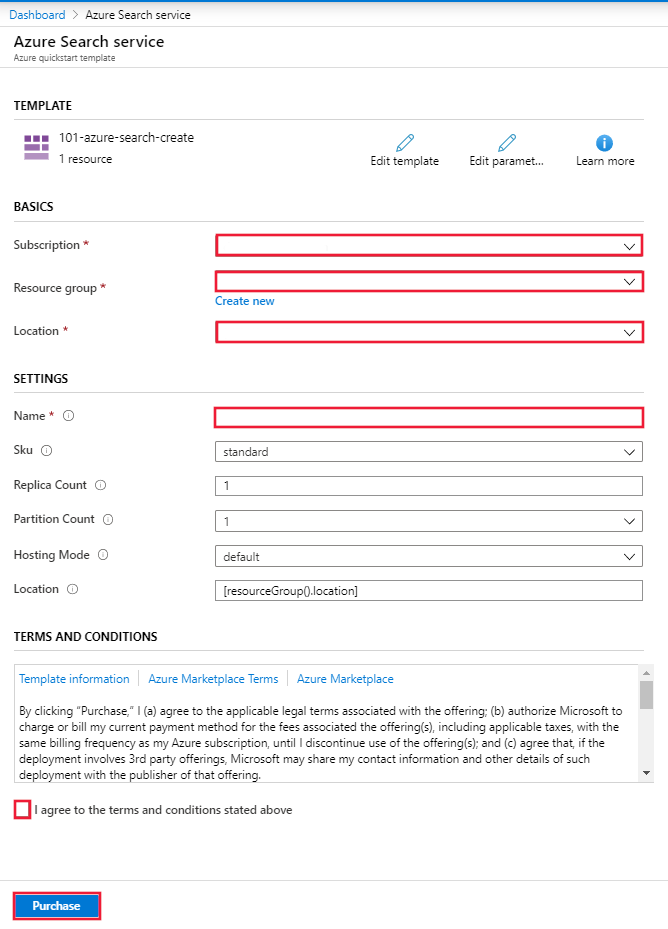
Azure 入口網站會顯示一個表單,方便你輕鬆提供參數值。 某些參數會預先填入範本中的預設值。 提供您的訂用帳戶、資源群組、位置和服務名稱。 如果你想在 AI 豐富流程中使用 Microsoft Foundry,例如分析文字的二進位影像檔案,請選擇同時提供 Azure AI 搜尋服務 和 Microsoft Foundry 的地點。 除非你使用無鑰匙連線,否則你的 Azure AI 搜尋服務 服務和 Microsoft Foundry 資源必須在同一區域,才能處理 AI 豐富化工作負載。 填寫表格後,同意條款與條件,然後選擇購買按鈕完成部署。
檢閱已部署的資源
部署完成後,您可以在 Azure 入口網站 中存取新的資源群組和新的搜尋服務。
清除資源
其他 Azure AI 搜尋服務快速入門和教學課程會以本快速入門為基礎。 如果你打算繼續使用後續的快速入門和教學,建議保留這個資源。 當你不再需要資源時,可以刪除資源群組。 刪除資源群組會刪除 Azure AI 搜尋服務 服務及相關資源。
相關內容
在這個快速入門中,你使用ARM範本建立了Azure AI 搜尋服務服務,然後驗證部署。 若要深入瞭解 Azure AI 搜尋服務和 Azure Resource Manager,請參閱下列文章: