File History. Reconnect Your Drive

Anders Strand-Holm 100 Reputation points
2026-09-12T09:39:10.8266667+00:00

When I try to run File history it indicate there is no available FHJ drive.
I have done various troubleshooting:

%LocalAppData%\Microsoft\Windows\FileHistory
I reset FH by renaming the Configuration and the Data folder to Configuration.old and Data. to Data.old

I had no need for the backup folders on my Network drive, so I deleted them in order to do a clean up for a new backup.

When I have selected the backup drive (NAS Server wired to the Router) and accepted the BitLocker must, I perform a Run Now just to get this error message, instantly:
"File History. Your files will be temporary copied to your hard drive until you reconnect your File History drive and run a backup"

That I can do in eternity.

PS. I can see that FH has generated the backup folders on my Network Drive, but they are empty, of course.

I have run out of possible solutions, so please help. BTW. The Network Drive is working fine and accessible from Windows Explorer.
I don't understand why I get this error, all of a sudden.
I need your help.
Thanks, Anders
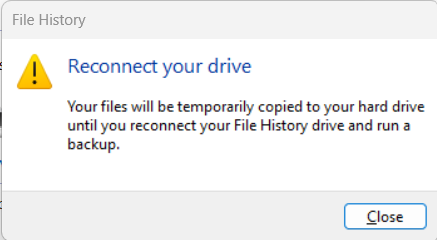
File History Error

Windows for home | Windows 11 | Recovery and backup

9 answers

Sort by: Most helpful
  1. ladyK 5 Reputation points
    2026-09-15T18:19:29.8333333+00:00

    I have the same problem. The same external drive I've used for File History for a long time is suddently not recognised. Bought a brand new drive. Also not recognised. Not I found this thread... I'm not a tech person so I'm not sure I can remove the updates and then prevent them coming back too...
    Especially infuriating as my laptop got knocked a few days ago and need to go to repair and I MUST get a File History backup working!

    Was this answer helpful?


  2. Anders Strand-Holm 100 Reputation points
    2026-09-12T14:07:03.94+00:00

    Two answers have been deleted, due to a violation of code of conduct (??)

    I don't understand what that is, but I still need someone to come forward at help me solve the problem.
    I just discovered that my wife has the very same problem on her Laptop. Exactly the same problen. I wonder what might have caused it because her FH worked and backed up on the 9/9 - this is just three days ago!
    It is a mystery!

    Was this answer helpful?

    0 comments No comments

  3. Anders Strand-Holm 100 Reputation points
    2026-09-12T13:59:22.1133333+00:00

    Hello Horace,

    It looks just similar but when I clock okay I get this nasty message. I checked my wifes laptop. It is identical to mine and FH does not work here either. It worked well on 9/9 - three days ago.

    All this is odd. I assume a Windows update messed something up or something similar....It worked FINE three days ago!

    Was this answer helpful?

    0 comments No comments

  4. Horace Wiggins 535 Reputation points
    2026-09-12T12:25:28.4566667+00:00

    Have you gone to, Control Panel>All Control Panel Items>File History? What does that show? If you deleted your folders/files, then they are probably gone. Have you checked your Recycle Bin?

    I have two drives on my desktop computer. My C drive is my OS drive, and my file history is saved on my E drive Data.

    Example image of my File History.

    User's image

    Was this answer helpful?

    0 comments No comments

Your answer

Answers can be marked as 'Accepted' by the question author and 'Recommended' by moderators, which helps users know the answer solved the author's problem.