
powershell的步驟做了,沒有改善
驅動程式的網站我無法進入,我用Windows裝置管理員搜尋更新可以嗎?
我也是會有事件識別碼 69
我發現我的User內並沒有AppData這個資料夾,這正常嗎?
我只有
管理員
我的id
公用
三個資料夾我的ID內容如下,而且我發現id少了一個字,不知道去哪裡能夠更動QQ
' cx='32' cy='32' r='32' /%3E%3Ctext x='50%25' y='55%25' dominant-baseline='middle' text-anchor='middle' fill='%23FFF' %3EA%3C/text%3E%3C/svg%3E)
想請問一下不管我要下在何種程式均無法下載他都顯示如附圖,不知道該如何處理了麻煩各位大大幫幫忙謝謝
鎖定的問題。 此問題已從 Microsoft 支援服務社群移轉。 您可以對其是否有幫助進行投票,但無法對問題新增註解或回覆,或進行追蹤。
powershell的步驟做了,沒有改善
驅動程式的網站我無法進入,我用Windows裝置管理員搜尋更新可以嗎?
我也是會有事件識別碼 69
我發現我的User內並沒有AppData這個資料夾,這正常嗎?
我只有
管理員
我的id
公用
三個資料夾我的ID內容如下,而且我發現id少了一個字,不知道去哪裡能夠更動QQ
' cx='32' cy='32' r='32' /%3E%3Ctext x='50%25' y='55%25' dominant-baseline='middle' text-anchor='middle' fill='%23FFF' %3EA%3C/text%3E%3C/svg%3E)
看起來並沒有異常,真苦惱,四月有個更新我更新看看有沒有問題好了,我是用1909 QQ
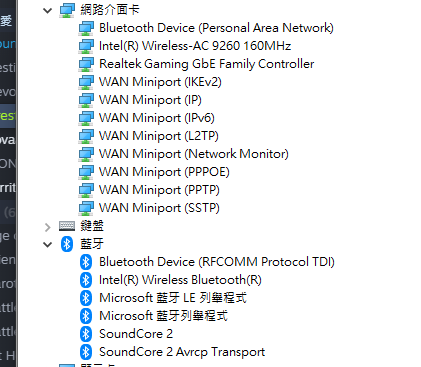
你是使用Cable 連線的, 所以驅動程式是 realtek gaming gbe family controller
以下是微軟Update 找出最新驅動
realtek gaming gbe family controller
搜powershell 右鍵點擊以系統管理員身份運行,
輸入 get-appxpackage *store* | remove-Appxpackage
輸入 add-appxpackage -register "C:\Program Files\WindowsApps\*WindowsStore*\AppxManifest.xml" -disabledevelopmentmode
刪除該資料夾在開看看
C:\Users\使用者名稱\AppData\Local\Packages\Microsoft.WindowsStore_8wekyb3d8bbwe\LocalCache
之後重新打開Store 試試。
似乎已經很多網友有這個問題, 但解決方式不確定,
我的就是每次更新 Store 會有事件識別碼 69
只是更新都是成功的
Microsoft-Windows-AppModel-Runtime/Admin
AppModel-Runtime
事件識別碼 69
但這問題已經好幾版重大更新前都已經消失, Windows 10 1909 再度出現
之前的對策是無效的!
Windows 10 error id 69 app model runtime
Also Press Windows + R and type wsreset.exe.
1.Type PowerShell in the search bar and click on run as Admin.
2.Type in the following command listed in the below under the “Remove PowerShell Command” column to remove the associated app.
3.get-appxpackage *Microsoft.Windows.Photos* | remove-appxpackage
4.The apps can be reinstalled using the Store App or by following the link listed in the table below.
5.You will need to exit the Store app if it is already open before reinstalling the app.
看起來並沒有異常,真苦惱,四月有個更新我更新看看有沒有問題好了,我是用1909 QQ
我留意到我可以順利連線至Microsoft Store 及 SS 驅動程式的無線網路中的網路功能與PPPOE的不同
PPPOE
Wifi
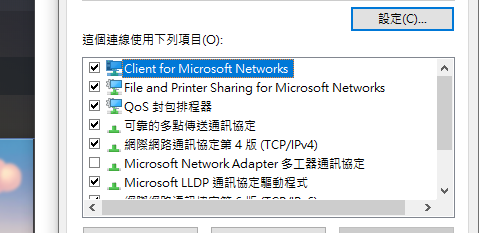
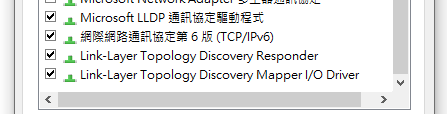
請問會是因為這個的關係嗎?
PPPOE缺少這麼多協定是正常的嗎?
還是沒有影響呢?
感謝您的解答QQ
可能先看看你的裝置管理員裏的驅動是否完整
我留意到我可以順利連線至Microsoft Store 及 SS 驅動程式的無線網路中的網路功能與PPPOE的不同
PPPOE
Wifi
請問會是因為這個的關係嗎?
PPPOE缺少這麼多協定是正常的嗎?
還是沒有影響呢?
感謝您的解答QQ