메모
Azure AI 검색 Azure 포털, REST API 및 Azure SDK 통해 사용할 수 있습니다. 또한 엔터프라이즈 콘텐츠를 Microsoft Foundry 포털의 에이전트에 대해 재사용 가능한 사용 권한 인식 기술 자료로 변환하는 관리되는 기술 계층인 Foundry IQ를 뒷받침합니다.
이 빠른 시작에서는 Azure Resource Manager 템플릿을 사용하여 Azure Portal에서 Azure AI 검색 서비스를 배포합니다.
Azure Resource Manager 템플릿은 프로젝트에 대한 인프라 및 구성을 정의하는 JSON(JavaScript Object Notation) 파일입니다. 이 템플릿은 선언적 구문을 사용합니다. 배포를 만들기 위한 프로그래밍 명령의 시퀀스를 작성하지 않고 의도하는 배포를 설명합니다.
배포는 템플릿에 포함된 속성만 사용합니다. 네트워크 보안 설정과 같은 추가 사용자 지정이 필요한 경우 서비스를 배포 후 작업으로 업데이트할 수 있습니다. 최소한의 단계로 기존 서비스를 사용자 지정하려면 Azure CLI 또는 Azure PowerShell을 사용합니다. 미리 보기 기능을 평가하는 경우 관리 REST API를 사용합니다.
해당 환경이 필수 조건을 충족하고 ARM 템플릿 사용에 익숙한 경우 Azure에 배포 단추를 선택합니다. 그러면 Azure Portal에서 템플릿이 열립니다.

필수 조건
Azure 구독이 없는 경우, 시작하기 전에 무료 계정을 만드십시오.
템플릿 검토
이 빠른 시작에서는 Azure 빠른 시작 템플릿의 템플릿을 사용합니다.
{
  "$schema": "https://schema.management.azure.com/schemas/2019-04-01/deploymentTemplate.json#",
  "contentVersion": "1.0.0.0",
  "metadata": {
    "_generator": {
      "name": "bicep",
      "version": "0.5.6.12127",
      "templateHash": "11257266040777038564"
    }
  },
  "parameters": {
    "name": {
      "type": "string",
      "maxLength": 60,
      "minLength": 2,
      "metadata": {
        "description": "Service name must only contain lowercase letters, digits or dashes, cannot use dash as the first two or last one characters, cannot contain consecutive dashes, and is limited between 2 and 60 characters in length."
      }
    },
    "sku": {
      "type": "string",
      "defaultValue": "standard",
      "metadata": {
        "description": "The pricing tier of the search service you want to create (for example, basic or standard)."
      },
      "allowedValues": [
        "free",
        "basic",
        "standard",
        "standard2",
        "standard3",
        "storage_optimized_l1",
        "storage_optimized_l2"
      ]
    },
    "replicaCount": {
      "type": "int",
      "defaultValue": 1,
      "maxValue": 12,
      "minValue": 1,
      "metadata": {
        "description": "Replicas distribute search workloads across the service. You need at least two replicas to support high availability of query workloads (not applicable to the free tier)."
      }
    },
    "partitionCount": {
      "type": "int",
      "defaultValue": 1,
      "allowedValues": [
        1,
        2,
        3,
        4,
        6,
        12
      ],
      "metadata": {
        "description": "Partitions allow for scaling of document count as well as faster indexing by sharding your index over multiple search units."
      }
    },
    "hostingMode": {
      "type": "string",
      "defaultValue": "default",
      "allowedValues": [
        "default",
        "highDensity"
      ],
      "metadata": {
        "description": "Applicable only for SKUs set to standard3. You can set this property to enable a single, high density partition that allows up to 1000 indexes, which is much higher than the maximum indexes allowed for any other SKU."
      }
    },
    "location": {
      "type": "string",
      "defaultValue": "[resourceGroup().location]",
      "metadata": {
        "description": "Location for all resources."
      }
    }
  },
  "resources": [
    {
      "type": "Microsoft.Search/searchServices",
      "apiVersion": "2020-08-01",
      "name": "[parameters('name')]",
      "location": "[parameters('location')]",
      "sku": {
        "name": "[parameters('sku')]"
      },
      "properties": {
        "replicaCount": "[parameters('replicaCount')]",
        "partitionCount": "[parameters('partitionCount')]",
        "hostingMode": "[parameters('hostingMode')]"
      }
    }
  ]
}
템플릿은 다음 Azure 리소스를 정의합니다.
- Microsoft.Search/searchServices: Azure AI 검색 서비스 만들기
템플릿 배포
다음 이미지를 선택하고 Azure에 로그인하여 템플릿을 엽니다. 이 템플릿은 Azure AI 검색 리소스를 만듭니다.
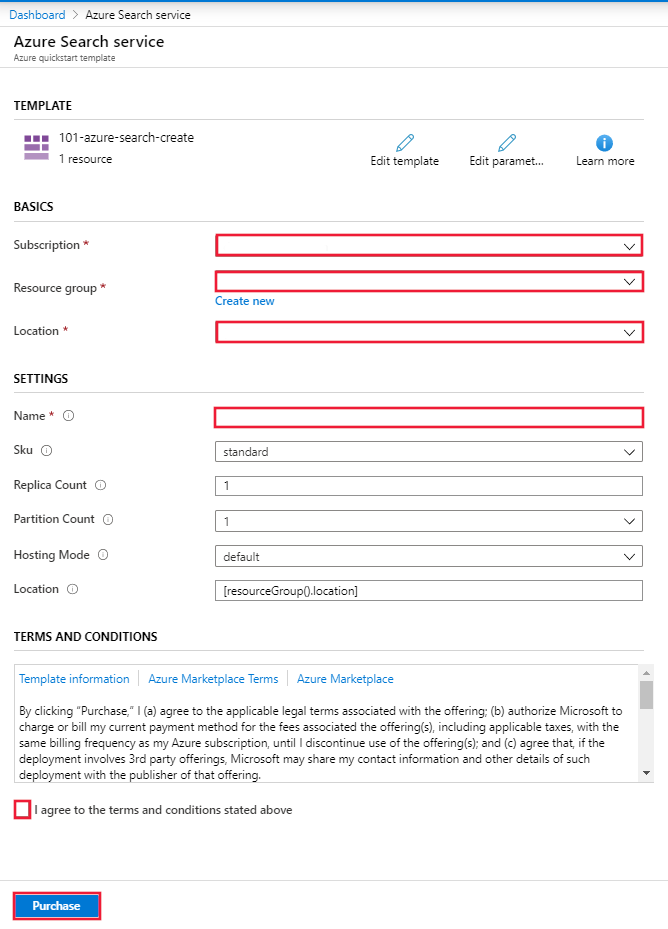
Azure 포털에는 매개 변수 값을 쉽게 제공하는 데 사용할 수 있는 양식이 표시됩니다. 일부 매개 변수는 템플릿의 기본값으로 미리 채워집니다. 구독, 리소스 그룹, 위치 및 서비스 이름을 제공합니다. 텍스트에 대한 이진 이미지 파일 분석과 같이 AI 보강 파이프라인에서 Microsoft Foundry를 사용하려면 Azure AI 검색 및 Microsoft Foundry를 모두 제공하는 위치를 선택합니다. 키 없는 연결을 사용하지 않는 한 Azure AI 검색 서비스 및 Microsoft Foundry 리소스는 AI 보강 워크로드에 대해 동일한 지역에 있어야 합니다. 양식을 완료한 후 사용 약관에 동의한 다음 구매 단추를 선택하여 배포를 완료합니다.
배포된 리소스 검토
배포가 완료되면 Azure Portal에서 새 리소스 그룹 및 새 검색 서비스에 액세스할 수 있습니다.
리소스 정리
다른 Azure AI 검색 빠른 시작과 자습서는 이 빠른 시작을 기반으로 작성됩니다. 후속 빠른 시작 및 자습서를 계속 사용하려는 경우 이 리소스를 그대로 두는 것이 좋습니다. 리소스가 더 이상 필요하지 않은 경우 리소스 그룹을 삭제할 수 있습니다. 리소스 그룹을 삭제하면 Azure AI 검색 서비스 및 관련 리소스가 삭제됩니다.
관련 콘텐츠
이 빠른 시작에서는 ARM 템플릿을 사용하여 Azure AI 검색 서비스를 만든 다음 배포의 유효성을 검사했습니다. Azure AI 검색 및 Azure Resource Manager에 대한 자세한 내용은 다음 문서를 참조하세요.