Outlook | Windows | Classic Outlook for Windows | For business
Using classic Outlook for Windows in business environments

This browser is no longer supported.
Upgrade to Microsoft Edge to take advantage of the latest features, security updates, and technical support.
' cx='32' cy='32' r='32' /%3E%3Ctext x='50%25' y='55%25' dominant-baseline='middle' text-anchor='middle' fill='%23FFF' %3ECD%3C/text%3E%3C/svg%3E)
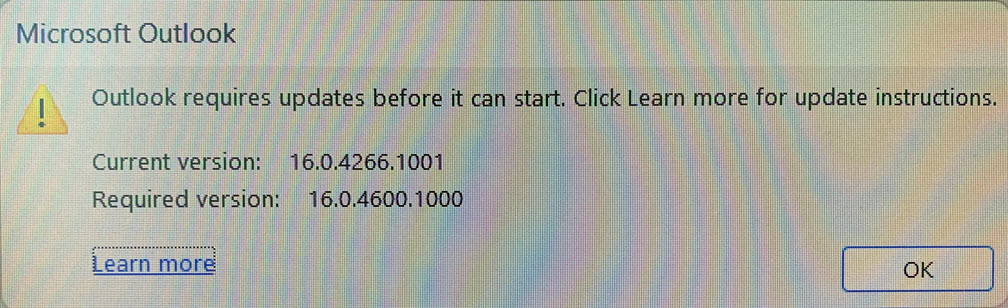
Our organization uses Outlook 2016, recently a number of staff have been receiving this error message stating that Outlook is out of date and cannot start. I've clicked the learn more link and it does not offer much assistance. Would anyone know if we are able to find a KB update file for this to remedy the issue?
Using classic Outlook for Windows in business environments
' cx='32' cy='32' r='32' /%3E%3Ctext x='50%25' y='55%25' dominant-baseline='middle' text-anchor='middle' fill='%23FFF' %3ERA%3C/text%3E%3C/svg%3E)
I FOUND THE ANSWER!!! If using windows 11 follow these steps:
System - About Your PC - Windows Update - Advanced Options - The click on where it says "receive updates for other Microsoft products" - The go back to previous screen and click "Check for Updates"
After a quite some time you'll see a number of updates, most of them related to outlook. Make sure they all download and say pending restart. Do not make the mistake of hitting restart when some updates are still pending. Scroll down and make sure ALL of them say pending restart. Once your computer reboots you should be good to go.
Hope this helps!
**If you're using windows 10 I don't know the exact steps, but you should be able to follow this with similar steps.
' cx='32' cy='32' r='32' /%3E%3Ctext x='50%25' y='55%25' dominant-baseline='middle' text-anchor='middle' fill='%23FFF' %3EKH%3C/text%3E%3C/svg%3E)
Worked for windows 10 too, Thanks RubenAmaro-8905
' cx='32' cy='32' r='32' /%3E%3Ctext x='50%25' y='55%25' dominant-baseline='middle' text-anchor='middle' fill='%23FFF' %3EFR%3C/text%3E%3C/svg%3E)
Did you already try update KB ?
https://www.microsoft.com/en-us/download/details.aspx?id=56064
' cx='32' cy='32' r='32' /%3E%3Ctext x='50%25' y='55%25' dominant-baseline='middle' text-anchor='middle' fill='%23FFF' %3EDM%3C/text%3E%3C/svg%3E)
' cx='32' cy='32' r='32' /%3E%3Ctext x='50%25' y='55%25' dominant-baseline='middle' text-anchor='middle' fill='%23FFF' %3EAC%3C/text%3E%3C/svg%3E)
Security Update for Microsoft Outlook 2016 (KB4011162) 64-Bit Edition helped to fix the issue. Thanks Fahru Reza

The solution is to install updates. That build number indicates the release version of Outlook/Office Volume License is installed without any updates applied. A later build number is required for compatibility with you version of Windows 10 and/or Exchange.
Depending on the update environment of your company, it generally is sufficient to enable Windows Update to also install updates for other applications as already indicated above.
You can find step-by-step instructions with screenshots here;
Not getting Office updates via Windows Update
Regardless of the error, you should apply updates anyway, as you're currently missing about 8 years worth of security updates as well. Once you've applied all updates, your build number should be 16.0.5430.1000 or higher.
' cx='32' cy='32' r='32' /%3E%3Ctext x='50%25' y='55%25' dominant-baseline='middle' text-anchor='middle' fill='%23FFF' %3ETH%3C/text%3E%3C/svg%3E)
Thank you @Robert Sparnaaij [MVP]
I received a warning message today which indicates that the issue still persists. The laptop is newly installed with Windows 10 and Office 2016. I am wondering if Microsoft has come up with a proper solution for this issue yet. I noticed that this problem was first reported in 2022, but it seems that there is still no proper solution available.
' cx='32' cy='32' r='32' /%3E%3Ctext x='50%25' y='55%25' dominant-baseline='middle' text-anchor='middle' fill='%23FFF' %3EKP%3C/text%3E%3C/svg%3E)
Hi,
I am currently facing the same issue..
We tried a few things;
We are going to try this: Settings - Update & Security - Windows Update - Advanced options > receive updates for other Microsoft products