RDS sessions disconnecting after 60 minutes

Ruber Linden 61 Reputation points
2020-08-07T15:52:05.387+00:00

Hi all,

All the servers on my RDS farm are joined to a domain, the licensing server shows no errors on Licensing Diagnostics, but this message is being displayed on all sessions:

"There is a problem with your license for Remote Desktop and the session will end in 60 minutes."

RDS Licensing Server shows that the CALs were assigned to the user, but it keeps showing the error on the sessions, which are disconnected after 60 minutes.

The licensing mode is Per User. I've already set up on the Server Manager, enforced on GPO settings, but still shows the same error.

Windows for business | Windows Client for IT Pros | User experience | Remote desktop services and terminal services

9 answers

Sort by: Most helpful
  1. Qba C 11 Reputation points
    2021-09-30T12:38:21.45+00:00

    I had the same problem too. The server is in a workgroup, not a domain.

    In the Remote Desktop license manager, I converted the license from "per user" to "per device" and modified the settings in gpedit as well. This message no longer appears.

    Of course, you have to reckon with the fact that we have replaced you with a license.

    Was this answer helpful?

    2 people found this answer helpful.
    0 comments No comments

  2. eloen 1 Reputation point
    2022-02-17T12:21:04.183+00:00

    is any working solution ? Windows server 2019 Standard without AD . Some updates ?

    Was this answer helpful?

    1 person found this answer helpful.

  3. Anonymous
    2020-08-10T03:22:52.813+00:00

    hi,
    l Have you ever set the session time limits for all user who logged on before?

    If not, here a workaround is to go to Group Policy and try to set session time limit, details shown as below:

    1. Cmd prompt, gpedit.msc
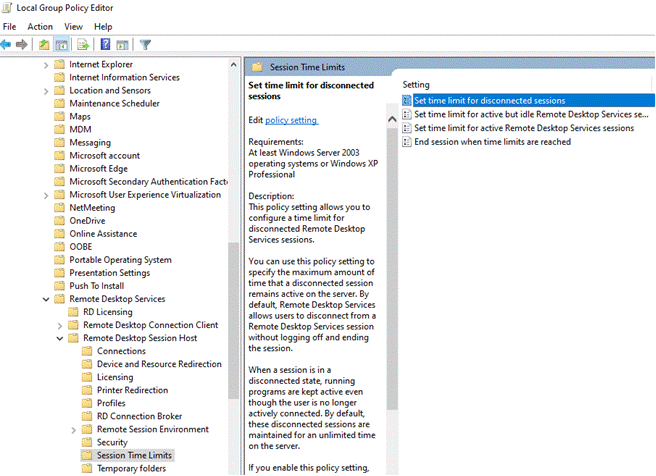
    2. Computer Configuration->Admin Templates-> Windows Components-> Remote Desktop Services->Remote Desktop Session Host->Session Time Limits
      16568-image.png
    3. Enable appropriate group policies and modify as needed
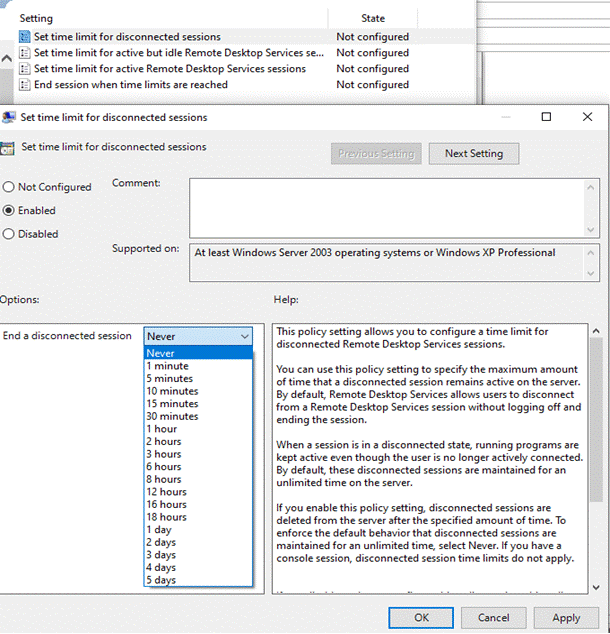
    4. We recommend setting this one because it will prevent disconnected sessions from consuming server resources — “Set time limit for disconnect sessions”
      16614-image.png
    5. After modifying group policies, you can force an update without rebooting by typing “gpupdate /force” at cmd prompt

    plz. inform me if it works well after the setting. And if it’s convenient to you, a clean boot is another workaround we can try.

    --please don't forget to Accept as answer if the reply is helpful--

    Was this answer helpful?

    1 person found this answer helpful.
    0 comments No comments

  4. Tyler 1 Reputation point
    2021-02-02T20:35:35.37+00:00

    If your system is in a domain, then you would go to the AD GPO policy for the OU your system is in and make the changes to the AD GPO, we have a specific OU for our terminal servers and a policy set to that OU, if you have the same, you should make the changes there (note, these changes will affect any other systems that are in that OU and will get the same GPO setting pushed down to them).

    You could do it on the local system if you are not in a domain, you would run gpedit.msc (as is noted in step 1 above) on the local system/terminal and edit the local group policy however, if your domain is pushing the AD GPO, you should make the change there otherwise your domain AD GPO might overwrite your changes on the local system policy...anyone feel free to correct me if I am wrong or clarify if this is unclear....

    Whether it is a Domain GPO or a local GPO you will edit it in the same place with the same setting as listed above.

    Was this answer helpful?

    0 comments No comments

  5. Homer Sibayan 131 Reputation points
    2021-01-28T04:26:40.807+00:00

    Hi yvonneyang

    Same Issue here we are encountered. my question is where do i need to go to edit the GPO ? Is it on the Licenses server of RDS ? or in the Session host Server ?

    Thanks
    Homer

    Was this answer helpful?

    0 comments No comments

Your answer

Answers can be marked as 'Accepted' by the question author and 'Recommended' by moderators, which helps users know the answer solved the author's problem.