I noticed you're using English in your messages, even though this is a French-speaking forum; I'll continue in English so my answer is as clear and useful as possible. As a friendly suggestion, posting in French may help your question reach a wider audience and increase the chances of receiving assistance from other community members. If you'd prefer I switch to French, please let me know, and I'll gladly do so. Also, since my test environment uses the English interface, the screenshots will appear in English. Thank you for your understanding!
Dear @Contact ,
Good day! Welcome to Microsoft Q&A forum!
First of all, I would like to clarify that this is a community forum where users help one another. No one here, including myself, has access to your Microsoft 365 tenant, account details, billing information, or authentication settings.
You could refer to this post answered by a moderator here: Lost my MFA to my business account
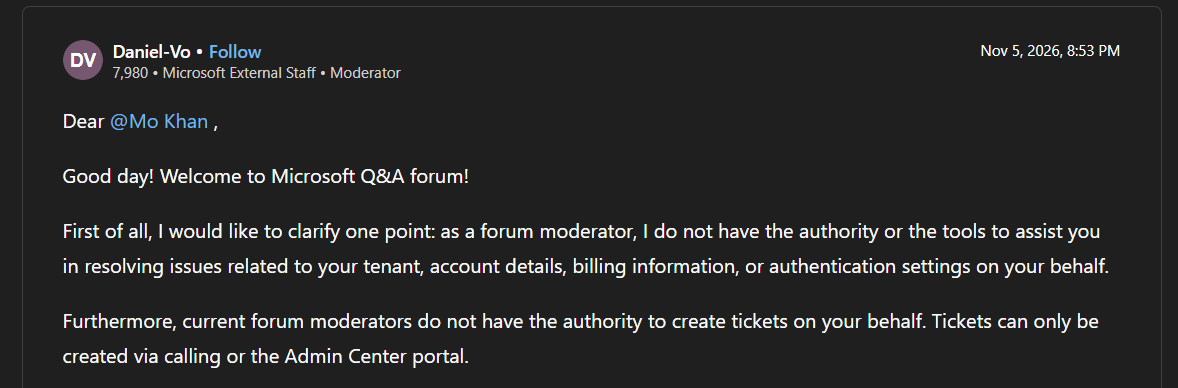
If you are the sole Global Administrator and the only MFA method is tied to a device you no longer control, tenant recovery typically requires assistance from Microsoft's Data Protection team.
Since you couldn't reach Phone Support, could you kindly check if you know someone with Admin rights to a Microsoft 365 Business tenant that could help raise a support ticket on your behalf (with your contact information in the ticket's description so that the Data Protection Team could reach out to you)?
As an alternative, you can create a new tenant account and submit your request from there.
To set up a new tenant, please follow these steps:
Once your tenant is created, you should be able to access the support portal and submit your ticket referencing your locked account without further issues.
In the ticket's description, you could refer to this message "Hello,
I am currently locked out of my Microsoft 365 tenant because multi-factor authentication is enforced, and I am unable to complete the verification process. I am the only global administrator for this tenant, which means I cannot access my account or the Microsoft 365 Admin Center.
To resolve this, I have created a new tenant and would like to be connected with the Data Protection Team to verify my identity and assist with regaining access. I am available to provide any required documentation or verification to support the recovery process."
Ticket Support: Log in the Microsoft 365 Admin Center using the newly created trial admin account (not the currently locked one) > Support > Help & Support. You can raise support ticket at: https://admin.microsoft.com/#/support/requests
When you open a support ticket, please make sure to turn off the Support Assistant (AI) in the help panel.
Several customers have reported issues when the Support Assistant is turned on the system sometimes fails to display the “Contact Support” option.
As shown in the screenshot, simply switch Support Assistant > Off, then type your issue description. Once the AI is off, the “Contact Support” button will appear normally, allowing you to submit a ticket directly.
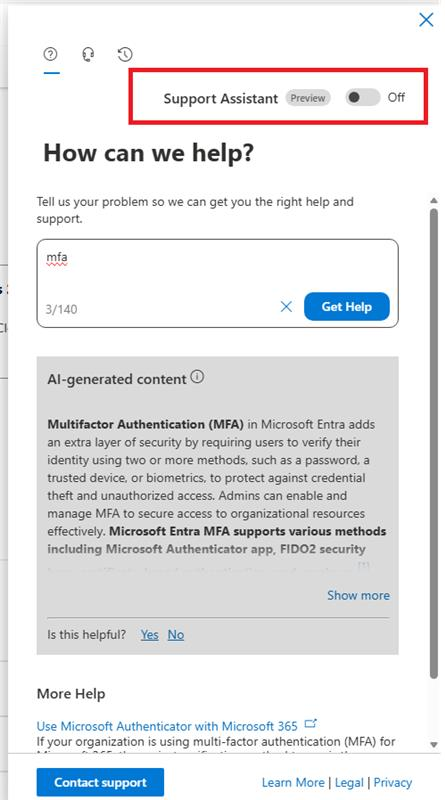
- After clicking on "Help & Support" button, you can type "I need agent support via phone or email". After that, you can click on "Contact support"
- Choose contact method: "Phone"
- Fill all the information in this contact support details, please describe your situation carefully so they will have enough information to help you.
- Finally, click on "Contact me"
- After completing them, you will receive an email appointment for a meeting to review this issue professionally together.
- For more details, you could refer to this article: Get support for Microsoft 365 for business
- This new trial tenant will not give you access to any of the data or settings in your original locked tenant. It is solely a temporary means to contact Microsoft support.
- Be prepared for Microsoft support to ask for verification of your identity and administrative rights for the locked tenant.
- The resolution time might be longer as you are contacting support from a different tenant.
- Remember to cancel the trial subscription for the new tenant once your issue with the original account is resolved to avoid any unintended charges. You can typically do this within the Microsoft 365 Admin Center under "Billing" > "Your products."
Once you regain access to the account, I recommend immediately reviewing and updating your security settings by registering one or more additional authentication methods, such as a secondary phone number, another authenticator device, or a security key. You should also verify that your account recovery information is current and, if possible, create a second Global Administrator account with its own MFA configuration. Maintaining multiple administrator accounts and backup authentication methods is a Microsoft best practice that can help prevent a complete tenant lockout if a device is lost, replaced, or reset in the future.
Kindly let me know when there are updates or if you need further assistance. Any updates you’re able to share would be really helpful.
I'm here and happy to help! Thank you for your kindness and patience!
' cx='32' cy='32' r='32' /%3E%3Ctext x='50%25' y='55%25' dominant-baseline='middle' text-anchor='middle' fill='%23FFF' %3EC%3C/text%3E%3C/svg%3E)

' cx='32' cy='32' r='32' /%3E%3Ctext x='50%25' y='55%25' dominant-baseline='middle' text-anchor='middle' fill='%23FFF' %3EJH%3C/text%3E%3C/svg%3E)