I will answer you in English based on your previous message. As a friendly suggestion, posting in Spanish may help your question reach a wider audience and increase the chances of receiving assistance from other community members.
Hi @Agustin Lira,
Thank you for posting your question in the Microsoft Q&A forum.
I’m very sorry to hear about your situation. Regarding that you’re unable to log in to your account.
If you don't have any other admin account in this situation, the Microsoft Data Protection team has tools and processes in place to verify identity and regain access to administrator accounts.
Please note that I'm also a user I have no control over user accounts, especially when it comes to logging in to your account, resetting your password, changing your access, etc.
Therefore, If you are the only administrator in your organization, then you need to involve Microsoft data protection team. Please try to find the related hotline number to call the frontline let them raise a ticket for you: Customer service phone numbers - Microsoft Support
*(Important Note: Depending on your country or region, when you call the support number, you may hear an introduction of about 30 seconds such as "you can visit the link...". You can ignore this introduction and wait until you are presented with the options. Then press "1" as a business email user, and again "1" for technical help.)
In some countries, this is an automated conversation: First, when you call the hotline, they will ask you what kind of problem you are struggling with.
Answer: Authenticator.
A: What products do you use?
B: Office 365 for business.
Verification: Education or company account?
B: For companies
A: Are you an administrator?
B: Yes.
A: Are there any other administrators in your organization?
B: No.
A: I need one.... Service request?
B: Yes
If your organization's Office 365 Business/Education subscription is from a partner or reseller, and the global administrator is unable to open a service request on your end, contact the reseller's support provider to help open a service request on behalf of you instead.
Alternatively, you can try set up a new trial tenant and submit your support request:
- Visit the Microsoft 365 Enterprise Plans page: Go to Compare Office 365 Enterprise Pricing and Plans | Microsoft 365.
- Choose a plan and start a free trial: Select any of the available plans and click "Try for free" to begin the trial setup process.
- Follow the guided setup: Complete the steps to create a new Microsoft account and a new tenant. This will be a separate and independent Microsoft 365 environment.
- Access the Microsoft 365 Admin Center: Once the new tenant is created, navigate to https://admin.microsoft.com/.
- Go to Support: In the left-hand navigation menu, click on "Support" and then "Help & support."
- Raise a support ticket: Describe your issue in detail. Crucially, you must clearly state that you are locked out of a different, pre-existing Microsoft 365 tenant where you are the administrator. Provide the following information about your locked account:
- Your administrator account email address for the locked tenant.
- The domain name of your locked tenant
- Any error messages you are receiving.
- Details about the authentication issues you are experiencing.
- Confirmation that you are the administrator of the locked tenant.
- Submit your ticket: Follow the prompts to submit your support request. You will likely receive a ticket number for tracking.
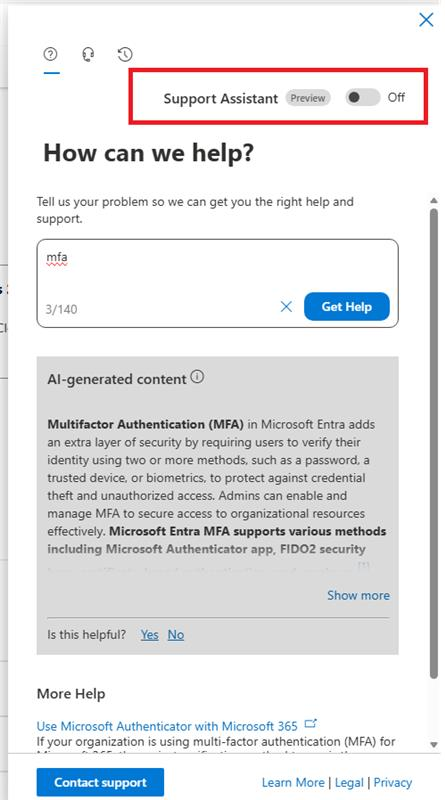
When you open a support ticket, please make sure to turn off the Support Assistant (AI) in the help panel.
Several customers have reported issues when the Support Assistant is turned on the system sometimes fails to display the “Contact Support” option.
As shown in the screenshot, simply switch Support Assistant > Off, then type your issue description. Once the AI is off, the “Contact Support” button will appear normally, allowing you to submit a ticket directly.
Important notes:
- This new trial tenant will not give you access to any of the data or settings in your original locked tenant. It is solely a temporary means to contact Microsoft support.
- Be prepared for Microsoft support to ask for verification of your identity and administrative rights for the locked tenant.
- The resolution time might be longer as you are contacting support from a different tenant.
- Remember to cancel the trial subscription for the new tenant once your issue with the original account is resolved to avoid any unintended charges. You can typically do this within the Microsoft 365 Admin Center under "Billing" -> "Your products."
Thank you again for your time and understanding. I really appreciate your patience, and I’m here to help. Looking forward to your response.
' cx='32' cy='32' r='32' /%3E%3Ctext x='50%25' y='55%25' dominant-baseline='middle' text-anchor='middle' fill='%23FFF' %3EAL%3C/text%3E%3C/svg%3E)

' cx='32' cy='32' r='32' /%3E%3Ctext x='50%25' y='55%25' dominant-baseline='middle' text-anchor='middle' fill='%23FFF' %3EH%3C/text%3E%3C/svg%3E)