Microsoft Security | Intune | Configuration Manager | Other
Other Configuration Manager-related features and issues

This browser is no longer supported.
Upgrade to Microsoft Edge to take advantage of the latest features, security updates, and technical support.
' cx='32' cy='32' r='32' /%3E%3Ctext x='50%25' y='55%25' dominant-baseline='middle' text-anchor='middle' fill='%23FFF' %3EST%3C/text%3E%3C/svg%3E)
Hello,
I have recently upgraded our infrastructure to Windows Server 2019 and SQL Server 2019. We have 1 primary site server and the SQL database is on its own server. I am running MECM 2010.
Administrative level users are able to open the console successfully. It is only users in a particular group that can't open it. They get the message below:
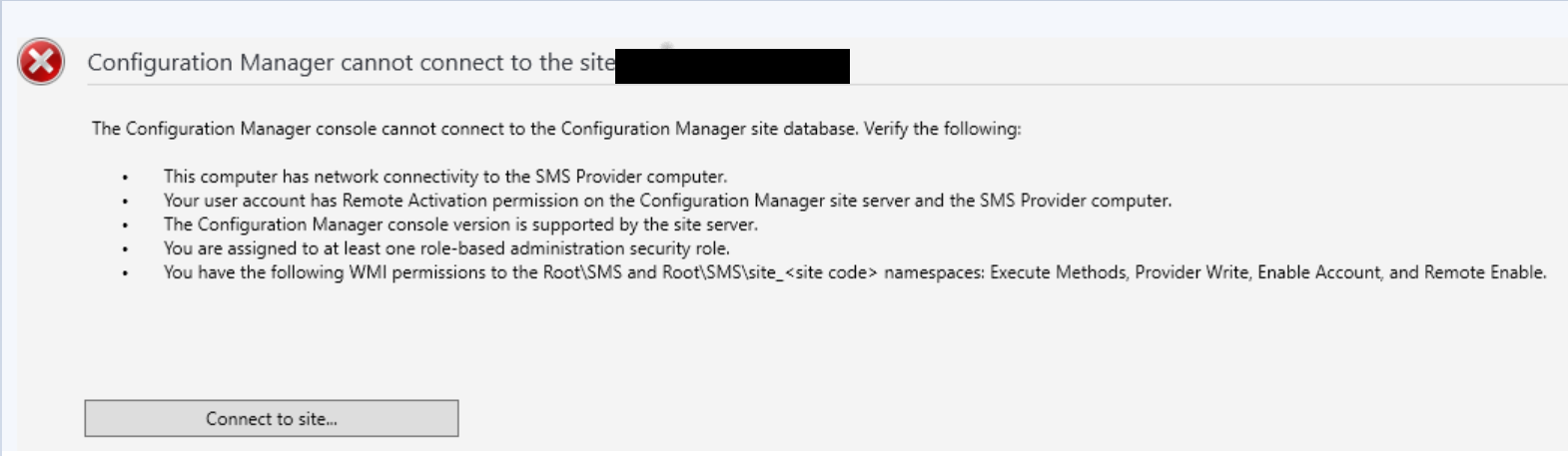
I have created a fresh test user and assigned it Full Administrator security role, that account gets the same error message.
I have looked at the SMSProv.log and the SMSAdminUI.log. There is nothing obvious in the SMSProv.log the SMSAdminUI.log has the following:
[1, PID:9900][04/12/2022 10:38:35] :System.Management.ManagementException\r\nNot found \r\n at System.Management.ManagementException.ThrowWithExtendedInfo(ManagementStatus errorCode)
at System.Management.QualifierData.RefreshQualifierInfo()
at System.Management.QualifierDataCollection.get_Item(String qualifierName)
at System.Management.ManagementBaseObject.GetQualifierValue(String qualifierName)
at Microsoft.ConfigurationManagement.ManagementProvider.WqlQueryEngine.WqlConnectionManager.GetQualifierValue(String className, String qualifierName)\r\nManagementException details:
[1, PID:9900][04/12/2022 10:38:35] :System.Management.ManagementException\r\nNot found \r\n at System.Management.ManagementException.ThrowWithExtendedInfo(ManagementStatus errorCode)
at System.Management.QualifierData.RefreshQualifierInfo()
at System.Management.QualifierDataCollection.get_Item(String qualifierName)
at System.Management.ManagementBaseObject.GetQualifierValue(String qualifierName)
at Microsoft.ConfigurationManagement.ManagementProvider.WqlQueryEngine.WqlConnectionManager.GetQualifierValue(String className, String qualifierName)\r\nManagementException details:
[1, PID:9900][04/12/2022 10:38:35] :System.Management.ManagementException\r\nNot found \r\n at System.Management.ManagementException.ThrowWithExtendedInfo(ManagementStatus errorCode)
at System.Management.QualifierData.RefreshQualifierInfo()
at System.Management.QualifierDataCollection.get_Item(String qualifierName)
at System.Management.ManagementBaseObject.GetQualifierValue(String qualifierName)
at Microsoft.ConfigurationManagement.ManagementProvider.WqlQueryEngine.WqlConnectionManager.GetQualifierValue(String className, String qualifierName)\r\nManagementException details:
[1, PID:9900][04/12/2022 10:38:35] :System.Management.ManagementException\r\nNot found \r\n at System.Management.ManagementException.ThrowWithExtendedInfo(ManagementStatus errorCode)
at System.Management.QualifierData.RefreshQualifierInfo()
at System.Management.QualifierDataCollection.get_Item(String qualifierName)
at System.Management.ManagementBaseObject.GetQualifierValue(String qualifierName)
at Microsoft.ConfigurationManagement.ManagementProvider.WqlQueryEngine.WqlConnectionManager.GetQualifierValue(String className, String qualifierName)\r\nManagementException details:
[1, PID:9900][04/12/2022 10:38:35] :System.Management.ManagementException\r\nNot found \r\n at System.Management.ManagementException.ThrowWithExtendedInfo(ManagementStatus errorCode)
at System.Management.QualifierData.RefreshQualifierInfo()
at System.Management.QualifierDataCollection.get_Item(String qualifierName)
at System.Management.ManagementBaseObject.GetQualifierValue(String qualifierName)
at Microsoft.ConfigurationManagement.ManagementProvider.WqlQueryEngine.WqlConnectionManager.GetQualifierValue(String className, String qualifierName)\r\nManagementException details:
[1, PID:9900][04/12/2022 10:38:35] :System.Management.ManagementException\r\nNot found \r\n at System.Management.ManagementException.ThrowWithExtendedInfo(ManagementStatus errorCode)
at System.Management.QualifierData.RefreshQualifierInfo()
at System.Management.QualifierDataCollection.get_Item(String qualifierName)
at System.Management.ManagementBaseObject.GetQualifierValue(String qualifierName)
at Microsoft.ConfigurationManagement.ManagementProvider.WqlQueryEngine.WqlConnectionManager.GetQualifierValue(String className, String qualifierName)\r\nManagementException details:
[1, PID:9900][04/12/2022 10:38:35] :System.Management.ManagementException\r\nNot found \r\n at System.Management.ManagementException.ThrowWithExtendedInfo(ManagementStatus errorCode)
at System.Management.QualifierData.RefreshQualifierInfo()
at System.Management.QualifierDataCollection.get_Item(String qualifierName)
at System.Management.ManagementBaseObject.GetQualifierValue(String qualifierName)
at Microsoft.ConfigurationManagement.ManagementProvider.WqlQueryEngine.WqlConnectionManager.GetQualifierValue(String className, String qualifierName)\r\nManagementException details:
[1, PID:9900][04/12/2022 10:38:35] :System.Management.ManagementException\r\nNot found \r\n at System.Management.ManagementException.ThrowWithExtendedInfo(ManagementStatus errorCode)
at System.Management.QualifierData.RefreshQualifierInfo()
at System.Management.QualifierDataCollection.get_Item(String qualifierName)
at System.Management.ManagementBaseObject.GetQualifierValue(String qualifierName)
at Microsoft.ConfigurationManagement.ManagementProvider.WqlQueryEngine.WqlConnectionManager.GetQualifierValue(String className, String qualifierName)\r\nManagementException details:
[1, PID:9900][04/12/2022 10:38:35] :System.Management.ManagementException\r\nNot found \r\n at System.Management.ManagementException.ThrowWithExtendedInfo(ManagementStatus errorCode)
at System.Management.QualifierData.RefreshQualifierInfo()
at System.Management.QualifierDataCollection.get_Item(String qualifierName)
at System.Management.ManagementBaseObject.GetQualifierValue(String qualifierName)
at Microsoft.ConfigurationManagement.ManagementProvider.WqlQueryEngine.WqlConnectionManager.GetQualifierValue(String className, String qualifierName)\r\nManagementException details:
[1, PID:9900][04/12/2022 10:38:35] :System.Management.ManagementException\r\nNot found \r\n at System.Management.ManagementException.ThrowWithExtendedInfo(ManagementStatus errorCode)
at System.Management.QualifierData.RefreshQualifierInfo()
at System.Management.QualifierDataCollection.get_Item(String qualifierName)
at System.Management.ManagementBaseObject.GetQualifierValue(String qualifierName)
at Microsoft.ConfigurationManagement.ManagementProvider.WqlQueryEngine.WqlConnectionManager.GetQualifierValue(String className, String qualifierName)\r\nManagementException details:
[1, PID:9900][04/12/2022 10:44:16] :Property: 'UUPPreference'\r\nSystem.Management.ManagementException\r\nNot found \r\n at System.Management.ManagementException.ThrowWithExtendedInfo(ManagementStatus errorCode)
at System.Management.PropertyData.RefreshPropertyInfo()
at System.Management.PropertyDataCollection.get_Item(String propertyName)
at Microsoft.ConfigurationManagement.ManagementProvider.WqlQueryEngine.WqlResultObjectBase.get_Item(String name)\r\nManagementException details:
[1, PID:9900][04/12/2022 10:44:16] :Property: 'Wind10product'\r\nSystem.Management.ManagementException\r\nNot found \r\n at System.Management.ManagementException.ThrowWithExtendedInfo(ManagementStatus errorCode)
at System.Management.PropertyData.RefreshPropertyInfo()
at System.Management.PropertyDataCollection.get_Item(String propertyName)
at Microsoft.ConfigurationManagement.ManagementProvider.WqlQueryEngine.WqlResultObjectBase.get_Item(String name)\r\nManagementException details:
[1, PID:9900][04/12/2022 10:44:16] :Property: 'UUPPreference'\r\nSystem.Management.ManagementException\r\nNot found \r\n at System.Management.ManagementException.ThrowWithExtendedInfo(ManagementStatus errorCode)
at System.Management.PropertyData.RefreshPropertyInfo()
at System.Management.PropertyDataCollection.get_Item(String propertyName)
at Microsoft.ConfigurationManagement.ManagementProvider.WqlQueryEngine.WqlResultObjectBase.get_Item(String name)\r\nManagementException details:
[1, PID:9900][04/12/2022 10:44:16] :Property: 'Wind10product'\r\nSystem.Management.ManagementException\r\nNot found \r\n at System.Management.ManagementException.ThrowWithExtendedInfo(ManagementStatus errorCode)
at System.Management.PropertyData.RefreshPropertyInfo()
at System.Management.PropertyDataCollection.get_Item(String propertyName)
at Microsoft.ConfigurationManagement.ManagementProvider.WqlQueryEngine.WqlResultObjectBase.get_Item(String name)\r\nManagementException details:
[1, PID:9900][04/12/2022 10:44:16] :Property: 'UUPPreference'\r\nSystem.Management.ManagementException\r\nNot found \r\n at System.Management.ManagementException.ThrowWithExtendedInfo(ManagementStatus errorCode)
at System.Management.PropertyData.RefreshPropertyInfo()
at System.Management.PropertyDataCollection.get_Item(String propertyName)
at Microsoft.ConfigurationManagement.ManagementProvider.WqlQueryEngine.WqlResultObjectBase.get_Item(String name)\r\nManagementException details:
[1, PID:9900][04/12/2022 10:44:16] :Property: 'Wind10product'\r\nSystem.Management.ManagementException\r\nNot found \r\n at System.Management.ManagementException.ThrowWithExtendedInfo(ManagementStatus errorCode)
at System.Management.PropertyData.RefreshPropertyInfo()
at System.Management.PropertyDataCollection.get_Item(String propertyName)
at Microsoft.ConfigurationManagement.ManagementProvider.WqlQueryEngine.WqlResultObjectBase.get_Item(String name)\r\nManagementException details:
[1, PID:9900][04/12/2022 10:44:16] :Property: 'UUPPreference'\r\nSystem.Management.ManagementException\r\nNot found \r\n at System.Management.ManagementException.ThrowWithExtendedInfo(ManagementStatus errorCode)
at System.Management.PropertyData.RefreshPropertyInfo()
at System.Management.PropertyDataCollection.get_Item(String propertyName)
at Microsoft.ConfigurationManagement.ManagementProvider.WqlQueryEngine.WqlResultObjectBase.get_Item(String name)\r\nManagementException details:
[1, PID:9900][04/12/2022 10:44:16] :Property: 'Wind10product'\r\nSystem.Management.ManagementException\r\nNot found \r\n at System.Management.ManagementException.ThrowWithExtendedInfo(ManagementStatus errorCode)
at System.Management.PropertyData.RefreshPropertyInfo()
at System.Management.PropertyDataCollection.get_Item(String propertyName)
at Microsoft.ConfigurationManagement.ManagementProvider.WqlQueryEngine.WqlResultObjectBase.get_Item(String name)\r\nManagementException details:
[1, PID:9900][04/12/2022 10:44:16] :Property: 'UUPPreference'\r\nSystem.Management.ManagementException\r\nNot found \r\n at System.Management.ManagementException.ThrowWithExtendedInfo(ManagementStatus errorCode)
at System.Management.PropertyData.RefreshPropertyInfo()
at System.Management.PropertyDataCollection.get_Item(String propertyName)
at Microsoft.ConfigurationManagement.ManagementProvider.WqlQueryEngine.WqlResultObjectBase.get_Item(String name)\r\nManagementException details:
[1, PID:9900][04/12/2022 10:44:16] :Property: 'Wind10product'\r\nSystem.Management.ManagementException\r\nNot found \r\n at System.Management.ManagementException.ThrowWithExtendedInfo(ManagementStatus errorCode)
at System.Management.PropertyData.RefreshPropertyInfo()
at System.Management.PropertyDataCollection.get_Item(String propertyName)
at Microsoft.ConfigurationManagement.ManagementProvider.WqlQueryEngine.WqlResultObjectBase.get_Item(String name)\r\nManagementException details:
[1, PID:9900][04/12/2022 10:44:16] :Property: 'UUPPreference'\r\nSystem.Management.ManagementException\r\nNot found \r\n at System.Management.ManagementException.ThrowWithExtendedInfo(ManagementStatus errorCode)
at System.Management.PropertyData.RefreshPropertyInfo()
at System.Management.PropertyDataCollection.get_Item(String propertyName)
at Microsoft.ConfigurationManagement.ManagementProvider.WqlQueryEngine.WqlResultObjectBase.get_Item(String name)\r\nManagementException details:
[1, PID:9900][04/12/2022 10:44:16] :Property: 'Wind10product'\r\nSystem.Management.ManagementException\r\nNot found \r\n at System.Management.ManagementException.ThrowWithExtendedInfo(ManagementStatus errorCode)
at System.Management.PropertyData.RefreshPropertyInfo()
at System.Management.PropertyDataCollection.get_Item(String propertyName)
at Microsoft.ConfigurationManagement.ManagementProvider.WqlQueryEngine.WqlResultObjectBase.get_Item(String name)\r\nManagementException details:
[1, PID:9900][04/12/2022 10:44:16] :Property: 'UUPPreference'\r\nSystem.Management.ManagementException\r\nNot found \r\n at System.Management.ManagementException.ThrowWithExtendedInfo(ManagementStatus errorCode)
at System.Management.PropertyData.RefreshPropertyInfo()
at System.Management.PropertyDataCollection.get_Item(String propertyName)
at Microsoft.ConfigurationManagement.ManagementProvider.WqlQueryEngine.WqlResultObjectBase.get_Item(String name)\r\nManagementException details:
[1, PID:9900][04/12/2022 10:44:16] :Property: 'Wind10product'\r\nSystem.Management.ManagementException\r\nNot found \r\n at System.Management.ManagementException.ThrowWithExtendedInfo(ManagementStatus errorCode)
at System.Management.PropertyData.RefreshPropertyInfo()
at System.Management.PropertyDataCollection.get_Item(String propertyName)
at Microsoft.ConfigurationManagement.ManagementProvider.WqlQueryEngine.WqlResultObjectBase.get_Item(String name)\r\nManagementException details:
[1, PID:9900][04/12/2022 10:44:16] :Property: 'UUPPreference'\r\nSystem.Management.ManagementException\r\nNot found \r\n at System.Management.ManagementException.ThrowWithExtendedInfo(ManagementStatus errorCode)
at System.Management.PropertyData.RefreshPropertyInfo()
at System.Management.PropertyDataCollection.get_Item(String propertyName)
at Microsoft.ConfigurationManagement.ManagementProvider.WqlQueryEngine.WqlResultObjectBase.get_Item(String name)\r\nManagementException details:
[1, PID:9900][04/12/2022 10:44:16] :Property: 'Wind10product'\r\nSystem.Management.ManagementException\r\nNot found \r\n at System.Management.ManagementException.ThrowWithExtendedInfo(ManagementStatus errorCode)
at System.Management.PropertyData.RefreshPropertyInfo()
at System.Management.PropertyDataCollection.get_Item(String propertyName)
at Microsoft.ConfigurationManagement.ManagementProvider.WqlQueryEngine.WqlResultObjectBase.get_Item(String name)\r\nManagementException details:
[1, PID:9900][04/12/2022 10:44:16] :Property: 'UUPPreference'\r\nSystem.Management.ManagementException\r\nNot found \r\n at System.Management.ManagementException.ThrowWithExtendedInfo(ManagementStatus errorCode)
at System.Management.PropertyData.RefreshPropertyInfo()
at System.Management.PropertyDataCollection.get_Item(String propertyName)
at Microsoft.ConfigurationManagement.ManagementProvider.WqlQueryEngine.WqlResultObjectBase.get_Item(String name)\r\nManagementException details:
[1, PID:9900][04/12/2022 10:44:16] :Property: 'Wind10product'\r\nSystem.Management.ManagementException\r\nNot found \r\n at System.Management.ManagementException.ThrowWithExtendedInfo(ManagementStatus errorCode)
at System.Management.PropertyData.RefreshPropertyInfo()
at System.Management.PropertyDataCollection.get_Item(String propertyName)
at Microsoft.ConfigurationManagement.ManagementProvider.WqlQueryEngine.WqlResultObjectBase.get_Item(String name)\r\nManagementException details:
[1, PID:9900][04/12/2022 10:48:02] :Updated object is an unexpected type and cannot be processed
[1, PID:9900][04/12/2022 10:50:34] :Updated object is an unexpected type and cannot be processed
[1, PID:9900][04/12/2022 10:51:40] :Updated object is an unexpected type and cannot be processed
[33, PID:9900][04/12/2022 10:56:39] :[SCCM.cornwall.ac.uk] : Failed to load expression host assembly. Details: Could not load file or assembly 'SrsResources, Culture=neutral' or one of its dependencies. The system cannot find the file specified.
[40, PID:9900][04/12/2022 11:13:20] :No user principal name is found for user CCG\ktadmin2
[18, PID:9900][04/12/2022 11:13:41] :No user principal name is found for user CCG\lmadmin
[1, PID:9900][04/12/2022 11:18:38] :Updated object is an unexpected type and cannot be processed
[1, PID:9900][04/12/2022 11:23:35] :The configured property (_IncludedInStatementOfHealth) was not found.
[1, PID:9900][04/12/2022 11:23:47] :The configured property (_IncludedInStatementOfHealth) was not found.
[1, PID:9900][04/12/2022 11:24:07] :The configured property (_IncludedInStatementOfHealth) was not found.
[1, PID:9900][04/12/2022 11:24:17] :The configured property (_IncludedInStatementOfHealth) was not found.
[1, PID:9900][04/12/2022 11:25:19] :The configured property (_IncludedInStatementOfHealth) was no found.
There are two users above ktadmin2 can login successfully, they have the Full Admin role assigned. The other user lmadmin is a member an AD group that via Security Roles in MECM only has access to manage computers and collections.
I have searched various forums but can't find an answer. Hopefully someone here will be able too.
Thanks
Shaun Trenberth
Other Configuration Manager-related features and issues
Locked Question. You can vote on whether it's helpful, but you can't add comments or replies or follow the question.

Hi @Shaun Trenberth ,
Thanks very much for your feedback. We're glad that the question is solved now. It's appreciated that you could click "Accept Answer" to the helpful reply, this will help other users to search for useful information more quickly. Here's a short summary for the problem.
Problem/Symptom:
Users in a particular group that can't open MECM Console with permission error.
Solution/Workaround:
Add the users as Admins to the site server and that resolves the issue.
Thanks again for your time! Have a nice day!
Best regards,
Simon
If the response is helpful, please click "Accept Answer" and upvote it.
Note: Please follow the steps in our documentation to enable e-mail notifications if you want to receive the related email notification for this thread.

Managed by SCCM Site Reset without changing any configuration.
I believe the upgrade did:
Thanks Team
Hi,
Thanks for your information. The reason is clear now, it is due to permissions.
1,How about giving Full control perimisson to SMS Admins group?
2,==>However, I don't want to do that as these users are technicians not admin users.
If step 1 doesn't work, you can try to install SCCM console on other server with less sensitive. And then use that server to open the console and manage computers and collections.
Refer to: Install the Configuration Manager console
Thanks for your time. Have a nice day!
Best regards,
Simon
If the response is helpful, please click "Accept Answer" and upvote it.
Note: Please follow the steps in our documentation to enable e-mail notifications if you want to receive the related email notification for this thread.
Hi,
I will try this and get back to you. I am on leave for the next week so I won't know the outcome until at least the 25th April.
Regards
Shaun
Hi,
OK, look forward to your feedback. And it's appreciated that you could click "Accept Answer" if the answer is helpful, this will help other users to search for useful information more quickly.
Thanks for your time.
Best regards,
Simon
Hi,
In the end I added the users as Admins to the site server and that resolve the issue.
Thanks for your help.
Regards
Shaun
Hello Simon,
I am now unable to open the console myself! The only change made was adding the groups to the (C:\Program Files\Microsoft Configuration Manager\Logs) and granting them full control. I have now removed them and still can't open the console.
There is no error message the console screen appears and says connecting to site database. The animation runs for a few minutes then stops.
I viewed the DCOM configuration and validated it following - http://schadda.blogspot.com/2012/08/how-to-fix-issues-related-with_7.html.
Please Help!!!!
Regards
Shaun
Hi Simon,
I have regained access to the console for myself, however other users are still getting an error. Please see attached for permissions.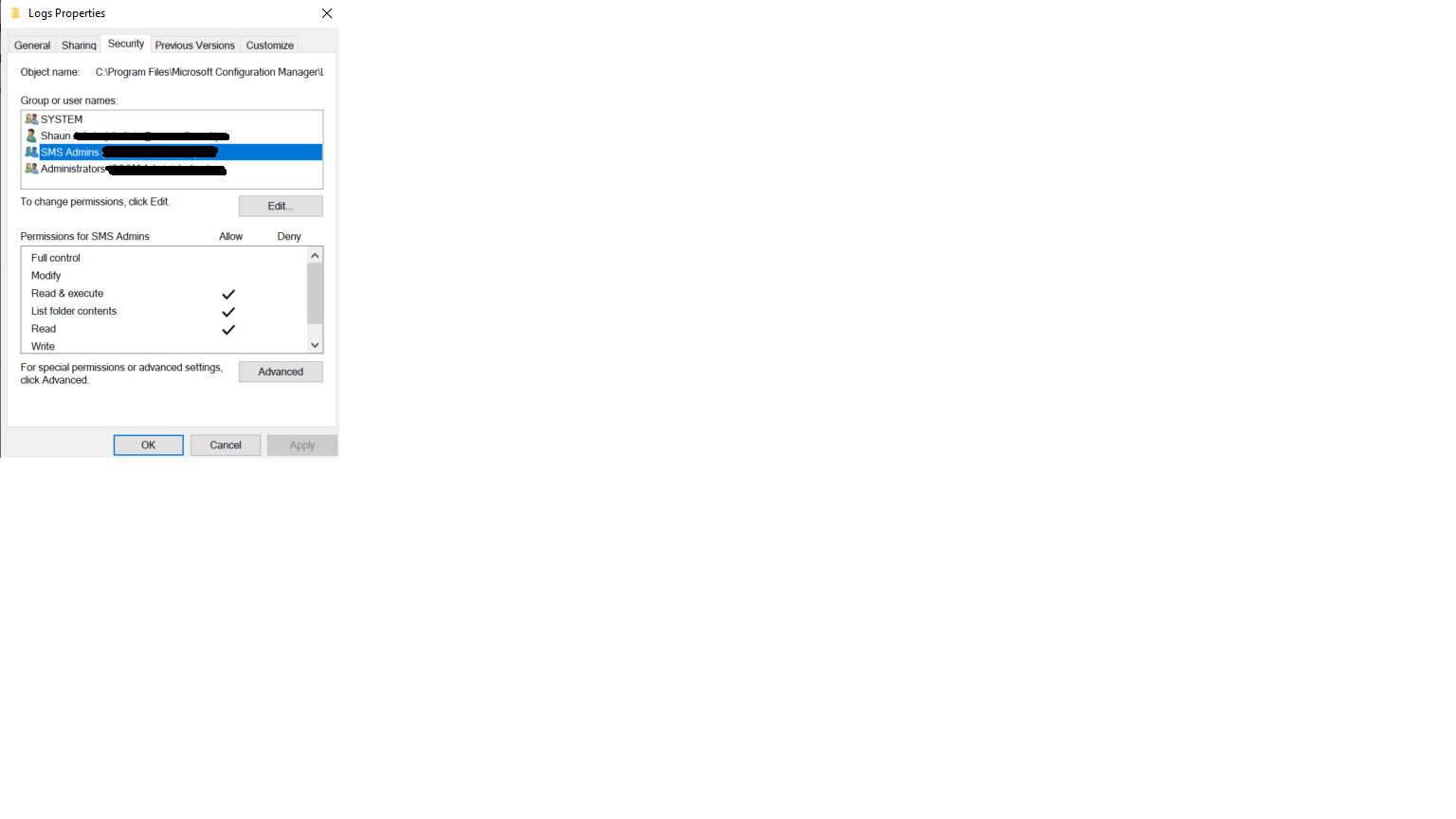
The SMS Admins group contains another group in which the users that can't access the console are members.
If I make that group a member of the local administrators group on the site server then the users can open the console. However, I don't want to do that as these users are technicians not admin users.
Regards
Shaun
Hello Simon,
I can confirm that the groups that the users are members of did not have permission to (C:\Program Files\Microsoft Configuration Manager\Logs). I have now added these groups and given the Full Control permission. I am now waiting for permissions to apply to see if that solves the problem.
Thanks
Shaun
Hi,
Thanks for your information. Look forward to hearing good news from you.
Have a nice day!
Best regards,
Simon
