
run cmd as administrator
create netrun.bat file !!
sc stop FDResPub
pause
sc start FDResPub
sc query fdrespub
This browser is no longer supported.
Upgrade to Microsoft Edge to take advantage of the latest features, security updates, and technical support.

Hello All,
Does anybody see the local computer in the list of computers in Explorer's "Network" view?
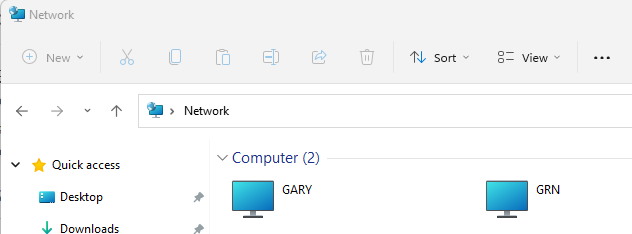
The reason that I am asking is that I think that I have discovered why it does not appear in my list and, if the idea is correct, I would not expect any Windows 11 system to show the local computer.
I think that there has been a long-term problem/bug in evaluating Windows Filtering Platform (WFP) filters for loopback traffic that had been disguised by default settings in Windows 10. A default has changed in Windows 11 and this has allowed the problem to become more visible.
The "missing" local computer is just an easily verifiable manifestation of the problem and not a big problem itself, but I think that some other problems that I have seen in forums might have the same root cause.
Update: I have written about the suspected problem and its causes in more detail at: https://gary-nebbett.blogspot.com/2022/04/windows-filtering-platform-loopback.html
Gary

Well I know I'm just a sample size of 1 person, but I checked here and I do not see my local PC in this view (I do see other computers on the same LAN). I do have network file sharing/discovery enabled and my network type is set to Private (simple home network).
Hello @@CmdrKeene ,
Thanks for the reply. I am retired, so I don't have access to a wide sample of systems to check this behaviour. I am writing an explanation of what I think that I have discovered and the techniques used to do so (essentially, detailed Event Tracing for Windows (ETW)). Replies like yours will influence the content of that explanation (e.g. how much room for doubt is there).
Gary
' cx='32' cy='32' r='32' /%3E%3Ctext x='50%25' y='55%25' dominant-baseline='middle' text-anchor='middle' fill='%23FFF' %3EDE%3C/text%3E%3C/svg%3E)
After many months of trial and error, I believe I have discovered a reliable workaround for this incredibly frustrating issue, and it was right in front of me all along. For the many years I have been using Microsoft peer-to-peer networking at home, going all the way back to the early versions of Windows, I have always made sure that all of my systems were assigned to the same workgroup. I recently updated my wife's desktop system to Windows 11, at which time it could "see itself" in the network folder. Following my old practice, I changed that system's workgroup to the same name as the other 3 computers, and it promptly disappeared from the network folder. Recalling that I had long experienced this problem with one of my other systems, I switched it to a different workgroup, and it reappeared in the network folder. Several back and forth experiments verified that this works every time. I hope this works for others experiencing the same problem. (By the way, this issue seems to occur only on systems connected to my router via WiFi. My Ethernet-connected desktop computer has never exhibited the problem.)
' cx='32' cy='32' r='32' /%3E%3Ctext x='50%25' y='55%25' dominant-baseline='middle' text-anchor='middle' fill='%23FFF' %3EA%3C/text%3E%3C/svg%3E)
How exactly (step-by-step) did you “switch it to a different workgroup”? Thanks.
' cx='32' cy='32' r='32' /%3E%3Ctext x='50%25' y='55%25' dominant-baseline='middle' text-anchor='middle' fill='%23FFF' %3ESC%3C/text%3E%3C/svg%3E)
run cmd as administrator
create netrun.bat file !!
sc stop FDResPub
pause
sc start FDResPub
sc query fdrespub
' cx='32' cy='32' r='32' /%3E%3Ctext x='50%25' y='55%25' dominant-baseline='middle' text-anchor='middle' fill='%23FFF' %3EFG%3C/text%3E%3C/svg%3E)
That seems similar to what I reported back on Aug 9, 2023.
net stop FDResPub
net start FDResPub
Why is MS not fixing this problem?
' cx='32' cy='32' r='32' /%3E%3Ctext x='50%25' y='55%25' dominant-baseline='middle' text-anchor='middle' fill='%23FFF' %3EA%3C/text%3E%3C/svg%3E)
For all of you, check the following answer from Hania Lian. I was going nuts scouring the net for a fix. This solved my problem:
Hania Lian, thank you.
' cx='32' cy='32' r='32' /%3E%3Ctext x='50%25' y='55%25' dominant-baseline='middle' text-anchor='middle' fill='%23FFF' %3ETB%3C/text%3E%3C/svg%3E)
Andre - I'm coming across this post fighting the fight that everyone on here has been going at for quite some time now. I read through the article that you posted but it is pretty dense to the uneducated (at least to me)... I didn't see what consisted of a "fix" listed. Can you help me understand what the fix is? My PC not showing up in Network is slowly driving me insane and just wan t the d*mn thing to work. Thank you for your help man.