Outlook | Windows | Classic Outlook for Windows | For business
Using classic Outlook for Windows in business environments

This browser is no longer supported.
Upgrade to Microsoft Edge to take advantage of the latest features, security updates, and technical support.
' cx='32' cy='32' r='32' /%3E%3Ctext x='50%25' y='55%25' dominant-baseline='middle' text-anchor='middle' fill='%23FFF' %3EA%3C/text%3E%3C/svg%3E)
Outlook now automatically adds a Teams Meeting link to any meeting I schedule using Outlook - I would like to permanently disable this for my Outlook as my team only uses Zoom for meetings. There does not seem to be any documentation about this and I have been unable to find anything in preferences that changes it permanently.
Using classic Outlook for Windows in business environments
Additional features, settings, or issues not covered by specific Microsoft Teams categories

' cx='32' cy='32' r='32' /%3E%3Ctext x='50%25' y='55%25' dominant-baseline='middle' text-anchor='middle' fill='%23FFF' %3EJM%3C/text%3E%3C/svg%3E)
Hi @Anonymous
Outlook now automatically adds a Teams Meeting link to any meeting I schedule using Outlook
How did you schedule meeting in Outlook client? Do you mean if you schedule "Any meeting" in Outlook, it will add Teams meeting link?
Based on my knowledge, if you don't want to schedule Teams meeting in Outlook client, you could try to disable it by following these steps:
It has been a while, how is everything going?
If you have any update about this issue, please feel free to post back.
' cx='32' cy='32' r='32' /%3E%3Ctext x='50%25' y='55%25' dominant-baseline='middle' text-anchor='middle' fill='%23FFF' %3EDM%3C/text%3E%3C/svg%3E)
I find it disturbing that MS just went ahead and started assuming that I would use MS Teams for all of my meetings. Believe it or not, people still have face-to-face meetings and use other online meeting software products. This feature turning on by default caused a lot of confusion. The solution below completely disables MS Teams in Outlook. I would still like it as an option, but don't assume that every meeting I schedule will use MS Teams. It's a big overstep.
' cx='32' cy='32' r='32' /%3E%3Ctext x='50%25' y='55%25' dominant-baseline='middle' text-anchor='middle' fill='%23FFF' %3ESR%3C/text%3E%3C/svg%3E)
I couldnt agree more. This is very poor product management.
' cx='32' cy='32' r='32' /%3E%3Ctext x='50%25' y='55%25' dominant-baseline='middle' text-anchor='middle' fill='%23FFF' %3ECM%3C/text%3E%3C/svg%3E)
Didn't this sort of anti-competitive behavior already cost Microsoft a boat load of money 20 years ago? Its exactly what is in their DNA.
' cx='32' cy='32' r='32' /%3E%3Ctext x='50%25' y='55%25' dominant-baseline='middle' text-anchor='middle' fill='%23FFF' %3EGE%3C/text%3E%3C/svg%3E)
First thing I tried before coming here was disabling the add-in but Teams re-enables it automatically the next time you launch a Teams meeting.
' cx='32' cy='32' r='32' /%3E%3Ctext x='50%25' y='55%25' dominant-baseline='middle' text-anchor='middle' fill='%23FFF' %3ETT%3C/text%3E%3C/svg%3E)
Can someone help me find this setting on the Mac version of Outlook?
Mac Outlook is doing the same now.
' cx='32' cy='32' r='32' /%3E%3Ctext x='50%25' y='55%25' dominant-baseline='middle' text-anchor='middle' fill='%23FFF' %3EDS%3C/text%3E%3C/svg%3E)
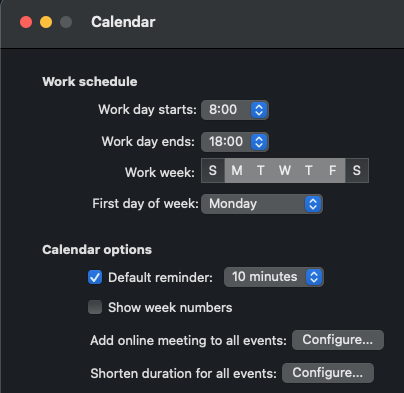
It looks like MS finally added it to the New Outlook for Mac's settings.
I hate that I cannot pick to have a Teams meeting or not. I would like to send meeting request and be able to either ADD a Teams meeting. I do NOT want all of my meeting invites to have a Teams meeting. Disabling this means it is totally disabled. JUNK!
' cx='32' cy='32' r='32' /%3E%3Ctext x='50%25' y='55%25' dominant-baseline='middle' text-anchor='middle' fill='%23FFF' %3ESS%3C/text%3E%3C/svg%3E)
' cx='32' cy='32' r='32' /%3E%3Ctext x='50%25' y='55%25' dominant-baseline='middle' text-anchor='middle' fill='%23FFF' %3EMT%3C/text%3E%3C/svg%3E)
The first recommendation not works for me, and I found below way through a PDF from Uni of Maryland.
Turning Off the Addition of MS Teams Meeting From the Outlook client:
' cx='32' cy='32' r='32' /%3E%3Ctext x='50%25' y='55%25' dominant-baseline='middle' text-anchor='middle' fill='%23FFF' %3EJL%3C/text%3E%3C/svg%3E)
Three things:
What an arrogant, self-serving approach to customers!
Found it for Mac in May 2023 update, no thanks to Jimmy Yang.
Select "Outlook" in upper left top menu
Select "Preferences"
Select "Other, subitem "Calendar"
Look under "Calendar Options" for "Add online meeting to all events"
Click the "Configure" button
Uncheck "Add online meetings to all meetings"
You're welcome.
' cx='32' cy='32' r='32' /%3E%3Ctext x='50%25' y='55%25' dominant-baseline='middle' text-anchor='middle' fill='%23FFF' %3EDG%3C/text%3E%3C/svg%3E)
We're running Office LTSC Pro Plus 2021 and its version is 2108 and I think that's before the "Add online meeting to all events" option was introduced. So I'm finding we have to disable the Teams Add-in in Outlook to stop the behavior but of course that removes all ability in Outlook to schedule a Teams meeting. Any suggestions?
' cx='32' cy='32' r='32' /%3E%3Ctext x='50%25' y='55%25' dominant-baseline='middle' text-anchor='middle' fill='%23FFF' %3EEA%3C/text%3E%3C/svg%3E)
How do we disable automatic Teams meetings in duplicated meeting invitations on Outlook OWA? In my settings, I've unchecked the "automatically add online meeting to all meetings" (seriously do you not employ any copy editors?), but every time I duplicate a meeting invitation, it overrides the existing zoom links and attaches Teams links within the body, along with a "join Teams meeting" button. Even after I once again switch off the "add Teams meeting" button in the Duplication dialog box. Please make it stop.
' cx='32' cy='32' r='32' /%3E%3Ctext x='50%25' y='55%25' dominant-baseline='middle' text-anchor='middle' fill='%23FFF' %3EW%3C/text%3E%3C/svg%3E)
For those of you looking to push a fix to all users via GPO. Put in a Group Policy preference for a delete and change to the HKCU and have the users log off then back on again after running GPUpdate.
Delete the key below from the users registry HKCU(AS THE USER)
HKEY_CURRENT_USER\SOFTWARE\Microsoft\Office\16.0\Outlook\Addins\TeamsAddin.FastConnect
Edit the following key to a value of 1 from 3
HKEY_CURRENT_USER\SOFTWARE\Microsoft\Office\Outlook\Addins\TeamsAddin.FastConnect
' cx='32' cy='32' r='32' /%3E%3Ctext x='50%25' y='55%25' dominant-baseline='middle' text-anchor='middle' fill='%23FFF' %3EKH%3C/text%3E%3C/svg%3E)
Hi Will, sure that will fix the issue because you deactivate the Teams Plugin. But I still wanna use Teams and only don't want to create the meetings automatically
I'm seeing that recent update to Teams has fixed this issue. Teams version 1.6.00.20776 - Office 2021 LTSC - with the Teams Add-in enabled we are no longer having new meetings creating as a Teams online meeting. Hopefully that's it for this issue and thanks for fixing what you broke Microsoft....
' cx='32' cy='32' r='32' /%3E%3Ctext x='50%25' y='55%25' dominant-baseline='middle' text-anchor='middle' fill='%23FFF' %3EN%3C/text%3E%3C/svg%3E)
Great news glad you found a fix however I'm only seeing Microsoft Teams Version 1.6.00.1868 as the latest version. Where did you get Teams version 1.6.00.20776?
' cx='32' cy='32' r='32' /%3E%3Ctext x='50%25' y='55%25' dominant-baseline='middle' text-anchor='middle' fill='%23FFF' %3ESS%3C/text%3E%3C/svg%3E)
My version of Teams with Office 2021 LTSC updated to 1.6.00.20074 (64-bit) (by using the "Check for updates" within Teams). This fixed the issue with a Teams meeting auto-populating in Outlook.
' cx='32' cy='32' r='32' /%3E%3Ctext x='50%25' y='55%25' dominant-baseline='middle' text-anchor='middle' fill='%23FFF' %3EKA%3C/text%3E%3C/svg%3E)
Сonfirmed. I don't have the problem after update Teams to 1.6.00.20074.
' cx='32' cy='32' r='32' /%3E%3Ctext x='50%25' y='55%25' dominant-baseline='middle' text-anchor='middle' fill='%23FFF' %3EKM%3C/text%3E%3C/svg%3E)
That Teams version doesn't fix the issue in Outlook 2016 unfortunately.
' cx='32' cy='32' r='32' /%3E%3Ctext x='50%25' y='55%25' dominant-baseline='middle' text-anchor='middle' fill='%23FFF' %3EAB%3C/text%3E%3C/svg%3E)
Any luck anyone? We have Outlook 2016 as well and would like to figure out a way to fix this issue.
' cx='32' cy='32' r='32' /%3E%3Ctext x='50%25' y='55%25' dominant-baseline='middle' text-anchor='middle' fill='%23FFF' %3EBC%3C/text%3E%3C/svg%3E)
Close Outlook, go to settings and more (...) and check for updates. After a little while it will update itself. Give it a minute or two and then manually exit teams from the notification area. Relaunch Team and check the version is now 1.6.00.20074. Test Outlook. My first meeting had it Teams meeting info in it, but anymore after that didn't.
' cx='32' cy='32' r='32' /%3E%3Ctext x='50%25' y='55%25' dominant-baseline='middle' text-anchor='middle' fill='%23FFF' %3EDL%3C/text%3E%3C/svg%3E)
Yes. Updating to Teams client version 1.6.00.20074 resolves the default Teams meeting issue in Outlook 2016.
If you would like to update manually, you can do so here:
https://statics.teams.cdn.office.net/production-windows-x64/1.6.00.20074/Teams_windows_x64.exe
' cx='32' cy='32' r='32' /%3E%3Ctext x='50%25' y='55%25' dominant-baseline='middle' text-anchor='middle' fill='%23FFF' %3ESF%3C/text%3E%3C/svg%3E)
Any command to force update the MS Teams client to verion 1.6.00.20074 automatically?
' cx='32' cy='32' r='32' /%3E%3Ctext x='50%25' y='55%25' dominant-baseline='middle' text-anchor='middle' fill='%23FFF' %3EKF%3C/text%3E%3C/svg%3E)
Updating to Teams client version 1.6.00.20074 does NOT resolve this for everyone...
A computer restart is also required after the client update.
Doesn't matter. This update does NOT fix the issue on Outlook 2016.
It works for us. On multiple machines. I'm sorry if it doesn't work for you, Kyle. :(
Weird. Seems it's not universally fixing it for everyone. Have seen multiple other responses on posts about this issue as well with some reporting it fixed, others reporting it not fixed.
This issue is now resolved by MS. We have confirmed. You can do two things. Update Teams to the July 19th version for all users. Or you can have all the users manually update Teams in the menu. A third possible option is to create a scheduled task to run as the user to run update.exe in their profile and it will update on the next launch. I can confirm this fix worked on a few hundred machines already and I am about to go full prod using the teams machine wide installer method today.
Like I said, this does NOT seem to fix it for everyone. If it worked for you, great, but we have numerous clients still experiencing the issue after Teams is confirmed to be properly updated.
Did you even try manually updating it? We have 30 different clients and over 15k machines in different environments. This has worked in every single case.
Dude, yes, I know how to update Teams and confirm a version number. We have numerous clients on the proper version and it is confirmed to not resolve the issue for them. Only on Outlook 2016 though.
I suggest you open a ticket with MS O365 then. Ours is solved for 2016. 2019 and O365.
Yeah, have had a ticket opened with them for 3 weeks on this now with no resolution so far.
I am closing mine today. We used PS App Deploy Toolkit and closed all office apps as well as teams in our deployments as well as performed a profile cleanup for good measure. I can share out snippets of the code later if you want. It could be that your issue is related to components being open.
' cx='32' cy='32' r='32' /%3E%3Ctext x='50%25' y='55%25' dominant-baseline='middle' text-anchor='middle' fill='%23FFF' %3EAS%3C/text%3E%3C/svg%3E)
Confirm, Problem Solved after TeamsmeetingAddin uprgrade to the below version:
' cx='32' cy='32' r='32' /%3E%3Ctext x='50%25' y='55%25' dominant-baseline='middle' text-anchor='middle' fill='%23FFF' %3EG7%3C/text%3E%3C/svg%3E)
We still have the problem with the following configuration:
The complete software was just updated yesterday, hoping the error was fixed - Even a new Outlook profile did not bring the desired success. What else could it be? I am grateful for any advice.
' cx='32' cy='32' r='32' /%3E%3Ctext x='50%25' y='55%25' dominant-baseline='middle' text-anchor='middle' fill='%23FFF' %3ESH%3C/text%3E%3C/svg%3E)
For people with Outlook 2016 still having issues, check the Teams-plugins folder! I noticed I had two versions in the folder. By renaming (or deleting) the old one, it finally worked for me (meaning no auto Teams meetings).
@Stijn Hurkmans There is the same folder also in Office 2019, and in fact there were two folders with different add-in versions in it. The folder with the old version of the add-in was deleted, but it still does not work for us on the terminal server. Does anyone have another suggested solution for Office 2019? We are starting to get stuck.
After I deleted the plug-in, closed Outlook and reopened it, the first time I opened a new meeting, the window without the Teams meeting actually came up first - But after about 2 seconds it refreshed, and promptly the Teams invitation was there again. What could this be?
Still looking for a solution for Office 2019 on a Terminal Server.
A user that was fixed for this problem has brought to our attention that the issue has returned. After checking their version of Teams, they are now on 1.6.00.22378 with no option to stop this happening again. MS needs to stop assuming people want to have a Teams meeting for everything.
Unbelievable that the problem is back with the latest Teams version 1.6.00.22378. Still waiting for a fix!
Someone with a conscious probably took it out and then was more than likely told off and told to put it back in again!
Can other users here also confirm that they have also experienced the problem again with Teams version 1.6.00.22378? Ben, what Outlook version are you using?
I can confirm that the issue still occurs with version 1.6.00.22378 and Outlook 2016 Standard & ProPlus
I can't test Outlook 2016 but our Teams is updated to version 1.6.00.22954. So you might check if there is a new version of Teams available - though your version should have the fix...in theory but Outlook 2016 may not be covered for whatever reason.
Also as some noted in the thread above, for tbshooting, in Windows File Explorer navigate to %userprofile%\AppData\Local\Microsoft\TeamsMeetingAddin to check the versions of the add-in. There should always be two versions - the previous one and the newest one - there shouldn't be any need to delete the older one.
Check the meeting-addin-install-logs.txt in this folder, scroll to the bottom for the recent entries, and note any error. In my log the last entry is "2023-08-17-06:05:13.083 PM Version 1.0.23213.1 of the meeting add-in is now installed".
When updating Teams, you do need to close and restart Outlook if there is a new version of the add-in. Otherwise Outlook will continue to use the old version until its restarted.
With version 1.6.00.22378, the Teams meeting problem appeared again, as written above. However, in the meantime, a preview version was released, with which - thank God - the problem no longer occurred.
Version number: 1.6.00.24078
Download: https://statics.teams.cdn.office.net/production-windows-x64/1.6.00.24078/Teams_windows_x64.exe

' cx='32' cy='32' r='32' /%3E%3Ctext x='50%25' y='55%25' dominant-baseline='middle' text-anchor='middle' fill='%23FFF' %3EBS%3C/text%3E%3C/svg%3E)
This is exactly what I needed for Outlook 2019. Thank you!
Looks like you would have to do this every time you invite someone to an event.
' cx='32' cy='32' r='32' /%3E%3Ctext x='50%25' y='55%25' dominant-baseline='middle' text-anchor='middle' fill='%23FFF' %3EZK%3C/text%3E%3C/svg%3E)
My Teams Meeting add in does not look like that. Also I do not want to completely disable the add in, I just don't want the invite attendees button to automatically turn an in person meeting into a virtual meeting either.
' cx='32' cy='32' r='32' /%3E%3Ctext x='50%25' y='55%25' dominant-baseline='middle' text-anchor='middle' fill='%23FFF' %3EGW%3C/text%3E%3C/svg%3E)
I've found another convoluted way around this governed by my Company's Global IT obsession with making as much as possible an 'Admin' task.
Disabling the add-in through Outlook 2016 has no effect - reinstated every time - auto load on startup 'governed by organisation'.
The 'Auto add online meetings' option doesn't exist.
We have Zoom but enabling the Zoom-Outlook add-in is 'Admin' only.
The below to 'disable' the auto add for teams meetings only works if you do NOT have the Zoom meetings add-in installed.
So... login to Office 365 web (sorry).
So I'm telling it to use Zoom, Zoom add-in in Outlook doesn't exist, so Outlook meetings does nothing.
So far this seems to be sticking despite performing a number of restarts to test.
' cx='32' cy='32' r='32' /%3E%3Ctext x='50%25' y='55%25' dominant-baseline='middle' text-anchor='middle' fill='%23FFF' %3EIB%3C/text%3E%3C/svg%3E)
I don't have an option to add Zoom as a Meeting Provider:
I do have Zoom installed:
And I have not Zoom activated in Outlook:
Sorry dude.
This whole problem seems to be really dependent on everyone's personal/corporate set up.
I can't use the 'Integrate Zoom with Outlook' option you've highlighted because my corp IT bunch have made it an Administrator level permissions option for my desktop.
If I leave the 'Add Online Meeting' option in 365 unchecked then my desktop forces Teams back into place.
Are you able to select the 'Integrate zoom into outlook' option or are you blocked like me?
If you can, try selecting the 'Integrate zoom into outlook' option.
Close and re-open your Outlook desktop and 365 web - does this then give you the option to select zoom as the provider in 365 web settings?
If it does, try selecting zoom then close and re-open your Outlook desktop and 365 web.
Create a meeting to see if it now adds in a zoom meeting instead of teams.
If it does, try unchecking the 'integrate zoom' box within Zoom.
Close and re-open your Outlook desktop and 365 web - try creating a meeting and see what happens.
In theory, it'll be forcing to use Zoom but the Zoom add-in won't be there so it stays blank.
That's about all I can suggest - I wish you well in finding a combination that works for your set up.
In our case the setting in Viva Insights did the trick, but only temporary. At first this setting made a difference, but a couple of days later the Teams-links appeared again. Anyway, this is what i did:
Quit Outlook desktop application and go to https://insights.viva.office.com/, click on the three dots in the upper right corner and select Settings, then Effective meetings in the left menu. Set Add Teams meeting to off and save. If it was already off, then set to on and save and then back to off and save.
' cx='32' cy='32' r='32' /%3E%3Ctext x='50%25' y='55%25' dominant-baseline='middle' text-anchor='middle' fill='%23FFF' %3ESM%3C/text%3E%3C/svg%3E)
For Outlook 2016 and 2019 where the calendar option is missing i found a registry solution here
I just tested this fix on Outlook 2016 and unfortunately it didn't work for me.