Microsoft 365 and Office | Install, redeem, activate | For business | MacOS
Processes in Microsoft 365 for setting up Office apps, redeeming product keys, and activating licenses.

This browser is no longer supported.
Upgrade to Microsoft Edge to take advantage of the latest features, security updates, and technical support.
' cx='32' cy='32' r='32' /%3E%3Ctext x='50%25' y='55%25' dominant-baseline='middle' text-anchor='middle' fill='%23FFF' %3ETB%3C/text%3E%3C/svg%3E)
Error on activation for Office Home & Business 2021 for Mac MSDN
Level 2 support directed me here for help with this problem. The gave me case # 1032588183
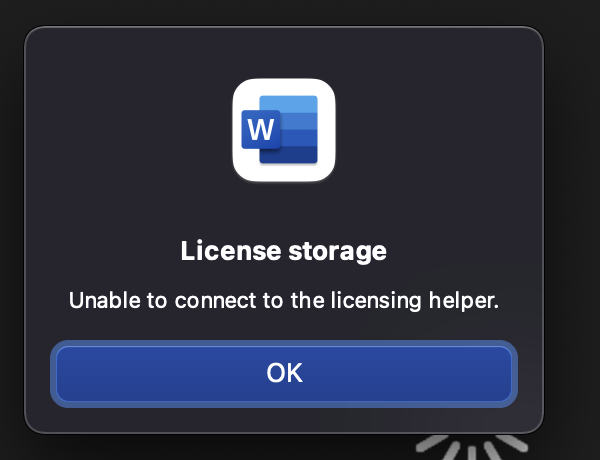
Whenever I try to activate office 2021 for mac i get a popup error that says.
License storage
Unable to connect to the licensing helper.
Support had me delete the license from the keychain, we also ran the uninstaller, reinstalled everything, deleted files from the containers and group containers folders in the library, rebooted all to no avail.
Processes in Microsoft 365 for setting up Office apps, redeeming product keys, and activating licenses.
' cx='32' cy='32' r='32' /%3E%3Ctext x='50%25' y='55%25' dominant-baseline='middle' text-anchor='middle' fill='%23FFF' %3EBM%3C/text%3E%3C/svg%3E)
Emi Zhang's answer sorted me out too. Running Office on 2015 MacBook Pro with latest version of Big Sur.
Thank you.

Hi @Tyronius Baggins Shabaaz ,
Based on the error message, I suggest you try this method:
"Please find the below commands to run on terminal.
sudo –s
launchctl load -w /Library/LaunchDaemons/com.microsoft.office.licensingV2.helper.plist
chmod 4755 /Library/PrivilegedHelperTools/com.microsoft.office.licensingV2.helper
"
You can get the information from the similar thread:
https://answers.microsoft.com/en-us/msoffice/forum/all/unable-to-connect-to-the-licensing-helper/38ca4278-0845-4371-9096-e496dba6e9ba
Just checking in to see if the information was helpful. Please let us know if you would like further assistance.
If the response is helpful, please click "Accept Answer" and upvote it.
Note: Please follow the steps in our documentation to enable e-mail notifications if you want to receive the related email notification for this thread.
' cx='32' cy='32' r='32' /%3E%3Ctext x='50%25' y='55%25' dominant-baseline='middle' text-anchor='middle' fill='%23FFF' %3E7%3C/text%3E%3C/svg%3E)
Hello,
i've been struggling with the same issue since few days now. the solution offered above worked. however, whenever i restart my laptop, i have to go through the whole process again and activate all he apps separately.
is there any fix or practical solution for this ?
thank you for your help !
' cx='32' cy='32' r='32' /%3E%3Ctext x='50%25' y='55%25' dominant-baseline='middle' text-anchor='middle' fill='%23FFF' %3EHW%3C/text%3E%3C/svg%3E)
Yes, also working for me!
' cx='32' cy='32' r='32' /%3E%3Ctext x='50%25' y='55%25' dominant-baseline='middle' text-anchor='middle' fill='%23FFF' %3EGS%3C/text%3E%3C/svg%3E)
I have the same issue, I don't know how to run these commands, can you help me with a step by step guide or even a video?
Thank You!!
' cx='32' cy='32' r='32' /%3E%3Ctext x='50%25' y='55%25' dominant-baseline='middle' text-anchor='middle' fill='%23FFF' %3EPO%3C/text%3E%3C/svg%3E)
I was also searching for answers to this and tried this and worked - thank you!
My joy was short-lived as I tried this and when I rebooted I had the same error - is there any other fix
That worked like a charm, thank you very much for your help @Emi Zhang-MSFT
:D
It's glad to help you.
I have the same issue, I don't know how to run these commands, can you help me with a step by step guide or even a video?
Thank You!!