
@Erland Sommarskog your solution solved the problem. Thanks
This browser is no longer supported.
Upgrade to Microsoft Edge to take advantage of the latest features, security updates, and technical support.
' cx='32' cy='32' r='32' /%3E%3Ctext x='50%25' y='55%25' dominant-baseline='middle' text-anchor='middle' fill='%23FFF' %3ESN%3C/text%3E%3C/svg%3E)
Hi, so here's what's going on. My PC originally did not meet requirements because the TPM module was not enabled in the BIOS. I also was on a local account and not a microsoft account when I initially tried to update. However, after enabling TPM and begrudgingly linking my PC to my microsoft account, Windows Update is still convinced that my PC doesn't meet systems reqs. I ran the PC Health Checker program and here are the results. 
And here is the error message the Windows Update shows me. 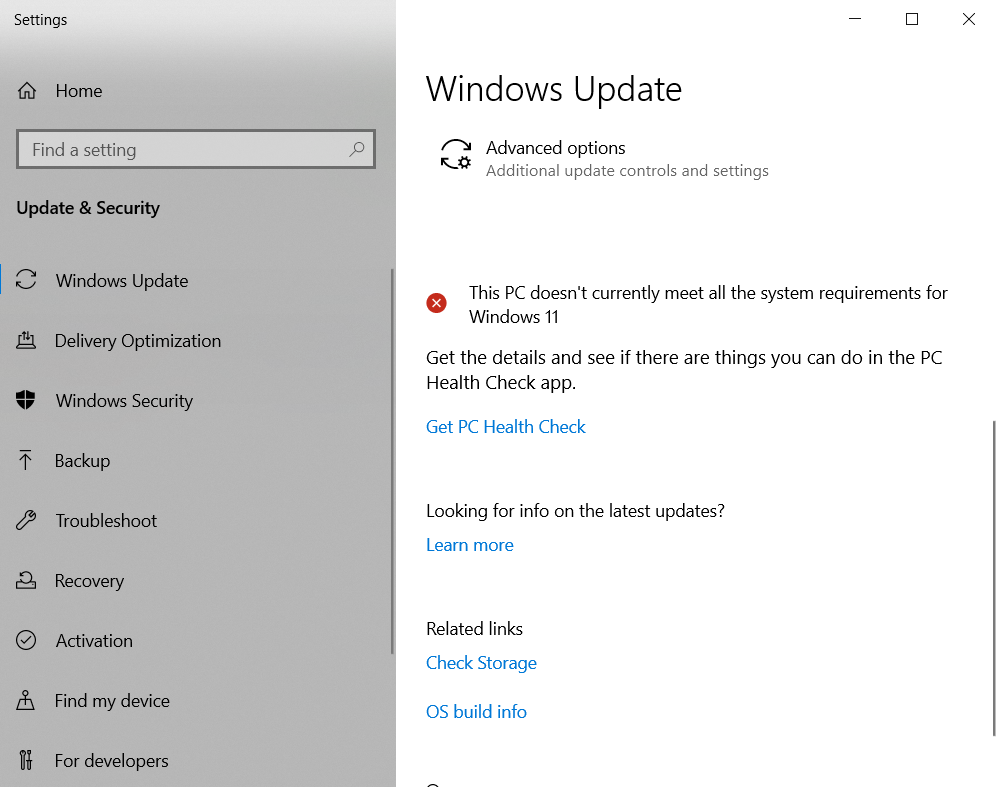
I have rebooted the PC several times and I have also run the Windows Update troubleshooter a few times to try to reset Windows Update but no luck so far. Please let me know if you have any guidance.

Locked Question. You can vote on whether it's helpful, but you can't add comments or replies or follow the question.
' cx='32' cy='32' r='32' /%3E%3Ctext x='50%25' y='55%25' dominant-baseline='middle' text-anchor='middle' fill='%23FFF' %3EJK%3C/text%3E%3C/svg%3E)
I got the same problem. Enabled TPM in my BIOS. After that the PC Health Check said my pc is meeting the requirements.
After a bit of trying i found that for me it helpt to go to your "Windows Insider Program" settings and then Choose the channel you want to recieve from. And then choose Beta (recommended) After re-searching for the Windows Update it was downloading the windows 11 update :)
' cx='32' cy='32' r='32' /%3E%3Ctext x='50%25' y='55%25' dominant-baseline='middle' text-anchor='middle' fill='%23FFF' %3ESL%3C/text%3E%3C/svg%3E)
Thank you, for helping me and many other!
' cx='32' cy='32' r='32' /%3E%3Ctext x='50%25' y='55%25' dominant-baseline='middle' text-anchor='middle' fill='%23FFF' %3EKF%3C/text%3E%3C/svg%3E)
' cx='32' cy='32' r='32' /%3E%3Ctext x='50%25' y='55%25' dominant-baseline='middle' text-anchor='middle' fill='%23FFF' %3EDK%3C/text%3E%3C/svg%3E)
Another thanks from me. I'm always amazed at all the dumb little roadblocks MS builds into every freaking upgrade. Would it have killed them to mention this in a more prominent way? Sheesh.
' cx='32' cy='32' r='32' /%3E%3Ctext x='50%25' y='55%25' dominant-baseline='middle' text-anchor='middle' fill='%23FFF' %3EJP%3C/text%3E%3C/svg%3E)
' cx='32' cy='32' r='32' /%3E%3Ctext x='50%25' y='55%25' dominant-baseline='middle' text-anchor='middle' fill='%23FFF' %3ECB%3C/text%3E%3C/svg%3E)
Thank you... this saved me tons of aggravation !!!
' cx='32' cy='32' r='32' /%3E%3Ctext x='50%25' y='55%25' dominant-baseline='middle' text-anchor='middle' fill='%23FFF' %3EJF%3C/text%3E%3C/svg%3E)
Thank you for sharing. Of all the tutorials that I followed, this is the only one that worked on me.
' cx='32' cy='32' r='32' /%3E%3Ctext x='50%25' y='55%25' dominant-baseline='middle' text-anchor='middle' fill='%23FFF' %3ECN%3C/text%3E%3C/svg%3E)
' cx='32' cy='32' r='32' /%3E%3Ctext x='50%25' y='55%25' dominant-baseline='middle' text-anchor='middle' fill='%23FFF' %3ERC%3C/text%3E%3C/svg%3E)
Perfect!! On spot solution. Worked like a charm for me. Thanks.
' cx='32' cy='32' r='32' /%3E%3Ctext x='50%25' y='55%25' dominant-baseline='middle' text-anchor='middle' fill='%23FFF' %3ENK%3C/text%3E%3C/svg%3E)
' cx='32' cy='32' r='32' /%3E%3Ctext x='50%25' y='55%25' dominant-baseline='middle' text-anchor='middle' fill='%23FFF' %3EJS%3C/text%3E%3C/svg%3E)
This worked for me, too, but I also had to turn on "Optional diagnostic data" to be sent to Microsoft. I had to go back and "re-check" for the Win11 update a couple times, but it finally started downloading on its own.
' cx='32' cy='32' r='32' /%3E%3Ctext x='50%25' y='55%25' dominant-baseline='middle' text-anchor='middle' fill='%23FFF' %3ESR%3C/text%3E%3C/svg%3E)
' cx='32' cy='32' r='32' /%3E%3Ctext x='50%25' y='55%25' dominant-baseline='middle' text-anchor='middle' fill='%23FFF' %3EJC%3C/text%3E%3C/svg%3E)
' cx='32' cy='32' r='32' /%3E%3Ctext x='50%25' y='55%25' dominant-baseline='middle' text-anchor='middle' fill='%23FFF' %3EJ%3C/text%3E%3C/svg%3E)
' cx='32' cy='32' r='32' /%3E%3Ctext x='50%25' y='55%25' dominant-baseline='middle' text-anchor='middle' fill='%23FFF' %3EMS%3C/text%3E%3C/svg%3E)
' cx='32' cy='32' r='32' /%3E%3Ctext x='50%25' y='55%25' dominant-baseline='middle' text-anchor='middle' fill='%23FFF' %3ECG%3C/text%3E%3C/svg%3E)
IT WORKED!
To be fair, it did not work for me right away. But then I read a few other replies below that said to wait a few hours and then try again. Well, I did just that and it worked about 4 hours later. Thank you for the suggestion.
' cx='32' cy='32' r='32' /%3E%3Ctext x='50%25' y='55%25' dominant-baseline='middle' text-anchor='middle' fill='%23FFF' %3EES%3C/text%3E%3C/svg%3E)
Open an Administrator: Command Prompt windows and enter this command: schtasks.exe /Run /TN "\Microsoft\Windows\Application Experience\Microsoft Compatibility Appraiser" then wait about 5 minutes or so and reopen Windows Update and the compatibility messages should match.
NOTE: The task is scheduled to run on its own eventually, this command just schedules the task to run immediately. Also make sure you run the Command Prompt as an Administrator
' cx='32' cy='32' r='32' /%3E%3Ctext x='50%25' y='55%25' dominant-baseline='middle' text-anchor='middle' fill='%23FFF' %3EDB%3C/text%3E%3C/svg%3E)
I have the same issue. I tried this too. Sadly it didn't help. Thanks all the same.
' cx='32' cy='32' r='32' /%3E%3Ctext x='50%25' y='55%25' dominant-baseline='middle' text-anchor='middle' fill='%23FFF' %3ES%3C/text%3E%3C/svg%3E)
' cx='32' cy='32' r='32' /%3E%3Ctext x='50%25' y='55%25' dominant-baseline='middle' text-anchor='middle' fill='%23FFF' %3EM%3C/text%3E%3C/svg%3E)
This helped me too.
First I had to get into my BIOS to enable the TPM.
After that I still had this problem, even though the PC health said I could get it.
Did this next in the administrator Command Prompt.
Now I can get Windows 11.
Thanks Evan
' cx='32' cy='32' r='32' /%3E%3Ctext x='50%25' y='55%25' dominant-baseline='middle' text-anchor='middle' fill='%23FFF' %3ESF%3C/text%3E%3C/svg%3E)
' cx='32' cy='32' r='32' /%3E%3Ctext x='50%25' y='55%25' dominant-baseline='middle' text-anchor='middle' fill='%23FFF' %3EM%3C/text%3E%3C/svg%3E)
' cx='32' cy='32' r='32' /%3E%3Ctext x='50%25' y='55%25' dominant-baseline='middle' text-anchor='middle' fill='%23FFF' %3EAZ%3C/text%3E%3C/svg%3E)
' cx='32' cy='32' r='32' /%3E%3Ctext x='50%25' y='55%25' dominant-baseline='middle' text-anchor='middle' fill='%23FFF' %3EJN%3C/text%3E%3C/svg%3E)
Thank you. It worked and it took around 5 minutes after the command in CMD.
' cx='32' cy='32' r='32' /%3E%3Ctext x='50%25' y='55%25' dominant-baseline='middle' text-anchor='middle' fill='%23FFF' %3ERO%3C/text%3E%3C/svg%3E)
' cx='32' cy='32' r='32' /%3E%3Ctext x='50%25' y='55%25' dominant-baseline='middle' text-anchor='middle' fill='%23FFF' %3EM1%3C/text%3E%3C/svg%3E)
' cx='32' cy='32' r='32' /%3E%3Ctext x='50%25' y='55%25' dominant-baseline='middle' text-anchor='middle' fill='%23FFF' %3EAB%3C/text%3E%3C/svg%3E)
Mine said access is denied. But I was able to see what time it was scheduled to come on. Tomorrow at 4 am. I don't know why the code didn't work for me. Guess I'll just wait.
' cx='32' cy='32' r='32' /%3E%3Ctext x='50%25' y='55%25' dominant-baseline='middle' text-anchor='middle' fill='%23FFF' %3ETM%3C/text%3E%3C/svg%3E)
Command didn't work for me ("access denied" error) but I went to Task Scheduler and found the "Microsoft Compatibility Appraiser" task and I ran it there and the it all worked; Windows 11 available afterward. thank you!!
' cx='32' cy='32' r='32' /%3E%3Ctext x='50%25' y='55%25' dominant-baseline='middle' text-anchor='middle' fill='%23FFF' %3ETB%3C/text%3E%3C/svg%3E)
I had the exact same symptoms and tried all the suggestions but non of them helped (thanks for them anyway, they worth a try). What solved it to me: I had to increase the size of my EFI system partition!
It had 99 MBs but it was almost full. After increasing its size to 200 MB I was able to upgrade (probably less would have been enough but I had space before the partition :-) ).
' cx='32' cy='32' r='32' /%3E%3Ctext x='50%25' y='55%25' dominant-baseline='middle' text-anchor='middle' fill='%23FFF' %3EMM%3C/text%3E%3C/svg%3E)
' cx='32' cy='32' r='32' /%3E%3Ctext x='50%25' y='55%25' dominant-baseline='middle' text-anchor='middle' fill='%23FFF' %3ED%3C/text%3E%3C/svg%3E)
I too am not having success upgrading to Windows 11. My PC Health Check shows that all of the requirements are satisfied, however, the upgrade still cannot be completed. I implemented the resolution recommended above by Josse Kuhlmann above to join the Windows Insider Program. After my next Win11 upgrade attempt, I received the error message in the image below. Then I implemented the resolution mentioned on this site recommended by Microsoft, which deletes fonts to make more space for the system-reserved partition, which has resolved the problem for some people, but that did not resolve my Win11 upgrade issue. Any suggestions other than downloading the Windows 11 ISO file to a USB for a fresh install that reformats the hard drives, or the other alternative that has worked for some people, which is to buy a suitable partition software that would allow you to expand the "system reserved partition" on your drive?
Have you tried doing what Tamas mentioned above earlier and increased the size of the efi system partition?
' cx='32' cy='32' r='32' /%3E%3Ctext x='50%25' y='55%25' dominant-baseline='middle' text-anchor='middle' fill='%23FFF' %3EAD%3C/text%3E%3C/svg%3E)
Well, FIST OF ALL, MAKE SURE YOU HAVE ALL REQUIREMENTS TO INSTALL WINDOWS 11, INCLUDING THE TMP 2.0, if you have follow the instructions:
PS: I have a friend that run this steps and has to restart the computer after the 3º step, so try this if your Microsoft Compatibility Agent get stuck in some way, but like i say, this process is slow and can take up to 30 to 40 minutes, depends the config of your computer.
Well, now if you go to Windows Update the problem should be solved!
PS²: You can revert the configs made in steps 1/2/3 if you wan't :);
If it's not you should try manual check by using PC Health or Windows 11 Installer itself, both of those options should bypass this errors :).
Good Luck!
This steps work on my machine, i manage to make my hardware re-check making this steps, but it can change from machine-to-machine, so please remember to share something if you find new stuff! ;)
' cx='32' cy='32' r='32' /%3E%3Ctext x='50%25' y='55%25' dominant-baseline='middle' text-anchor='middle' fill='%23FFF' %3EA%3C/text%3E%3C/svg%3E)
My pc also wasn't W11 worthy. Despite the fact my pc is running with an I7 processor, 256 GB SSD and 16 GB memory. Windows/Microsoft keeps surprising me with their logic every day. Too bad a work-around is often necessary for the mistakes Microsoft makes, and they keep coming.
' cx='32' cy='32' r='32' /%3E%3Ctext x='50%25' y='55%25' dominant-baseline='middle' text-anchor='middle' fill='%23FFF' %3EPN%3C/text%3E%3C/svg%3E)
Either stick with windows 10 or go and buy a new pc or laptop thats all you can do windows 11 does tend to fail to install even on a pc or laptop that meets the minimum system requirements setup checks your hardware but only cpu memory and tpm but doesnt check everything i had this my laptop seemed to meet the minimum requirments but failed to install there was incompatibilities and microsoft say it was compatible but at the end of the day their not computer technicians if you have this problem then you need to buy a new pc or laptop.
' cx='32' cy='32' r='32' /%3E%3Ctext x='50%25' y='55%25' dominant-baseline='middle' text-anchor='middle' fill='%23FFF' %3EDM%3C/text%3E%3C/svg%3E)
ya microsoft was pretty good to allow computers as far back as 2018 to be compatible, what do people want,, yet apple people buy new hardware every year and no one complains, lol
' cx='32' cy='32' r='32' /%3E%3Ctext x='50%25' y='55%25' dominant-baseline='middle' text-anchor='middle' fill='%23FFF' %3ECJ%3C/text%3E%3C/svg%3E)
' cx='32' cy='32' r='32' /%3E%3Ctext x='50%25' y='55%25' dominant-baseline='middle' text-anchor='middle' fill='%23FFF' %3ETB%3C/text%3E%3C/svg%3E)
This thread was very helpful to resolve the windows update issue on our computer. We had the following problem: Windows 10 could not be updated to Windows 11 due to missing minimum system requirements. The main reason was the missing TPM configuration on BIOS level. After we enabled TPM and restarted the PC all minimum requirements were met. However, the Windows Update have still displayed the old notification about requirements not met. The command in this thread (triggering the task via command prompt to run the Microsoft Compatibility Appraiser) resolved our problem. After around 10 Minutes and closing and opening the Windows Update Screen multiple times, the content was updated and we could trigger the update to Windows 11. Thank you very much.
' cx='32' cy='32' r='32' /%3E%3Ctext x='50%25' y='55%25' dominant-baseline='middle' text-anchor='middle' fill='%23FFF' %3EMC%3C/text%3E%3C/svg%3E)
@Erland Sommarskog your solution solved the problem. Thanks