
I can confirm this is now also working for myself.
This browser is no longer supported.
Upgrade to Microsoft Edge to take advantage of the latest features, security updates, and technical support.
' cx='32' cy='32' r='32' /%3E%3Ctext x='50%25' y='55%25' dominant-baseline='middle' text-anchor='middle' fill='%23FFF' %3EJF%3C/text%3E%3C/svg%3E)
Hi there.
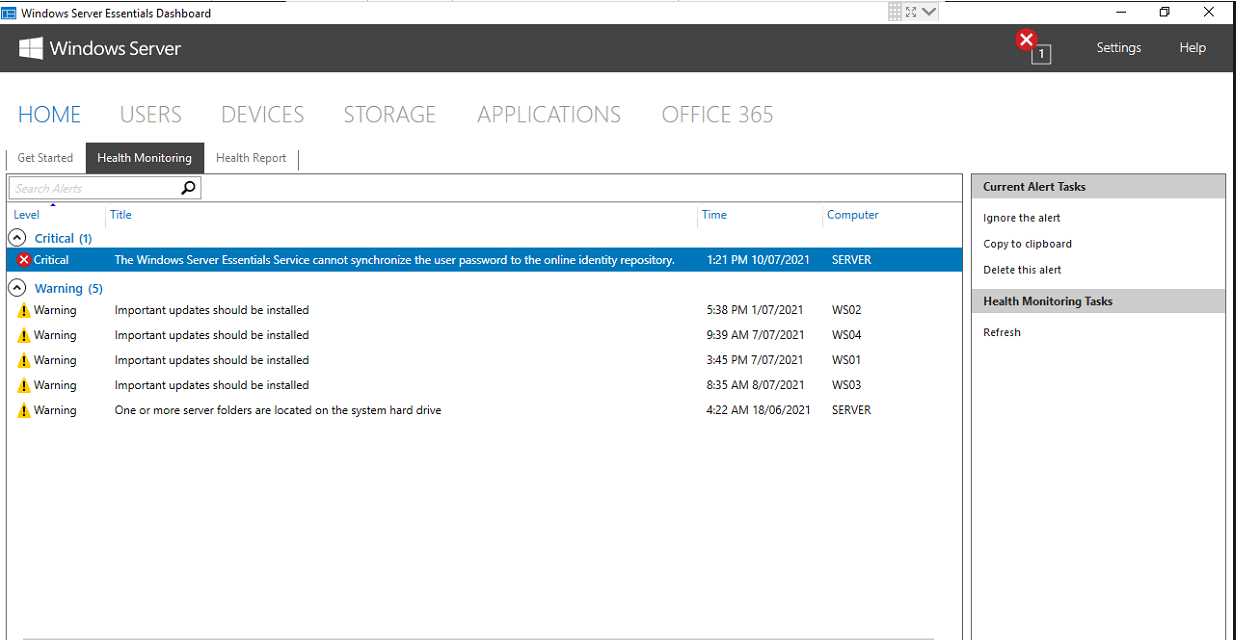
Recently. I have the below error coming up on multiple 2016 essential servers when doing password changes via the Essentials Dashboards.
I can confirm that passwords are not syncing to 365.
I have tired disabling 365 integration. Then re enabling. Same issue.
Anyone else seen this issue?

' cx='32' cy='32' r='32' /%3E%3Ctext x='50%25' y='55%25' dominant-baseline='middle' text-anchor='middle' fill='%23FFF' %3EFG%3C/text%3E%3C/svg%3E)
Same here and My users are freaking out! please keep me updated

We are also having this same issue with all clients using Server 2016 Essentials 2016 standard with Essentials Role installed. Password sync to Office 365 stopped working recently. Have not checked clients with Server 2012 R2 Essentials but will check them. I seems very odd that creating a new user with sync to Office 365 and create the password correctly In process of opening a MS ticket.
Manson

So glad I found this thread, I was just about to open a case to Microsoft, as I have 3 sites now failing with this error. Hopefully, they get this fixed soon!
' cx='32' cy='32' r='32' /%3E%3Ctext x='50%25' y='55%25' dominant-baseline='middle' text-anchor='middle' fill='%23FFF' %3EPF%3C/text%3E%3C/svg%3E)
Like others, ive now got 4 different customers experiencing this issue.
this is the only thread ive managed to find with any information.
has there been any update on this?
' cx='32' cy='32' r='32' /%3E%3Ctext x='50%25' y='55%25' dominant-baseline='middle' text-anchor='middle' fill='%23FFF' %3EM%3C/text%3E%3C/svg%3E)
' cx='32' cy='32' r='32' /%3E%3Ctext x='50%25' y='55%25' dominant-baseline='middle' text-anchor='middle' fill='%23FFF' %3EZS%3C/text%3E%3C/svg%3E)
I have a similar issue too with two of my clients on server 2016 essential
I have a similar issue too with two of my clients on server 2016 essential
' cx='32' cy='32' r='32' /%3E%3Ctext x='50%25' y='55%25' dominant-baseline='middle' text-anchor='middle' fill='%23FFF' %3EI%3C/text%3E%3C/svg%3E)
Good news, Password synch is now working, although I've not yet heard it from Microsoft in response to our support ticket. Just tested on a couple of Client server and it works!
Lets hope its a permanent fix...
' cx='32' cy='32' r='32' /%3E%3Ctext x='50%25' y='55%25' dominant-baseline='middle' text-anchor='middle' fill='%23FFF' %3ERB%3C/text%3E%3C/svg%3E)
I can confirm this is now also working for myself.
' cx='32' cy='32' r='32' /%3E%3Ctext x='50%25' y='55%25' dominant-baseline='middle' text-anchor='middle' fill='%23FFF' %3EDT%3C/text%3E%3C/svg%3E)
what did you do to get it working again, we are on the latest build and still getting errors
' cx='32' cy='32' r='32' /%3E%3Ctext x='50%25' y='55%25' dominant-baseline='middle' text-anchor='middle' fill='%23FFF' %3ELH%3C/text%3E%3C/svg%3E)
After IshtiaqAIshaq-7109 mentioned that it is working again I can say for sure that nobody here touched the system to make it work again, there was no reboot and nothing else - except from the customer was working. I logged on to the server, changed the password of a test account and checked a couple of minutes later successfully to logon into the related cloud account.
It's not retroactive - you have to change the password again to have it sync. So if you're looking at accounts that have failed previously - you have to force them to change their password again - then it will start syncing correctly. We've done this to all of our sites here and can confirm, it's working (although waiting for some users to change their passwords may take a week or longer, due to vacations, etc...).
This is great news - now the question of is this retroactive? Meaning any password changes from the past few months are now being sync'd - or do they need to change their password again for it to sync?
Unfortunately, it seems that users will need to reset their passwords in order for them to be synced.
Good news, Password synch is now working, although I've not yet heard it from Microsoft in response to our support ticket. Just tested on a couple of Client server and it works!
Lets hope its a permanent fix...
' cx='32' cy='32' r='32' /%3E%3Ctext x='50%25' y='55%25' dominant-baseline='middle' text-anchor='middle' fill='%23FFF' %3EKG%3C/text%3E%3C/svg%3E)
Did you have to run any updates or change anything?
I would like to know this as well as I still have the alert in health monitoring on a customers site after deleting and running again, there is an update queued though so that may resolve the issue when it runs this evening
the latest build did not resolve the issue, we are still having the same issue
' cx='32' cy='32' r='32' /%3E%3Ctext x='50%25' y='55%25' dominant-baseline='middle' text-anchor='middle' fill='%23FFF' %3EAJ%3C/text%3E%3C/svg%3E)
It's not retroactive, so you need to change again passwords of accounts listed on the alert. The problem was on Graph API of AAD, so it was fixed on MS side, not in local server, that's why last cumulative update didn't cleared the alert.
' cx='32' cy='32' r='32' /%3E%3Ctext x='50%25' y='55%25' dominant-baseline='middle' text-anchor='middle' fill='%23FFF' %3EWD%3C/text%3E%3C/svg%3E)
Don't know if anyone else can repro, and it's definitely suboptimal, but we managed to fix this by temporarily enabling user password resets in AAD.
' cx='32' cy='32' r='32' /%3E%3Ctext x='50%25' y='55%25' dominant-baseline='middle' text-anchor='middle' fill='%23FFF' %3EB7%3C/text%3E%3C/svg%3E)
Just talked with an O365 support rep on this issue. They said I will need to open a ticket with the On-Prem support team, and that it was paid support. They said it was a known issue, and gave me a link to this post (which I had already found and sent the link with my initial O365 ticket request. They also said it was basically the On-Prem teams problem and not O365.
I suspect that O365 changed the Graph segment of Azure AD and failed to coordinate with the Server Essentials 2016 team. Since Essentials 2016 was in that awkward place between SBS 2011 and Essentials 2019 of forcing transition into the cloud and removal of On-Prem services, it is likely this small segment did not seem important. Unfortunately many businesses likely used 2016 because 2019 did not have the Access Anywhere function many have leaned on since SBS 2003/2008.
O365 will likely not make any change that will allow the sync to work, and it will be on the Server 2016 to fix where the password sync tool attempts to connect with a patch or update.
Honestly, I expect that a company like Microsoft will be able to coordinate the transfer to another team inside the same enterprise, without anybody needs to open another ticket!
I'm also aware that the focus in the software business is meanwhile almost only on SaaS, but all people affected once paid money for this product and they did not decide not to use AADS as it is possible without any issues for the regular 2016/2019/2019 WSE server.
Since the product did not even reached the Mainstream End Date, there is only one statement to be mentioned:
Microsoft broke it, Microsoft should fix it, and not put people off until Jan 11, 2022 has been reached to find more excuses why it takes ages - full stop.