Group Policy: Automatically Delete User Profiles Older Than Certain Number of Days Win 10 not working.

P. Amila Mahesh Muthukumarana 26 Reputation points
2021-06-18T07:05:45.63+00:00

Hi

I enabled Computer Configuration\Administrative Templates\System\User Profiles\Delete User Profiles Older Than xxx GPO and apply to Windows 10 PCs.
Dayes set to 90.
Unfortunately, this didn't remove old data folders in C:\user.
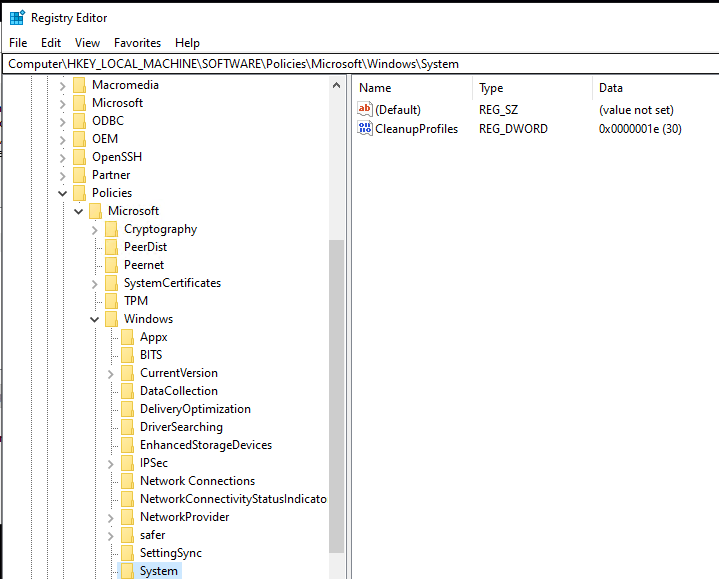
I checked the registry HKEY_LOCAL_MACHINE\Software\Policies\Microsoft\Windows\System was added the REG_DWORD
I'm using Win 2019 domain and Win 10 client PC's.
Can someone help me to fix this?
The link which I use is https://social.technet.microsoft.com/wiki/contents/articles/28647.group-policy-how-to-automatically-delete-user-profiles-older-than-certain-number-of-days.aspx

Kr,
Amila.

Windows for business | Windows Server | User experience | Other
Windows for business | Windows Client for IT Pros | User experience | Other

Answer accepted by question author
Anonymous
2021-06-18T09:03:43.997+00:00

Hello @P. Amila Mahesh Muthukumarana ,

Thanks for posting here.

I did the testing in my lab, and below are the findings.

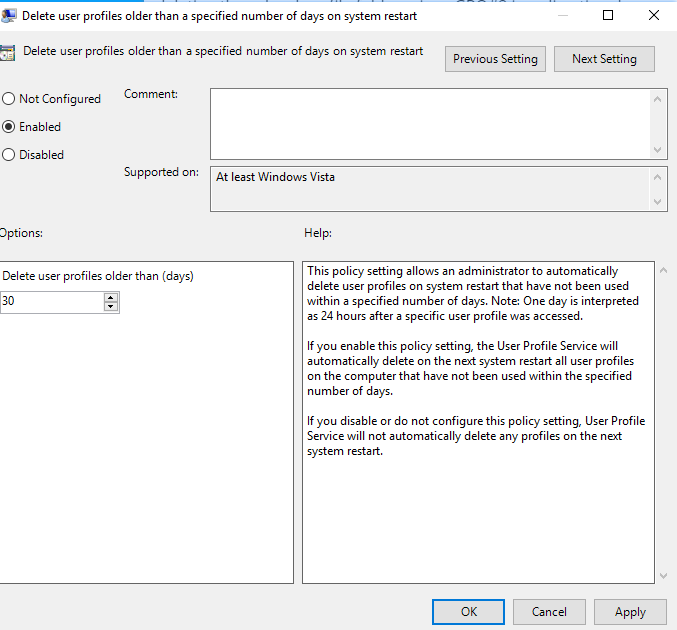
The group policy was configured as shown below.
106946-image.png

106947-image.png

This policy setting allows an administrator to automatically delete user profiles on system restart that have not been used within a specified number of days. Note: One day is interpreted as 24 hours after a specific user profile was accessed.

If you enable this policy setting, the User Profile Service will automatically delete on the next system restart all user profiles on the computer that have not been used within the specified number of days.

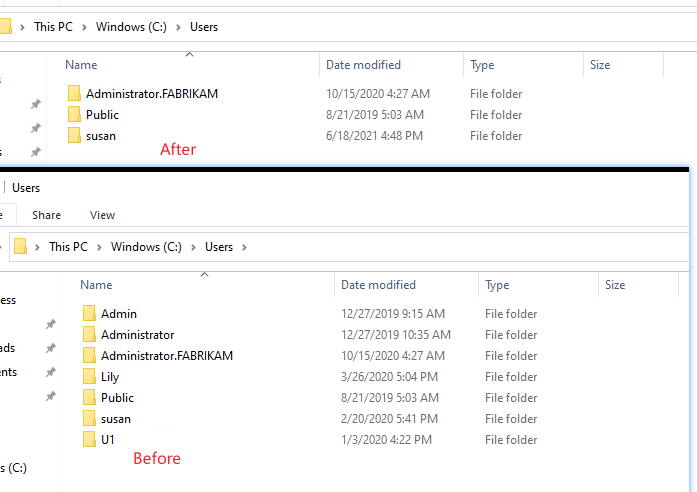
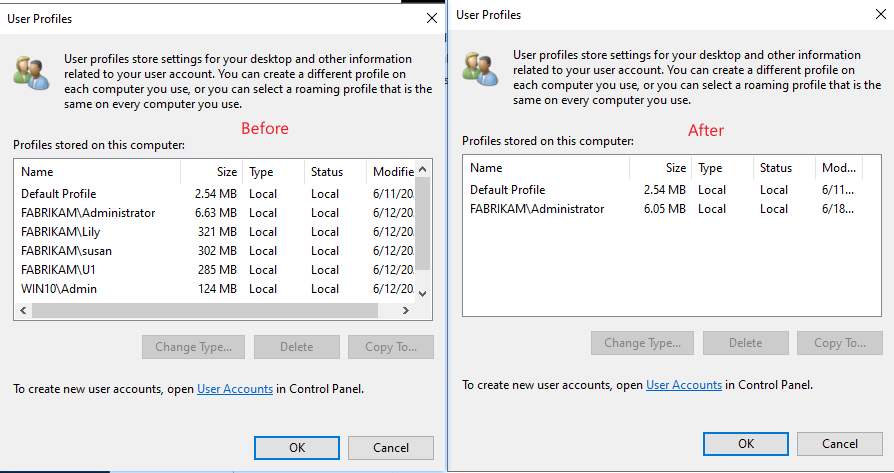
So I restarted the system and then checked the folders under C:\Users and User profiles were deleted.
106978-image.png

106948-image.png

Hope it helps. For any question, please post here.

Best regards,
Hannah Xiong

Was this answer helpful?

2 people found this answer helpful.

7 additional answers

Sort by: Most helpful
  1. Deleted

    This answer has been deleted due to a violation of our Code of Conduct. The answer was manually reported or identified through automated detection before action was taken. Please refer to our Code of Conduct for more information.


    Comments have been turned off. Learn more

  2. Rytram 0 Reputation points
    2023-11-08T05:58:37.8966667+00:00

    Hello.

    This was an issue that plagues me at my previous job. The company I worked for used micro PC's such as Lenovo's and Dell Optiplex computers. The main issue was the meager 128GB drives becoming full and bogging the computer down. This is inevitably an issue that will come up at any business that uses roaming profiles (which is most).

    This is not a water tight solution, but a pretty decent attempt at addressing the issue.

    My Method uses the last modified date of a users folder as a baseline for their inactivity. From there, I with some assistance, created a script that reads all users, their folder size, and last modified dates all in one nifty little popup window with check boxes and a delete option.

    Here is the script we came up with. I would be glad for feedback and modification suggestions. Such as replacing last modified date of user folder with the UsrClass.Dat date.

    user cleanup PS script.txt

    Was this answer helpful?


  3. Rytram 0 Reputation points
    2023-11-08T05:46:26.55+00:00

    Hello.

    This was an issue that plagues me at my previous job. The company I worked for used micro PC's such as Lenovo's and Dell Optiplex computers. The main issue was the meager 128GB drives becoming full and bogging the computer down. This is inevitably an issue that will come up at any business that uses roaming profiles (which is most).

    This is not a water tight solution, but a pretty decent attempt at addressing the issue.

    My Method uses the last modified date of a users folder as a baseline for their inactivity. From there, I with some assistance, created a script that reads all users, their folder size, and last modified dates all in one nifty little popup window with check boxes and a delete option.

    Here is the script we came up with. I would be glad for feedback and modification suggestions. Such as replacing last modified date of user folder with the UsrClass.Dat date.

    user cleanup PS script.txt

    Was this answer helpful?

    0 comments No comments

Your answer

Answers can be marked as 'Accepted' by the question author and 'Recommended' by moderators, which helps users know the answer solved the author's problem.