Cannot install new system voice packages.

Anonymous
2023-07-17T15:28:01+00:00

I am unable to install new voice packages on my system. I have reviewed some similar questions to this, such as this one. But I have not been able to find any recent information on this issue.

There are two related places of concern:

Settings > Time & language > Speech

Under Manage Voices, the Add voices option does not work. Specifically, when I select a new voice there from the list, a message displays instructing me to reopen Settings for the changes to take effect, however nothing actually changes, and no package is installed.

Settings > Time & language > Language & region

Next, I tried adding languages here via the Add a language button. This time, language downloads began, but failed mid-way.

Following this, returning to Settings > Time & language > Speech now displays entries for the languages that failed to install on the Language & region screen, however they show a size of 0 MB and I am unable to remove them, and their voices are not available:
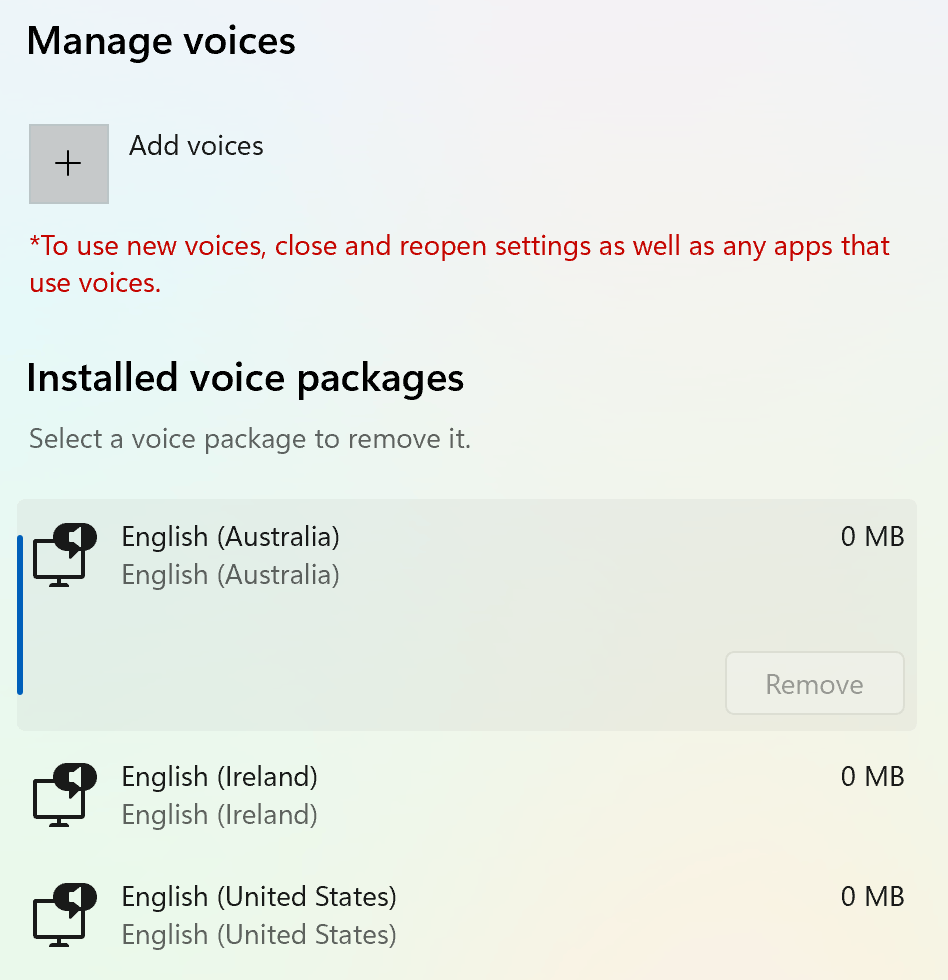
(Curiously, my original system language of "English (United States) also shows a zero size; I'm not sure if that's atypical.)

Thank you in advance for any help you might provide.

Windows for home | Windows 11 | Settings

Locked Question. This question was migrated from the Microsoft Support Community. You can vote on whether it's helpful, but you can't add comments or replies or follow the question.

0 comments No comments
Answer accepted by question author
Anonymous
2023-07-26T01:24:02+00:00

I have voted for your feedback and submitted it to the appropriate team for investigation. It will take some time to investigate and fix this issue, thank you for your patience and understanding.

We appreciate your feedback, please click Yes or No to help us improve the support experience. 

Hope you are keeping safe and well.

Was this answer helpful?

10+ people found this answer helpful.
0 comments No comments

23 additional answers

Sort by: Most helpful
  1. Anonymous
    2025-01-23T09:46:25+00:00

    Yes, there is a huge update: all of our devs have switched their dev-boxes and also their office-workstations to Linux 😁👍!

    As it got obvious for us Microsoft is fully concentrated on investing into the useless AI s**t instead of caring about their hardcore devs and fixing all their existing product bugs, we were forced to ditch every Windows and we recommend this to all other folks as well. It was a bit PITA at the beginning, as we had so many tools and workflows under Win, but as MS keeps ignoring anything but CoPilot/AI BS, we had to move on wo be able to develop and use the OS for daily work.

    Under Linux, you can use Rider with C#/Blazor/Azure plugins, which are excellent btw, plus you have Azurite emulator in the Docker: best combination you can get today hands down! The Azure core technologies are pretty cool, just don't try to use Windows locally for anything but flying MSFS, as the only thing which will work is CoPilot watching your life.

    Was this answer helpful?

    1 person found this answer helpful.
    0 comments No comments
  2. Anonymous
    2024-12-05T18:29:12+00:00

    As MS pushes AI/Recall/CoPilot etc. while the most basic elementary use-cases are broken, we were forced to switch to Rider and Linux and couldn't be happier ;-). We didn't have the needed waiting-for-a-fix-time nor the needed nerves-of-metal and it was much easier to switch to a non-Win platform than to fight closed-source bugs. Greetz

    Was this answer helpful?

    1 person found this answer helpful.
    0 comments No comments
  3. Anonymous
    2024-05-06T06:10:57+00:00

    Thank you for posting this. I'm having the exact same problem with mine. 5/6/2024

    Was this answer helpful?

    1 person found this answer helpful.
    0 comments No comments
  4. Anonymous
    2024-02-16T23:09:32+00:00

    This did not make any difference for me, unfortunately.

    Was this answer helpful?

    1 person found this answer helpful.
    0 comments No comments