Howto remove one account under email&accounts

Anonymous
2024-09-02T16:25:09+00:00

Good evening,

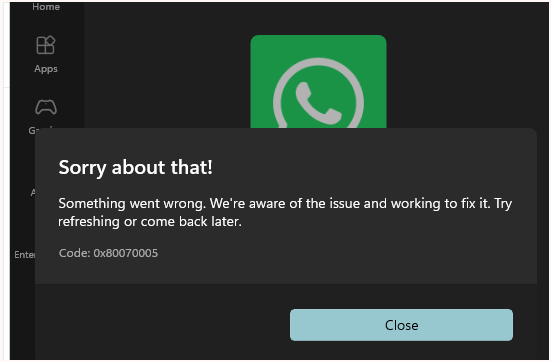
I have this problem I do not know how I was able to do that. The majot outcome I see is Microsoft Store not working, neither to update existing apps neither buying and downloading new ones.

I have a laptop I access to using my personal account I used when I accessed the first time, using my personal email (******@yyyyyy.it).

Then I worked as a free lance using this laptop and having access to Customers's mail & office with ******@zzzzzz.it.

Now, I understood the problem: two accounts in email&accounts (******@yyyyyy.it and ******@zzzzzz.it)

If I click on manage below ******@zzzzzz.it, I come to the problem: I'm directly connected with account "name surname-Ext" linked to ******@yyyyyy.it as a work account.

I surely made a mistake in the past creating this account under an organization.

Is there any suggestion how to remove this "name surname-Ext" from that organization?

Or, is there any suggestion to have only my personal account as email&accounts in Windows?

Thanks in advance

Alex

======================

Addition @19.46CET

I understood that one azure directory yyyyyy.it exists in the cloud, I'm not able to identify the administrator to ask to be removed.

Windows for home | Windows 11 | Accounts, profiles, and login

Locked Question. This question was migrated from the Microsoft Support Community. You can vote on whether it's helpful, but you can't add comments or replies or follow the question.

0 comments No comments
Answer accepted by question author
EmilyS726 267.8K Reputation points Independent Advisor
2024-09-02T17:58:06+00:00

Hello, this is Emily.

To remove this business account, you simply need to go to Settings > Accounts > Access Work or School. Note, it is not "Email and Accounts" page.

In the Access Work or School page, you can select this business account, then click on Disconnect.

Restart Windows after that and this account should be gone.

Was this answer helpful?

2 people found this answer helpful.
0 comments No comments

19 additional answers

Sort by: Most helpful
  1. EmilyS_726 29,285 Reputation points Volunteer Moderator
    2024-09-05T12:17:59+00:00

    Ah I see.. you forced a Win11 onto the unsupported CPU.

    While the store issue is not necessarily related to this, but I can understand why you wouldn't want to shake things up.

    Was this answer helpful?

    0 comments No comments
  2. Anonymous
    2024-09-05T08:29:25+00:00

    Thanks for last suggestion.

    Please have a look about System, as I'm afraid a repair install could be not enough ..... as I should probably repeat procedure I used to upgrade to win11 and this is not perfectly clean.

    So, considering I have problems only with the store, I would prefer to stop here.

    I greatly appreciated your help, thanks again

    Thank you for your kind words.

    Does this happen to Whatsapp only or other apps too?

    If it is other apps too, perform a repair install, and see if that helps.

    To perform a repair installation of Windows 11 using the Windows Media Creation Tool: The following steps should be done on a working Windows computer: Download the Windows Media Creation Tool from Microsoft's official website. https://www.microsoft.com/software-download/windows11 click on the "download now" button under "Create Windows 11 Installation Media" Run the tool and select "Create installation media for another PC." Choose "USB flash drive" as the media to use for the installation and select "Next." Connect a USB flash drive with at least 8 GB of free space to your computer. Select the USB flash drive you want to use, and then select "Next." The tool will then download the required files and create the installation media. =====================================================

    Now these steps will  be done on your problematic computer: Go to the USB drive via File Explorer, locate and run the Setup.exe file. Ideally, you should disconnect all USB and Bluetooth devices other than mouse and keyboard. Disable any 3rd party antivirus program. Disconnect the internet. Once you run the Setup.exe file, choose the Install option, and the choose the option that keeps your files and apps.

    Was this answer helpful?

    0 comments No comments
  3. EmilyS726 267.8K Reputation points Independent Advisor
    2024-09-04T21:31:57+00:00

    Thank you for your kind words.

    Does this happen to Whatsapp only or other apps too?

    If it is other apps too, perform a repair install, and see if that helps.

    To perform a repair installation of Windows 11 using the Windows Media Creation Tool: The following steps should be done on a working Windows computer: Download the Windows Media Creation Tool from Microsoft's official website. https://www.microsoft.com/software-download/windows11 click on the "download now" button under "Create Windows 11 Installation Media" Run the tool and select "Create installation media for another PC." Choose "USB flash drive" as the media to use for the installation and select "Next." Connect a USB flash drive with at least 8 GB of free space to your computer. Select the USB flash drive you want to use, and then select "Next." The tool will then download the required files and create the installation media. =====================================================

    Now these steps will  be done on your problematic computer: Go to the USB drive via File Explorer, locate and run the Setup.exe file. Ideally, you should disconnect all USB and Bluetooth devices other than mouse and keyboard. Disable any 3rd party antivirus program. Disconnect the internet. Once you run the Setup.exe file, choose the Install option, and the choose the option that keeps your files and apps.

    Was this answer helpful?

    0 comments No comments
  4. Anonymous
    2024-09-04T21:07:16+00:00

    I think I did what you instructed me about (first changed alias using an already existing gmail account, then deleting "problematic" alias, then signed with local account, then reboot, then signed with gmail account)

    Now my microsoft account is a gmail one.

    I think now accounts' situation is clean.

    If I go back to the origin of my query, I still get same behavior from store:
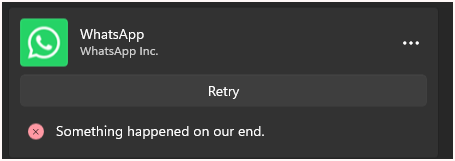
    Should I repeat some sequence among the ones you suggested to me?

    Till now, your support was really great and appreciated, I'm excited about you were able to drive me through all these "inside" steps.

    Thanks

    Alex

    I see. So it sounds like you might have registered your Microsoft account using the same email that also has a commercial account, which is not recommended and can cause issue.

    I do not want you to lose your bitlocker key, so I would recmmend you give your Microsoft account a different alias so the email address with your own domain can solely be used for commercial only.

    Can you sign into your personal account via this link: https://account.live.com? If so, go to Your Info > Sign in preference, Add an alias. You have two options here:

    Create new: this will allow you to use the native domain outlook.com to create a new alias.

    Add existing: this will allow you to add a 3rd party email address, such as yahoo, gmail, as long as they are not already associated with another Microsoft account.

    Once added, make this new alias your primary alias, then you can delete the other email as alias, and that email is free from this Microsoft account instantly.

    ==============

    This way you still have the same Microsoft, but you will be just using a different email address to access it.

    Then you can do the relink instruction I gave you above.

    Was this answer helpful?

    0 comments No comments