Hello Microsoft Community,
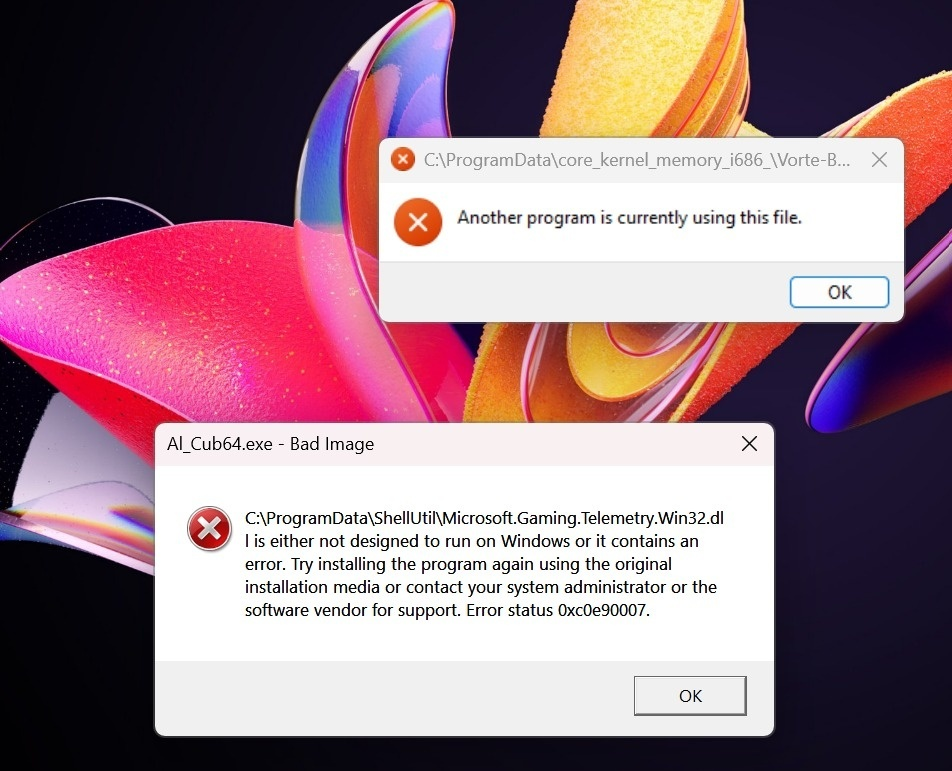
I am facing two recurring error popups immediately after starting my Windows 11 laptop. These started appearing after a system reboot, and standard system repairs have not fixed them.
Here are the exact errors I am receiving:
Error 1:
Window Title: C:\ProgramData\core_kernel_memory_i686_\Vorte-B...
Error Message: Another program is currently using this file.
Error 2:
Window Title: AI_Cub64.exe - Bad Image
Error Message: C:\ProgramData\ShellUtil\Microsoft.Gaming.Telemetry.Win32.dll is either not designed to run on Windows or it contains an error. Try installing the program again using the original installation media or contact your system administrator or the software vendor for support. Error status 0xc0e90007.
Troubleshooting already done:
- Ran
DISM /Online /Cleanup-Image /RestoreHealth (Completed).
- Ran
sfc /scannow (Completed).Hello Microsoft Community, I am facing two recurring error popups immediately after starting my Windows 11 laptop. These started appearing after a system reboot, and standard system repairs have not fixed them. Here are the exact errors I am receiving: Error 1: Window Title: C:\ProgramData\core_kernel_memory_i686_\Vorte-B...
__Error Message:__ `Another program is currently using this file.`
Error 2: Window Title: AI_Cub64.exe - Bad Image
__Error Message:__ `C:\ProgramData\ShellUtil\Microsoft.Gaming.Telemetry.Win32.dll is either not designed to run on Windows or it contains an error. Try installing the program again using the original installation media or contact your system administrator or the software vendor for support. Error status 0xc0e90007.`
Troubleshooting already done: Ran DISM /Online /Cleanup-Image /RestoreHealth (Completed).
- Ran
sfc /scannow (Completed).
My Question: The file paths (core_kernel_memory_i686_ and ShellUtil inside C:\ProgramData) and the executable AI_Cub64.exe look very suspicious and do not seem like standard Windows components. Is this a known malware infection, adware, or a corrupted legitimate component? What is the safest way to remove these specific startup triggers or files without completely resetting Windows?
' cx='32' cy='32' r='32' /%3E%3Ctext x='50%25' y='55%25' dominant-baseline='middle' text-anchor='middle' fill='%23FFF' %3ESE%3C/text%3E%3C/svg%3E)


