Hello,
To remove your child's account (Compromised account) from the Microsoft Family Safety group,
Go to https://account.microsoft.com/family/home and sign in with the Organizer's account.
Note: Only the Organizer of the family group can add/remove members.
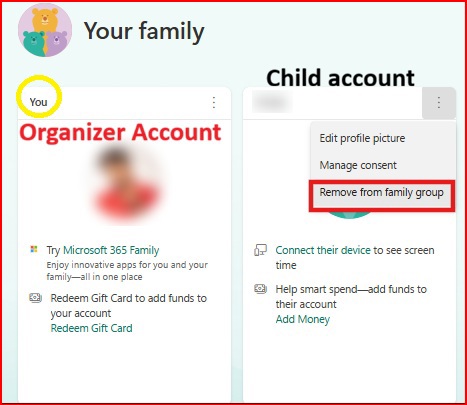
Select 'Remove from family group'.
This particular account will no longer be able to manage their Family Safety settings and will lose access to Family Safety features.
Meanwhile, if you remember all of your child’s account information, like gamertag, you can submit an account recovery request through Xbox Live chat support here. The support team may be able to help recover the compromised account.
Recover your Microsoft account
' cx='32' cy='32' r='32' /%3E%3Ctext x='50%25' y='55%25' dominant-baseline='middle' text-anchor='middle' fill='%23FFF' %3EWS%3C/text%3E%3C/svg%3E)

