Please note that our forum is a public platform, and we will modify your question to hide your personal information in the description. Kindly ensure that you hide any personal or organizational information the next time you post an error or other details to protect personal data.
Hello Panda G
I understand why this is infuriating, especially when the error tells you to contact Support but does not provide a usable route.
Since the same payment error occurs in both the app and a web browser, this is unlikely to be a browser-specific issue. Before escalating it, please check these two details:
- The organizer’s Microsoft account country or region, the child’s account region, and the payment method’s billing country should match.
- On the child’s Spending page, remove the existing payment method and add it again, or test a different payment method if one is available.
As a temporary workaround, you can purchase a Microsoft or Xbox gift card from an authorized retailer and redeem it while signed in to the child’s Microsoft account. Please buy a gift card for the same country or region as the child’s account, because gift cards are region restricted.
If the payment still fails, it likely requires Microsoft to review the payment attempt or account’s commerce profile. You will need to contact support again, but this time please try these steps to reach support:
Please note that this is a user-to-user support forum. Moderators and contributors, including external Microsoft employees, are not allowed to directly interfere with Microsoft product features or access back-end systems. Our role is limited solely to providing technical guidance on reported incidents, requests, or ideas.
- Visit this website: Contact - Microsoft Support
- Type Contact in the search box.
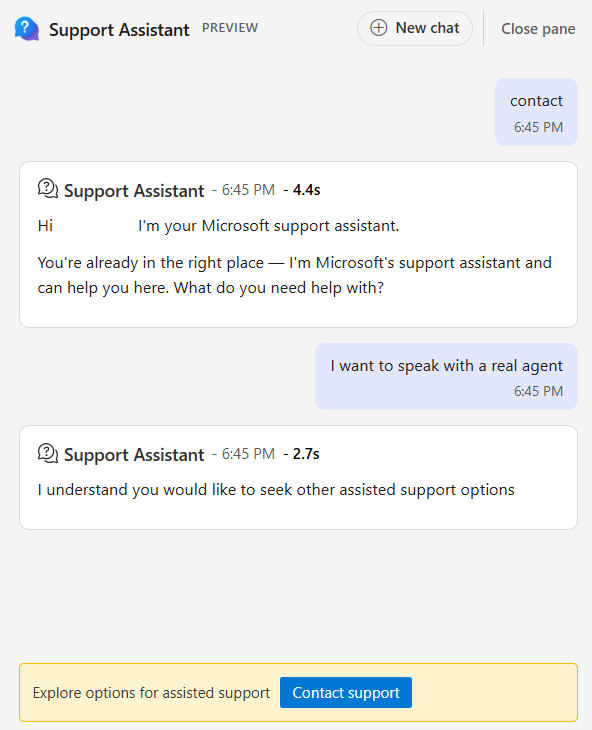
- Now click Get help, and Select Ask our support assistant or Sign in to contact support below.
- Chat with the support assistant like in the screenshot
- Select contact support and it should take you to the Products and services tab, and choose either Microsoft 365 and Office category.
- On the Category tab, choose Technical support.
- Go to Confirm.
- You can now choose the option of Chat with a support agent on your web browser.
When contacting Support, provide the diagnostic reference and timestamp shown in the error privately.
I hope you can get the support you need,
have a nice day.
' cx='32' cy='32' r='32' /%3E%3Ctext x='50%25' y='55%25' dominant-baseline='middle' text-anchor='middle' fill='%23FFF' %3EPG%3C/text%3E%3C/svg%3E)

' cx='32' cy='32' r='32' /%3E%3Ctext x='50%25' y='55%25' dominant-baseline='middle' text-anchor='middle' fill='%23FFF' %3EXD%3C/text%3E%3C/svg%3E)