Microsoft Security | Microsoft Entra | Microsoft Entra Internet Access
Securing internet traffic from devices with identity-aware web filtering and threat protection

This browser is no longer supported.
Upgrade to Microsoft Edge to take advantage of the latest features, security updates, and technical support.
' cx='32' cy='32' r='32' /%3E%3Ctext x='50%25' y='55%25' dominant-baseline='middle' text-anchor='middle' fill='%23FFF' %3EAG%3C/text%3E%3C/svg%3E)
We need to grant conditional access for 1 user from blocked country
Securing internet traffic from devices with identity-aware web filtering and threat protection
' cx='32' cy='32' r='32' /%3E%3Ctext x='50%25' y='55%25' dominant-baseline='middle' text-anchor='middle' fill='%23FFF' %3ERJ%3C/text%3E%3C/svg%3E)
Exclude the user but ensure you add additional measures to verify the user and alike explicitly.
AI answer
Create a Conditional Access policy that blocks the country/region, then exclude a group that contains only that user.
Recommended approach:
Important points:
If the goal is only one user, keeping that user as the only member of the exclusion group is the simplest supported design.
' cx='32' cy='32' r='32' /%3E%3Ctext x='50%25' y='55%25' dominant-baseline='middle' text-anchor='middle' fill='%23FFF' %3EMP%3C/text%3E%3C/svg%3E)
To grant conditional access for a specific user from a blocked country, you must exclude that specific user from the existing country-blocking Conditional Access policy.
Sign in to the Microsoft Entra admin center as a Conditional Access Administrator, Security Administrator, or Global Administrator. Navigate to Protection > Conditional Access > Policies and select the existing country-blocking policy.
Under Assignments, select Users or workload identities. Go to the Exclude tab, select Users and groups, and choose the specific user who needs access from the blocked country.
Save or update the policy. The selected user will then be excluded from that country-blocking policy.
A good way to grant access to specific users traveling to specific countries is to create a universal "exclude" group in your Conditional Access policies, and then add those users to that group when they are traveling.
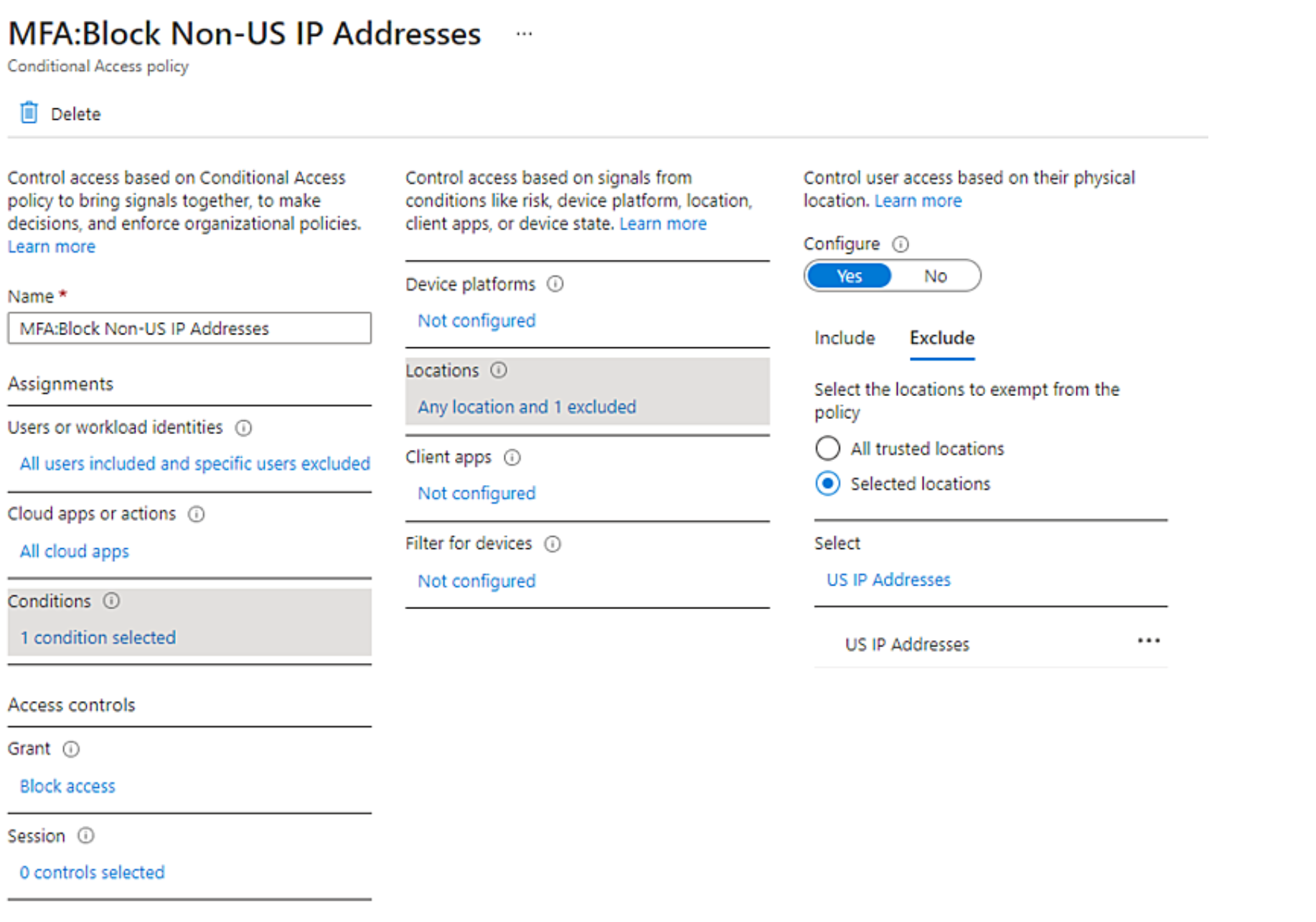
Then if you enforce MFA for untrusted locations and have those users added as an exemption to your "block international countries", any attempts to access those accounts outside of your trusted locations will still be prompted for MFA.
So in summary, you can have a general policy to block access from "All locations" or all international locations, and then exclude the countries where you want to allow access. You would then create a separate policy to enforce MFA for all locations and exclude the ones marked as "trusted." When your users go on vacation, you can add them to your "universal exclude" group and remove them from that group when they return.
There isn't a way to add a specific policy around a specific user and country, but the above solution should achieve basically the same goal.
There is a similar discussion around this topic in Spiceworks where several users have added their solutions, including this sample policy:
If the above response helps answer your question, remember to "Accept Answer" so that others in the community facing similar issues can easily find the solution. Your contribution is highly appreciated.
hth
Marcin