Azure AI 搜尋服務支援透過 Microsoft Entra ID 進行角色型存取控制。 基於角色的存取是可選的,但建議使用。 替代方法是金鑰型驗證,這是預設值。
如果你為一個安全主體指派多個角色,權限會合併。 角色分配適用於所有工具和客戶庫。
本文說明如何指派服務管理、開發,以及唯讀查詢與檢索存取的內建角色。 它也提供建立自訂角色及測試角色指派的步驟。
小提示
- 想要快速簡單地了解內建角色嗎? 請參閱 權限摘要。
- 若要在文件層級控制搜尋結果的存取,也稱為列級安全,請參見Azure AI 搜尋服務中的文件層級存取控制。
先決條件
已啟用角色型存取的 Azure AI 搜尋服務 (任何區域、任何層級)。
授予指派 Azure 角色的權限。 下列任一角色皆可使用:
請檢視您偏好客戶的角色分配指示:
確認你偏好的客戶所要求的受派對象價值。 根據用戶端與受指派者類型,此值可能是使用者主體名稱、群組物件 ID、服務主體名稱、服務主體應用程式 ID 或 Microsoft Entra 物件 ID。
內建角色
角色是一組影響控制平面或資料平面的權限:
角色描述
以下內建角色授予 Azure AI 搜尋服務 權限。 控制平面角色一律可用,而資料平面角色則要求您在搜尋服務上啟用角色型存取。 你可以結合內建角色以擴大存取範圍,或建立一個擁有特定權限的 自訂角色 。
| 角色 |
平面 |
描述 |
|
擁有者 |
管理 |
- 完整的控制平面存取權,包括指派角色及更改認證設定的能力。
- 訂閱管理員預設擁有此角色。
- 可以管理 API 金鑰。
- 無法建立搜尋物件、載入文件、查詢索引,或從知識庫擷取資料。
|
|
參與者 |
管理 |
|
|
讀取者 |
管理 |
- 唯讀控制平面存取。
- 可以查看服務指標和物件定義。
- 無法查看或管理 API 金鑰、載入文件、查詢索引,或從知識庫檢索。
|
|
搜尋服務參與者 |
控制與資料 |
|
|
搜尋索引資料參與者 |
資料 |
- 讀寫內容存取權。
- 能載入文件、查詢索引,並從知識庫檢索。
- 無法修改物件定義或取得管理員金鑰。
|
|
搜尋索引資料讀取者 |
資料 |
- 唯讀內容存取。
- 可以查詢索引並從知識庫檢索。
- 無法載入文件、修改物件定義或取得管理金鑰。
|
重要事項
- 擁有者、貢獻者與搜尋服務貢獻者可取得管理員金鑰,提供資料平面的完整讀寫權限。 這些角色只授予受信任的使用者。
- 預設情況下,資料平面角色適用於搜尋服務中的所有索引。 若要將搜尋索引資料貢獻者或搜尋索引資料讀取器範圍至單一索引,請參見 授權存取單一索引。
權限摘要
請使用以下表格快速找出哪個角色提供所需的權限。
| 權限 |
擁有者/參與者 |
讀取者 |
搜尋服務參與者 |
搜尋索引資料參與者 |
搜尋索引資料讀取者 |
| 建立並配置 Azure AI 搜尋服務 服務 |
✅ |
❌ |
✅ |
❌ |
❌ |
| 在 Azure 入口網站中存取服務 |
✅ |
✅ |
✅ |
❌ |
❌ |
| 檢視服務屬性、指標與端點 |
✅ |
✅ |
✅ |
❌ |
❌ |
| 列出服務中的所有物件 |
✅ |
✅ |
✅ |
❌ |
❌ |
| 存取配額和服務統計資料 |
✅ |
❌ |
✅ |
❌ |
❌ |
| 檢視、複製及重新產生金鑰 |
✅ |
❌ |
✅ |
❌ |
❌ |
| 設定驗證選項 |
✅ |
❌ |
✅ |
❌ |
❌ |
| 查看角色、政策與定義 |
✅ |
✅ |
✅ |
❌ |
❌ |
| 配置網路安全與私人連線 |
✅ |
❌ |
✅ |
❌ |
❌ |
| 建立、執行及管理搜尋物件 1 |
❌ |
❌ |
✅ |
❌ |
❌ |
| 上傳索引資料 2 |
❌ |
❌ |
❌ |
✅ |
❌ |
| 查詢索引 |
❌ |
❌ |
❌ |
✅ |
✅ |
| 從知識庫檢索 |
❌ |
❌ |
❌ |
✅ |
✅ |
| 透過提升閱讀(預覽)繞過權限篩選器 |
❌ |
❌ |
❌ |
✅ |
❌ |
1 包含索引、索引器、資料來源、技能集、別名、同義詞映射、除錯工作階段、知識庫及知識來源。 索引器也支援執行與重置操作。
2 擁有者或貢獻者可以執行 匯入資料 精靈 來建立並載入索引,儘管他們無法在其他用戶端上傳文件。 同樣地,索引器可以寫入搜尋服務中的任何索引,不論 每個索引角色的分配。 在這兩種情況下,搜尋服務(而非使用者)會使用其 Microsoft.Search/searchServices/indexes/documents/* 權限執行資料平面操作。
指派內建角色
在本節中,你指派以下角色:
指派服務管理的角色
以下職務讓你能建立、設定和管理搜尋服務。 這些角色是階層式的,請根據你需要的存取權限選擇一個。
| 角色 |
ID |
|
擁有者 |
8e3af657-a8ff-443c-a75c-2fe8c4bcb635 |
|
參與者 |
b24988ac-6180-42a0-ab88-20f7382dd24c |
|
讀取者 |
acdd72a7-3385-48ef-bd42-f606fba81ae7 |
前往Azure 入口網站中的搜尋服務。
從左側窗格選擇 Access control (IAM)。
選擇 [] + [新增>] 新增角色指派 []。
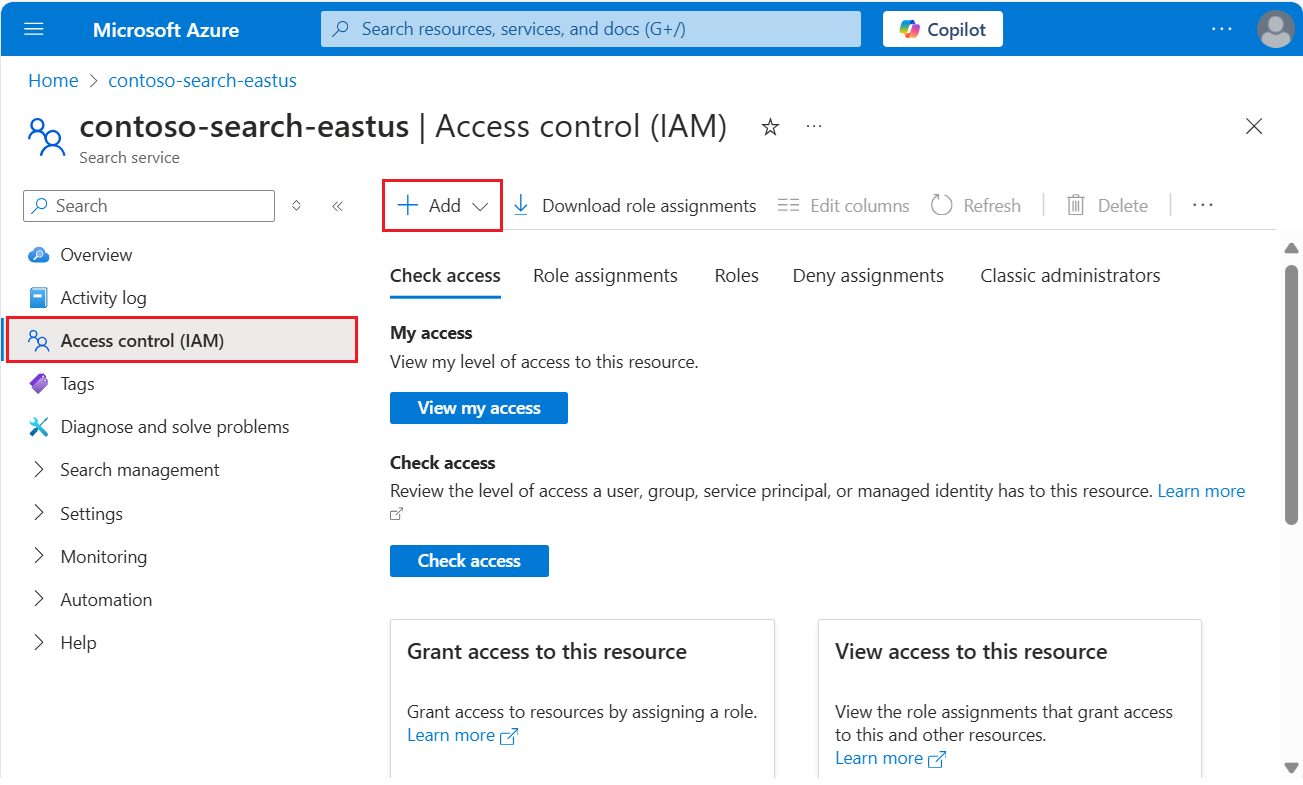
選擇角色: 擁有者、 貢獻者或 讀者。
在 Members 標籤中,選擇Microsoft Entra使用者或群組身份。 如果你正在為其他 Azure 服務設定權限,請選擇系統指派或使用者指派的管理身份。
在 [檢閱 + 指派] 索引標籤上,選取 [檢閱 + 指派] 以指派角色。
登入 Azure 訂用帳戶。
az login
建立以搜尋服務為範圍的角色指派。 提供受讓人及適用範圍。
az role assignment create \
    --assignee <assignee> \
    --role "Reader" \
    --scope "/subscriptions/<subscription>/resourceGroups/<resource-group>/providers/Microsoft.Search/searchServices/<search-service>"
參考資料:az 角色指派建立
匯入所需模組並連接到你的 Azure 帳號。
Import-Module Az.Resources
Connect-AzAccount
建立以搜尋服務為範圍的角色指派。 此範例使用使用者登入名稱。
New-AzRoleAssignment -SignInName <email> `
    -RoleDefinitionName "Reader" `
    -Scope  "/subscriptions/<subscription>/resourceGroups/<resource-group>/providers/Microsoft.Search/searchServices/<search-service>"
參考資料:New-AzRoleAssignment
開啟命令殼並登入你的 Azure 訂閱。
az login
取得 Azure Resource Manager 的存取權杖。
az account get-access-token --scope https://management.azure.com/.default --query accessToken --output tsv
發送 PUT 要求,以建立一個範圍為搜尋服務的角色指派。 設 principalType 為 User、 Group或 ServicePrincipal 以匹配受派對象。
PUT https://management.azure.com/subscriptions/<subscription>/resourceGroups/<resource-group>/providers/Microsoft.Search/searchServices/<search-service>/providers/Microsoft.Authorization/roleAssignments/<role-assignment-guid>?api-version=2022-04-01 HTTP/1.1
Authorization: Bearer <access-token>
Content-Type: application/json

{
    "properties": {
        "roleDefinitionId": "/subscriptions/<subscription>/providers/Microsoft.Authorization/roleDefinitions/acdd72a7-3385-48ef-bd42-f606fba81ae7",
        "principalId": "<principal-object-id>",
        "principalType": "<principal-type>"
    }
}
參考資料:角色分配 - 建立
指派用於開發的角色
以下角色讓你能建立搜尋物件、載入文件、查詢索引,以及從知識庫檢索。 將所有三個角色分配,以涵蓋完整的開發任務範圍。
| 角色 |
ID |
|
搜尋服務參與者 |
7ca78c08-252a-4471-8644-bb5ff32d4ba0 |
|
搜尋索引資料參與者 |
8ebe5a00-799e-43f5-93ac-243d3dce84a7 |
|
搜尋索引資料讀取者 |
1407120a-92aa-4202-b7e9-c0e197c71c8f |
前往Azure 入口網站中的搜尋服務。
從左側窗格選擇 Access control (IAM)。
選擇 [] + [新增>] 新增角色指派 []。
選擇 搜尋服務貢獻者。
在 Members 標籤中,選擇Microsoft Entra使用者或群組身份。 如果你正在為其他 Azure 服務設定權限,請選擇系統指派或使用者指派的管理身份。
在 [檢閱 + 指派] 索引標籤上,選取 [檢閱 + 指派] 以指派角色。
重複這些步驟以指派 搜尋索引資料貢獻 者與 搜尋索引資料閱讀器。
登入 Azure 訂用帳戶。
az login
建立以搜尋服務為範圍的角色指派。 提供受讓人及適用範圍。
az role assignment create \
    --assignee <assignee> \
    --role "Search Index Data Contributor" \
    --scope "/subscriptions/<subscription>/resourceGroups/<resource-group>/providers/Microsoft.Search/searchServices/<search-service>"
參考資料:az 角色指派建立
(可選)建立一個以索引為範疇的角色指派。 提供受讓人及適用範圍。
az role assignment create \
    --assignee <assignee> \
    --role "Search Index Data Contributor" \
    --scope "/subscriptions/<subscription>/resourceGroups/<resource-group>/providers/Microsoft.Search/searchServices/<search-service>/indexes/<index-name>"
參考資料:az 角色指派建立
匯入所需模組並連接到你的 Azure 帳號。
Import-Module Az.Resources
Connect-AzAccount
建立以搜尋服務為範圍的角色指派。 此範例使用使用者登入名稱。
New-AzRoleAssignment -SignInName <email> `
    -RoleDefinitionName "Search Index Data Contributor" `
    -Scope  "/subscriptions/<subscription>/resourceGroups/<resource-group>/providers/Microsoft.Search/searchServices/<search-service>"
參考資料:New-AzRoleAssignment
(可選)建立一個以索引為範疇的角色指派。 此範例使用使用者登入名稱。
New-AzRoleAssignment -SignInName <email> `
    -RoleDefinitionName "Search Index Data Contributor" `
    -Scope  "/subscriptions/<subscription>/resourceGroups/<resource-group>/providers/Microsoft.Search/searchServices/<search-service>/indexes/<index-name>"
參考資料:New-AzRoleAssignment
開啟命令殼並登入你的 Azure 訂閱。
az login
取得 Azure Resource Manager 的存取權杖。
az account get-access-token --scope https://management.azure.com/.default --query accessToken --output tsv
發送 PUT 要求,以建立一個範圍為搜尋服務的角色指派。 設 principalType 為 User、 Group或 ServicePrincipal 以匹配受派對象。
PUT https://management.azure.com/subscriptions/<subscription>/resourceGroups/<resource-group>/providers/Microsoft.Search/searchServices/<search-service>/providers/Microsoft.Authorization/roleAssignments/<role-assignment-guid>?api-version=2022-04-01 HTTP/1.1
Authorization: Bearer <access-token>
Content-Type: application/json

{
    "properties": {
        "roleDefinitionId": "/subscriptions/<subscription>/providers/Microsoft.Authorization/roleDefinitions/8ebe5a00-799e-43f5-93ac-243d3dce84a7",
        "principalId": "<principal-object-id>",
        "principalType": "<principal-type>"
    }
}
參考資料:角色分配 - 建立
(可選)傳送 PUT 要求,以建立以索引為範圍的角色指派。
PUT https://management.azure.com/subscriptions/<subscription>/resourceGroups/<resource-group>/providers/Microsoft.Search/searchServices/<search-service>/indexes/<index-name>/providers/Microsoft.Authorization/roleAssignments/<role-assignment-guid>?api-version=2022-04-01 HTTP/1.1
Authorization: Bearer <access-token>
Content-Type: application/json

{
    "properties": {
        "roleDefinitionId": "/subscriptions/<subscription>/providers/Microsoft.Authorization/roleDefinitions/8ebe5a00-799e-43f5-93ac-243d3dce84a7",
        "principalId": "<principal-object-id>",
        "principalType": "<principal-type>"
    }
}
參考資料:角色分配 - 建立
指派唯讀存取的角色
請使用以下角色來處理只需要讀取索引和知識庫的應用程式和流程。 支援的操作包括 搜尋、 查找、 自動補全,以及 索引建議 ,以及知識庫的 檢索 。
| 角色 |
ID |
|
搜尋索引資料讀取者 |
1407120a-92aa-4202-b7e9-c0e197c71c8f |
前往Azure 入口網站中的搜尋服務。
從左側窗格選擇 Access control (IAM)。
選擇 [] + [新增>] 新增角色指派 []。
選擇 搜尋索引資料閱讀器 角色。
在 Members 標籤中,選擇Microsoft Entra使用者或群組身份。 如果你正在為其他 Azure 服務設定權限,請選擇系統指派或使用者指派的管理身份。
在 [檢閱 + 指派] 索引標籤上,選取 [檢閱 + 指派] 以指派角色。
登入 Azure 訂用帳戶。
az login
建立以搜尋服務為範圍的角色指派。 提供受讓人及適用範圍。
az role assignment create \
    --assignee <assignee> \
    --role "Search Index Data Reader" \
    --scope "/subscriptions/<subscription>/resourceGroups/<resource-group>/providers/Microsoft.Search/searchServices/<search-service>"
參考資料:az 角色指派建立
(可選)建立一個以索引為範疇的角色指派。 提供受讓人及適用範圍。
az role assignment create \
    --assignee <assignee> \
    --role "Search Index Data Reader" \
    --scope "/subscriptions/<subscription>/resourceGroups/<resource-group>/providers/Microsoft.Search/searchServices/<search-service>/indexes/<index-name>"
參考資料:az 角色指派建立
匯入所需模組並連接到你的 Azure 帳號。
Import-Module Az.Resources
Connect-AzAccount
建立以搜尋服務為範圍的角色指派。 此範例使用使用者登入名稱。
New-AzRoleAssignment -SignInName <email> `
    -RoleDefinitionName "Search Index Data Reader" `
    -Scope  "/subscriptions/<subscription>/resourceGroups/<resource-group>/providers/Microsoft.Search/searchServices/<search-service>"
參考資料:New-AzRoleAssignment
(可選)建立一個以索引為範疇的角色指派。 此範例使用使用者登入名稱。
New-AzRoleAssignment -SignInName <email> `
    -RoleDefinitionName "Search Index Data Reader" `
    -Scope  "/subscriptions/<subscription>/resourceGroups/<resource-group>/providers/Microsoft.Search/searchServices/<search-service>/indexes/<index-name>"
參考資料:New-AzRoleAssignment
開啟命令殼並登入你的 Azure 訂閱。
az login
取得 Azure Resource Manager 的存取權杖。
az account get-access-token --scope https://management.azure.com/.default --query accessToken --output tsv
發送 PUT 要求,以建立一個範圍為搜尋服務的角色指派。 設 principalType 為 User、 Group或 ServicePrincipal 以匹配受派對象。
PUT https://management.azure.com/subscriptions/<subscription>/resourceGroups/<resource-group>/providers/Microsoft.Search/searchServices/<search-service>/providers/Microsoft.Authorization/roleAssignments/<role-assignment-guid>?api-version=2022-04-01 HTTP/1.1
Authorization: Bearer <access-token>
Content-Type: application/json

{
    "properties": {
        "roleDefinitionId": "/subscriptions/<subscription>/providers/Microsoft.Authorization/roleDefinitions/1407120a-92aa-4202-b7e9-c0e197c71c8f",
        "principalId": "<principal-object-id>",
        "principalType": "<principal-type>"
    }
}
參考資料:角色分配 - 建立
(可選)傳送 PUT 要求,以建立以索引為範圍的角色指派。
PUT https://management.azure.com/subscriptions/<subscription>/resourceGroups/<resource-group>/providers/Microsoft.Search/searchServices/<search-service>/indexes/<index-name>/providers/Microsoft.Authorization/roleAssignments/<role-assignment-guid>?api-version=2022-04-01 HTTP/1.1
Authorization: Bearer <access-token>
Content-Type: application/json

{
    "properties": {
        "roleDefinitionId": "/subscriptions/<subscription>/providers/Microsoft.Authorization/roleDefinitions/1407120a-92aa-4202-b7e9-c0e197c71c8f",
        "principalId": "<principal-object-id>",
        "principalType": "<principal-type>"
    }
}
參考資料:角色分配 - 建立
測試角色指派
使用用戶端來測試角色指派。 記住角色是累積的。 無法在資源 (搜尋服務) 層級刪除或拒絕繼承自訂用帳戶或資源群組層級的角色。
在進行之前,先 設定應用程式為無鑰匙連接 ,並設定好角色分配。
前往Azure 入口網站中的搜尋服務。
從左側窗格選擇 搜尋管理>索引 以測試與索引相關的權限:
搜尋服務貢獻者可以建立、修改和刪除搜尋物件,但無法載入文件或執行查詢。 若要驗證權限,請建立搜尋索引。
搜尋索引資料參與者可以載入文件。 Azure入口網站中除了Import datawizard外,沒有載入文件的選項,但你可以重置並執行索引器來確認文件載入權限。
搜尋索引資料閱讀器可以查詢索引。 若要驗證權限,請使用搜尋總管。 你應該能發送查詢並查看結果,但不應該能查看索引定義或建立索引。
此方法假設 Visual Studio Code 搭配 REST Client 擴充功能。
開啟 Azure CLI 的命令殼,並登入你的 Azure 訂閱。
az login
取得 Azure AI 搜尋服務 資料平面的存取權杖。
az account get-access-token --scope https://search.azure.com/.default --query accessToken --output tsv
將這些變數貼上到 Visual Studio Code 中的新文字檔。
@baseUrl = PASTE-YOUR-SEARCH-SERVICE-URL-HERE
@index-name = PASTE-YOUR-INDEX-NAME-HERE
@token = PASTE-YOUR-TOKEN-HERE
發送一個請求,使用你指定的變數。 對於搜尋索引資料閱讀器的角色,您可以使用任何 支援的 API 版本發送查詢。
POST https://{{baseUrl}}/indexes/{{index-name}}/docs/search?api-version=2026-04-01 HTTP/1.1
Content-type: application/json
Authorization: Bearer {{token}}

{
    "queryType": "simple",
    "search": "motel",
    "filter": "",
    "select": "HotelName,Description,Category,Tags",
    "count": true
}
參考資料:查詢文件
成功查詢會回傳與匹配文件的搜尋結果。 若索引為空或無匹配,則 value 包含空陣列。
安裝所需的套件。
dotnet add package Azure.Search.Documents
dotnet add package Azure.Identity
請使用Azure.Identity for .NET進行令牌驗證。 Microsoft建議大多數情況下使用DefaultAzureCredential()。
以下是使用 DefaultAzureCredential() 的用戶端連線範例。
// Create a SearchIndexClient to send create/delete index commands
// Requires Search Service Contributor role
SearchIndexClient adminClient = new SearchIndexClient(serviceEndpoint, new DefaultAzureCredential());

// Create a SearchClient to load and query documents
// Requires Search Index Data Contributor (load) or Search Index Data Reader (query)
SearchClient srchclient = new SearchClient(serviceEndpoint, indexName, new DefaultAzureCredential());
參考資料:SearchClient, SearchIndexClient, DefaultAzureCredential
這裡還有另一個使用 用戶端秘密憑證的例子。
var tokenCredential =  new ClientSecretCredential(aadTenantId, aadClientId, aadSecret);
SearchClient srchclient = new SearchClient(serviceEndpoint, indexName, tokenCredential);
這裡有一個執行查詢的範例。
SearchResults<SearchDocument> response = srchclient.Search<SearchDocument>("motel");
foreach (SearchResult<SearchDocument> result in response.GetResults())
{
    Console.WriteLine(result.Document["HotelName"]);
}
成功的查詢會回傳搜尋結果。 若無文件匹配,結果集合為空。
安裝所需的套件。
pip install azure-search-documents azure-identity
請使用Azure.Identity for Python 進行令牌驗證。
如果Python用戶端是執行伺服器端的應用程式,請使用 DefaultAzureCredential。 如果應用程式在瀏覽器中執行,請啟用互動式驗證。
以下為範例。
from azure.search.documents import SearchClient
from azure.identity import DefaultAzureCredential

credential = DefaultAzureCredential()
endpoint = "https://<mysearch>.search.windows.net"
index_name = "myindex"
client = SearchClient(endpoint=endpoint, index_name=index_name, credential=credential)
Reference:SearchClient, DefaultAzureCredential
將必要相依性新增到您的pom.xml。
<dependency>
  <groupId>com.azure</groupId>
  <artifactId>azure-search-documents</artifactId>
  <version>11.7.4</version>
</dependency>
<dependency>
  <groupId>com.azure</groupId>
  <artifactId>azure-identity</artifactId>
  <version>1.15.0</version>
</dependency>
請使用Azure.Identity for Java 做為令牌驗證的工具。
使用 DefaultAzureCredential來支援在 Azure 上運行的應用程式。
授與單一索引的存取權
在某些情況下,您可能想要限制應用程式對單一資源 (例如索引) 的存取權。
目前,Azure 入口網站不支援索引層級的角色指派。 使用 Azure CLI、PowerShell 或 REST API 來指派範圍限定於單一索引的角色。
登入 Azure 訂用帳戶。
az login
建立一個針對單一索引的角色指派。 提供受指派者及索引層級範圍。
az role assignment create \
    --assignee <assignee> \
    --role "Search Index Data Contributor" \
    --scope "/subscriptions/<subscription>/resourceGroups/<resource-group>/providers/Microsoft.Search/searchServices/<search-service>/indexes/<index-name>"
參考資料:az 角色指派建立
匯入所需模組並連接到你的 Azure 帳號。
Import-Module Az.Resources
Connect-AzAccount
建立一個針對單一索引的角色指派。 此範例使用使用者登入名稱。
New-AzRoleAssignment -SignInName <email> `
    -RoleDefinitionName "Search Index Data Contributor" `
    -Scope  "/subscriptions/<subscription>/resourceGroups/<resource-group>/providers/Microsoft.Search/searchServices/<search-service>/indexes/<index-name>"
參考資料:New-AzRoleAssignment
開啟命令殼並登入你的 Azure 訂閱。
az login
取得 Azure Resource Manager 的存取權杖。
az account get-access-token --scope https://management.azure.com/.default --query accessToken --output tsv
傳送 PUT 請求以建立範圍限定於單一索引的角色指派。 設 principalType 為 User、 Group或 ServicePrincipal 以匹配受派對象。
PUT https://management.azure.com/subscriptions/<subscription>/resourceGroups/<resource-group>/providers/Microsoft.Search/searchServices/<search-service>/indexes/<index-name>/providers/Microsoft.Authorization/roleAssignments/<role-assignment-guid>?api-version=2022-04-01 HTTP/1.1
Authorization: Bearer <access-token>
Content-Type: application/json

{
    "properties": {
        "roleDefinitionId": "/subscriptions/<subscription>/providers/Microsoft.Authorization/roleDefinitions/8ebe5a00-799e-43f5-93ac-243d3dce84a7",
        "principalId": "<principal-object-id>",
        "principalType": "<principal-type>"
    }
}
參考資料:角色分配 - 建立
每個索引的範圍和索引器的操作
依索引分配的角色指派僅適用於直接的 API 操作,例如使用者或應用程式的查詢或文件上傳。 索引器不受單一索引的權限限制,因為它們使用服務層級的憑證進行操作。
擁有 搜尋服務貢獻者 角色的使用者可以建立索引器,將資料寫入搜尋服務中的任何索引,即使是該使用者沒有該索引角色分配的索引。
為了嚴格確保索引間的資料隔離,請考慮以下技術方法:
- 對於需要索引層級隔離的團隊或使用者,請使用不同的搜尋服務。
- 僅將 搜尋服務協作者 指派給管理索引器的管理員。
- 使用文件 層級的存取控制 搭配安全過濾器,限制共享索引內的查詢結果。
建立自訂角色
如果內建角色無法提供正確的權限組合,你可以建立 自訂角色 來支援所需的操作。
以下範例是複製 Search Index Data Reader ,並新增依名稱列出索引的功能。 通常,列出搜尋服務上的索引會被視為系統管理權限。
登入 Azure 入口,並進入您的搜尋服務。
從左側窗格選擇 Access control (IAM)。
在角色索引標籤上,找到 Search Index Data Reader 或其他角色,選取省略符號 (...),然後選取複製。
在 Basics 標籤中,輸入自訂角色名稱,例如「Search Index Data Explorer」,然後選擇 Next。
在 [許可權] 索引標籤上,選取 [新增許可權]。
在 Add 權限面板中,選擇 Microsoft 搜尋 圖塊。
在頂部選擇 「行動 」後,請設定以下權限:
- 在
Microsoft.Search/operations 下,選擇 Read: 列出所有可用的操作。
- 在
Microsoft.Search/searchServices/indexes下,選擇Read : Read Index。
切換到頂部的 Data Actions,在 Microsoft.Search/searchServices/indexes/documents 下,選擇 Read : Read Documents。
JSON 定義看起來像下列範例:
{
    "properties": {
        "roleName": "Search Index Data Explorer",
        "description": "List all indexes on the service and query them.",
        "assignableScopes": [
            "/subscriptions/<subscription>/resourceGroups/<resource-group>"
        ],
        "permissions": [
            {
                "actions": [
                    "Microsoft.Search/operations/read",
                    "Microsoft.Search/searchServices/indexes/read"
                ],
                "notActions": [],
                "dataActions": [
                    "Microsoft.Search/searchServices/indexes/documents/read"
                ],
                "notDataActions": []
            }
        ]
    }
}
選擇 新增 以關閉窗格。
選取 [檢閱 + 建立] 以建立角色。
您現在可以將使用者和群組指派給角色。 如需瞭解這些步驟的詳細資訊,請參閱 使用 Azure 入口網站建立或更新自訂角色。
Azure CLI 範例展示了建立自訂角色的 JSON 語法,該角色是 Search Index Data Reader 的克隆版,但能以名稱列出所有索引。 關於自訂角色建立的逐步說明,請參見「使用 Azure CLI 建立或更新 Azure 自訂角色」。
檢閱不可部分完成的權限清單,以判斷您需要的權限。 在這個例子中,你需要以下權限:
"Microsoft.Search/operations/read",
"Microsoft.Search/searchServices/indexes/read",
"Microsoft.Search/searchServices/indexes/documents/read"
將以下角色定義儲存到一個名為 search-index-data-explorer.json的 JSON 檔案。 請為 Id 提供您產生的新 GUID。
{
    "Name": "Search Index Data Explorer",
    "Id": "<role-definition-guid>",
    "IsCustom": true,
    "Description": "List all indexes on the service and query them.",
    "Actions": [
        "Microsoft.Search/operations/read",
        "Microsoft.Search/searchServices/indexes/read"
    ],
    "NotActions": [],
    "DataActions": [
        "Microsoft.Search/searchServices/indexes/documents/read"
    ],
    "NotDataActions": [],
    "AssignableScopes": [
        "/subscriptions/<subscription>/resourceGroups/<resource-group>"
    ]
}
透過將 JSON 檔案傳給 az role definition create來建立自訂角色。
az role definition create --role-definition @search-index-data-explorer.json
參考資料:az 角色定義 create
PowerShell 範例展示了建立自訂角色的 JSON 語法,該角色是 Search Index Data Reader 的克隆版,但能以名稱列出所有索引。 關於自訂角色建立的逐步說明,請參見「使用 Azure PowerShell 建立或更新 Azure 自訂角色」。
檢閱不可部分完成的權限清單,以判斷您需要的權限。 在這個例子中,你需要以下權限:
"Microsoft.Search/operations/read",
"Microsoft.Search/searchServices/indexes/read",
"Microsoft.Search/searchServices/indexes/documents/read"
將以下角色定義儲存到一個名為 search-index-data-explorer.json的 JSON 檔案。 請為 Id 提供您產生的新 GUID。
{
    "Name": "Search Index Data Explorer",
    "Id": "<role-definition-guid>",
    "IsCustom": true,
    "Description": "List all indexes on the service and query them.",
    "Actions": [
        "Microsoft.Search/operations/read",
        "Microsoft.Search/searchServices/indexes/read"
    ],
    "NotActions": [],
    "DataActions": [
        "Microsoft.Search/searchServices/indexes/documents/read"
    ],
    "NotDataActions": [],
    "AssignableScopes": [
        "/subscriptions/<subscription>/resourceGroups/<resource-group>"
    ]
}
透過將 JSON 檔案傳給 New-AzRoleDefinition來建立自訂角色。
New-AzRoleDefinition -InputFile "search-index-data-explorer.json"
參考資料:New-AzRoleDefinition
REST API 範例展示了建立自訂角色的 JSON 語法,該角色是 Search Index Data Reader 的克隆版,但能以名稱列出所有索引。 關於自訂角色建立的逐步說明,請參閱使用 REST API 建立或更新 Azure 自訂角色。
檢閱不可部分完成的權限清單,以判斷您需要的權限。 在這個例子中,你需要以下權限:
"Microsoft.Search/operations/read",
"Microsoft.Search/searchServices/indexes/read",
"Microsoft.Search/searchServices/indexes/documents/read"
透過向角色定義端點發送以下請求來建立自訂角色。
PUT https://management.azure.com/subscriptions/<subscription>/providers/Microsoft.Authorization/roleDefinitions/<role-definition-guid>?api-version=2022-04-01 HTTP/1.1
Authorization: Bearer <access-token>
Content-Type: application/json

{
    "properties": {
        "roleName": "Search Index Data Explorer",
        "description": "List all indexes on the service and query them.",
        "type": "CustomRole",
        "permissions": [
            {
                "actions": [
                    "Microsoft.Search/operations/read",
                    "Microsoft.Search/searchServices/indexes/read"
                ],
                "notActions": [],
                "dataActions": [
                    "Microsoft.Search/searchServices/indexes/documents/read"
                ],
                "notDataActions": []
            }
        ],
        "assignableScopes": [
            "/subscriptions/<subscription>/resourceGroups/<resource-group>"
        ]
    }
}
參考資料:角色定義 - 建立或更新
建立條件式存取原則
如果你需要執行組織政策,例如多重驗證,請使用 Microsoft Entra 條件式存取。
要為 Azure AI 搜尋服務 建立條件存取政策:
登入 Azure 入口網站。
搜尋Microsoft Entra 條件式存取。
在 「概覽 」頁面,選擇 建立新政策。
在 Cloud 應用程式或動作,根據你想如何設定政策,將 Azure AI 搜尋服務 加入為雲端應用程式。
更新保單剩餘的參數。 例如,指定該政策適用於哪些使用者和群組。
儲存原則。
重要事項
如果你的搜尋服務有被指派管理身份,該搜尋服務會以雲端應用程式的形式出現。 然而,選擇該特定搜尋服務並不代表該政策會被強制執行。 請選擇一般的 Azure AI 搜尋服務 雲端應用程式,將條件存取政策套用到您的搜尋服務上。
Troubleshooting
當你開發使用基於角色的存取控制來進行驗證的應用程式時,可能會遇到一些常見問題:
搜尋服務的預設設定是以金鑰為基礎的驗證。 如果你不將此設定改為 「兩者 」或 「基於角色的存取控制」,所有使用基於角色驗證的請求都會自動被拒絕,不論底層權限為何。
如果你的請求包含 API 金鑰與基於角色的憑證,服務會使用該金鑰進行認證。 從請求標頭移除 API 金鑰,以使用基於角色的認證。
如果授權憑證來自 受管理身份 ,且你最近才分配了適當的權限, 權限分配可能需要好幾個小時 才能生效。
如果帶有文件層級權限的查詢無法回傳預期結果,請使用 Search Index Data Contributor,或建立一個權限提升(預覽)的自訂角色來調查。
下一個步驟
本文說明如何在 Azure AI 搜尋服務 上指派控制平面與資料平面操作的角色。 新增角色基礎存取權至你的應用程式碼的完整說明如下:
使用身分識別將你的應用程式連接到 Azure AI 搜尋