注意
Azure AI 搜尋服務 可透過 Azure 入口網站、REST API 及 Azure SDK 取得。 它同時也是 Foundry IQ 的基礎,這是一個管理式知識層,能將企業內容轉化為可重複使用、權限感知的知識庫,供 Microsoft Foundry 入口網站中的代理使用。
本文說明如何使用 C# 和 Azure SDK for .NET 中的 Azure.Search.Documents 用戶端程式庫來建立及管理搜尋物件。
你可以使用此函式庫進行資料平面操作,包括:
- 建立和管理搜尋索引、資料來源、索引器、技能集和同義字對應表
- 載入和管理索引中的搜尋文件
- 執行查詢,無需處理 HTTP 和 JSON 的詳細資料
- 呼叫及管理 AI 擴充功能(技能集)和輸出
此程式庫會以單一 NuGet 套件形式發佈,其中包含以程式方式存取搜尋服務所需的所有 API。
用戶端程式庫會定義類別,例如 SearchIndex、SearchField 和 SearchDocument,以及在 SearchIndexClient.CreateIndex 和 SearchClient.Search 類別上的作業,例如 SearchIndexClient 和 SearchClient。 這些類別可編成以下命名空間:
Azure.Search.DocumentsAzure.Search.Documents.IndexesAzure.Search.Documents.Indexes.ModelsAzure.Search.Documents.Models
Azure。Search.Documents 用戶端函式庫不提供服務管理操作,例如建立與擴展搜尋服務,以及管理 API 金鑰。 如果你需要用 .NET 應用程式管理搜尋資源,請使用 Azure。 Azure SDK for .NET 中的 ResourceManager.Search library.
SDK 需求
Visual Studio 2019 或更新版本。
使用 Visual Studio 中的工具>>來下載 NuGet 套件。 搜尋套件名稱
Azure.Search.Documents。
適用於 .NET 的 Azure SDK 符合 .NET Standard 2.0。
範例應用程式
本文 依範例說明,依賴 GitHub 上的 DotNetHowTo 程式代碼範例來說明 Azure AI 搜尋服務的基本概念,以及如何建立、載入和查詢搜尋索引。
在本文的其餘部分,假設有一個名為 hotels 的新索引,其中已填入幾份文件,並有數個查詢會比對出結果。
下列範例顯示主要程式,以及整體流程:
// This sample shows how to delete, create, upload documents and query an index
static void Main(string[] args)
{
    IConfigurationBuilder builder = new ConfigurationBuilder().AddJsonFile("appsettings.json");
    IConfigurationRoot configuration = builder.Build();

    SearchIndexClient indexClient = CreateSearchIndexClient(configuration);

    string indexName = configuration["SearchIndexName"];

    Console.WriteLine("{0}", "Deleting index...\n");
    DeleteIndexIfExists(indexName, indexClient);

    Console.WriteLine("{0}", "Creating index...\n");
    CreateIndex(indexName, indexClient);

    SearchClient searchClient = indexClient.GetSearchClient(indexName);

    Console.WriteLine("{0}", "Uploading documents...\n");
    UploadDocuments(searchClient);

    SearchClient indexClientForQueries = CreateSearchClientForQueries(indexName, configuration);

    Console.WriteLine("{0}", "Run queries...\n");
    RunQueries(indexClientForQueries);

    Console.WriteLine("{0}", "Complete.  Press any key to end application...\n");
    Console.ReadKey();
}
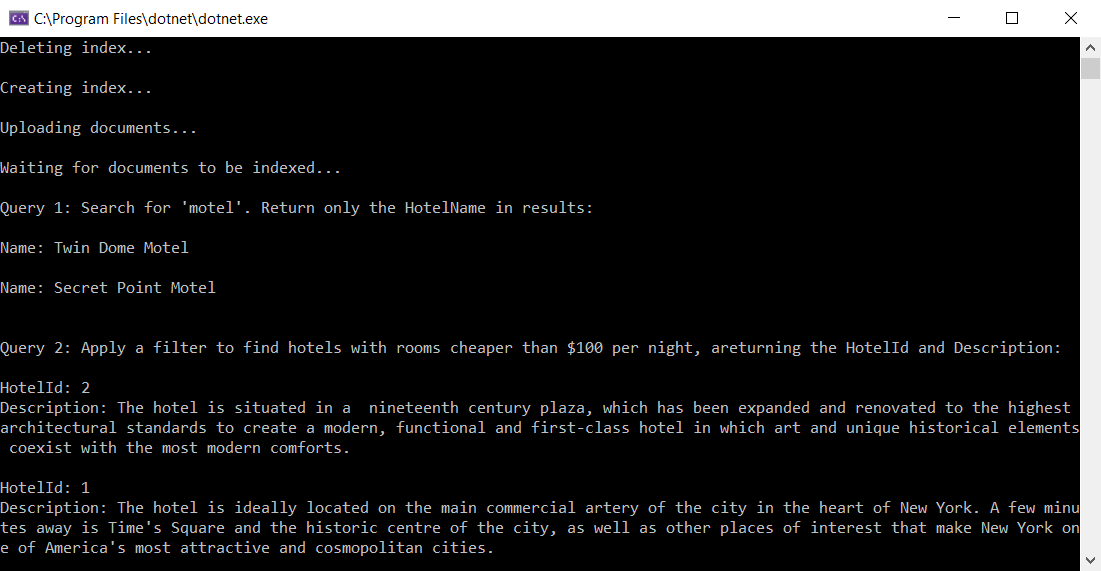
接下來是輸出的部分螢幕擷取畫面,假設您使用有效的服務名稱和 API 金鑰來執行此應用程式:
用戶端類型
用戶端程式庫會針對不同作業使用三種用戶端類型:SearchIndexClient 用於建立、更新或刪除索引、SearchClient 用於載入或查詢索引,而 SearchIndexerClient 則可使用索引子和技能集。 本文會聚焦於前兩個類型。
所有用戶端都必須至少具備服務名稱或端點,以及 API 金鑰。 在組態檔中提供這項資訊很常見,類似於您在 DotNetHowTo 範例應用程式appsettings.json檔案中找到的內容。 若要從組態檔讀取,請將 using Microsoft.Extensions.Configuration; 新增至您的程式。
下列陳述式會建立用來建立、更新或刪除索引的索引用戶端。 它需要服務端點和管理員 API 金鑰。
private static SearchIndexClient CreateSearchIndexClient(IConfigurationRoot configuration)
{
    string searchServiceEndPoint = configuration["YourSearchServiceEndPoint"];
    string adminApiKey = configuration["YourSearchServiceAdminApiKey"];

    SearchIndexClient indexClient = new SearchIndexClient(new Uri(searchServiceEndPoint), new AzureKeyCredential(adminApiKey));
    return indexClient;
}
下一個陳述式會建立搜尋用戶端,用來載入文件或執行查詢。
SearchClient 需要索引。 您需要系統管理 API 金鑰才能載入檔,但您可以使用查詢 API 金鑰來執行查詢。
string indexName = configuration["SearchIndexName"];

private static SearchClient CreateSearchClientForQueries(string indexName, IConfigurationRoot configuration)
{
    string searchServiceEndPoint = configuration["YourSearchServiceEndPoint"];
    string queryApiKey = configuration["YourSearchServiceQueryApiKey"];

    SearchClient searchClient = new SearchClient(new Uri(searchServiceEndPoint), indexName, new AzureKeyCredential(queryApiKey));
    return searchClient;
}
注意
如果您為匯入作業提供了無效的金鑰(例如,在需要管理金鑰時提供查詢金鑰),SearchClient 會在您第一次對其呼叫作業方法時擲回 CloudException,並顯示錯誤訊息 Forbidden。 如果你遇到這種情況,請再次確認 API 金鑰。
刪除索引
在開發初期,您可能會想加入 DeleteIndex 陳述式來刪除尚在建置中的索引,以便使用更新後的定義重新建立它。 Azure AI 搜尋的範例程式碼通常會包含刪除步驟,方便讓您重新執行範例。
下面這行會呼叫DeleteIndexIfExists:
Console.WriteLine("{0}", "Deleting index...\n");
DeleteIndexIfExists(indexName, indexClient);
此方法使用指定的 SearchIndexClient 確認索引是否存在,如果存在,就將其刪除:
private static void DeleteIndexIfExists(string indexName, SearchIndexClient indexClient)
{
    try
    {
        if (indexClient.GetIndex(indexName) != null)
        {
            indexClient.DeleteIndex(indexName);
        }
    }
    catch (RequestFailedException e) when (e.Status == 404)
    {
        // Throw an exception if the index name isn't found
        Console.WriteLine("The index doesn't exist. No deletion occurred.");
注意
本文中的範例程式碼會使用同步方法進行簡化,但在您自己的應用程式中應使用非同步方法,使程式碼保持可調整且反應快速。 例如,在上一個方法中,您可以使用 DeleteIndexAsync 而不是 DeleteIndex。
建立索引
您可以使用 SearchIndexClient 來建立索引。
下列方法會建立新的 SearchIndex 物件,其中包含定義新索引架構的物件清單 SearchField 。 每個欄位均有一個名稱、資料類型和一些屬性,以用於定義欄位的搜尋行為。
您可以在模型類別使用 FieldBuilder 以定義欄位。
FieldBuilder類別會藉由檢查指定SearchField模型類別的公用屬性和屬性,使用反映為索引建立Hotel物件的清單。 我們稍後會仔細查看 Hotel 類別。
private static void CreateIndex(string indexName, SearchIndexClient indexClient)
{
    FieldBuilder fieldBuilder = new FieldBuilder();
    var searchFields = fieldBuilder.Build(typeof(Hotel));

    var definition = new SearchIndex(indexName, searchFields);

    indexClient.CreateOrUpdateIndex(definition);
}
除了欄位之外,您還可以將評分設定檔、建議工具或 CORS 選項新增至索引 (為保持簡潔,範例已省略這些參數)。 您可以在 SearchIndex 屬性清單以及 REST API 參考中,找到有關 物件及其組成部分的更多資訊。
注意
如有需要,您永遠可以直接建立 Field 物件清單,而不是使用FieldBuilder。 例如,您可能不想使用模型類別,或者您可能需要使用您不想透過新增屬性來修改的現有模型類別。
在 Main() 中呼叫 CreateIndex
Main 呼叫上述方法,以建立新的 旅館 索引:
Console.WriteLine("{0}", "Creating index...\n");
CreateIndex(indexName, indexClient);
使用模型類別進行資料表示
DotNetHowTo 範例會針對 Hotel、Address 和 Room 資料結構使用模型類別。
Hotel 參考 Address、單一層級複雜類型 (多部分欄位),以及 Room (多部分欄位集合)。
您可以使用這些類型來建立和載入索引,以及根據查詢建構回應:
// Use-case: <Hotel> in a field definition
FieldBuilder fieldBuilder = new FieldBuilder();
var searchFields = fieldBuilder.Build(typeof(Hotel));

// Use-case: <Hotel> in a response
private static void WriteDocuments(SearchResults<Hotel> searchResults)
{
    foreach (SearchResult<Hotel> result in searchResults.GetResults())
    {
        Console.WriteLine(result.Document);
    }

    Console.WriteLine();
}
替代方法是直接將欄位新增至索引。 下列範例只會顯示幾個欄位。
 SearchIndex index = new SearchIndex(indexName)
 {
     Fields =
         {
             new SimpleField("hotelId", SearchFieldDataType.String) { IsKey = true, IsFilterable = true, IsSortable = true },
             new SearchableField("hotelName") { IsFilterable = true, IsSortable = true },
             new SearchableField("hotelCategory") { IsFilterable = true, IsSortable = true },
             new SimpleField("baseRate", SearchFieldDataType.Int32) { IsFilterable = true, IsSortable = true },
             new SimpleField("lastRenovationDate", SearchFieldDataType.DateTimeOffset) { IsFilterable = true, IsSortable = true }
         }
 };
欄位定義
您在 .NET 中的資料模型及其對應的索引架構,應該支援要提供給使用者的搜尋體驗。 .NET 中的每個最上層物件,例如搜尋索引中的搜尋文件,將對應至使用者介面中所顯示的搜尋結果。 例如,在旅館搜尋應用程式中,您的終端使用者可能會想要依旅館名稱、旅館功能或特定房間的特性進行搜尋。
在每個類別中,欄位會以資料類型和屬性定義,決定其使用方式。 各類別中每個公用屬性的名稱,都會對應至索引定義中具有相同名稱的欄位。
請查看下列從 Hotel 類別提取幾個欄位定義的程式碼片段。
Address 以及 Rooms 都是具有自己類別定義的 C# 型別(如果你想查看,請參考範例程式碼)。 兩者都是複雜類型。 如需詳細資訊,請參閱如何建立複雜類型模型。
public partial class Hotel
{
    [SimpleField(IsKey = true, IsFilterable = true)]
    public string HotelId { get; set; }

    [SearchableField(IsSortable = true)]
    public string HotelName { get; set; }

    [SearchableField(AnalyzerName = LexicalAnalyzerName.Values.EnLucene)]
    public string Description { get; set; }

    [SearchableField(IsFilterable = true, IsSortable = true, IsFacetable = true)]
    public string Category { get; set; }

    [JsonIgnore]
    public bool? SmokingAllowed => (Rooms != null) ? Array.Exists(Rooms, element => element.SmokingAllowed == true) : (bool?)null;

    [SearchableField]
    public Address Address { get; set; }

    public Room[] Rooms { get; set; }
選擇欄位類別
定義欄位時,您可以使用基 SearchField 類,或使用做為 範本的衍生協助程式模型,以及預先設定的屬性。
您的索引中必須恰有一個欄位作為文件索引鍵 (IsKey = true)。 此欄位必須是字串,且能唯一識別每個文件。 還需要具有 IsHidden = true,表示此欄位不會顯示在搜尋結果中。
| 欄位類型 | 描述和使用方式 |
|---|---|
SearchField |
基底類別,其大多數屬性都設為 null,但必填的 Name 除外,而 AnalyzerName 預設為標準 Lucene。 |
SimpleField |
輔助模型。 可以是任何資料類型、一律不可搜尋 (全文檢索搜尋查詢會將其忽略),以及可擷取 (不會隱藏)。 其他屬性預設為關閉,但可以啟用。 您可以針對僅用於篩選條件、面或評分設定檔的文件識別碼或欄位使用SimpleField。 若是如此,請務必套用案例所需的任何屬性,例如文件識別碼的 IsKey = true。 如需詳細資訊,請參閱原始程式碼中的 SimpleFieldAttribute.cs。 |
SearchableField |
輔助模型。 必須是字串,而且一律可搜尋並可擷取。 其他屬性預設為關閉,但可以啟用。 由於此欄位類型可搜尋,因此支援同義字以及分析器屬性的完整集合。 如需詳細資訊,請參閱原始程式碼中的 SearchableFieldAttribute.cs。 |
無論您使用的是基本 SearchField API 或其中一個 協助程式模型,都必須明確啟用篩選、Facet 和排序屬性。 例如,IsFilterable、IsSortable 和 IsFacetable 必須明確屬性化,如上一個範例所示。
新增欄位屬性
請注意每個欄位以屬性裝飾的方式,例如 IsFilterable、IsSortable、IsKey 和 AnalyzerName。 這些屬性會直接對應到 Azure AI 搜尋索引中的對應欄位屬性。
FieldBuilder 類別會使用這些屬性來建構索引的欄位定義。
欄位類型對應
屬性的 .NET 類型會對應至索引定義中相等的欄位類型。 例如,Category 字串屬性會對應至 category 欄位 (此欄位屬於 Edm.String 類型)。
bool? 與 Edm.Boolean、DateTimeOffset? 與 Edm.DateTimeOffset 等屬性之間也有類似的類型對應。
您是否有注意到 SmokingAllowed 屬性?
[JsonIgnore]
public bool? SmokingAllowed => (Rooms != null) ? Array.Exists(Rooms, element => element.SmokingAllowed == true) : (bool?)null;
此屬性的 JsonIgnore 屬性會告知 FieldBuilder 不要將其序列化到索引中作為欄位。 這是建立用戶端計算屬性的絕佳方式,讓您可以在應用程式中將其作為輔助之用。 在此情況下,SmokingAllowed 屬性會反映 Room 集合中的任何 Rooms 是否允許吸煙。 如果全都為 false,則表示整間飯店皆不允許吸菸。
載入索引
Main 中的下一個步驟會將資料填入新建立的 hotels 索引。 此索引母體擴展是在下列方法中完成的:(某些程序代碼會 ... 取代為 ,以供說明之用。如需完整的數據母體擴展程序代碼,請參閱完整的範例解決方案。
private static void UploadDocuments(SearchClient searchClient)
{
    IndexDocumentsBatch<Hotel> batch = IndexDocumentsBatch.Create(
        IndexDocumentsAction.Upload(
            new Hotel()
            {
                HotelId = "1",
                HotelName = "Stay-Kay City Hotel",
                ...
                Address = new Address()
                {
                    StreetAddress = "677 5th Ave",
                    ...
                },
                Rooms = new Room[]
                {
                    new Room()
                    {
                        Description = "Budget Room, 1 Queen Bed (Cityside)",
                        ...
                    },
                    new Room()
                    {
                        Description = "Budget Room, 1 King Bed (Mountain View)",
                        ...
                    },
                    new Room()
                    {
                        Description = "Deluxe Room, 2 Double Beds (City View)",
                        ...
                    }
                }
            }),
        IndexDocumentsAction.Upload(
            new Hotel()
            {
                HotelId = "2",
                HotelName = "Old Century Hotel",
                ...
                {
                    StreetAddress = "140 University Town Center Dr",
                    ...
                },
                Rooms = new Room[]
                {
                    new Room()
                    {
                        Description = "Suite, 2 Double Beds (Mountain View)",
                        ...
                    },
                    new Room()
                    {
                        Description = "Standard Room, 1 Queen Bed (City View)",
                        ...
                    },
                    new Room()
                    {
                        Description = "Budget Room, 1 King Bed (Waterfront View)",
                        ...
                    }
                }
            }),
        IndexDocumentsAction.Upload(
            new Hotel()
            {
                HotelId = "3",
                HotelName = "Gastronomic Landscape Hotel",
                ...
                Address = new Address()
                {
                    StreetAddress = "3393 Peachtree Rd",
                    ...
                },
                Rooms = new Room[]
                {
                    new Room()
                    {
                        Description = "Standard Room, 2 Queen Beds (Amenities)",
                        ...
                    },
                    new Room ()
                    {
                        Description = "Standard Room, 2 Double Beds (Waterfront View)",
                        ...
                    },
                    new Room()
                    {
                        Description = "Deluxe Room, 2 Double Beds (Cityside)",
                        ...
                    }
                }
            }
        };

    try
    {
        IndexDocumentsResult result = searchClient.IndexDocuments(batch);
    }
    catch (Exception)
    {
        // Sometimes when your Search service is under load, indexing will fail for some of the documents in
        // the batch. Depending on your application, you can take compensating actions like delaying and
        // retrying. For this simple demo, we just log the failed document keys and continue.
        Console.WriteLine("Failed to index some of the documents: {0}");
    }

    Console.WriteLine("Waiting for documents to be indexed...\n");
    Thread.Sleep(2000);
此方法分四個部分。 第一個會建立一個包含三個 Hotel 物件的陣列,而每個物件又包含三個 Room 物件,作為我們要上傳至索引的輸入資料。 為簡單起見,此資料採硬式編碼。 在實際的應用程式中,數據可能來自外部數據源,例如 SQL 資料庫。
第二部分會建立一個包含這些文件的 IndexDocumentsBatch。 您在建立批次時 (在此案例中,是藉由呼叫 IndexDocumentsAction.Upload),指定要套用至該批次的作業。 接著以 IndexDocuments 方法將該 Batch 上傳至 Azure AI 搜尋服務索引。
注意
在此範例中,您只是上傳檔。 如果您想要將變更合併至現有的文件,或是刪除文件,您可以改為呼叫 IndexDocumentsAction.Merge、IndexDocumentsAction.MergeOrUpload 或 IndexDocumentsAction.Delete 來建立批次。 您也可以在單一批次中混合不同的作業,方法是呼叫 IndexBatch.New,它會採用一組 IndexDocumentsAction 物件,其中每個物件都會要求 Azure AI 搜尋服務針對文件執行特定的作業。 您可以呼叫相應的方法(例如 IndexDocumentsAction、IndexDocumentsAction.Merge 等),建立各自具有自身操作的 IndexAction.Upload。
此方法的第三部分是一個 catch 區塊,用於處理建立索引時的一種重要錯誤情況。 如果您的搜尋服務無法將批次中的一些文件編制索引,系統會擲回 RequestFailedException。 如果您在服務負載過重時編制文件的索引,就可能會發生例外狀況。 我們強烈建議您在程式碼中明確處理此情況。 您可以延遲,然後重新嘗試將失敗的文件編制索引,或像範例一樣加以記錄並繼續,或是根據您應用程式的資料一致性需求執行其他操作。 替代方法是使用 SearchIndexingBufferedSender 進行智慧型批次處理、自動排清,以及重試失敗的索引編製動作。 如需詳細資訊,請參閱 SearchIndexingBufferedSender 範例。
最後,UploadDocuments 方法會延遲兩秒。 索引編製會在您的搜尋服務中以非同步方式執行,因此範例應用程式必須稍待一會,才能確定文件已準備好可供搜尋。 通常只有在示範、測試和範例應用程式中,才需要這類延遲。
在 Main() 中呼叫 UploadDocuments
下列程式碼片段會使用 indexClient 的 SearchClient 方法來設定 GetSearchClient 的執行個體。 indexClient 會在發出請求時使用管理員 API 金鑰,這是載入或重新整理文件所必需的。
替代方法是直接呼叫 SearchClient,並在 AzureKeyCredential 上提供系統管理 API 金鑰。
SearchClient searchClient = indexClient.GetSearchClient(indexName);

Console.WriteLine("{0}", "Uploading documents...\n");
UploadDocuments(searchClient);
執行查詢
首先,設定 SearchClient,用於讀取 appsettings.json 的服務端點和查詢 API 金鑰:
private static SearchClient CreateSearchClientForQueries(string indexName, IConfigurationRoot configuration)
{
    string searchServiceEndPoint = configuration["YourSearchServiceEndPoint"];
    string queryApiKey = configuration["YourSearchServiceQueryApiKey"];

    SearchClient searchClient = new SearchClient(new Uri(searchServiceEndPoint), indexName, new AzureKeyCredential(queryApiKey));
    return searchClient;
}
其次,請定義傳送查詢要求的方法。
每當方法執行查詢時,都會建立新的 SearchOptions 物件。 此物件是用來指定查詢的其他選項,例如排序、篩選、分頁和分面。 在此方法中,我們會針對不同查詢設定 Filter、Select 和 OrderBy 屬性。 如需搜尋查詢運算式語法的詳細資訊,請參閱簡單查詢語法。
下一步是執行查詢。 執行搜尋將會使用 SearchClient.Search 方法。 針對每次查詢,需要傳遞搜尋文字做為字串 (如果沒有搜尋文字,則傳遞 "*"),並再加上先前建立的搜尋選項。 我們也指定了 Hotel 做為 SearchClient.Search 的類型參數,藉此告訴 SDK 將搜尋結果中的文件還原序列化為 Hotel 類型的物件。
private static void RunQueries(SearchClient searchClient)
{
    SearchOptions options;
    SearchResults<Hotel> results;

    Console.WriteLine("Query 1: Search for 'motel'. Return only the HotelName in results:\n");

    options = new SearchOptions();
    options.Select.Add("HotelName");

    results = searchClient.Search<Hotel>("motel", options);

    WriteDocuments(results);

    Console.Write("Query 2: Apply a filter to find hotels with rooms cheaper than $100 per night, ");
    Console.WriteLine("returning the HotelId and Description:\n");

    options = new SearchOptions()
    {
        Filter = "Rooms/any(r: r/BaseRate lt 100)"
    };
    options.Select.Add("HotelId");
    options.Select.Add("Description");

    results = searchClient.Search<Hotel>("*", options);

    WriteDocuments(results);

    Console.Write("Query 3: Search the entire index, order by a specific field (lastRenovationDate) ");
    Console.Write("in descending order, take the top two results, and show only hotelName and ");
    Console.WriteLine("lastRenovationDate:\n");

    options =
        new SearchOptions()
        {
            Size = 2
        };
    options.OrderBy.Add("LastRenovationDate desc");
    options.Select.Add("HotelName");
    options.Select.Add("LastRenovationDate");

    results = searchClient.Search<Hotel>("*", options);

    WriteDocuments(results);

    Console.WriteLine("Query 4: Search the HotelName field for the term 'hotel':\n");

    options = new SearchOptions();
    options.SearchFields.Add("HotelName");

    //Adding details to select, because "Location" isn't supported yet when deserializing search result to "Hotel"
    options.Select.Add("HotelId");
    options.Select.Add("HotelName");
    options.Select.Add("Description");
    options.Select.Add("Category");
    options.Select.Add("Tags");
    options.Select.Add("ParkingIncluded");
    options.Select.Add("LastRenovationDate");
    options.Select.Add("Rating");
    options.Select.Add("Address");
    options.Select.Add("Rooms");

    results = searchClient.Search<Hotel>("hotel", options);

    WriteDocuments(results);
}
第三,定義回應的寫入方法,將每份文件列印至主控台:
private static void WriteDocuments(SearchResults<Hotel> searchResults)
{
    foreach (SearchResult<Hotel> result in searchResults.GetResults())
    {
        Console.WriteLine(result.Document);
    }

    Console.WriteLine();
}
在 Main() 中呼叫 RunQueries
SearchClient indexClientForQueries = CreateSearchClientForQueries(indexName, configuration);

Console.WriteLine("{0}", "Running queries...\n");
RunQueries(indexClientForQueries);
探索查詢結構
讓我們依序仔細查看每個查詢。 以下是執行第一個查詢的程式碼:
options = new SearchOptions();
options.Select.Add("HotelName");

results = searchClient.Search<Hotel>("motel", options);

WriteDocuments(results);
在此情況下,我們會在任何可搜尋的欄位中,針對字詞 motel 搜尋整個索引,而且我們只想擷取由 Select 選項指定的飯店名稱。 以下是結果:
Name: Stay-Kay City Hotel

Name: Old Century Hotel
在第二個查詢中,使用篩選條件來選取每晚費率小於 $100 的會議室。 結果中僅傳回旅館識別碼和描述:
options = new SearchOptions()
{
    Filter = "Rooms/any(r: r/BaseRate lt 100)"
};
options.Select.Add("HotelId");
options.Select.Add("Description");

results = searchClient.Search<Hotel>("*", options);
此查詢會使用 OData $filter 運算式 Rooms/any(r: r/BaseRate lt 100)來篩選索引中的檔。 它會使用任何運算子,將「BaseRate lt 100」套用至 Rooms 集合中的每個項目。 如需詳細資訊,請參閱 OData 篩選語法。
在第三個查詢中,尋找最近重新裝修的前兩間旅館,並顯示旅館名稱和上次重新裝修日期。 程式碼如下:
options =
    new SearchOptions()
    {
        Size = 2
    };
options.OrderBy.Add("LastRenovationDate desc");
options.Select.Add("HotelName");
options.Select.Add("LastRenovationDate");

results = searchClient.Search<Hotel>("*", options);

WriteDocuments(results);
在最後一個查詢中,尋找符合旅館一字 的所有旅館名稱:
options.Select.Add("HotelId");
options.Select.Add("HotelName");
options.Select.Add("Description");
options.Select.Add("Category");
options.Select.Add("Tags");
options.Select.Add("ParkingIncluded");
options.Select.Add("LastRenovationDate");
options.Select.Add("Rating");
options.Select.Add("Address");
options.Select.Add("Rooms");

results = searchClient.Search<Hotel>("hotel", options);

WriteDocuments(results);
本節對 .NET SDK 的簡介到此結束,但還有其他內容等待您探索。 下一節會推薦其他資源,協助您深入瞭解如何使用 Azure AI 搜尋進行程式設計。