' cx='32' cy='32' r='32' /%3E%3Ctext x='50%25' y='55%25' dominant-baseline='middle' text-anchor='middle' fill='%23FFF' %3EA%3C/text%3E%3C/svg%3E)

' cx='32' cy='32' r='32' /%3E%3Ctext x='50%25' y='55%25' dominant-baseline='middle' text-anchor='middle' fill='%23FFF' %3EA%3C/text%3E%3C/svg%3E)
看起來並沒有異常,真苦惱,四月有個更新我更新看看有沒有問題好了,我是用1909 QQ
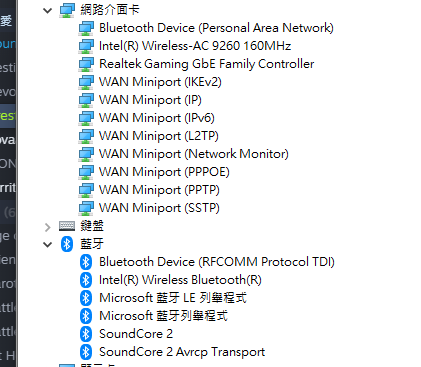
你是使用Cable 連線的, 所以驅動程式是 realtek gaming gbe family controller
以下是微軟Update 找出最新驅動
realtek gaming gbe family controller
搜powershell 右鍵點擊以系統管理員身份運行,
輸入 get-appxpackage *store* | remove-Appxpackage
輸入 add-appxpackage -register "C:\Program Files\WindowsApps\*WindowsStore*\AppxManifest.xml" -disabledevelopmentmode
刪除該資料夾在開看看
C:\Users\使用者名稱\AppData\Local\Packages\Microsoft.WindowsStore_8wekyb3d8bbwe\LocalCache
之後重新打開Store 試試。
似乎已經很多網友有這個問題, 但解決方式不確定,
我的就是每次更新 Store 會有事件識別碼 69
只是更新都是成功的
Microsoft-Windows-AppModel-Runtime/Admin
AppModel-Runtime
事件識別碼 69
但這問題已經好幾版重大更新前都已經消失, Windows 10 1909 再度出現
之前的對策是無效的!
Windows 10 error id 69 app model runtime
Also Press Windows + R and type wsreset.exe.
1.Type PowerShell in the search bar and click on run as Admin.
2.Type in the following command listed in the below under the “Remove PowerShell Command” column to remove the associated app.
3.get-appxpackage *Microsoft.Windows.Photos* | remove-appxpackage
4.The apps can be reinstalled using the Store App or by following the link listed in the table below.
5.You will need to exit the Store app if it is already open before reinstalling the app.