電腦不斷和不定時出現藍屏Error : WHEA_UNCORRECTABLE_ERROR
請問要如何解決?
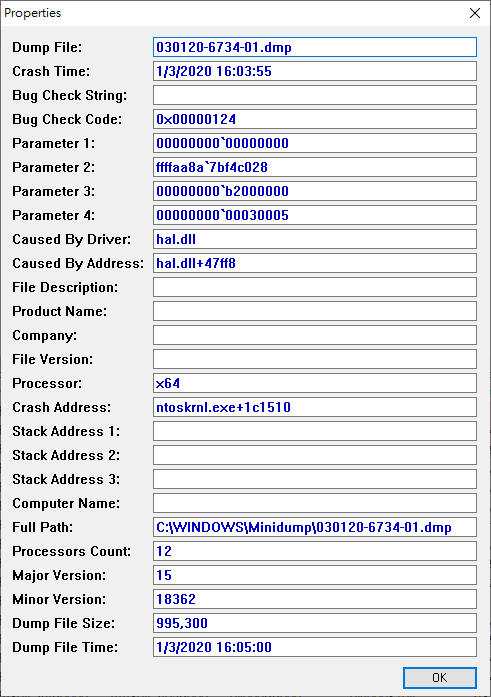
以下是用軟件WhoCrashed取得的資料:
Crash Dump Analysis
Crash dumps are enabled on your computer.
Crash dump directories:
C:\WINDOWS
C:\WINDOWS\Minidump
On Sun 1/3/2020 16:03:55 your computer crashed or a problem was reported
crash dump file: C:\WINDOWS\Minidump\030120-6734-01.dmp
This was probably caused by the following module:
hal.dll (hal+0x47FF8)
Bugcheck code: 0x124 (0x0, 0xFFFFAA8A7BF4C028, 0xB2000000, 0x30005)
Error: WHEA_UNCORRECTABLE_ERROR
file path: C:\WINDOWS\system32\hal.dll
product: MicrosoftR WindowsR Operating System
company: Microsoft Corporation
description: Hardware Abstraction Layer DLL
Bug check description: This bug check indicates that a fatal hardware error has occurred. This bug check uses the error data that is provided by the Windows Hardware Error Architecture (WHEA).
This is likely to be caused by a hardware problem.
The crash took place in the Windows kernel. Possibly this problem is caused by another driver that cannot be identified at this time.
On Sun 1/3/2020 16:03:55 your computer crashed or a problem was reported
crash dump file: C:\WINDOWS\MEMORY.DMP
This was probably caused by the following module:
pshed.dll (PSHED!PshedBugCheckSystem+0x10)
Bugcheck code: 0x124 (0x0, 0xFFFFAA8A7BF4C028, 0xB2000000, 0x30005)
Error: WHEA_UNCORRECTABLE_ERROR
file path: C:\WINDOWS\system32\pshed.dll
product: MicrosoftR WindowsR Operating System
company: Microsoft Corporation
description: 指定平台硬體錯誤驅動程式
Bug check description: This bug check indicates that a fatal hardware error has occurred. This bug check uses the error data that is provided by the Windows Hardware Error Architecture (WHEA).
This is likely to be caused by a hardware problem.
The crash took place in a Microsoft module. Your system configuration may be incorrect. Possibly this problem is caused by another driver on your system that cannot be identified at this time.
' cx='32' cy='32' r='32' /%3E%3Ctext x='50%25' y='55%25' dominant-baseline='middle' text-anchor='middle' fill='%23FFF' %3EA%3C/text%3E%3C/svg%3E)

