你当前正在访问 Microsoft Azure Global Edition 技术文档网站。 如果需要访问由世纪互联运营的 Microsoft Azure 中国技术文档网站,请访问 https://docs.azure.cn。
注释
Azure AI 搜索可通过Azure门户、REST API 和Azure SDK获取。 它也是 Foundry IQ 的基础;Foundry IQ 是一个托管式知识层,可将企业内容转化为供 Microsoft Foundry 门户中的智能体使用的、可复用且具备权限感知能力的知识库。
Important
这些特性和功能支持与其他Microsoft 服务和第三方服务的连接。 使用这些服务受其各自的条款的约束,可能会导致数据处理或存储超出Azure符合性边界,以及流入Azure符合性边界的数据。
您有责任管理您的数据是否会流出您组织的合规和地理边界之外及其任何相关影响,并确保已配置适当的权限、边界和审批。
你负责仔细查看和测试在特定用例上下文中生成的应用程序,并做出所有适当的决策和自定义。 这包括实施自己的负责任的 AI 缓解措施,例如元系统、内容筛选器或其他安全系统,并确保应用程序满足适当的质量、可靠性、安全性和可信度标准。 有关详细信息,请参阅 Azure AI 搜索 透明度说明。
提示
本文适用于使用文档布局技能的现有管道。 对于新的技能组,请使用 Azure 内容理解技能。 此技能提供更新功能,例如语义分块、AI 生成的图像说明,以及单个技能中改进的文档嵌入表提取。 要开始使用,请参阅 使用 Azure 内容理解技能对内容进行分块和向量化。
文本数据分块策略在优化 RAG 响应和性能方面具有关键作用。 通过使用 文档布局 技能,可以根据文档结构对内容进行分块,根据语义一致性(如段落和句子)捕获标题和分块内容正文。 块是独立处理的。 由于 LLM 使用多个块,因此当这些块的质量较高并且这些块在语义上连贯时,查询的整体相关性会得到提升。
文档布局技能从 Foundry Tools 中的 Azure 文档智能调用 布局模型 。 该模型使用 Markdown 语法以 JSON 格式阐明内容结构(标题和内容),并且标题和内容的字段存储在 Azure AI 搜索的搜索索引中。 从文档布局技能生成的可搜索内容为纯文本,但你可以应用集成矢量化为源文档中的任何字段(包括图像)生成嵌入。
在本文中,将学习以下内容:
- 使用文档布局技能识别文档结构
- 使用文本拆分技能将区块大小限制到每个 Markdown 节
- 为每个区块生成嵌入内容
- 使用索引投影将嵌入内容映射到搜索索引中的字段
出于说明目的,本文使用上传到 Azure Blob 存储的 示例健康计划 PDF 文件,然后使用 导入数据 向导进行索引。
先决条件
基于索引器的索引管道,其索引接受输出。 索引必须具有用于接收标题和内容的字段。
索引投影,用于一对多编制索引。
受支持的数据源,其中包含要分块的文本内容。
具有以下两种技能的技能集:
基于段落边界拆分文档的文档布局技能。 如果使用基于密钥的计费,此技能要求 Microsoft Foundry 与 Azure AI 搜索的 AI 扩充位于同一区域。 对于无密钥计费,区域要求有所放宽。
生成矢量嵌入的 Azure OpenAI 嵌入功能。 此技能 没有 区域要求。
准备数据文件
必须为原始输入使用 受支持的数据源 ,并且文件必须采用 文档布局技能支持的格式。
支持的文件格式包括 PDF、JPEG、JPG、PNG、BMP、TIFF、DOCX、XLSX、PPTX 和 HTML。
支持索引器是可以处理受支持文件格式的任何索引器。 这些索引器包括 Blob 索引器、Microsoft OneLake 索引器和文件索引器(预览版)。
此功能门户体验支持的区域包括美国东部、西欧和美国中北部。 如果要以编程方式设置技能集,则可以使用任何 Azure 文档智能区域,该区域还提供 Azure AI 搜索的 AI 扩充功能。 有关详细信息,请参阅 文档布局技能支持的区域。
可以使用 Azure 门户、REST API 或 Azure SDK 包来创建数据源。
提示
若要在您自己的搜索服务上尝试文档布局技能和结构感知分块,请将健康计划PDF示例文件上传到支持的数据源。 导入数据向导是一种简单的无代码方法,可用于试用此技能。 请务必选择“默认分析模式”以使用结构感知分块。 否则,将使用 Markdown 分析模式 。
为一对多索引编制创建索引
以下示例演示围绕区块设计的单个搜索文档。 使用区块时,需要一个区块字段和一个标识区块源的父字段。 在此示例中,父字段是 text_parent_id 字段。 子字段是 Markdown 部分的矢量区块和非矢量区块。
文档布局技能输出标题和内容。 在此示例中,header_1 到 header_3 存储通过技能检测到的文档标题。 其他内容(如段落)存储在 chunk 中。
text_vector 字段是块字段内容的矢量表示形式。
可以在 Azure 门户、REST API 或 Azure SDK 中使用 导入数据 向导 来创建索引。 以下索引与向导默认创建的索引非常相似。 如果添加图像矢量化,则可能有更多的字段。
如果不使用向导,那么在创建技能组或运行索引器之前,索引必须存在于搜索服务上。
{
  "name": "my_consolidated_index",
  "fields": [
    {
      "name": "chunk_id",
      "type": "Edm.String",
      "searchable": true,
      "filterable": false,
      "retrievable": true,
      "stored": true,
      "sortable": true,
      "facetable": false,
      "key": true,
      "analyzer": "keyword"
    },
    {
      "name": "text_parent_id",
      "type": "Edm.String",
      "searchable": false,
      "filterable": true,
      "retrievable": true,
      "stored": true,
      "sortable": false,
      "facetable": false,
      "key": false
    },
    {
      "name": "chunk",
      "type": "Edm.String",
      "searchable": true,
      "filterable": false,
      "retrievable": true,
      "stored": true,
      "sortable": false,
      "facetable": false,
      "key": false
    },
    {
      "name": "title",
      "type": "Edm.String",
      "searchable": true,
      "filterable": false,
      "retrievable": true,
      "stored": true,
      "sortable": false,
      "facetable": false,
      "key": false
    },
    {
      "name": "header_1",
      "type": "Edm.String",
      "searchable": true,
      "filterable": false,
      "retrievable": true,
      "stored": true,
      "sortable": false,
      "facetable": false,
      "key": false
    },
    {
      "name": "header_2",
      "type": "Edm.String",
      "searchable": true,
      "filterable": false,
      "retrievable": true,
      "stored": true,
      "sortable": false,
      "facetable": false,
      "key": false
    },
    {
      "name": "header_3",
      "type": "Edm.String",
      "searchable": true,
      "filterable": false,
      "retrievable": true,
      "stored": true,
      "sortable": false,
      "facetable": false,
      "key": false
    },
    {
      "name": "text_vector",
      "type": "Collection(Edm.Single)",
      "searchable": true,
      "filterable": false,
      "retrievable": true,
      "stored": true,
      "sortable": false,
      "facetable": false,
      "key": false,
      "dimensions": 1536,
      "stored": false,
      "vectorSearchProfile": "profile"
    }
  ],
  "vectorSearch": {
    "profiles": [
      {
        "name": "profile",
        "algorithm": "algorithm"
      }
    ],
    "algorithms": [
      {
        "name": "algorithm",
        "kind": "hnsw"
      }
    ]
  }
}
定义技能组以进行结构感知分块和矢量化
以下示例演示了一个技能集定义,该定义将单个 Markdown 节、区块及其向量等效项投影为搜索索引中的字段。 它使用文档布局技能根据源文档中在语义上连贯的段落和句子检测标题并填充内容字段。 它使用文本拆分技能将 Markdown 内容拆分为块。 它使用 Azure OpenAI 嵌入技能对块和你想要嵌入的任何其他字段进行矢量化。
除了技能,技能组还包括 indexProjections 和 cognitiveServices:
indexProjections用于包含分块文档的索引。 投影指明如何将父子关系的内容映射到搜索索引中的字段以进行一对多的索引。 有关详细信息,请参阅定义索引投影。cognitiveServices附加Microsoft Foundry资源以用于计费目的。 文档布局技能可通过 标准定价获得。
POST {endpoint}/skillsets?api-version=2026-04-01

{
  "name": "my_skillset",
  "description": "A skillset for structure-aware chunking and vectorization with an index projection around markdown section",
  "skills": [
    {
      "@odata.type": "#Microsoft.Skills.Util.DocumentIntelligenceLayoutSkill",
      "name": "my_document_intelligence_layout_skill",
      "context": "/document",
      "outputMode": "oneToMany",
      "inputs": [
        {
          "name": "file_data",
          "source": "/document/file_data"
        }
      ],
      "outputs": [
        {
          "name": "markdown_document",
          "targetName": "markdownDocument"
        }
      ],
      "markdownHeaderDepth": "h3"
    },
    {
      "@odata.type": "#Microsoft.Skills.Text.SplitSkill",
      "name": "my_markdown_section_split_skill",
      "description": "A skill that splits text into chunks",
      "context": "/document/markdownDocument/*",
      "inputs": [
        {
          "name": "text",
          "source": "/document/markdownDocument/*/content",
          "inputs": []
        }
      ],
      "outputs": [
        {
          "name": "textItems",
          "targetName": "pages"
        }
      ],
      "defaultLanguageCode": "en",
      "textSplitMode": "pages",
      "maximumPageLength": 2000,
      "pageOverlapLength": 500,
      "unit": "characters"
    },
    {
      "@odata.type": "#Microsoft.Skills.Text.AzureOpenAIEmbeddingSkill",
      "name": "my_azure_openai_embedding_skill",
      "context": "/document/markdownDocument/*/pages/*",
      "inputs": [
        {
          "name": "text",
          "source": "/document/markdownDocument/*/pages/*",
          "inputs": []
        }
      ],
      "outputs": [
        {
          "name": "embedding",
          "targetName": "text_vector"
        }
      ],
      "resourceUri": "https://<subdomain>.openai.azure.com",
      "deploymentId": "text-embedding-3-small",
      "apiKey": "<Azure OpenAI api key>",
      "modelName": "text-embedding-3-small"
    }
  ],
  "cognitiveServices": {
    "@odata.type": "#Microsoft.Azure.Search.CognitiveServicesByKey",
    "key": "<Cognitive Services api key>"
  },
  "indexProjections": {
    "selectors": [
      {
        "targetIndexName": "my_consolidated_index",
        "parentKeyFieldName": "text_parent_id",
        "sourceContext": "/document/markdownDocument/*/pages/*",
        "mappings": [
          {
            "name": "text_vector",
            "source": "/document/markdownDocument/*/pages/*/text_vector"
          },
          {
            "name": "chunk",
            "source": "/document/markdownDocument/*/pages/*"
          },
          {
            "name": "title",
            "source": "/document/title"
          },
          {
            "name": "header_1",
            "source": "/document/markdownDocument/*/sections/h1"
          },
          {
            "name": "header_2",
            "source": "/document/markdownDocument/*/sections/h2"
          },
          {
            "name": "header_3",
            "source": "/document/markdownDocument/*/sections/h3"
          }
        ]
      }
    ],
    "parameters": {
      "projectionMode": "skipIndexingParentDocuments"
    }
  }
}
配置和运行索引器
创建数据源、索引和技能集后, 创建并运行索引器。 此步骤会将管道置于执行状态。
使用 文档布局技能时,在索引器定义上设置以下参数:
- 将
allowSkillsetToReadFileData参数设置为true。 - 将
parsingMode参数设置为default。
无需在此方案中设置 outputFieldMappings ,因为 indexProjections 处理源字段以搜索字段关联。 索引投影处理文档布局技能的字段关联,并且还借助拆分技能对导入和矢量化的数据工作负载进行常规分块。 你仍然需要适用于转换的输出字段映射,或适用于其他情况的函数的复杂数据映射。 但是,对于每个文档的 n 个块,索引投影可以以原生方式实现这种功能。
下面是索引器创建请求的示例。
POST {endpoint}/indexers?api-version=2026-04-01

{
  "name": "my_indexer",
  "dataSourceName": "my_blob_datasource",
  "targetIndexName": "my_consolidated_index",
  "skillsetName": "my_skillset",
  "parameters": {
    "batchSize": 1,
    "configuration": {
        "dataToExtract": "contentAndMetadata",
        "parsingMode": "default",
        "allowSkillsetToReadFileData": true
    }
  },
  "fieldMappings": [
    {
      "sourceFieldName": "metadata_storage_path",
      "targetFieldName": "title"
    }
  ],
  "outputFieldMappings": []
}
将请求发送到搜索服务时,索引器将运行。
验证结果
你可以在处理结束后查询你的搜索索引以测试你的解决方案。
若要检查结果,请针对索引运行查询。 使用搜索资源管理器作为搜索客户端或发送 HTTP 请求的任何工具。 以下查询选择的字段包含 Markdown 部分非矢量内容及其矢量的结果。
对于搜索资源管理器,可以仅复制 JSON 并将其粘贴到 JSON 视图中以进行查询执行。
POST /indexes/[index name]/docs/search?api-version=[api-version]
{
  "search": "copay for in-network providers",
  "count": true,
  "searchMode": "all",
  "vectorQueries": [
    {
      "kind": "text",
      "text": "*",
      "fields": "text_vector,image_vector"
    }
  ],
  "queryType": "semantic",
  "semanticConfiguration": "healthplan-doc-layout-test-semantic-configuration",
  "captions": "extractive",
  "answers": "extractive|count-3",
  "select": "header_1, header_2, header_3"
}
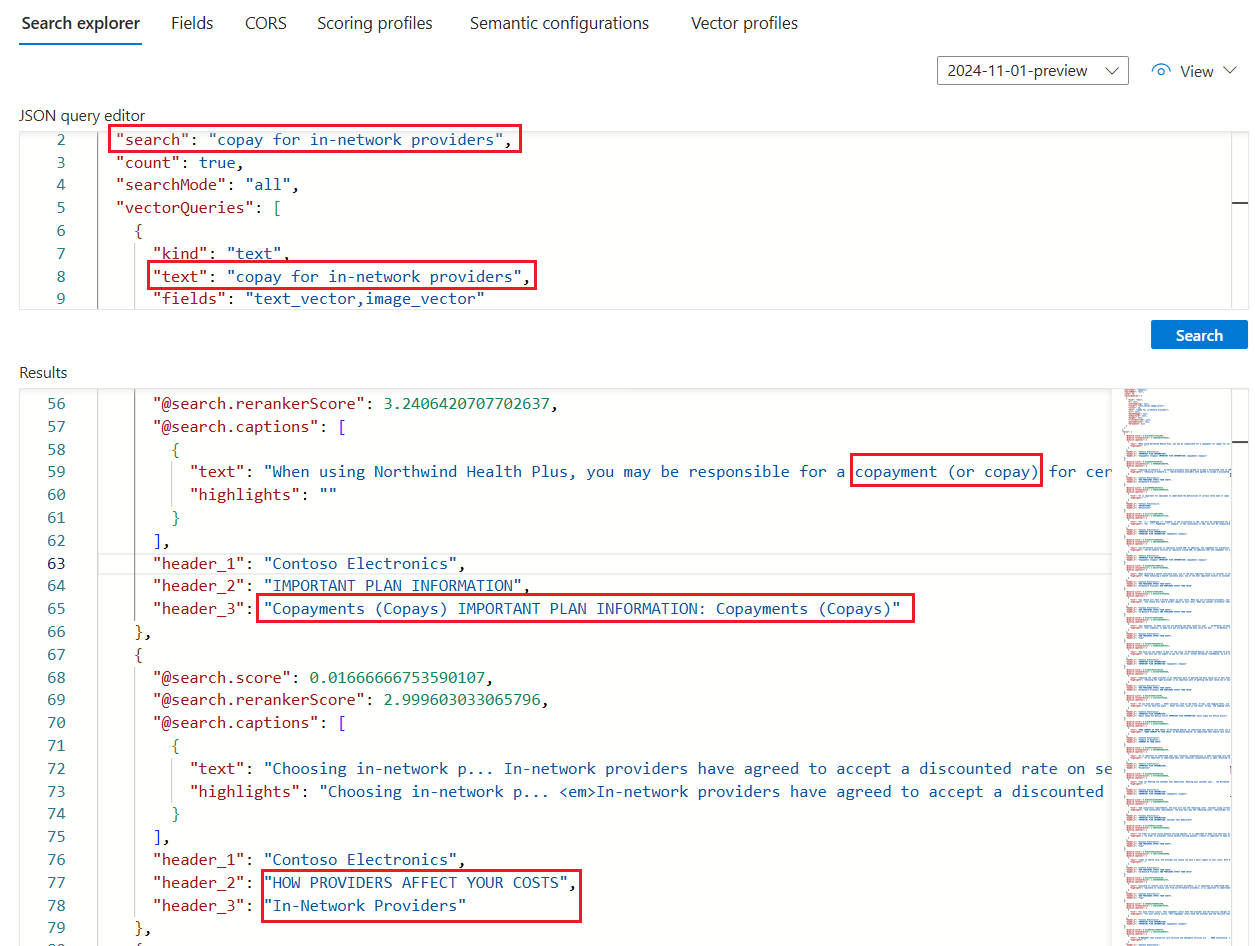
如果使用了健康计划 PDF 测试此技能,示例查询的搜索资源管理器结果应类似于以下屏幕截图中的结果。
查询是对文本和矢量的混合查询,因此你会看到
@search.rerankerScore并且结果按该分数进行排名。searchMode=all意味着,对于一个匹配项,必须考虑到所有查询词(默认值为“any”)。查询使用语义排名,因此可以看到
captions。 它还包含answers,但它们未显示在屏幕截图中。 结果在语义上与查询输入最相关(由语义排序器确定)。select语句(未显示在屏幕截图中)指定文档布局技能检测并填充的标题字段。 可以向 select 子句添加更多字段,以便检查数据块、标题或任何其他便于人阅读的字段的内容。