Topic: TPM 2.0 / Secure Boot / AIK attestation (Windows security).
Posted under "Other" because no matching Windows 10 sub-topic exists.
Summary
Windows AIK certificate enrollment (SCEP / AIK) fails with HTTP 404 "The authority does not exist"
against the Microsoft Azure AIK service. The failing KeyId is derived from the Authority Key
Identifier of this machine's Intel PTT endorsement key certificate, so it is fixed per device.
This blocks Call of Duty secure attestation (Ricochet reports "BIOS firmware update required /
verification failed"), even after a BIOS update, TPM clear and re-provisioning.
Hardware / OS
- Motherboard: ASUS EX-B760M-V5 D4 (BIOS 1838, updated from 1601 on 2026-11-22; latest available 1846)
- CPU: Intel Core i5-13400F (13th gen)
- OS: Windows 10 Pro 22H2, build 19045.5912, UEFI boot, Secure Boot ON
- TPM: Intel PTT 2.0, manufacturer INTC, firmware 600.18.1040.2765, spec 1.38, EK certificate present
Reproduction (built-in command, no third-party tool)
certreq -enrollaik -config ""
Output:
TPM-Version:2.0 -Level:0-Revision:1.38-VendorID:'INTC'-Firmware:39321618.68160205
INTC-KeyId-75d8da94f022e7e8b0487dfe7c9cb5bbd4d50a09
CN=CSME ADL PTT 01SVN
https://INTC-KeyId-75d8da94f022e7e8b0487dfe7c9cb5bbd4d50a09.microsoftaik.azure.net/templates/Aik/scep
GetCACaps
GetCACaps: Not Found
{"Message":"The authority "intc-keyid-75d8da94f022e7e8b0487dfe7c9cb5bbd4d50a09.microsoftaik.azure.net" does not exist."}
HTTP/1.1 404 Not Found
EnrollStage = 140, error 0x80190194
Event log: Application / Microsoft-Windows-CertificateServicesClient-CertEnroll, Event ID 86,
repeats every ~4 seconds with the same 404. Direct GET of the same URL from the machine also
returns 404, so this is not a local network or proxy issue.
Key finding that rules out local fixes
The KeyId in the URL equals the Authority Key Identifier extension inside the EK certificate:
AKI = 75D8DA94F022E7E8B0487DFE7C9CB5BBD4D50A09
EK issuer = CN=CSME ADL PTT 01SVN
Because the KeyId is contained in the EK certificate, it cannot be changed by updating BIOS,
clearing the TPM, resetting Secure Boot keys, or importing intermediate CAs locally.
Windows also self-reports the TPM as not attestation-capable:
tpmtool getdeviceinformation -> "Ready For Attestation: False", "Is Capable For Attestation: False",
Information Flags 0x00000002 (EK certificate only)
Already performed, with no change in behaviour
- BIOS 1601 -> 1838 flash via EZ Flash 3 (CAP hash verified); COD prompt unchanged
- Secure Boot verified (UEFI Windows mode, default keys present, Confirm-SecureBootUEFI = True)
- TPM cleared and re-provisioned (Clear-Tpm / Initialize-Tpm, RestartPending cleared)
- Intel OnDie CA root and intermediates imported to Local Computer\CA (OnDie CA Root, ODCA CA2 CSME Intermediate, ODCA 2 CSME P_ADL 00002226 Issuing CA); EK chain still returns PartialChain because the immediate issuer CN=CSME ADL PTT 01SVN exists only in TPM NV (index 0x01C00100) and cannot be read on this system: Tbsi_Context_Create returns 0x8028400F (TBS_E_TPM_NOT_FOUND) for admin and SYSTEM alike
- Memory Integrity (HVCI) and VBS enabled (now active, VBS status = running)
- No proxy/VPN/accelerator installed; C:\Windows\System32\ricochet absent
Request
- Please register the Intel CA authority for the KeyId above in the AIK service (INTC-KeyId-75d8da94f022e7e8b0487dfe7c9cb5bbd4d50a09), or confirm whether this CA (CN=CSME ADL PTT 01SVN, EK chain for Intel PTT on ADL/13th-gen) is scheduled to be added.
- If this is a known gap, please share the tracking ID / ETA.
- If a client-side workaround exists for Intel PTT EK chains that cannot read NV 0x01C00100, please describe it, including how to import the three embedded intermediates (CSME ADL ROM CA, CSME ADL SVN01 Kernel CA, CSME ADL PTT 01SVN) on a system where TBS is unavailable.
Attachments
01-游戏弹窗截图.png Ricochet prompt ("BIOS firmware update required / verification failed")
02-certreq-enrollaik-404.txt full certreq -enrollaik output with the 404 payload
03-事件日志ID86.txt event log samples (Event ID 86)
04-tpmtool设备信息.txt tpmtool getdeviceinformation output
05-TpmInformation.txt full TPM diagnostic dump
06-ek-cert.cer / .txt EK certificate (contains AKI = KeyId)
07-TBS读取失败记录.txt TBS/NV read failure record
03-事件日志ID86.txt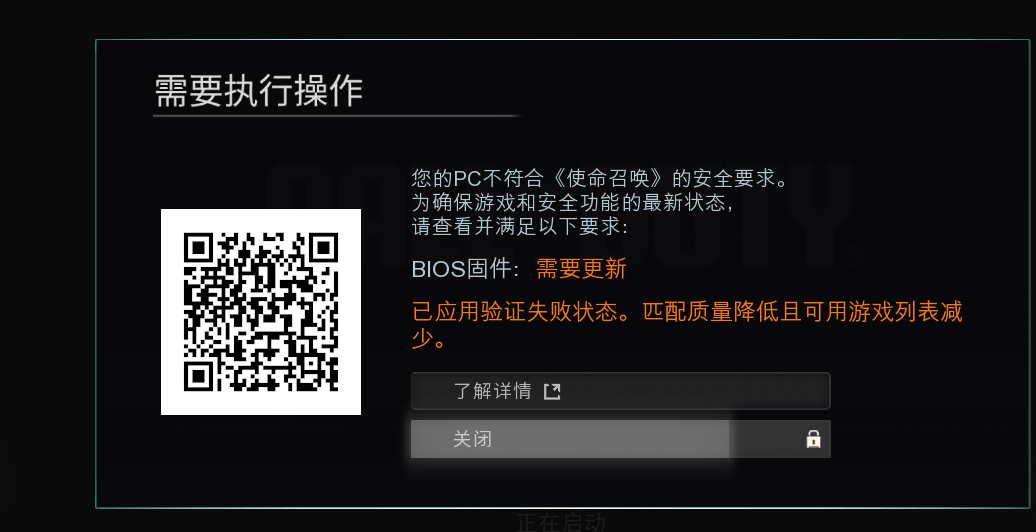 |
[2026-11-22 22:27:26] ID=86
通过 https://INTC-KeyId-75d8da94f022e7e8b0487dfe7c9cb5bbd4d50a09.microsoftaik.azure.net/templates/Aik/scep 为 本地系统 执行 SCEP 证书注册初始化失败:
GetCACaps: Not Found
{"Message":"The authority \"intc-keyid-75d8da94f022e7e8b0487dfe7c9cb5bbd4d50a09.microsoftaik.azure.net\" does not exist."}
' cx='32' cy='32' r='32' /%3E%3Ctext x='50%25' y='55%25' dominant-baseline='middle' text-anchor='middle' fill='%23FFF' %3EA%3C/text%3E%3C/svg%3E)

' cx='32' cy='32' r='32' /%3E%3Ctext x='50%25' y='55%25' dominant-baseline='middle' text-anchor='middle' fill='%23FFF' %3ECL%3C/text%3E%3C/svg%3E)