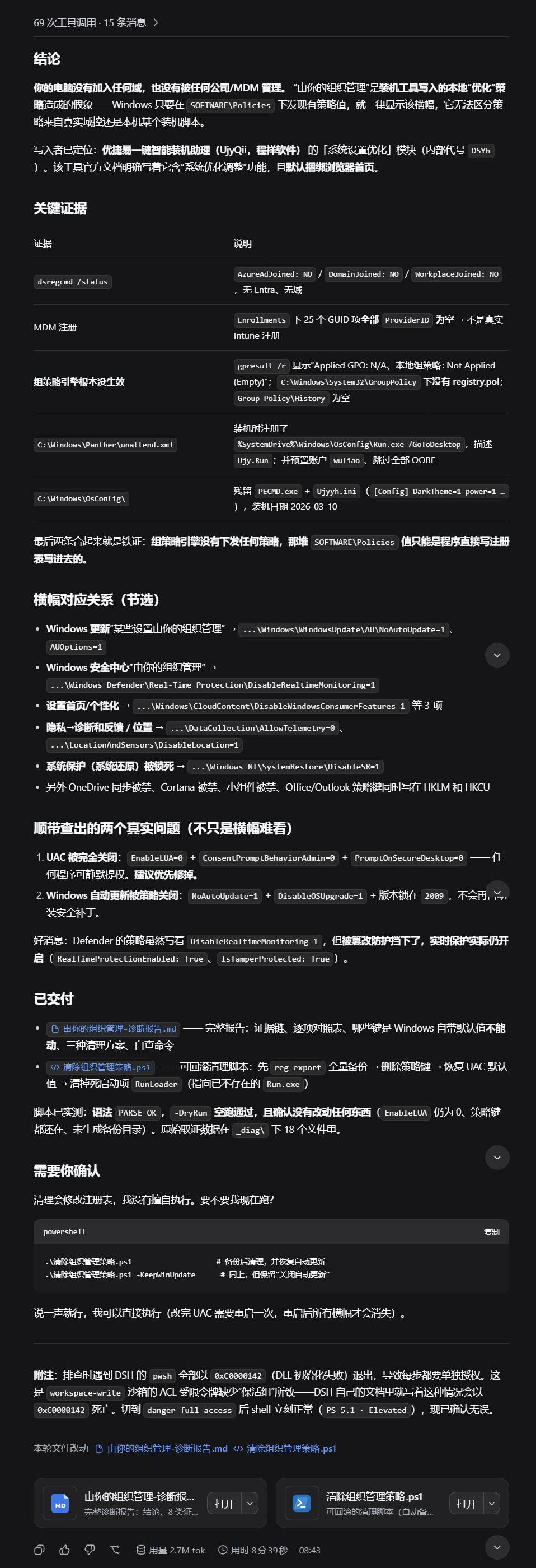
我使用的deepseek进行搜索得到该结果,但可能出现未知的bug,如导致chorme插件失效,需要重新安装插件
#Requires -Version 5.1
<#
.SYNOPSIS
    一键修复:清理「由你的组织管理」策略 + 修复标准用户读不到的文件/目录权限。
.DESCRIPTION
    把原来的三个脚本整合成一个:
      1) 清除「由你的组织管理」横幅
         —— 来源是优捷易一键装机助理(UjyQii / OSYh 模块)装机时直接写进
            HKLM/HKCU\SOFTWARE\Policies 的企业级策略值。本机并未加入任何域或 MDM。
      2) 修复 Chrome / Edge 扩展目录权限
         —— 症状「此扩展程序可能已损坏」。真实原因不是文件损坏,而是那些目录的 ACL
            缺少当前用户的 ACE(只剩 SYSTEM + Administrators)。
    为什么这两件事要放一起(实测结论,请勿改回去):
      UAC 关闭时,所有进程都持有完整管理员令牌,会把这些「只有管理员能访问」的权限
      缺陷完全掩盖;一旦 UAC 恢复正常,Chrome 这类标准用户进程立刻读不到自己的扩展
      目录。所以:UAC 应当保持开启(关闭是明确的安全降级),正确做法是修目录权限。
.PARAMETER Action
    Scan  仅诊断,只读,不修改任何东西(默认)。建议永远先跑这个。
    Fix   执行修复。需要管理员权限。
    Undo  不修复,改为从最近的备份目录导入 .reg 回滚注册表策略。
.PARAMETER RestoreUAC
    Fix 时把 UAC 恢复为 Windows 默认(EnableLUA=1 / 提示同意 / 安全桌面提示)。
    默认完全不碰 UAC。
.PARAMETER KeepWinUpdate
    保留「关闭 Windows 自动更新 / 锁定版本」相关策略(默认会删除,即恢复自动更新)。
.PARAMETER RemoveOfficePolicy
    一并删除 Office/Outlook 策略键。对 Office 2016+(16.0)来说 12.0/14.0/15.0 本来就是死键。
.PARAMETER RemoveUnknown
    一并删除来源不明的 Windows NT\Windows File Protection\KnownDllList。
.PARAMETER RemoveOsConfig
    一并删除装机工具残留目录 C:\Windows\OsConfig。
.PARAMETER SkipExtensions
    跳过 Chrome / Edge 扩展目录的权限检查与修复。
.PARAMETER ExtraPath
    额外要检查/修复权限的目录,可给多个。用于本机其它同样「只有管理员能读」的目录。
.PARAMETER BackupDir
    Undo 时指定备份目录;不给则自动选脚本同目录下最新的「组织管理策略备份-*」。
.EXAMPLE
    .\一键修复.ps1
    先诊断,什么都不改。
.EXAMPLE
    .\一键修复.ps1 -Action Fix
    管理员身份执行完整修复。
.EXAMPLE
    .\一键修复.ps1 -Action Undo
    回滚到最近一次修复前的状态。
.NOTES
    被脚本执行策略拦截时用:
      powershell -NoProfile -ExecutionPolicy Bypass -File ".\一键修复.ps1"
#>
[CmdletBinding()]
param(
    [ValidateSet('Scan', 'Fix', 'Undo')]
    [string]$Action = 'Scan',
    [switch]$RestoreUAC,
    [switch]$KeepWinUpdate,
    [switch]$RemoveOfficePolicy,
    [switch]$RemoveUnknown,
    [switch]$RemoveOsConfig,
    [switch]$SkipExtensions,
    [string[]]$ExtraPath,
    [string]$BackupDir
)
$ScriptVersion = 'v3 整合版 (2026-09-25)'
$ErrorActionPreference = 'Continue'
$scriptDir = if ($PSScriptRoot) { $PSScriptRoot } else { (Get-Location).Path }
$Me        = "$env:USERDOMAIN\$env:USERNAME"
$IsElevated = $false
# ==================================================================== 输出助手
function Say  { param($m, $c = 'Gray') Write-Host "    $m" -ForegroundColor $c }
function Step { param($m)              Write-Host "`n==> $m" -ForegroundColor Cyan }
function Ok   { param($m)              Write-Host "    [OK]   $m" -ForegroundColor Green }
function Act  { param($m)              Write-Host "    [处理] $m" -ForegroundColor Yellow }
function Skip { param($m)              Write-Host "    [跳过] $m" -ForegroundColor DarkGray }
function Warn { param($m)              Write-Host "    [注意] $m" -ForegroundColor Magenta }
function Bad  { param($m)              Write-Host "    [问题] $m" -ForegroundColor Red }
# ==================================================================== 基础封装
function Test-RegKey     { param($k)         & reg query $k 2>&1 | Out-Null; $LASTEXITCODE -eq 0 }
function Test-RegValue   { param($k, $v)     & reg query $k /v $v 2>&1 | Out-Null; $LASTEXITCODE -eq 0 }
function Remove-RegKey   { param($k)         & reg delete $k /f 2>&1 | Out-Null; $LASTEXITCODE -eq 0 }
function Remove-RegValue { param($k, $v)     & reg delete $k /v $v /f 2>&1 | Out-Null; $LASTEXITCODE -eq 0 }
function Set-RegDword    { param($k, $v, $d) & reg add $k /v $v /t REG_DWORD /d $d /f 2>&1 | Out-Null; $LASTEXITCODE -eq 0 }
function Get-RegDword    { param($k, $v)     (Get-ItemProperty -Path "Registry::$k" -Name $v -ErrorAction SilentlyContinue).$v }
function Test-IsElevated {
    # 关键:UAC 过滤令牌下 Administrators 是 deny-only,
    # WindowsPrincipal.IsInRole(Administrator) 会误报 True,必须看完整性级别。
    return ((((& whoami /groups) -join "`n") -match 'S-1-16-12288'))
}
# ==================================================================== 策略目标清单
function Get-PolicyTargets {
    # (1) 整个键都是装机工具写的 —— 整键删除
    $whole = [ordered]@{
        'Windows 更新页横幅 / 恢复自动更新' = @(
            'HKLM\SOFTWARE\Policies\Microsoft\Windows\WindowsUpdate'
        )
        '设置首页 / 个性化 / 聚焦推荐' = @(
            'HKLM\SOFTWARE\Policies\Microsoft\Windows\CloudContent'
            'HKCU\SOFTWARE\Policies\Microsoft\Windows\CloudContent'
        )
        '隐私 - 位置和传感器' = @(
            'HKLM\SOFTWARE\Policies\Microsoft\Windows\LocationAndSensors'
        )
        '地图离线数据' = @(
            'HKLM\SOFTWARE\Policies\Microsoft\Windows\Maps'
        )
        'OneDrive 文件同步' = @(
            'HKLM\SOFTWARE\Policies\Microsoft\Windows\OneDrive'
        )
        '任务栏搜索 / Cortana' = @(
            'HKLM\SOFTWARE\Policies\Microsoft\Windows\Windows Search'
            'HKCU\SOFTWARE\Policies\Microsoft\Windows\Explorer'
        )
        '小组件 (资讯和兴趣)' = @(
            'HKLM\SOFTWARE\Policies\Microsoft\Windows\Windows Feeds'
        )
        '系统还原 / MSI 超时' = @(
            'HKLM\SOFTWARE\Policies\Microsoft\Windows NT\SystemRestore'
            'HKLM\SOFTWARE\Policies\Microsoft\Windows\Installer'
        )
        'Windows 安全中心横幅' = @(
            'HKLM\SOFTWARE\Policies\Microsoft\Windows Defender\Real-Time Protection'
            'HKLM\SOFTWARE\Policies\Microsoft\Windows Defender Security Center'
        )
        '其它去广告 / 去遥测项' = @(
            'HKLM\SOFTWARE\Policies\Microsoft\MRT'
            'HKLM\SOFTWARE\Policies\Microsoft\PushToInstall'
            'HKLM\SOFTWARE\Policies\Microsoft\SQMClient'
            'HKLM\SOFTWARE\Policies\Microsoft\Windows\Gwx'
            'HKLM\SOFTWARE\Policies\Microsoft\Windows\safer'
            'HKCU\SOFTWARE\Policies\Power'
        )
    }
    if ($RemoveOfficePolicy) {
        $whole['Office / Outlook 死键'] = @(
            'HKLM\SOFTWARE\Policies\Microsoft\Office'
            'HKCU\SOFTWARE\Policies\Microsoft\Office'
        )
    }
    if ($RemoveUnknown) {
        $whole['来源不明的策略'] = @(
            'HKLM\SOFTWARE\Policies\Microsoft\Windows NT\Windows File Protection'
        )
    }
    # (2) Windows 自己会重建的容器键 —— 只删值、保留键本身
    $values = @(
        @{ Key = 'HKLM\SOFTWARE\Policies\Microsoft\Windows\DataCollection'; Value = 'AllowTelemetry' }
        @{ Key = 'HKLM\SOFTWARE\Policies\Microsoft\Windows\DataCollection'; Value = 'DoNotShowFeedbackNotifications' }
        @{ Key = 'HKCU\SOFTWARE\Policies\Microsoft\Windows\DataCollection'; Value = 'AllowTelemetry' }
        @{ Key = 'HKLM\SOFTWARE\Policies\Microsoft\Windows Defender';       Value = 'DisableRoutinelyTakingAction' }
    )
    return @{ Whole = $whole; Values = $values }
}
# ==================================================================== 权限检查
function Get-AclSafe {
    param([string]$Path)
    try { return Get-Acl -LiteralPath $Path -ErrorAction Stop } catch { return $null }
}
function Test-DirReadable {
    param([string]$Path)
    try { [void](Get-ChildItem -LiteralPath $Path -Force -ErrorAction Stop); return $true }
    catch { return $false }
}
function Test-UserHasAllowAce {
    # 判断当前标准用户(或 Users 组)是否在 DACL 里被授权,且没有被显式 Deny。
    param($Acl, [string]$User)
    if (-not $Acl) { return $false }
    $deny = @($Acl.Access | Where-Object {
        $_.AccessControlType -eq 'Deny' -and $_.IdentityReference.Value -eq $User
    })
    if ($deny.Count -gt 0) { return $false }
    $allow = @($Acl.Access | Where-Object {
        $_.AccessControlType -eq 'Allow' -and (
            $_.IdentityReference.Value -eq $User -or
            $_.IdentityReference.Value -eq 'Everyone' -or
            $_.IdentityReference.Value -match '\\(Users|Everyone|Authenticated Users)$'
        )
    })
    return ($allow.Count -gt 0)
}
function Test-OnePath {
    # 返回 $null 表示正常;否则返回问题描述对象。
    param([string]$Path)
    $acl      = Get-AclSafe $Path
    $readable = Test-DirReadable $Path
    $hasAce   = Test-UserHasAllowAce $acl $Me
    if ($acl -and $readable -and $hasAce) { return $null }
    return [PSCustomObject]@{
        Path      = $Path
        AclReadable = ($null -ne $acl)
        HasUserAce  = $hasAce
        Enumerable  = $readable
        AceCount    = if ($acl) { @($acl.Access).Count } else { -1 }
        Inherited   = if ($acl) { @($acl.Access | Where-Object { $_.IsInherited }).Count } else { -1 }
        Owner       = if ($acl) { $acl.Owner } else { '(读不到)' }
    }
}
function Find-BadPaths {
    # 浏览器扩展目录(Chrome / Edge,全部配置文件)+ 用户额外指定的目录
    $bad = New-Object System.Collections.Generic.List[object]
    if (-not $SkipExtensions) {
        $browserDataRoots = @(
            (Join-Path $env:LOCALAPPDATA 'Google\Chrome\User Data')
            (Join-Path $env:LOCALAPPDATA 'Microsoft\Edge\User Data')
        )
        foreach ($dataRoot in $browserDataRoots) {
            if (-not (Test-Path $dataRoot)) { continue }
            foreach ($profile in (Get-ChildItem $dataRoot -Directory -ErrorAction SilentlyContinue)) {
                $extRoot = Join-Path $profile.FullName 'Extensions'
                if (-not (Test-Path $extRoot)) { continue }
                foreach ($idDir in (Get-ChildItem $extRoot -Directory -ErrorAction SilentlyContinue)) {
                    $sub = @(Get-ChildItem $idDir.FullName -Directory -Force -ErrorAction SilentlyContinue)
                    $targets = if ($sub.Count -gt 0) { $sub } else { @($idDir) }
                    foreach ($t in $targets) {
                        $r = Test-OnePath $t.FullName
                        if ($r) { $bad.Add($r) }
                    }
                }
            }
        }
    }
    foreach ($x in $ExtraPath) {
        if (-not $x) { continue }
        if (-not (Test-Path $x)) { Warn "ExtraPath 不存在,跳过: $x"; continue }
        $r = Test-OnePath $x
        if ($r) { $bad.Add($r) } else { Ok "ExtraPath 正常: $x" }
    }
    return $bad
}
function Repair-OnePath {
    param([string]$Path)
    $r = [ordered]@{}
    $r['takeown'] = ((cmd /c "takeown /f `"$Path`" /r /d y /a"  2>&1) -join ' / ')
    $r['reset']   = ((cmd /c "icacls `"$Path`" /reset /T /C /Q" 2>&1) -join ' / ')
    $r['label']   = ((cmd /c "icacls `"$Path`" /setintegritylevel `"(OI)(CI)Medium`" /T /C /Q" 2>&1) -join ' / ')
    return $r
}
function Show-PathProblems {
    param($Bad, [string]$Title)
    Step $Title
    if ($Bad.Count -eq 0) { Ok '没有发现问题目录'; return }
    Bad "$($Bad.Count) 个目录当前对标准用户不可用:"
    $Bad | ForEach-Object {
        Write-Host ("      {0}" -f $_.Path) -ForegroundColor DarkYellow
        Write-Host ("          ACL可读={0}  用户有Allow={1}  可枚举={2}  继承ACE={3}/{4}  所有者={5}" -f `
            $_.AclReadable, $_.HasUserAce, $_.Enumerable, $_.Inherited, $_.AceCount, $_.Owner) -ForegroundColor DarkGray
    }
    Warn '判据:DACL 里必须有当前用户(或 Users 组)的 Allow ACE。只有 SYSTEM + Administrators 就是有问题的。'
}
# ==================================================================== 环境
Write-Host '==============================================================' -ForegroundColor White
Write-Host " 一键修复  $ScriptVersion" -ForegroundColor White
Write-Host '==============================================================' -ForegroundColor White
Write-Host " Action = $Action" -ForegroundColor White
$IsElevated = Test-IsElevated
$lua = Get-RegDword 'HKLM\SOFTWARE\Microsoft\Windows\CurrentVersion\Policies\System' 'EnableLUA'
Step '环境'
Say "用户       : $Me"
Say "完整性令牌 : $(if ($IsElevated) { 'High / 已提权' } else { 'Medium / 未提权' })"
Say "EnableLUA  : $lua  $(if ($lua -eq 0) { '<= UAC 被关闭,属安全降级' } else { '(UAC 正常)' })"
if (-not $IsElevated) { Warn '未提权:Scan 可用;Fix 需要管理员权限。' }
# ==================================================================== Undo
if ($Action -eq 'Undo') {
    Step '回滚模式'
    if (-not $BackupDir) {
        $cand = Get-ChildItem -Path $scriptDir -Directory -Filter '组织管理策略备份-*' -ErrorAction SilentlyContinue |
                Sort-Object Name -Descending | Select-Object -First 1
        if (-not $cand) { throw "在 $scriptDir 下找不到任何「组织管理策略备份-*」目录,请用 -BackupDir 指定。" }
        $BackupDir = $cand.FullName
    }
    if (-not (Test-Path $BackupDir)) { throw "备份目录不存在: $BackupDir" }
    Ok "使用备份: $BackupDir"
    if (-not $IsElevated) { Warn '未提权,导入 HKLM 部分可能失败' }
    Get-ChildItem -Path $BackupDir -Filter '*.reg' | ForEach-Object {
        & reg import $_.FullName 2>&1 | Out-Null
        if ($LASTEXITCODE -eq 0) { Ok "已导入 $($_.Name)" } else { Warn "导入失败 $($_.Name)" }
    }
    Warn '注意:备份只覆盖注册表策略。文件/目录 ACL 的修复不会被回滚(也不需要回滚)。'
    Step '刷新策略'
    & gpupdate /force 2>&1 | Out-Null
    Ok '已刷新。建议重启一次。'
    return
}
# ==================================================================== Scan
$targets = Get-PolicyTargets
if ($Action -eq 'Scan') {
    Step '一、策略扫描 ——「由你的组织管理」的来源'
    $hit = 0
    foreach ($group in $targets.Whole.Keys) {
        $found = @($targets.Whole[$group] | Where-Object { Test-RegKey $_ })
        if ($found.Count -eq 0) { continue }
        Write-Host "  [$group]" -ForegroundColor White
        foreach ($k in $found) { Bad $k; $hit++ }
    }
    foreach ($t in $targets.Values) {
        if (Test-RegValue $t.Key $t.Value) { Bad "$($t.Key)  \  $($t.Value)"; $hit++ }
    }
    if ($hit -eq 0) { Ok '没有发现任何已知的装机工具策略值' }
    Step '二、Policies 树下现有的所有子键(供人工核对,不一定要删)'
    foreach ($root in @('HKLM\SOFTWARE\Policies\Microsoft', 'HKCU\SOFTWARE\Policies\Microsoft')) {
        Write-Host "  --- $root ---" -ForegroundColor White
        $keys = @()
        if (Test-RegKey $root) {
            $keys = (Get-ChildItem -Path "Registry::$root" -ErrorAction SilentlyContinue |
                     Select-Object -ExpandProperty PSChildName | Sort-Object)
        }
        if ($keys.Count -eq 0) { Say '(无)' } else { $keys | ForEach-Object { Say $_ } }
    }
    $bad = Find-BadPaths
    Show-PathProblems $bad '三、浏览器扩展目录 / 额外目录 的权限'
    Step '四、装机工具残留'
    $runVal = (Get-ItemProperty -Path 'Registry::HKLM\SOFTWARE\WOW6432Node\Microsoft\Windows\CurrentVersion\Run' `
                                -Name 'RunLoader' -ErrorAction SilentlyContinue).RunLoader
    if ($runVal) { Bad "死启动项 RunLoader = $runVal" } else { Ok 'RunLoader 不存在' }
    if (Test-Path 'C:\Windows\OsConfig') { Warn '残留目录存在: C:\Windows\OsConfig' } else { Ok 'C:\Windows\OsConfig 不存在' }
    Step '汇总'
    Say "策略命中        : $hit"
    Say "权限问题目录    : $($bad.Count)"
    Say ''
    Say '确认无误后执行修复:' White
    Say '  .\一键修复.ps1 -Action Fix                    (需要管理员身份)' White
    Say '  .\一键修复.ps1 -Action Fix -RestoreUAC        (同时恢复 UAC 默认值)' White
    Say '  .\一键修复.ps1 -Action Fix -RemoveOfficePolicy -RemoveUnknown -RemoveOsConfig' White
    return
}
# ==================================================================== Fix
if (-not $IsElevated) {
    Warn 'Fix 需要管理员权限(会用到 HKLM 写入、takeown、icacls)。'
    Warn '请右键「以管理员身份运行」,或使用下面这条命令:'
    Say ('powershell -NoProfile -ExecutionPolicy Bypass -File "' + $PSCommandPath + '" -Action Fix') White
    throw '未提权,已中止。'
}
$stamp   = Get-Date -Format 'yyyyMMdd-HHmmss'
$backup  = Join-Path $scriptDir "组织管理策略备份-$stamp"
$logFile = Join-Path $backup "run-$stamp.log"
$acted   = 0
Step '备份当前策略'
New-Item -ItemType Directory -Force -Path $backup | Out-Null
$exports = [ordered]@{
    'HKLM-SOFTWARE-Policies.reg'       = 'HKLM\SOFTWARE\Policies'
    'HKCU-SOFTWARE-Policies.reg'       = 'HKCU\SOFTWARE\Policies'
    'HKLM-CurrentVersion-Policies.reg' = 'HKLM\SOFTWARE\Microsoft\Windows\CurrentVersion\Policies'
    'HKLM-WOW6432-Run.reg'             = 'HKLM\SOFTWARE\WOW6432Node\Microsoft\Windows\CurrentVersion\Run'
}
$allOk = $true
foreach ($f in $exports.Keys) {
    $dest = Join-Path $backup $f
    & reg export $exports[$f] $dest /y 2>&1 | Out-Null
    if ((Test-Path $dest) -and ((Get-Item $dest).Length -gt 0)) { Ok $f }
    else { Warn "导出失败或为空: $f"; $allOk = $false }
}
if (-not $allOk) { throw '备份不完整,已中止(未做任何修改)。' }
Start-Transcript -Path $logFile -Force | Out-Null
Say "回滚: .\一键修复.ps1 -Action Undo" DarkGray
Step '一、清理策略键'
foreach ($group in $targets.Whole.Keys) {
    Write-Host "  [$group]" -ForegroundColor White
    foreach ($key in $targets.Whole[$group]) {
        if ($group -eq 'Windows 更新页横幅 / 恢复自动更新' -and $KeepWinUpdate) { Skip "$key  (-KeepWinUpdate)"; continue }
        if (-not (Test-RegKey $key)) { Skip "$key  (不存在)"; continue }
        if (Remove-RegKey $key) { Act $key; $acted++ } else { Warn "删除失败: $key" }
    }
}
Step '二、清理 Windows 维护容器里的策略值(保留键本身)'
foreach ($t in $targets.Values) {
    if (-not (Test-RegValue $t.Key $t.Value)) { Skip "$($t.Key) \ $($t.Value)  (不存在)"; continue }
    if (Remove-RegValue $t.Key $t.Value) { Act "$($t.Key) \ $($t.Value)"; $acted++ }
    else { Warn "删除失败: $($t.Key)\$($t.Value)" }
}
Step '三、用户账户控制 (UAC)'
if ($RestoreUAC) {
    Warn '你显式要求恢复 UAC 默认值。'
    Warn '提醒:UAC 关闭期间所有进程都持有完整管理员令牌,会掩盖「只有提升进程能访问」的'
    Warn '      权限问题。开启后 Chrome 等标准用户程序可能立刻读不到某些目录'
    Warn '      (典型症状:扩展提示「此扩展程序可能已损坏」)。本脚本第四节会一并修掉。'
    $uacKey = 'HKLM\SOFTWARE\Microsoft\Windows\CurrentVersion\Policies\System'
    foreach ($item in @(
        @{ Name = 'EnableLUA';                  Value = 1 }
        @{ Name = 'ConsentPromptBehaviorAdmin'; Value = 5 }
        @{ Name = 'PromptOnSecureDesktop';      Value = 1 }
    )) {
        $cur = Get-RegDword $uacKey $item.Name
        if ($null -ne $cur -and [int]$cur -eq $item.Value) { Skip "$($item.Name) 已是 $($item.Value)"; continue }
        if (Set-RegDword $uacKey $item.Name $item.Value) { Ok "$($item.Name) = $($item.Value)"; $acted++ }
        else { Warn "设置失败: $($item.Name)" }
    }
    Warn 'UAC 改动需要重启才生效'
} else {
    Skip "默认不修改 UAC(当前 EnableLUA = $lua)。需要恢复请加 -RestoreUAC"
    if ($lua -eq 0) { Warn 'EnableLUA=0 表示 UAC 被完全关闭,是明显的安全降级,建议另行处理。' }
}
Step '四、修复目录权限(标准用户读不到的目录)'
$badBefore = Find-BadPaths
if ($badBefore.Count -eq 0) {
    Ok '没有需要修复的目录'
} else {
    Bad "待修复 $($badBefore.Count) 个目录"
    $fixedOk = 0
    foreach ($item in $badBefore) {
        Write-Host ("  --- " + $item.Path) -ForegroundColor White
        Say ("      修复前: 用户有Allow={0}  可枚举={1}  继承ACE={2}/{3}" -f $item.HasUserAce, $item.Enumerable, $item.Inherited, $item.AceCount)
        $r = Repair-OnePath $item.Path
        foreach ($k in $r.Keys) {
            $v = $r[$k]; if ($v.Length -gt 160) { $v = $v.Substring(0,160) + '...' }
            Say ("      $k : $v") DarkGray
        }
        $after = Test-OnePath $item.Path
        if ($null -eq $after) {
            $acl2 = Get-AclSafe $item.Path
            Ok ("修复成功(继承ACE={0}/{1})" -f @($acl2.Access | Where-Object { $_.IsInherited }).Count, @($acl2.Access).Count)
            $fixedOk++
        } else {
            Warn ("仍异常:用户有Allow={0}  可枚举={1}" -f $after.HasUserAce, $after.Enumerable)
        }
    }
    Say ''
    Say "修复成功 $fixedOk / $($badBefore.Count)"
    $acted += $fixedOk
}
Step '五、清理装机工具残留'
$runKey = 'HKLM\SOFTWARE\WOW6432Node\Microsoft\Windows\CurrentVersion\Run'
$runVal = (Get-ItemProperty -Path "Registry::$runKey" -Name 'RunLoader' -ErrorAction SilentlyContinue).RunLoader
if ($runVal) {
    if (Remove-RegValue $runKey 'RunLoader') { Ok '已删除死启动项 RunLoader'; $acted++ } else { Warn '删除 RunLoader 失败' }
} else { Skip 'RunLoader 不存在' }
if (Test-Path 'C:\Windows\OsConfig') {
    if ($RemoveOsConfig) {
        Remove-Item 'C:\Windows\OsConfig' -Recurse -Force -ErrorAction SilentlyContinue
        if (Test-Path 'C:\Windows\OsConfig') { Warn '删除失败: C:\Windows\OsConfig' }
        else { Ok '已删除 C:\Windows\OsConfig'; $acted++ }
    } else { Skip 'C:\Windows\OsConfig 保留(加 -RemoveOsConfig 可删)' }
} else { Skip 'C:\Windows\OsConfig 不存在' }
Step '六、复核'
$left = New-Object System.Collections.Generic.List[string]
foreach ($group in $targets.Whole.Keys) {
    foreach ($key in $targets.Whole[$group]) {
        if ($group -eq 'Windows 更新页横幅 / 恢复自动更新' -and $KeepWinUpdate) { continue }
        if (Test-RegKey $key) { $left.Add($key) }
    }
}
foreach ($t in $targets.Values) { if (Test-RegValue $t.Key $t.Value) { $left.Add("$($t.Key) \ $($t.Value)") } }
if ($left.Count -eq 0) { Ok '策略:全部已清除' } else { $left | ForEach-Object { Warn "策略仍存在: $_" } }
$badAfter = Find-BadPaths
if ($badAfter.Count -eq 0) { Ok '权限:没有剩余问题目录' } else { $badAfter | ForEach-Object { Warn "权限仍异常: $($_.Path)" } }
& gpupdate /force 2>&1 | Out-Null
Ok '已刷新策略'
Stop-Transcript | Out-Null
Write-Host "`n==============================================================" -ForegroundColor White
Write-Host " 完成。共处理 $acted 项。" -ForegroundColor Green
Write-Host " 备份:$backup" -ForegroundColor Green
Write-Host " 日志:$logFile" -ForegroundColor Green
Write-Host ''
Write-Host ' 需要重启(UAC 改动与各设置页横幅)' -ForegroundColor White
Write-Host ' 浏览器扩展:完全退出 Chrome / Edge 再打开;仍报损坏就点该扩展的「修复」' -ForegroundColor White
Write-Host ''
Write-Host ' 回滚: .\一键修复.ps1 -Action Undo' -ForegroundColor White
Write-Host '==============================================================' -ForegroundColor White
' cx='32' cy='32' r='32' /%3E%3Ctext x='50%25' y='55%25' dominant-baseline='middle' text-anchor='middle' fill='%23FFF' %3EA%3C/text%3E%3C/svg%3E)

