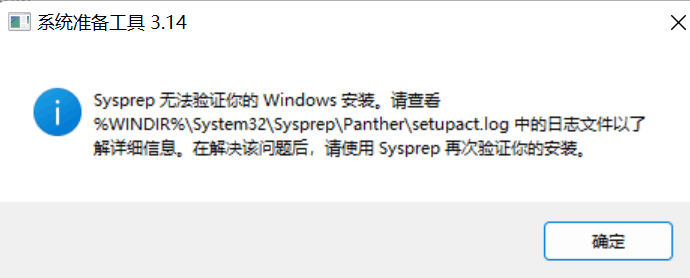
以下是setupact.log日志
2026-01-15 11:18:18, Info SYSPRP ========================================================
2026-01-15 11:18:18, Info SYSPRP === Beginning of a new sysprep run ===
2026-01-15 11:18:18, Info SYSPRP ========================================================
2026-01-15 11:18:18, Info [0x0f004d] SYSPRP The time is now 2026-01-15 11:18:18
2026-01-15 11:18:18, Info [0x0f004e] SYSPRP Initialized SysPrep log at C:\Windows\System32\Sysprep\Panther
2026-01-15 11:18:18, Info [0x0f0054] SYSPRP ValidatePrivileges:User has required privileges to sysprep machine
2026-01-15 11:18:18, Info [0x0f007e] SYSPRP FCreateTagFile:Tag file C:\Windows\System32\Sysprep\Sysprep_succeeded.tag does not already exist, no need to delete anything
2026-01-15 11:18:18, Warning SYSPRP WinMain: File operations pending
2026-01-15 11:18:18, Info [0x0f003d] SYSPRP WinMain:Displaying dialog box for user to choose sysprep mode...
2026-01-15 11:29:33, Info [0x0f00d7] SYSPRP WinMain:Pre-validing 'cleanup' internal providers.
2026-01-15 11:29:33, Info SYSPRP RunDlls:Running platform actions specified in action file for phase 3
2026-01-15 11:29:33, Info SYSPRP SysprepSession::CreateSession: Successfully created instance with action file C:\Windows\System32\Sysprep\ActionFiles\Cleanup.xml, and mode <null>
2026-01-15 11:29:33, Info SYSPRP SysprepSession::Validate: Beginning action execution from C:\Windows\System32\Sysprep\ActionFiles\Cleanup.xml
2026-01-15 11:29:33, Info SYSPRP SysprepSession::CreateXPathForSelection: Sysprep mode in registry is <null>
2026-01-15 11:29:33, Info SYSPRP SysprepSession::CreateXPathForSelection: Processor architecture in registry is AMD64
2026-01-15 11:29:33, Info SYSPRP ActionPlatform::LaunchModule: Executing method 'Sysprep_Clean_Validate_Opk' from C:\Windows\System32\spopk.dll
2026-01-15 11:29:33, Info CSI 00000001 Shim considered [l:123]'??\C:\Windows\WinSxS\amd64_microsoft-windows-servicingstack_31bf3856ad364e35_10.0.26100.1738_none_a5031b637767a4e7\wcp.dll' : got STATUS_SUCCESS
2026-01-15 11:29:34, Info SYSPRP Sysprep_Clean_Validate_Opk: Successfully validated reserves state on the machine for entering audit mode.
2026-01-15 11:29:34, Info SYSPRP ActionPlatform::LaunchModule: Successfully executed 'Sysprep_Clean_Validate_Opk' from C:\Windows\System32\spopk.dll
2026-01-15 11:29:34, Info [0x0f00d7] SYSPRP WinMain:Pre-validing 'generalize' internal providers.
2026-01-15 11:29:34, Info SYSPRP RunDlls:Running platform actions specified in action file for phase 1
2026-01-15 11:29:34, Info SYSPRP SysprepSession::CreateSession: Successfully created instance with action file C:\Windows\System32\Sysprep\ActionFiles\Generalize.xml, and mode <null>
2026-01-15 11:29:34, Info SYSPRP SysprepSession::Validate: Beginning action execution from C:\Windows\System32\Sysprep\ActionFiles\Generalize.xml
2026-01-15 11:29:34, Info SYSPRP SysprepSession::CreateXPathForSelection: Sysprep mode in registry is <null>
2026-01-15 11:29:34, Info SYSPRP SysprepSession::CreateXPathForSelection: Processor architecture in registry is AMD64
2026-01-15 11:29:34, Info SYSPRP ActionPlatform::LaunchModule: Executing method 'ValidateBitLockerState' from C:\Windows\System32\BdeSysprep.dll
2026-01-15 11:29:34, Info SYSPRP ActionPlatform::LaunchModule: Successfully executed 'ValidateBitLockerState' from C:\Windows\System32\BdeSysprep.dll
2026-01-15 11:29:34, Info SYSPRP ActionPlatform::LaunchModule: Executing method 'SysprepGeneralizeValidate' from C:\Windows\System32\AppxSysprep.dll
2026-01-15 11:29:34, Info SYSPRP Entering SysprepGeneralizeValidate (Appx) - validating whether all apps are also provisioned.
2026-01-15 11:29:34, Error SYSPRP Package Microsoft.Ink.Handwriting.Main.zh-Hans.1.0_0.1082.2350.0_x64__8wekyb3d8bbwe was installed for a user, but not provisioned for all users. This package will not function properly in the sysprep image.
2026-01-15 11:29:34, Error SYSPRP Failed to remove apps for the current user: 0x80073cf2.
2026-01-15 11:29:34, Error SYSPRP Exit code of RemoveAllApps thread was 0x3cf2.
2026-01-15 11:29:34, Error SYSPRP ActionPlatform::LaunchModule: Failure occurred while executing 'SysprepGeneralizeValidate' from C:\Windows\System32\AppxSysprep.dll; dwRet = 0x3cf2
2026-01-15 11:29:34, Error SYSPRP SysprepSession::Validate: Error in validating actions from C:\Windows\System32\Sysprep\ActionFiles\Generalize.xml; dwRet = 0x3cf2
2026-01-15 11:29:34, Error SYSPRP RunPlatformActions:Failed while validating Sysprep session actions; dwRet = 0x3cf2
2026-01-15 11:29:34, Error [0x0f0070] SYSPRP RunDlls:An error occurred while running registry sysprep DLLs, halting sysprep execution. dwRet = 0x3cf2
2026-01-15 11:29:34, Error [0x0f00d8] SYSPRP WinMain:Hit failure while pre-validate sysprep generalize internal providers; hr = 0x80073cf2
2026-01-15 11:32:32, Info [0x0f0052] SYSPRP Shutting down SysPrep log
2026-01-15 11:32:32, Info [0x0f004d] SYSPRP The time is now 2026-01-15 11:32:32
2026-01-15 12:23:56, Info SYSPRP ========================================================
2026-01-15 12:23:56, Info SYSPRP === Beginning of a new sysprep run ===
2026-01-15 12:23:56, Info SYSPRP ========================================================
2026-01-15 12:23:56, Info [0x0f004d] SYSPRP The time is now 2026-01-15 12:23:56
2026-01-15 12:23:56, Info [0x0f004e] SYSPRP Initialized SysPrep log at C:\Windows\System32\Sysprep\Panther
2026-01-15 12:23:56, Info [0x0f0054] SYSPRP ValidatePrivileges:User has required privileges to sysprep machine
2026-01-15 12:23:56, Info [0x0f007e] SYSPRP FCreateTagFile:Tag file C:\Windows\System32\Sysprep\Sysprep_succeeded.tag does not already exist, no need to delete anything
2026-01-15 12:23:56, Warning SYSPRP WinMain: File operations pending
2026-01-15 12:23:56, Info [0x0f003d] SYSPRP WinMain:Displaying dialog box for user to choose sysprep mode...
2026-01-15 12:24:02, Info [0x0f00d7] SYSPRP WinMain:Pre-validing 'cleanup' internal providers.
2026-01-15 12:24:02, Info SYSPRP RunDlls:Running platform actions specified in action file for phase 3
2026-01-15 12:24:02, Info SYSPRP SysprepSession::CreateSession: Successfully created instance with action file C:\Windows\System32\Sysprep\ActionFiles\Cleanup.xml, and mode <null>
2026-01-15 12:24:02, Info SYSPRP SysprepSession::Validate: Beginning action execution from C:\Windows\System32\Sysprep\ActionFiles\Cleanup.xml
2026-01-15 12:24:02, Info SYSPRP SysprepSession::CreateXPathForSelection: Sysprep mode in registry is <null>
2026-01-15 12:24:02, Info SYSPRP SysprepSession::CreateXPathForSelection: Processor architecture in registry is AMD64
2026-01-15 12:24:02, Info SYSPRP ActionPlatform::LaunchModule: Executing method 'Sysprep_Clean_Validate_Opk' from C:\Windows\System32\spopk.dll
2026-01-15 12:24:02, Info CSI 00000001 Shim considered [l:123]'??\C:\Windows\WinSxS\amd64_microsoft-windows-servicingstack_31bf3856ad364e35_10.0.26100.1738_none_a5031b637767a4e7\wcp.dll' : got STATUS_SUCCESS
2026-01-15 12:24:02, Info SYSPRP Sysprep_Clean_Validate_Opk: Successfully validated reserves state on the machine for entering audit mode.
2026-01-15 12:24:02, Info SYSPRP ActionPlatform::LaunchModule: Successfully executed 'Sysprep_Clean_Validate_Opk' from C:\Windows\System32\spopk.dll
2026-01-15 12:24:02, Info [0x0f00d7] SYSPRP WinMain:Pre-validing 'generalize' internal providers.
2026-01-15 12:24:02, Info SYSPRP RunDlls:Running platform actions specified in action file for phase 1
2026-01-15 12:24:02, Info SYSPRP SysprepSession::CreateSession: Successfully created instance with action file C:\Windows\System32\Sysprep\ActionFiles\Generalize.xml, and mode <null>
2026-01-15 12:24:02, Info SYSPRP SysprepSession::Validate: Beginning action execution from C:\Windows\System32\Sysprep\ActionFiles\Generalize.xml
2026-01-15 12:24:02, Info SYSPRP SysprepSession::CreateXPathForSelection: Sysprep mode in registry is <null>
2026-01-15 12:24:02, Info SYSPRP SysprepSession::CreateXPathForSelection: Processor architecture in registry is AMD64
2026-01-15 12:24:02, Info SYSPRP ActionPlatform::LaunchModule: Executing method 'ValidateBitLockerState' from C:\Windows\System32\BdeSysprep.dll
2026-01-15 12:24:02, Info SYSPRP ActionPlatform::LaunchModule: Successfully executed 'ValidateBitLockerState' from C:\Windows\System32\BdeSysprep.dll
2026-01-15 12:24:02, Info SYSPRP ActionPlatform::LaunchModule: Executing method 'SysprepGeneralizeValidate' from C:\Windows\System32\AppxSysprep.dll
2026-01-15 12:24:02, Info SYSPRP Entering SysprepGeneralizeValidate (Appx) - validating whether all apps are also provisioned.
2026-01-15 12:24:02, Error SYSPRP Package Microsoft.Ink.Handwriting.Main.zh-Hans.1.0_0.1082.2350.0_x64__8wekyb3d8bbwe was installed for a user, but not provisioned for all users. This package will not function properly in the sysprep image.
2026-01-15 12:24:02, Error SYSPRP Failed to remove apps for the current user: 0x80073cf2.
2026-01-15 12:24:02, Error SYSPRP Exit code of RemoveAllApps thread was 0x3cf2.
2026-01-15 12:24:02, Error SYSPRP ActionPlatform::LaunchModule: Failure occurred while executing 'SysprepGeneralizeValidate' from C:\Windows\System32\AppxSysprep.dll; dwRet = 0x3cf2
2026-01-15 12:24:02, Error SYSPRP SysprepSession::Validate: Error in validating actions from C:\Windows\System32\Sysprep\ActionFiles\Generalize.xml; dwRet = 0x3cf2
2026-01-15 12:24:02, Error SYSPRP RunPlatformActions:Failed while validating Sysprep session actions; dwRet = 0x3cf2
2026-01-15 12:24:02, Error [0x0f0070] SYSPRP RunDlls:An error occurred while running registry sysprep DLLs, halting sysprep execution. dwRet = 0x3cf2
2026-01-15 12:24:02, Error [0x0f00d8] SYSPRP WinMain:Hit failure while pre-validate sysprep generalize internal providers; hr = 0x80073cf2
2026-01-15 12:24:07, Info [0x0f0052] SYSPRP Shutting down SysPrep log
2026-01-15 12:24:07, Info [0x0f004d] SYSPRP The time is now 2026-01-15 12:24:07
' cx='32' cy='32' r='32' /%3E%3Ctext x='50%25' y='55%25' dominant-baseline='middle' text-anchor='middle' fill='%23FFF' %3EA%3C/text%3E%3C/svg%3E)

' cx='32' cy='32' r='32' /%3E%3Ctext x='50%25' y='55%25' dominant-baseline='middle' text-anchor='middle' fill='%23FFF' %3EDV%3C/text%3E%3C/svg%3E)