Language note: Although the post is in the Russian (ru‑ru) locale, your question was written in English, so the answer is given in English for your convenience.
Good day stanislav babenco!
Based on what you described, your Microsoft account appears to be incorrectly classified as a child account, even though you are an adult and the original owner. Because there is no parent or organizer account associated with it, you’re unable to remove the family restrictions or correct the account status on your own.
Please note that this is a user‑to‑user community forum. No one here can access your account or make changes on your behalf; we can only share suggestions based on our findings and personal experiences.
As a first step, please review and follow the instructions under “I’m an adult, but Microsoft thinks I’m a child” in this official Microsoft support article, which outlines the supported options for correcting an account’s age or family status.
If the issue still persists, or if you’re unable to complete those steps due to the lack of a parent/organizer account, the next step would be to contact Microsoft Support directly.
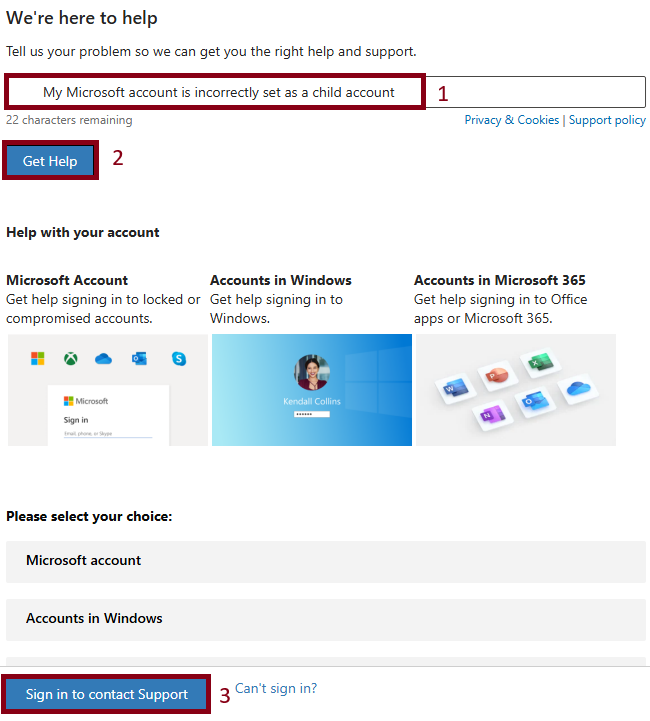
Here's how to reach out to Support Team (live chat):
Go to: https://support.microsoft.com/home/contact
- In the search box, enter a short description of your issue, for example: My Microsoft account is incorrectly set as a child account
- Hit "Get Help"
- Select Sign in to contact support (please sign in using a personal Microsoft account). Then follow the on-screen prompts to reach Support Team.
Tip: Support Team availability can vary, and retrying at a different time often helps.
Hope this helps. Feel free to post back if you need more clarification!
Best regards.
' cx='32' cy='32' r='32' /%3E%3Ctext x='50%25' y='55%25' dominant-baseline='middle' text-anchor='middle' fill='%23FFF' %3ESB%3C/text%3E%3C/svg%3E)

' cx='32' cy='32' r='32' /%3E%3Ctext x='50%25' y='55%25' dominant-baseline='middle' text-anchor='middle' fill='%23FFF' %3ENL%3C/text%3E%3C/svg%3E)
