Microsoft account incorrectly set as child account, no access to parent account

stanislav babenco 0 Баллы репутации
2026-04-19T13:29:38.2866667+00:00

My Microsoft account was mistakenly set as a child account. I am an adult and the sole owner of this account, but I do not have access to any parent/organizer account. Because of this, I cannot remove the restrictions myself. I would like to request: - removal of my account from any family group - correction of the account status to an adult account I am ready to verify my identity and provide any required information. Thank you.


[Tag moved from: Microsoft System Center | Other]

Microsoft 365 и Office | Microsoft Family Safety | Для дома | Другое

Бесплатное приложение и служба, помогающие семьям формировать полезные цифровые привычки и оставаться на связи. Предназначено для обеспечения безопасности в Интернете и повышения осведомленности о безопасности в реальном мире с помощью средств управления временем использования экрана, фильтрации контента и обмена геоданными

Комментариев: 0 Без комментариев

Ответы: 3

Сортировать по: Новейшие
  1. stanislav babenco 0 Баллы репутации
    2026-04-21T18:36:49.9566667+00:00

    Hello,

    Thank you for your response.

    I understand the suggested workaround with creating a parent account, but I would prefer not to create an additional Microsoft account or use a different email address.

    This is my personal account, and I am an adult. The account was incorrectly set as a child account due to a setup error.

    Since I do not have access to any parent or organizer account, I am unable to resolve this issue on my own.

    I would like to request direct assistance in correcting the date of birth and removing the child account restrictions from my account.

    I am fully willing to verify my identity and provide any information required to confirm ownership of the account.

    Please advise on how this can be resolved without creating a secondary account.

    Thank you.

    Этот ответ помог вам?


  2. EmilyS726 270.5K Баллы репутации Независимый помощник
    2026-04-20T12:56:02.3166667+00:00

    When you go to https://account.live.com, did this screen pop up? Пользовательское изображение

    You want to choose "I am a parent or guardian", then sign into a different Microsoft account whose date of birth indicating an adult user. If you don't have one you can use, you can create a new one just for this purpose for now. It will prompt you to sign in, and give your account consent, and join your family group. Once joining the new account's family group, go to https://account.live.com/mykids.aspx sign in with the new account (adult one), you should see your "child" account listed. Click on "Edit this child's personal info" And it will let you update the date of birth for this child user. Пользовательское изображение

    Once updated, you can then use the "Remove consent for this child's account", then go back to the family safety page, click on this child account and choose "remove from family group".

    Этот ответ помог вам?

    Комментариев: 0 Без комментариев

  3. Norah-L 11,410 Баллы репутации Внешний персонал Microsoft Модератор
    2026-04-20T00:15:29.3733333+00:00

    Language note: Although the post is in the Russian (ru‑ru) locale, your question was written in English, so the answer is given in English for your convenience.


    Good day stanislav babenco!

    Based on what you described, your Microsoft account appears to be incorrectly classified as a child account, even though you are an adult and the original owner. Because there is no parent or organizer account associated with it, you’re unable to remove the family restrictions or correct the account status on your own.

    Please note that this is a user‑to‑user community forum. No one here can access your account or make changes on your behalf; we can only share suggestions based on our findings and personal experiences.

    As a first step, please review and follow the instructions under “I’m an adult, but Microsoft thinks I’m a child” in this official Microsoft support article, which outlines the supported options for correcting an account’s age or family status.

    If the issue still persists, or if you’re unable to complete those steps due to the lack of a parent/organizer account, the next step would be to contact Microsoft Support directly.

    Here's how to reach out to Support Team (live chat):

    Go to: https://support.microsoft.com/home/contact

    1. In the search box, enter a short description of your issue, for example: My Microsoft account is incorrectly set as a child account
    2. Hit "Get Help"
    3. Select Sign in to contact support (please sign in using a personal Microsoft account). Then follow the on-screen prompts to reach Support Team.

    Tip: Support Team availability can vary, and retrying at a different time often helps.
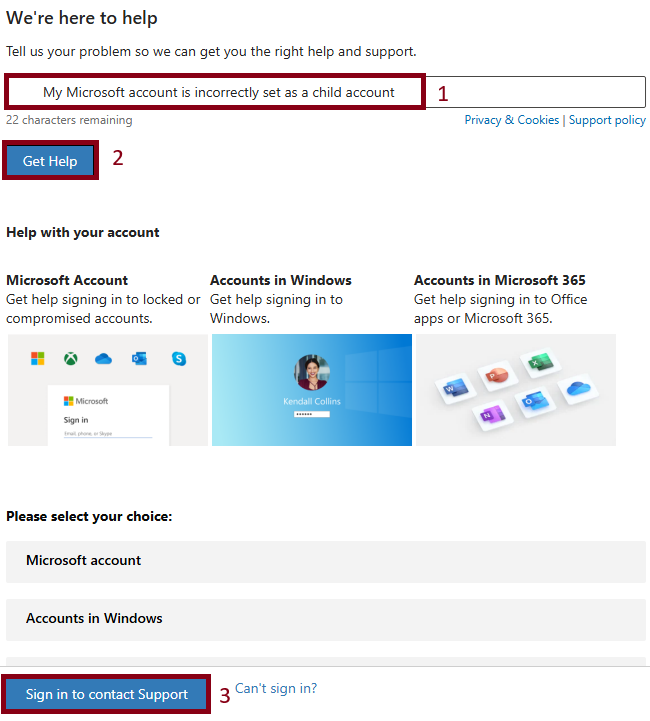
    Пользовательское изображение

    Hope this helps. Feel free to post back if you need more clarification!

    Best regards.

    Этот ответ помог вам?

    Комментариев: 0 Без комментариев

Ваш ответ

Автор вопроса может устанавливать для ответов пометку "Принято", а модераторы — пометку "Рекомендуется". Благодаря этому пользователям становится проще понять, какой из ответов помог решить проблему автора.