Hi @User9183
Thank you for reaching out to Microsoft Learn Q&A!
Based on what you've shared, I understand that your retention policy doesn’t seem to be working as expected, possibly due to the use of personal tags.
From my research and testing in Exchange Online (though this may also partially apply to Exchange Server), I’ve found that the “Never move to archive” tag only takes effect when it is manually assigned in Outlook.
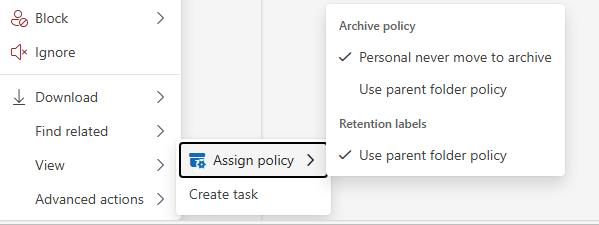
For example, I created a new retention policy that moves items to archive after 1 day. When I ran the command:
Get-Mailbox -Identity ******@domain.com| Select Name, RententionPolicy
The result was blank. However, in the Exchange Admin Center, I could clearly see that the policy was correctly applied under the Retention Policy section.
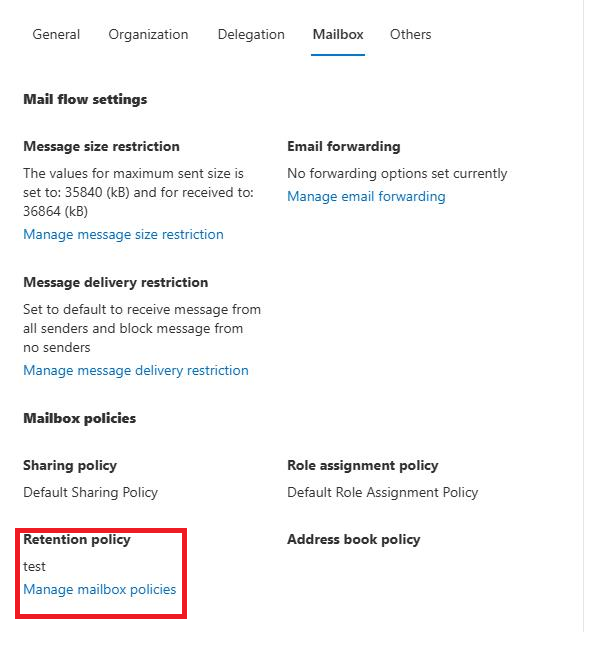
To ensure the retention policy is applied, you’ll need to:
- Change the tag to “Use parent folder policy.”
- Run the following command to force synchronization:
Start-ManagedFolderAssistant –Identity user@domain
This will trigger the retention processing and apply the correct policy.
It’s important to note that personal tags must be manually assigned to take effect.
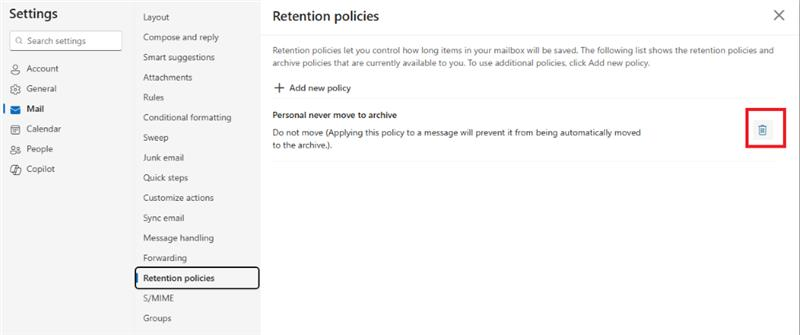
One possible reason for the issue is that the user may have accidentally applied a personal tag, such as “Never move to archive.”
Recommended next step:
You could ask the user to remove the 'Never move to archive' tag in Outlook by deleting it from the Retention Policy section. This should help avoid any accidental selection of that tag in the future.
I hope this helps clarify your situation and guides you toward to a solution. Please know that while our initial response might not resolve the issue right away, your input is incredibly valuable. With a bit more detail, we’ll work together to find the best solution for you.
If the answer is helpful, please click "Accept Answer" and kindly upvote it. If you have extra questions about this answer, please click "Comment".
Note: Please follow the steps in our documentation to enable e-mail notifications if you want to receive the related email notification for this thread
' cx='32' cy='32' r='32' /%3E%3Ctext x='50%25' y='55%25' dominant-baseline='middle' text-anchor='middle' fill='%23FFF' %3EU%3C/text%3E%3C/svg%3E)
' cx='32' cy='32' r='32' /%3E%3Ctext x='50%25' y='55%25' dominant-baseline='middle' text-anchor='middle' fill='%23FFF' %3EA%3C/text%3E%3C/svg%3E)