Even though this thread was posted from a pt-br location, you’ve used English in your description, so I will continue supporting this case in English for clarity and consistency.
Dear @Felipe Eduardo Perin,
Thank you for posting your question in the Microsoft Q&A forum. I understand you’re using daily recurring tasks in Microsoft Planner and noticed that when you mark a task as Completed, the next instance appears immediately
I would like to clarify how this works:
Is this expected behavior? Yes, this is the intended design. In Planner, recurring tasks are completion-based, not calendar-based. This means:
- When you complete a task, Planner immediately creates the next instance, regardless of the recurrence pattern.
- This ensures continuity, but it can feel cluttered for daily tasks
Currently, there’s no setting to delay the creation until the next day or next cycle. The next instance will always appear as soon as the previous one is completed.
If you want tasks to appear only on the day they’re needed:
- Manual Scheduling: Create tasks for each day with specific start/due dates.
- Use Buckets or Labels to organize tasks by day or priority.
- Consider Microsoft To Do or Outlook Tasks, which offer calendar-based recurrence options.
Planner also allows some customization for recurring tasks:
- When you click Repeat, choose Custom.
- You can:
- Select Weekly and pick multiple days (e.g., Monday, Wednesday, Friday).
- Set the recurrence to every X weeks (e.g., every 2 weeks).
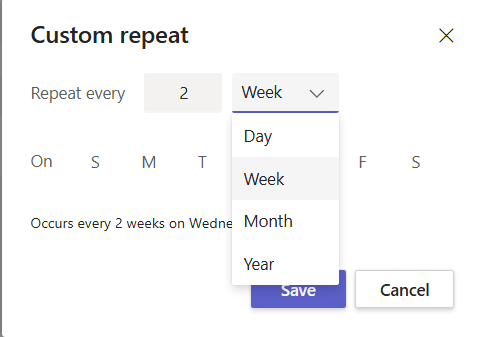
- This helps reduce clutter if daily recurrence is too frequent.
Please understand that our initial response does not always resolve the issue immediately. However, with your help and more detailed information, we can work together to find a solution. Your detailed response will help us diagnose and investigate the issue more efficiently.
I truly appreciate your patience and understanding. If I misunderstood what you’re looking for, feel free to let me know or share a screenshot. I’d be happy to help further!
I'm looking forward for your reply. Thank you for your cooperation.
If the answer is helpful, please click "Accept Answer" and kindly upvote it. If you have extra questions about this answer, please click "Comment".
Note: Please follow the steps in our documentation to enable e-mail notifications if you want to receive the related email notification for this thread.
' cx='32' cy='32' r='32' /%3E%3Ctext x='50%25' y='55%25' dominant-baseline='middle' text-anchor='middle' fill='%23FFF' %3EFE%3C/text%3E%3C/svg%3E)

' cx='32' cy='32' r='32' /%3E%3Ctext x='50%25' y='55%25' dominant-baseline='middle' text-anchor='middle' fill='%23FFF' %3EA%3C/text%3E%3C/svg%3E)