Screen Duplication not having enough gpu resources.

TheMysticPleb 0 Reputatiepunten
2026-10-27T00:01:05.81+00:00

Hello.

I'm having a problem where duplicating the screen while having a very intensive gpu game makes the duplication very stuttery.

I duplicate the screen to an elgato capture card.

When i run light games it's fine.

When i run games that use 100% gpu the duplication to the stream pc becomes very stuttery.

I don't know exactly wich window service it is.
But i need to give the duplication process more priority or have windows reserve more gpu power to make the screen duplication be more fluid at 100% load.

In rocket league for example it's smooth. but when i try games like onimusha or forza horizon 6 it becomes a porblem.

My specs are a 5080, 32gb ram and a 9800x3d.

i hope there is a way to force windows to reserve more resources for this a running a passtrough setup is annoying as i'm running a high resolution and the capture card only goes up to 200 hz. + my monitor only has a 2.0 hdmi so i'm stuck at 100hz while using a passtrough.

thanks in advance

Windows voor thuisgebruik | Windows 11 | Gaming
0 opmerkingen Geen opmerkingen

5 antwoorden

Sorteren op: Oudste
  1. Ivan B 127.7K Reputatiepunten Onafhankelijke adviseur
    2026-10-27T01:28:10.3566667+00:00

    Hi,

    Are you connecting your graphics card to the Elgato, or do you have one cable going to the Elgato and another cable from the GPU to your monitor—and are you using the "duplicate" display mode?

    Which Elgato model are you using?

    How is the Elgato configured within OBS?

    Thanks.

    Was dit antwoord nuttig?

    0 opmerkingen Geen opmerkingen

  2. TheMysticPleb 0 Reputatiepunten
    2026-10-27T11:13:21.92+00:00

    Hello,

    I have 1 hdmi going from gpu to the capture card and then one from the hdmi out from the capture card to my monitor. Then one cable (Displayport) from my gpu to my monitor for if my stream pc is not on and i just want to game using my monitors full potential. It's a 34gs950qe from lg.
    since i am using passtrough atm while being stuck at 100 hz because of the hdmi 2.0 on my lg monitor.

    But the issue happens when i'm duplicating my screen to the elgato without using passtrough mode.
    because if i use duplicate i still have my gsync and 240hz.

    When i'm playing something like rocket league it's very smooth but it's capped at 240 hz and gpu is only using like 50% of it's power.
    When i'm playing a game like onimusha or forza however it becomes stuttery because as far as i have looked into it.

    The Screen duplication doesn't have enough gpu resources to duplicate all the frames.

    Hdmi out on the capture card connected or not doesn't make a diffrence.

    I am using the 4k Pro. wich is the latest.

    The elgato is configured at 3440x1440@100fps in obs.

    So since it's smooth on games that don't max out the gpu i'm not assuming that the capture card or the connection to it is a problem.

    Only the gpu load is an issue.
    capping fps is kinda hard to do since those demanding games are all over the place fps wise. from low 50s to high 100s.
    And capping at 40 or 50 isn't a solution for me.

    And i'd be fine sitting at 100 fps with passtrough mode but then i have a lot of screen tearing.
    Because for some weird reason, gsync doesn't activate while using hdmi and at 100hz.
    while it looks smooth when i'm using the hdmi directly from my gpu to my monitor at 240hz.

    It uses compression to reach that. wich the elgato doesn't support sadly.

    But also when i connect my monitor directly to my gpu at 100hz it also has screen tears while gsync is active in the nvidia app.

    So my conclusion and yes with the help of copilot ai is that at 100% gpu load the screen duplication process in windows doesn't have enough gpu overhead to do this smoothly. and is losing frames because of the high load.

    I'm also using hdmi 2.1 cables so the cables shouldn't be an issue.

    Was dit antwoord nuttig?

    0 opmerkingen Geen opmerkingen

  3. Ivan B 127.7K Reputatiepunten Onafhankelijke adviseur
    2026-10-27T18:18:37.1+00:00

    Hii,

    You’ve reached your own conclusion, but something doesn’t quite add up. So, let me ask first: does the stuttering disappear if you disable display mirroring and use only your monitor? Since OBS runs on your streaming PC, this test will definitively tell us whether mirroring is, in fact, the cause of the issue.

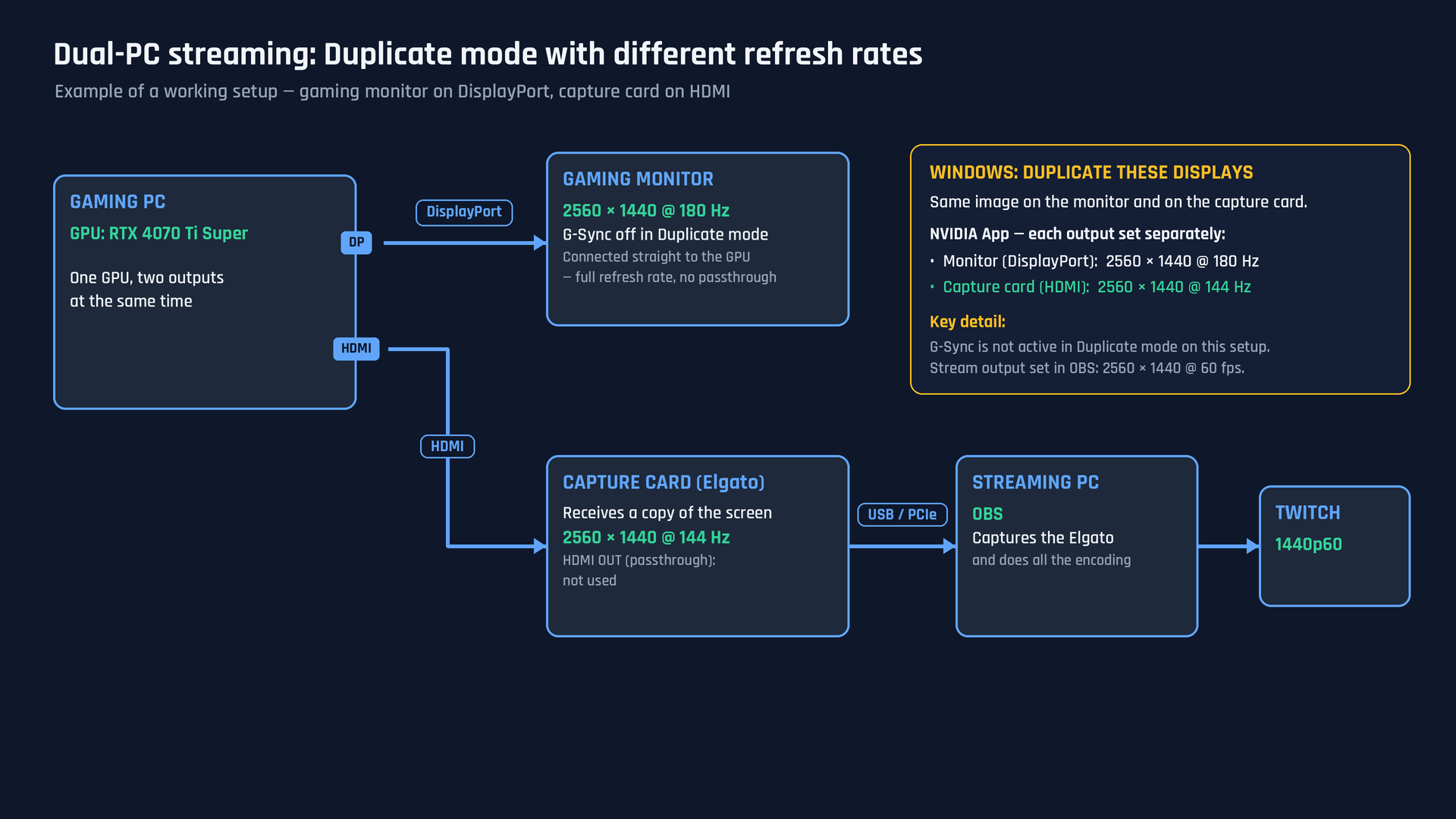
    For comparison, here is my setup: I play Onimusha using an RTX 4070 Ti Super and an Elgato 4K60 capture card, with mirroring handled directly by the GPU—one cable runs from the GPU to the Elgato, and another from the GPU to the monitor. The Elgato receives a 1440p 144Hz signal, while OBS streams to Twitch at 1440p 60fps. I’m able to maintain a stable 90fps with no stuttering at all.

    Therefore, the refresh rate on the Elgato doesn’t seem to be the problem—in fact, mine is higher than the 100Hz you’re using. The main difference I notice is G-Sync: in my setup, it’s not active during display mirroring, whereas in yours, it remains enabled. The fact that G-Sync delivers frames at a variable rate, while the capture card requires a fixed rate, could be what’s causing the stuttering when your GPU is running at its limit (100% usage). Another detail: your ultrawide monitor has about 34% more pixels that need to be mirrored for every frame.
    dual-pc-duplicate-setup.png

    I would suggest, first and foremost, disabling G-Sync while using display mirroring mode.

    If you want to keep G-Sync enabled while maintaining maximum performance, another option is to stream more demanding games directly from your gaming PC. NVIDIA graphics cards feature a dedicated encoding chip (NVENC), which keeps performance loss to a minimum—though it isn't entirely zero, as OBS still uses a small portion of the GPU to compose the scene. Running OBS as an administrator helps ensure it maintains priority, even when a game is utilizing 100% of the GPU.

    In short: your options are to stream from the same PC you’re using to play (a single-machine setup) or to use a screen-mirroring/duplication mode with G-Sync disabled—which is the method I use. It’s worth checking if there’s a noticeable difference; if I recall correctly, when streaming to Twitch, the frame rate is capped at 60 fps, regardless of the resolution.

    If I’ve misunderstood, could you provide some more details?

    Thanks.

    Was dit antwoord nuttig?

    0 opmerkingen Geen opmerkingen

  4. TheMysticPleb 0 Reputatiepunten
    2026-10-27T23:50:53.3633333+00:00

    I made a recording from a fight in onimusha for each case. I do feel like the capped fps one is still the smoothest. the first 2 do seem to stutter a bit more. and i'm talking just gameplay footage, not fps wise ingame. the recording being smooth is the most important.

    I'm also a bit tired to see much diffrence at all atm. Maybe i'm going crazy atm. i'll need to get a better example i guess...

    i'll try to see if i can replicate it better tomorrow in a diffrent scene.

    Screen Duplication Gsync on 100% load: https://www.youtube.com/live/d0Ij0s9RCPI
    Screen Duplication Gsync off 100% load: https://www.youtube.com/live/iSAD4CFh_kI

    Screen Duplication Capped fps https://www.youtube.com/live/ZrAY8ODuTdQ

    Single Pc 100% load: https://www.youtube.com/live/8_aDH9g-CLc

    Was dit antwoord nuttig?


  5. TheMysticPleb 0 Reputatiepunten
    2026-10-29T21:00:22.2733333+00:00

    I'm sorry i missed your last response. i can't load it.

    I have done some more testing:
    Forza Single PC = Smooth: https://www.youtube.com/live/r9HG3yBwK9Y
    Forza Dual PC = Stutters: https://youtu.be/hdhw0JlQLYg
    Onimusha Single PC = smooth: https://www.youtube.com/live/o8fQrbwTjO8
    Onimusha Dual PC = stutters: https://youtu.be/TNyD16xl9xg

    Onimusha Dual PC FPS cap 100 & ultra performance dlss :https://www.youtube.com/live/82U20HgiSt4

    It's clearly only an issue when the gpu load is at 100% and has to duplicate the screen...

    in the last test you clearly see the diffrence the moment i activate ultra performance...
    the moment the gpu has breathing room the stream stabilizes.

    It does feel like it gives my eyes rest lmao

    so if i'm able to give that screen duplication a little bit more headroom it would solve all my issues...
    I do lose about 15-20% performance streaming from a single pc unless i use passtrough but my monitor doesn't go higher than 100 fps...

    Limiting my fps has the same effect...

    quite annoying that screen duplication is this highly affected by gpu load being maxed

    Was dit antwoord nuttig?


Uw antwoord

Antwoorden kunnen worden gemarkeerd als 'Geaccepteerd' door de auteur van de vraag en 'Aanbevolen' door moderators, zodat gebruikers het antwoord van de auteur kunnen weten.