Hii,
You’ve reached your own conclusion, but something doesn’t quite add up. So, let me ask first: does the stuttering disappear if you disable display mirroring and use only your monitor? Since OBS runs on your streaming PC, this test will definitively tell us whether mirroring is, in fact, the cause of the issue.
For comparison, here is my setup: I play Onimusha using an RTX 4070 Ti Super and an Elgato 4K60 capture card, with mirroring handled directly by the GPU—one cable runs from the GPU to the Elgato, and another from the GPU to the monitor. The Elgato receives a 1440p 144Hz signal, while OBS streams to Twitch at 1440p 60fps. I’m able to maintain a stable 90fps with no stuttering at all.
Therefore, the refresh rate on the Elgato doesn’t seem to be the problem—in fact, mine is higher than the 100Hz you’re using. The main difference I notice is G-Sync: in my setup, it’s not active during display mirroring, whereas in yours, it remains enabled. The fact that G-Sync delivers frames at a variable rate, while the capture card requires a fixed rate, could be what’s causing the stuttering when your GPU is running at its limit (100% usage). Another detail: your ultrawide monitor has about 34% more pixels that need to be mirrored for every frame.
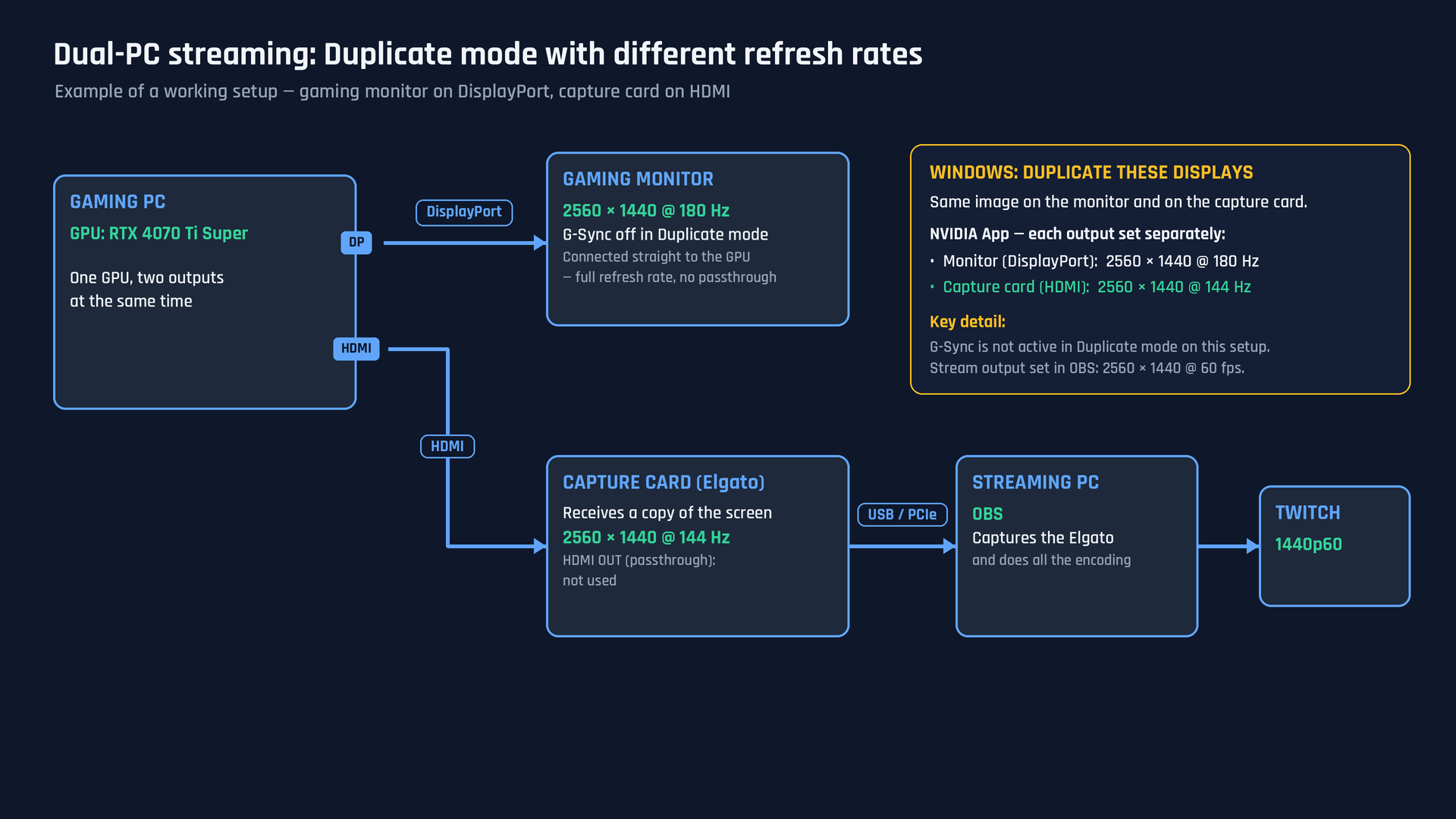
I would suggest, first and foremost, disabling G-Sync while using display mirroring mode.
If you want to keep G-Sync enabled while maintaining maximum performance, another option is to stream more demanding games directly from your gaming PC. NVIDIA graphics cards feature a dedicated encoding chip (NVENC), which keeps performance loss to a minimum—though it isn't entirely zero, as OBS still uses a small portion of the GPU to compose the scene. Running OBS as an administrator helps ensure it maintains priority, even when a game is utilizing 100% of the GPU.
In short: your options are to stream from the same PC you’re using to play (a single-machine setup) or to use a screen-mirroring/duplication mode with G-Sync disabled—which is the method I use. It’s worth checking if there’s a noticeable difference; if I recall correctly, when streaming to Twitch, the frame rate is capped at 60 fps, regardless of the resolution.
If I’ve misunderstood, could you provide some more details?
Thanks.
' cx='32' cy='32' r='32' /%3E%3Ctext x='50%25' y='55%25' dominant-baseline='middle' text-anchor='middle' fill='%23FFF' %3ET%3C/text%3E%3C/svg%3E)

' cx='32' cy='32' r='32' /%3E%3Ctext x='50%25' y='55%25' dominant-baseline='middle' text-anchor='middle' fill='%23FFF' %3EIB%3C/text%3E%3C/svg%3E)