Hoi Walter en Linda,
Bij deze de screenshots / resultaten:
chkdsk / f:
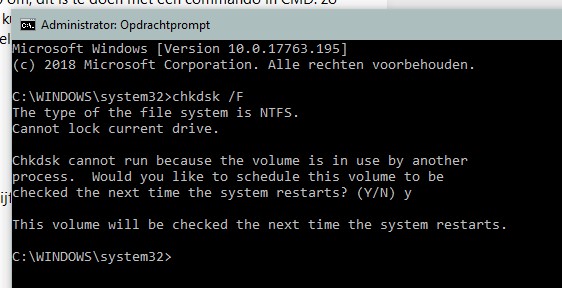
Resultaat in logbestanden:
Checking file system on C:
The type of the file system is NTFS.
A disk check has been scheduled.
Windows will now check the disk.
Stage 1: Examining basic file system structure ...
695808 file records processed.
File verification completed.
7020 large file records processed.
0 bad file records processed.
Stage 2: Examining file name linkage ...
4065 reparse records processed.
844886 index entries processed.
Index verification completed.
0 unindexed files scanned.
0 unindexed files recovered to lost and found.
4065 reparse records processed.
Stage 3: Examining security descriptors ...
Cleaning up 87 unused index entries from index $SII of file 0x9.
Cleaning up 87 unused index entries from index $SDH of file 0x9.
Cleaning up 87 unused security descriptors.
Security descriptor verification completed.
74540 data files processed.
CHKDSK is verifying Usn Journal...
38768160 USN bytes processed.
Usn Journal verification completed.
Windows has scanned the file system and found no problems.
No further action is required.
975320585 KB total disk space.
471162212 KB in 422186 files.
248940 KB in 74541 indexes.
0 KB in bad sectors.
835165 KB in use by the system.
65536 KB occupied by the log file.
503074268 KB available on disk.
4096 bytes in each allocation unit.
243830146 total allocation units on disk.
125768567 allocation units available on disk.
Internal Info:
00 9e 0a 00 f3 92 07 00 6e e2 0d 00 00 00 00 00 ........n.......
3b 0f 00 00 a6 00 00 00 00 00 00 00 00 00 00 00 ;...............
Windows has finished checking your disk.
Please wait while your computer restarts.
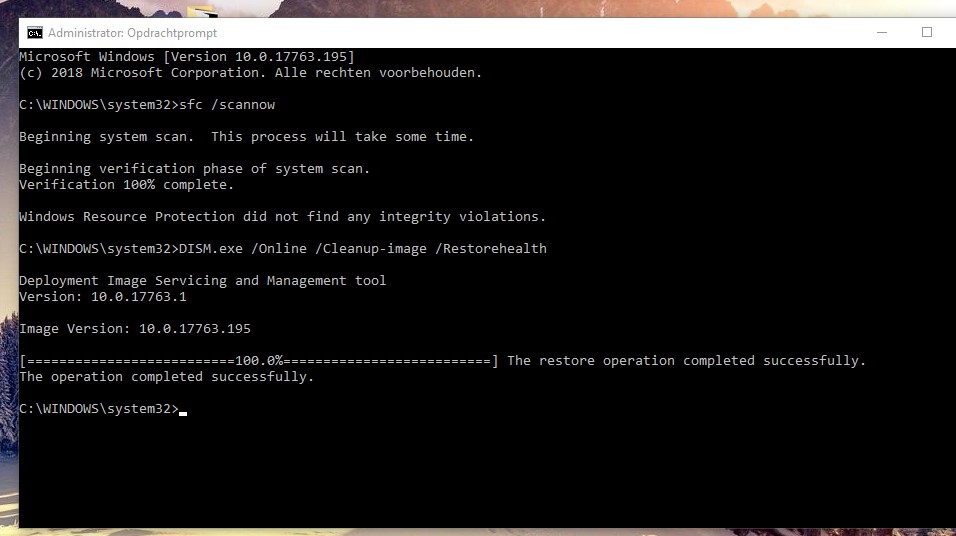
sfc en dism:
Appxpackage:
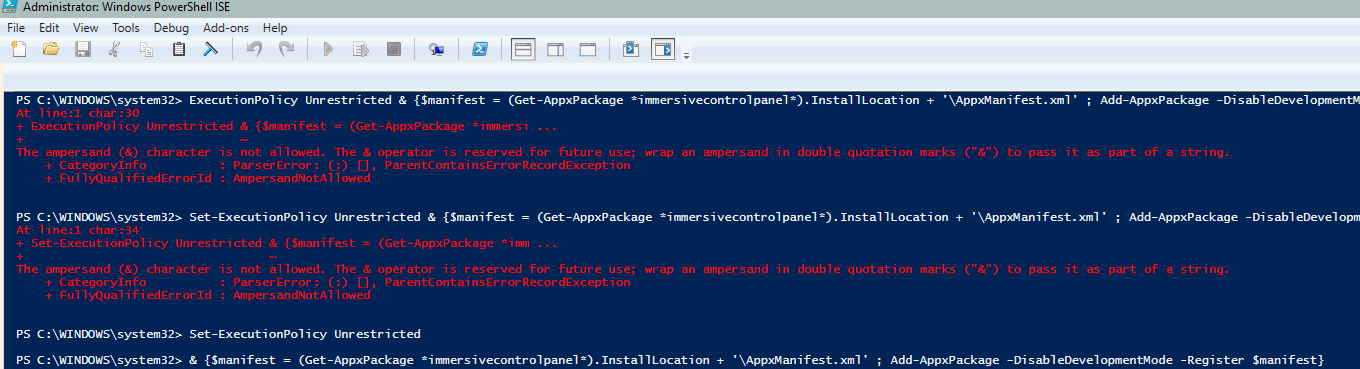
Execution policy wilde niet werken zoals in jullie instructies stonden, dus heb dit met set-ExecutionPolicy uitgevoerd.
Daarna de volgende regel die ik er eigenlijk aan toe zou moeten voegen. ik zie even kort een blauw balkje wat laden en daarna verdwijnt het weer.
Tot zover de instructies.
Nogmaals mijn specs:
Windows 10 Pro 64 bits, build 17763
MSI moederbord, H110M ECO
Intel Pentium G4560 Dual core met Hyper-threading
8GB 2144Mhz geheugen
MSI Nvidia GTX 750 ti 2GB videokaart (Nvidia stuurprogramma 417.35)
Samsung EVO 860 1TB SSD
Corsair K55 keyboard en Logitech lasergaming mouse G5
En ik gebruik twee monitoren in 1080p via mijn GTX 750 (hdmi en vga), niet via onboard.
Video:
Nu ik de instellingen app nogmaals probeer te openen, nog steeds geen positief resultaat:
Youtube video instellingen werkt niet
En nog steeds krijg ik deze melding in de logboeken:
Naam van toepassing met fout: SystemSettings.exe, versie: 10.0.17763.1, tijdstempel: 0x9d9d9332
Naam van module met fout: Windows.UI.Xaml.dll, versie: 10.0.17763.168, tijdstempel: 0x4b439076
Uitzonderingscode: 0xc000027b
Foutmarge: 0x0000000000708ab2
Id van proces met fout: 0x3190
Starttijd van toepassing met fout: 0x01d4a8410c9aefe2
Pad naar toepassing met fout: C:\Windows\ImmersiveControlPanel\SystemSettings.exe
Pad naar module met fout: C:\Windows\System32\Windows.UI.Xaml.dll
Rapport-id: 1a772605-cc57-4de7-8e2a-9439fdfdb347
Volledige pakketnaam met fout: windows.immersivecontrolpanel_10.0.2.1000_neutral_neutral_cw5n1h2txyewy
Relatieve toepassings-id van pakket met fout: microsoft.windows.immersivecontrolpanel
Tot zover,
Alvast bedankt,
Mvg,
Michiel
' cx='32' cy='32' r='32' /%3E%3Ctext x='50%25' y='55%25' dominant-baseline='middle' text-anchor='middle' fill='%23FFF' %3EA%3C/text%3E%3C/svg%3E)
