이 문서는 레거시 Microsoft.Azure.Search (버전 10) 클라이언트 라이브러리에 대한 C# 빠른 시작이며, 이제 Azure.Search.Documents (버전 11) 클라이언트 라이브러리로 대체됩니다.
비고
기존 또는 진행 중인 개발 프로젝트가 있는 경우 버전 10을 계속 사용할 수 있습니다. 그러나 새 프로젝트의 경우 또는 새 기능을 사용하려면 새 라이브러리로 전환해야 합니다.
이 빠른 시작 가이드에 관하여
Visual Studio 및 Microsoft.Azure.Search 클라이언트 라이브러리를 사용하여 Azure Cognitive Search 인덱스를 만들고, 로드하고, 쿼리하는 .NET Core 콘솔 애플리케이션을 C#에서 만듭니다.
이 문서에서는 애플리케이션을 만드는 방법을 설명합니다. 전체 애플리케이션을 다운로드하고 실행할 수도 있습니다.
비고
이 문서의 데모 코드는 간단히 하기 위해 Azure Cognitive Search 버전 10 .NET SDK의 동기 메서드를 사용합니다. 그러나 프로덕션 시나리오의 경우 사용자 고유의 애플리케이션에서 비동기 메서드를 사용하여 확장성과 응답성을 유지하는 것이 좋습니다. 예를 들어, Create 및 Delete 대신 CreateAsync 및 DeleteAsync를 사용할 수 있습니다.
필수 조건
시작하기 전에 다음이 있어야 합니다.
활성 구독이 있는 Azure 계정. 무료로계정을 만드세요.
Azure Cognitive Search 서비스입니다. 서비스를 만들거나 현재 구독에서 기존 서비스를 찾습니다. 이 빠른 시작을 위해 무료 서비스를 사용할 수 있습니다.
Visual Studio 모든 버전. 샘플 코드와 지침은 Community 평가판 버전에서 테스트되었습니다.
키 및 URL 가져오기
서비스에 대한 호출에는 모든 요청에 URL 엔드포인트와 액세스 키가 필요합니다. 검색 서비스는 둘 다로 만들어지므로 구독에 Azure Cognitive Search를 추가한 경우 다음 단계에 따라 필요한 정보를 가져옵니다.
Azure Portal에 로그인하고 검색 서비스 개요 페이지에서 URL을 가져옵니다. 엔드포인트의 예는 다음과 같습니다.
https://mydemo.search.windows.net설정>키에서 서비스에 대한 모든 권한의 관리자 키를 가져옵니다. 교체 가능한 두 개의 관리자 키가 있으며, 하나를 롤오버해야 하는 경우 비즈니스 연속성을 위해 다른 하나가 제공됩니다. 개체 추가, 수정 및 삭제 요청 시 기본 또는 보조 키를 사용할 수 있습니다.
쿼리 키도 가져옵니다. 읽기 전용 액세스 권한으로 쿼리 요청을 발급하는 것이 가장 좋습니다.
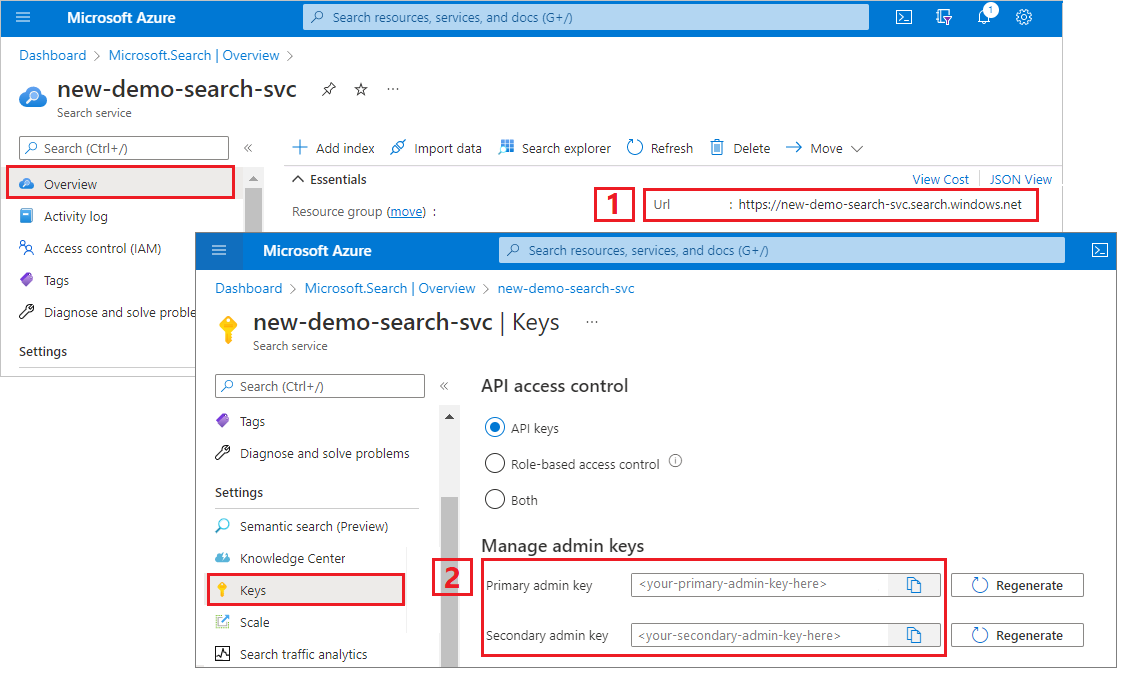
모든 요청에는 서비스로 전송된 모든 요청에 api-key가 필요합니다. 유효한 키를 보유하면 요청을 보내는 애플리케이션과 요청을 처리하는 서비스 간에 요청별로 트러스트가 설정됩니다.
환경 설정
먼저 Visual Studio를 열고 .NET Core에서 실행할 수 있는 새 콘솔 앱 프로젝트를 만듭니다.
NuGet 패키지 설치
Microsoft.Azure.Search 패키지는 NuGet 패키지로 배포되는 몇 가지 클라이언트 라이브러리로 구성됩니다.
이 프로젝트의 경우 NuGet 패키지 버전 Microsoft.Azure.Search 10 및 최신 Microsoft.Extensions.Configuration.Json NuGet 패키지를 사용합니다.
도구>NuGet 패키지 관리자에서 솔루션의 NuGet 패키지 관리...를 선택합니다.
찾아보기를 클릭합니다.
버전 10을
Microsoft.Azure.Search검색하여 선택합니다.오른쪽에서 설치 를 클릭하여 프로젝트 및 솔루션에 어셈블리를 추가합니다.
Microsoft.Extensions.Configuration.Json버전 2.2.0 이상을 선택하여 반복합니다.
Azure Cognitive Search 서비스 정보 추가
솔루션 탐색기에서 프로젝트를 마우스 오른쪽 단추로 클릭하고새 항목추가>...를 선택합니다.
새 항목 추가에서 "JSON"을 검색하여 항목 형식의 JSON 관련 목록을 반환합니다.
JSON 파일을 선택하고 파일 이름을 "appsettings.json"로 지정하고 추가를 클릭합니다.
출력 디렉터리에 파일을 추가합니다. appsettings.json 마우스 오른쪽 단추로 클릭하고 속성을 선택합니다. 출력 디렉터리로 복사에서 최신인 경우 복사를 선택합니다.
다음 JSON을 새 JSON 파일에 복사합니다.
{
  "SearchServiceName": "<YOUR-SEARCH-SERVICE-NAME>",
  "SearchServiceAdminApiKey": "<YOUR-ADMIN-API-KEY>",
  "SearchIndexName": "hotels-quickstart"
}
검색 서비스 이름(YOUR-SEARCH-SERVICE-NAME) 및 관리자 API 키(YOUR-ADMIN-API-KEY)를 유효한 값으로 바꿉니다. 서비스 엔드포인트인
https://mydemo.search.windows.net경우 서비스 이름은 "mydemo"입니다.
프로젝트에 ".Method" 파일을 추가합니다.
이 단계는 콘솔에서 의미 있는 출력을 생성하는 데 필요합니다. 결과를 콘솔 창에 인쇄할 때 Hotel 개체의 개별 필드를 문자열로 반환해야 합니다. 이 단계에서는 필요한 코드를 두 개의 새 파일에 복사하여 이 작업을 수행하는 ToString() 을 구현합니다.
프로젝트에 Address.Methods.cs, Hotel.Methods.cs 두 개의 빈 클래스 정의를 추가합니다.
Address.Methods.cs 기본 내용을 1-25줄의 다음 코드로 덮어씁니다.
Hotel.Methods.cs 1-68줄을 복사합니다.
1 - 인덱스 만들기
호텔 인덱스는 단순 필드가 "HotelName" 또는 "Description"이고, 복합 필드는 하위 필드가 있는 주소 또는 객실 컬렉션인 단순하고 복잡한 필드로 구성됩니다. 인덱스에 복합 형식이 포함된 경우 복합 필드 정의를 별도의 클래스로 격리합니다.
프로젝트에 Address.cs, Hotel.cs 두 개의 빈 클래스 정의를 추가합니다.
Address.cs 다음 코드로 기본 콘텐츠를 덮어씁니다.
using System;
using Microsoft.Azure.Search;
using Microsoft.Azure.Search.Models;
using Newtonsoft.Json;

namespace AzureSearchQuickstart
{
    public partial class Address
    {
        [IsSearchable]
        public string StreetAddress { get; set; }

        [IsSearchable, IsFilterable, IsSortable, IsFacetable]
        public string City { get; set; }

        [IsSearchable, IsFilterable, IsSortable, IsFacetable]
        public string StateProvince { get; set; }

        [IsSearchable, IsFilterable, IsSortable, IsFacetable]
        public string PostalCode { get; set; }

        [IsSearchable, IsFilterable, IsSortable, IsFacetable]
        public string Country { get; set; }
    }
}
Hotel.cs 클래스는 주소 클래스에 대한 참조를 포함하여 인덱스의 전체 구조를 정의합니다.
namespace AzureSearchQuickstart
{
    using System;
    using Microsoft.Azure.Search;
    using Microsoft.Azure.Search.Models;
    using Newtonsoft.Json;

    public partial class Hotel
    {
        [System.ComponentModel.DataAnnotations.Key]
        [IsFilterable]
        public string HotelId { get; set; }

        [IsSearchable, IsSortable]
        public string HotelName { get; set; }

        [IsSearchable]
        [Analyzer(AnalyzerName.AsString.EnMicrosoft)]
        public string Description { get; set; }

        [IsSearchable]
        [Analyzer(AnalyzerName.AsString.FrLucene)]
        [JsonProperty("Description_fr")]
        public string DescriptionFr { get; set; }

        [IsSearchable, IsFilterable, IsSortable, IsFacetable]
        public string Category { get; set; }

        [IsSearchable, IsFilterable, IsFacetable]
        public string[] Tags { get; set; }

        [IsFilterable, IsSortable, IsFacetable]
        public bool? ParkingIncluded { get; set; }

        [IsFilterable, IsSortable, IsFacetable]
        public DateTimeOffset? LastRenovationDate { get; set; }

        [IsFilterable, IsSortable, IsFacetable]
        public double? Rating { get; set; }

        public Address Address { get; set; }
    }
}
필드의 특성은 애플리케이션에서 사용되는 방법을 결정합니다. 예를 들어 전체 텍스트 검색에
IsSearchable포함해야 하는 모든 필드에 특성을 할당해야 합니다.비고
.NET SDK에서 필드는 명시적으로
IsSearchable,IsFilterable,IsSortable, 및IsFacetable의 특성을 가져야 합니다. 이 동작은 데이터 형식에 따라 특성을 암시적으로 사용하도록 설정하는 REST API와는 대조적입니다(예: 간단한 문자열 필드는 자동으로 검색 가능).형식
string의 인덱스에서 정확히 하나의 필드가 키 필드여야 하며 각 문서를 고유하게 식별합니다. 이 스키마에서 키는 .입니다HotelId.이 인덱스에서 설명 필드는 기본 표준 Lucene 분석기를 재정의할 때 지정된 선택적
analyzer속성을 사용합니다. 이description_fr필드는 프랑스어 텍스트를 저장하기 때문에 프랑스어 Lucene 분석기(FrLucene)를 사용합니다.description는 선택적인 Microsoft 언어 분석기(EnMicrosoft)를 사용하고 있습니다.Program.cs 애플리케이션의
SearchServiceClient구성 파일(appsettings.json)에 저장된 값을 사용하여 서비스에 연결할 클래스의 인스턴스를 만듭니다.SearchServiceClientIndexes에는 Azure Cognitive Search 인덱스를 생성, 나열, 업데이트 또는 삭제하는 데 필요한 모든 메서드를 제공하는 속성이 있습니다.using System; using System.Linq; using System.Threading; using Microsoft.Azure.Search; using Microsoft.Azure.Search.Models; using Microsoft.Extensions.Configuration; namespace AzureSearchQuickstart { class Program { // Demonstrates index delete, create, load, and query // Commented-out code is uncommented in later steps static void Main(string[] args) { IConfigurationBuilder builder = new ConfigurationBuilder().AddJsonFile("appsettings.json"); IConfigurationRoot configuration = builder.Build(); SearchServiceClient serviceClient = CreateSearchServiceClient(configuration); string indexName = configuration["SearchIndexName"]; Console.WriteLine("{0}", "Deleting index...\n"); DeleteIndexIfExists(indexName, serviceClient); Console.WriteLine("{0}", "Creating index...\n"); CreateIndex(indexName, serviceClient); // Uncomment next 3 lines in "2 - Load documents" // ISearchIndexClient indexClient = serviceClient.Indexes.GetClient(indexName); // Console.WriteLine("{0}", "Uploading documents...\n"); // UploadDocuments(indexClient); // Uncomment next 2 lines in "3 - Search an index" // Console.WriteLine("{0}", "Searching index...\n"); // RunQueries(indexClient); Console.WriteLine("{0}", "Complete. Press any key to end application...\n"); Console.ReadKey(); } // Create the search service client private static SearchServiceClient CreateSearchServiceClient(IConfigurationRoot configuration) { string searchServiceName = configuration["SearchServiceName"]; string adminApiKey = configuration["SearchServiceAdminApiKey"]; SearchServiceClient serviceClient = new SearchServiceClient(searchServiceName, new SearchCredentials(adminApiKey)); return serviceClient; } // Delete an existing index to reuse its name private static void DeleteIndexIfExists(string indexName, SearchServiceClient serviceClient) { if (serviceClient.Indexes.Exists(indexName)) { serviceClient.Indexes.Delete(indexName); } } // Create an index whose fields correspond to the properties of the Hotel class. // The Address property of Hotel will be modeled as a complex field. // The properties of the Address class in turn correspond to sub-fields of the Address complex field. // The fields of the index are defined by calling the FieldBuilder.BuildForType() method. private static void CreateIndex(string indexName, SearchServiceClient serviceClient) { var definition = new Microsoft.Azure.Search.Models.Index() { Name = indexName, Fields = FieldBuilder.BuildForType<Hotel>() }; serviceClient.Indexes.Create(definition); } } }가능하면 너무 많은 연결을 열지 않도록 애플리케이션의
SearchServiceClient단일 인스턴스를 공유합니다. 클래스 메서드는 공유가 가능하도록 스레드로부터 안전합니다.클래스에는 여러 생성자가 있습니다. 원하는 것은 검색 서비스 이름과
SearchCredentials객체를 매개 변수로 사용하는 것입니다.SearchCredentials는 api-key를 감쌉니다.인덱스 정의에서 개체를 만드는
Field가장 쉬운 방법은 메서드를FieldBuilder.BuildForType호출하고 형식 매개 변수에 대한 모델 클래스를 전달하는 것입니다. 모델 클래스에는 인덱스의 필드에 매핑되는 속성이 있습니다. 이 매핑을 사용하면 검색 인덱스의 문서를 모델 클래스의 인스턴스에 바인딩할 수 있습니다.비고
모델 클래스를 사용하지 않으려면 개체를 직접 만들어
Field인덱스도 정의할 수 있습니다. 데이터 형식(또는 문자열 필드의 분석기)과 함께 필드의 이름을 생성자에 제공할 수 있습니다. 예를 들어IsSearchable,IsFilterable와 같은 다른 속성을 설정할 수 있습니다.F5 키를 눌러 앱을 빌드하고 인덱스 만들기
프로젝트가 성공적으로 빌드되면 콘솔 창이 열리고 인덱스를 삭제하고 만들기 위한 상태 메시지를 화면에 기록합니다.
2 - 문서 로드
Azure Cognitive Search에서 문서는 인덱싱에 대한 입력 및 쿼리의 출력인 데이터 구조입니다. 외부 데이터 소스에서 얻은 문서들은 데이터베이스의 행, Blob 스토리지의 블롭, 또는 디스크의 JSON 문서들일 수 있습니다. 이 예에서는 손쉬운 방법을 사용하여 4개 호텔에 대한 JSON 문서를 코드 자체에 포함합니다.
문서를 업로드할 때는 개체를 IndexBatch 사용해야 합니다.
IndexBatch 각 개체 컬렉션 IndexAction 에는 Azure Cognitive Search에 수행할 작업(업로드, 병합, 삭제 및 mergeOrUpload)을 알려주는 문서와 속성이 포함되어 있습니다.
Program.cs 문서 및 인덱스 작업의 배열을 만든 다음 배열을 전달합니다
IndexBatch. 아래 문서는 호텔 및 주소 클래스에 정의된 호텔 빠른 시작 인덱스를 따릅니다.// Upload documents as a batch private static void UploadDocuments(ISearchIndexClient indexClient) { var actions = new IndexAction<Hotel>[] { IndexAction.Upload( new Hotel() { HotelId = "1", HotelName = "Secret Point Motel", Description = "The hotel is ideally located on the main commercial artery of the city in the heart of New York. A few minutes away is Time's Square and the historic centre of the city, as well as other places of interest that make New York one of America's most attractive and cosmopolitan cities.", DescriptionFr = "L'hôtel est idéalement situé sur la principale artère commerciale de la ville en plein cœur de New York. A quelques minutes se trouve la place du temps et le centre historique de la ville, ainsi que d'autres lieux d'intérêt qui font de New York l'une des villes les plus attractives et cosmopolites de l'Amérique.", Category = "Boutique", Tags = new[] { "pool", "air conditioning", "concierge" }, ParkingIncluded = false, LastRenovationDate = new DateTimeOffset(1970, 1, 18, 0, 0, 0, TimeSpan.Zero), Rating = 3.6, Address = new Address() { StreetAddress = "677 5th Ave", City = "New York", StateProvince = "NY", PostalCode = "10022", Country = "USA" } } ), IndexAction.Upload( new Hotel() { HotelId = "2", HotelName = "Twin Dome Motel", Description = "The hotel is situated in a nineteenth century plaza, which has been expanded and renovated to the highest architectural standards to create a modern, functional and first-class hotel in which art and unique historical elements coexist with the most modern comforts.", DescriptionFr = "L'hôtel est situé dans une place du XIXe siècle, qui a été agrandie et rénovée aux plus hautes normes architecturales pour créer un hôtel moderne, fonctionnel et de première classe dans lequel l'art et les éléments historiques uniques coexistent avec le confort le plus moderne.", Category = "Boutique", Tags = new[] { "pool", "free wifi", "concierge" }, ParkingIncluded = false, LastRenovationDate = new DateTimeOffset(1979, 2, 18, 0, 0, 0, TimeSpan.Zero), Rating = 3.60, Address = new Address() { StreetAddress = "140 University Town Center Dr", City = "Sarasota", StateProvince = "FL", PostalCode = "34243", Country = "USA" } } ), IndexAction.Upload( new Hotel() { HotelId = "3", HotelName = "Triple Landscape Hotel", Description = "The Hotel stands out for its gastronomic excellence under the management of William Dough, who advises on and oversees all of the Hotel’s restaurant services.", DescriptionFr = "L'hôtel est situé dans une place du XIXe siècle, qui a été agrandie et rénovée aux plus hautes normes architecturales pour créer un hôtel moderne, fonctionnel et de première classe dans lequel l'art et les éléments historiques uniques coexistent avec le confort le plus moderne.", Category = "Resort and Spa", Tags = new[] { "air conditioning", "bar", "continental breakfast" }, ParkingIncluded = true, LastRenovationDate = new DateTimeOffset(2015, 9, 20, 0, 0, 0, TimeSpan.Zero), Rating = 4.80, Address = new Address() { StreetAddress = "3393 Peachtree Rd", City = "Atlanta", StateProvince = "GA", PostalCode = "30326", Country = "USA" } } ), IndexAction.Upload( new Hotel() { HotelId = "4", HotelName = "Sublime Cliff Hotel", Description = "Sublime Cliff Hotel is located in the heart of the historic center of Sublime in an extremely vibrant and lively area within short walking distance to the sites and landmarks of the city and is surrounded by the extraordinary beauty of churches, buildings, shops and monuments. Sublime Cliff is part of a lovingly restored 1800 palace.", DescriptionFr = "Le sublime Cliff Hotel est situé au coeur du centre historique de sublime dans un quartier extrêmement animé et vivant, à courte distance de marche des sites et monuments de la ville et est entouré par l'extraordinaire beauté des églises, des bâtiments, des commerces et Monuments. Sublime Cliff fait partie d'un Palace 1800 restauré avec amour.", Category = "Boutique", Tags = new[] { "concierge", "view", "24-hour front desk service" }, ParkingIncluded = true, LastRenovationDate = new DateTimeOffset(1960, 2, 06, 0, 0, 0, TimeSpan.Zero), Rating = 4.6, Address = new Address() { StreetAddress = "7400 San Pedro Ave", City = "San Antonio", StateProvince = "TX", PostalCode = "78216", Country = "USA" } } ), }; var batch = IndexBatch.New(actions); try { indexClient.Documents.Index(batch); } catch (IndexBatchException e) { // When a service is under load, indexing might fail for some documents in the batch. // Depending on your application, you can compensate by delaying and retrying. // For this simple demo, we just log the failed document keys and continue. Console.WriteLine( "Failed to index some of the documents: {0}", String.Join(", ", e.IndexingResults.Where(r => !r.Succeeded).Select(r => r.Key))); } // Wait 2 seconds before starting queries Console.WriteLine("Waiting for indexing...\n"); Thread.Sleep(2000); }개체
IndexBatch를 초기화한 후,SearchIndexClient개체의Documents.Index를 호출하여 인덱스에 보낼 수 있습니다.Documents는 인덱스에서SearchIndexClient문서를 추가, 수정, 삭제 또는 쿼리하는 메서드를 제공하는 속성입니다.try/catch메서드 호출을Index둘러싼 경우 인덱싱 오류가 발생하며, 이는 서비스가 부하가 많은 경우에 발생할 수 있습니다. 프로덕션 코드에서는 실패한 문서 인덱싱을 지연한 다음 다시 시도하거나 샘플처럼 로그 및 계속하거나 애플리케이션의 데이터 일관성 요구 사항을 충족하는 다른 방법으로 처리할 수 있습니다.2초 지연은 비동기식 인덱싱을 보정합니다. 따라서 쿼리가 실행되기 전에 모든 문서를 인덱싱할 수 있습니다. 지연 시 코딩은 일반적으로 데모, 테스트, 샘플 애플리케이션에서만 필요합니다.
Program.cs의 main에서 "2 - 문서 로드"에 대한 줄의 주석 처리를 제거합니다.
// Uncomment next 3 lines in "2 - Load documents"
ISearchIndexClient indexClient = serviceClient.Indexes.GetClient(indexName);
Console.WriteLine("{0}", "Uploading documents...\n");
UploadDocuments(indexClient);
F5 키를 눌러 앱을 다시 빌드합니다.
프로젝트가 성공적으로 빌드되면 콘솔 창이 열리고, 이번에는 문서 업로드에 대한 메시지와 함께 상태 메시지를 작성합니다. Azure Portal의 검색 서비스 개요 페이지에서 호텔-빠른 시작 인덱스가 이제 4개의 문서를 갖게 됩니다.
문서 처리에 대한 자세한 내용은 ".NET SDK에서 문서를 처리하는 방법"을 참조하세요.
3 - 인덱스 검색
첫 번째 문서의 인덱싱이 완료되는 즉시 쿼리 결과를 얻을 수 있지만 인덱스에 대한 실제 테스트는 모든 문서의 인덱싱이 완료될 때까지 기다려야 합니다.
이 섹션에서는 쿼리 논리 및 결과라는 두 가지 기능을 추가합니다. 쿼리의 경우 메서드를 Search 사용합니다. 이 메서드는 검색 텍스트와 다른 매개 변수를 사용합니다.
클래스는 DocumentsSearchResult 결과를 나타냅니다.
Program.cs 검색 결과를 콘솔에 출력하는 WriteDocuments 메서드를 만듭니다.
private static void WriteDocuments(DocumentSearchResult<Hotel> searchResults)
{
    foreach (SearchResult<Hotel> result in searchResults.Results)
    {
        Console.WriteLine(result.Document);
    }

    Console.WriteLine();
}
쿼리를 실행하고 결과를 반환하는 RunQueries 메서드를 만듭니다. 결과는 호텔 객체들입니다. select 매개 변수를 사용하여 개별 필드를 표시할 수 있습니다. select 매개 변수에 필드가 포함되지 않은 경우 해당 Hotel 속성은 null이 됩니다.
private static void RunQueries(ISearchIndexClient indexClient)
{
    SearchParameters parameters;
    DocumentSearchResult<Hotel> results;

    // Query 1
    Console.WriteLine("Query 1: Search for term 'Atlanta' with no result trimming");
    parameters = new SearchParameters();
    results = indexClient.Documents.Search<Hotel>("Atlanta", parameters);
    WriteDocuments(results);

    // Query 2
    Console.WriteLine("Query 2: Search on the term 'Atlanta', with trimming");
    Console.WriteLine("Returning only these fields: HotelName, Tags, Address:\n");
    parameters =
        new SearchParameters()
        {
            Select = new[] { "HotelName", "Tags", "Address" },
        };
    results = indexClient.Documents.Search<Hotel>("Atlanta", parameters);
    WriteDocuments(results);

    // Query 3
    Console.WriteLine("Query 3: Search for the terms 'restaurant' and 'wifi'");
    Console.WriteLine("Return only these fields: HotelName, Description, and Tags:\n");
    parameters =
        new SearchParameters()
        {
            Select = new[] { "HotelName", "Description", "Tags" }
        };
    results = indexClient.Documents.Search<Hotel>("restaurant, wifi", parameters);
    WriteDocuments(results);

    // Query 4 -filtered query
    Console.WriteLine("Query 4: Filter on ratings greater than 4");
    Console.WriteLine("Returning only these fields: HotelName, Rating:\n");
    parameters =
        new SearchParameters()
        {
            Filter = "Rating gt 4",
            Select = new[] { "HotelName", "Rating" }
        };
    results = indexClient.Documents.Search<Hotel>("*", parameters);
    WriteDocuments(results);

    // Query 5 - top 2 results
    Console.WriteLine("Query 5: Search on term 'boutique'");
    Console.WriteLine("Sort by rating in descending order, taking the top two results");
    Console.WriteLine("Returning only these fields: HotelId, HotelName, Category, Rating:\n");
    parameters =
        new SearchParameters()
        {
            OrderBy = new[] { "Rating desc" },
            Select = new[] { "HotelId", "HotelName", "Category", "Rating" },
            Top = 2
        };
    results = indexClient.Documents.Search<Hotel>("boutique", parameters);
    WriteDocuments(results);
}
쿼리에서 용어를 일치시키는 방법에는 전체 텍스트 검색과 필터의 두 가지가 있습니다. 전체 본문 검색 쿼리는 인덱스의
IsSearchable필드에서 하나 이상의 용어를 찾습니다. 필터는 인덱스의 필드에 대해IsFilterable계산되는 부울 식입니다. 전체 텍스트 검색 및 필터를 함께 또는 별도로 사용할 수 있습니다.검색 및 필터는 모두 메서드를
Documents.Search사용하여 수행됩니다. 검색 쿼리는 매개 변수에searchText전달될 수 있지만 필터 식은 클래스의SearchParameters속성에Filter전달될 수 있습니다. 검색하지 않고 필터링하려면 매개 변수를 전달"*"하기만 하면됩니다searchText. 필터 없이 검색하려면Filter속성을 설정하지 않거나SearchParameters인스턴스를 아예 전달하지 마세요.Program.cs에서 메인 함수 내 "3 - 검색"에 대한 줄의 주석 처리를 제거합니다.
// Uncomment next 2 lines in "3 - Search an index"
Console.WriteLine("{0}", "Searching documents...\n");
RunQueries(indexClient);
이제 솔루션이 완료되었습니다. F5 키를 눌러서 애플리케이션을 다시 빌드하고 프로그램 전체를 실행합니다.
출력에는 이전과 동일한 메시지가 포함되며 쿼리 정보 및 결과가 추가됩니다.
리소스 정리
자체 구독에서 작업하는 경우 프로젝트를 마치면 만든 리소스가 여전히 필요한지 여부를 확인하는 것이 좋습니다. 리소스를 실행 상태로 남겨두면 비용이 발생할 수 있습니다. 리소스를 개별적으로 삭제하거나 리소스 그룹을 삭제하여 전체 리소스 세트를 삭제할 수 있습니다.
왼쪽 탐색 창에서 모든 리소스 또는 리소스 그룹 링크를 사용하여 포털에서 리소스를 찾고 관리할 수 있습니다.
무료 서비스를 사용하는 경우 세 개의 인덱스, 인덱서 및 데이터 원본으로 제한됩니다. 포털에서 개별 항목을 삭제하여 제한에 따라 유지할 수 있습니다.
다음 단계
이 C# 빠른 시작에서는 인덱스를 만들고, 문서로 로드하고, 쿼리를 실행하는 일련의 작업을 수행했습니다. 여러 단계에서, 가독성과 이해를 돕기 위해 손쉬운 방법을 사용하여 코드를 간소화했습니다. 기본 개념에 익숙한 경우 지식을 심화하는 대체 접근 방식 및 개념을 탐색하기 위한 다음 문서를 권장합니다.
샘플 코드 및 인덱스가 확장된 버전입니다. 다음 샘플에서는 Rooms 컬렉션을 추가하고, 다양한 클래스와 작업을 사용하며, 처리가 작동하는 방식을 자세히 살펴봅니다.
클라우드 비용을 최적화하여 비용을 절감하고 싶습니까?