내용은 아래와 같은대요?. rufus-4.6 마운트 하여 프로그램을 실행 하면 아래와 같은 사진과 같은 경고 메시지가 나옵니다.
그래서 제가 궁굼한점은
https://www.microsoft.com/en-us/software-download/windowsinsiderpreviewiso
26100.1150 iso 여기서 받은 이 버전의 윈도우는 보안에 취악한가요?.
Get-FileHash C:\Users\user1\Downloads\Contoso8_1_ENT.iso
Windows11_InsiderPreview_Client_x64_ko-kr_26100.1150
133A997785260E52F850216A6CBEE1814F07DE54E46FB5DB771F5114FD5FC558
https://files.rg-adguard.net/file/238b9303-f9e6-fa02-0c62-ab515ddb84e9?lang=ru-ru
rufus-4.6
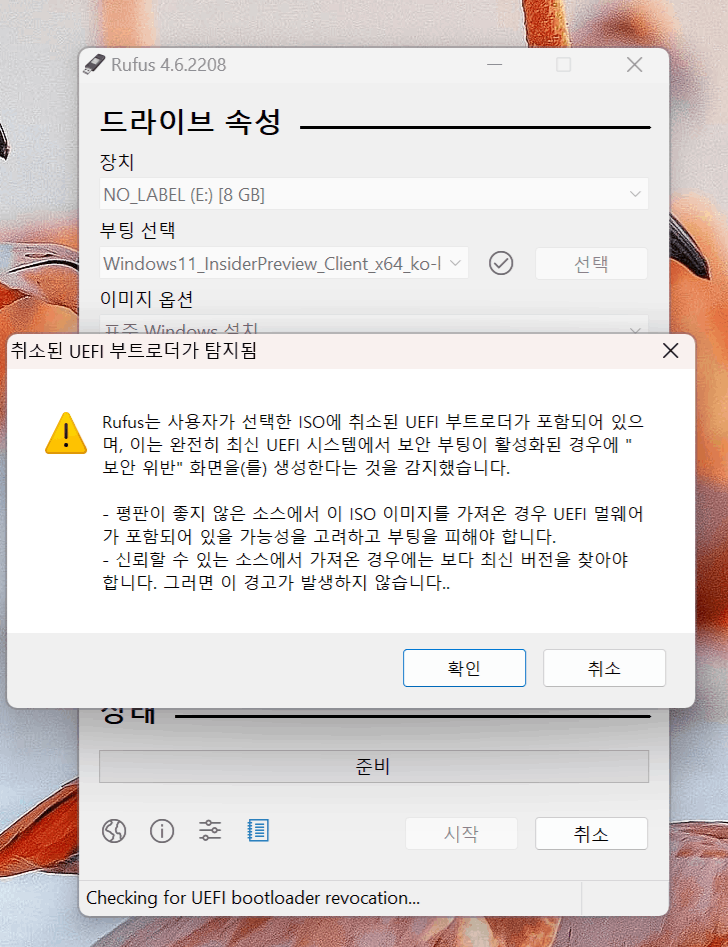
제가 rufus-4.6로 부터 받은 메시지 입니다. 경고 메시지에 대한 설명. iso 파일이 보안에 취악하다고 알려 주고 있습니다.
Windows 8.1 uses Secure Boot bootloaders that are vulnerable and have
been revoked by UEFI
Therefore, if your system is fully up to date in terms of security
(meaning your UEFI revoked bootloaders, also known as DBX, is up to
date), the bootloaders will NOT be able to run when Secure Boot is
enabled, but produce a security error instead.
So you have 2 options:
- If you trust that the ISO you are using is safe, you can disable
Secure Boot.
- Or you can use an ISO that does not use vulnerable bootloaders, which
means you need to use Windows 11 24H2 or later (as pretty much every
Windows ISO before that also uses bootloaders for which vulnerabilities
have been discovered).
This has nothing to do with using Insider ISOs. This has everything to
do with complex software, like the Windows UEFI bootloaders, eventually
being found to contain bugs that, if left unchecked, would allow
exploitation by malicious actors to completely defeat Secure Boot and
install permanent UEFI rootkits. Therefore, as these kind of bugs are
found, and to prevent exploitation, OSes like Windows and Linux
regularly update the database of known vulnerable bootloaders, which the
UEFI firmware checks at every boot, and which is designed to return an
error when a bootloader, such as the ones used in the Windows 8.1 ISOs,
is identified.
And in order to avoid bad surprise, Rufus performs the same kind of
checks for revocation as the UEFI firmware does, and alerts the user
before they run into the issue, so that they can decide whether they
want to disable Secure Boot to allow these vulnerable bootloaders to
run, or use a more modern ISO, where the known vulnerabilities in the
bootloaders have been fixed.
Regards,
/Pete
https://www.microsoft.com/ko-kr/software-download/windows11
여기서 받은 것은 보안 경고가 표시 되지 않았습니다. 그렇다면 이 싸이트만 안전한건가요?.
아니면 단순한 오류 일까요? 나는 단순한 오류라고 생각 하고 있습니다. 하지만 궁굼 하여 질문 드립니다.
' cx='32' cy='32' r='32' /%3E%3Ctext x='50%25' y='55%25' dominant-baseline='middle' text-anchor='middle' fill='%23FFF' %3EA%3C/text%3E%3C/svg%3E)