この記事は、従来の Microsoft.Azure.Search (バージョン 10) クライアント ライブラリの C# クイック スタートであり、 現在は Azure.Search.Documents (バージョン 11) クライアント ライブラリに置き換えられます。
注
既存または未完了の開発プロジェクトがある場合は、バージョン 10 を引き続き使用できます。 ただし、新しいプロジェクトの場合、または新機能を使用するには、 新しいライブラリに移行する必要があります。
このクイック スタートについて
Visual Studio と Microsoft.Azure.Search クライアント ライブラリを使用して Azure Cognitive Search インデックスを作成、読み込み、クエリする .NET Core コンソール アプリケーションを C# で作成します。
この記事では、アプリケーションを作成する方法について説明します。 また、完全なアプリケーションをダウンロードして実行することもできます。
注
この記事のデモ コードでは、わかりやすくするために、Azure Cognitive Search バージョン 10 .NET SDK の同期メソッドを使用します。 ただし、運用環境のシナリオでは、独自のアプリケーションで非同期メソッドを使用して、スケーラブルで応答性を維持することをお勧めします。 たとえば、CreateやDeleteの代わりにCreateAsyncとDeleteAsyncを使用できます。
[前提条件]
始める前に、次のものを用意する必要があります:
アクティブなサブスクリプションを持つ Azure アカウント。 無料でアカウントを作成できます。
Azure Cognitive Search サービス。 サービスを作成するか、現在のサブスクリプションから既存のサービスを検索します。 このクイック スタート用には、無料のサービスを使用できます。
Visual Studio (任意のエディション)。 サンプル コードと手順については、無料の Community エディションでテストされています。
キーと URL を取得する
サービスへの呼び出しには、すべての要求に対して URL エンドポイントとアクセス キーが必要です。 両方を使用して検索サービスが作成されるため、Azure Cognitive Search をサブスクリプションに追加した場合は、次の手順に従って必要な情報を取得します。
Azure portal にサインインし、検索サービスの [概要 ] ページで URL を取得します。 たとえば、エンドポイントは
https://mydemo.search.windows.netのようになります。[設定]>[キー] で、サービスに対する完全な権限の管理キーを取得します。 管理キーをロールオーバーする必要がある場合に備えて、2 つの交換可能な管理キーがビジネス継続性のために提供されています。 オブジェクトの追加、変更、および削除の要求には、主キーまたはセカンダリ キーのどちらかを使用できます。
クエリ キーも取得します。 読み取り専用アクセスでクエリ要求を発行することをお勧めします。
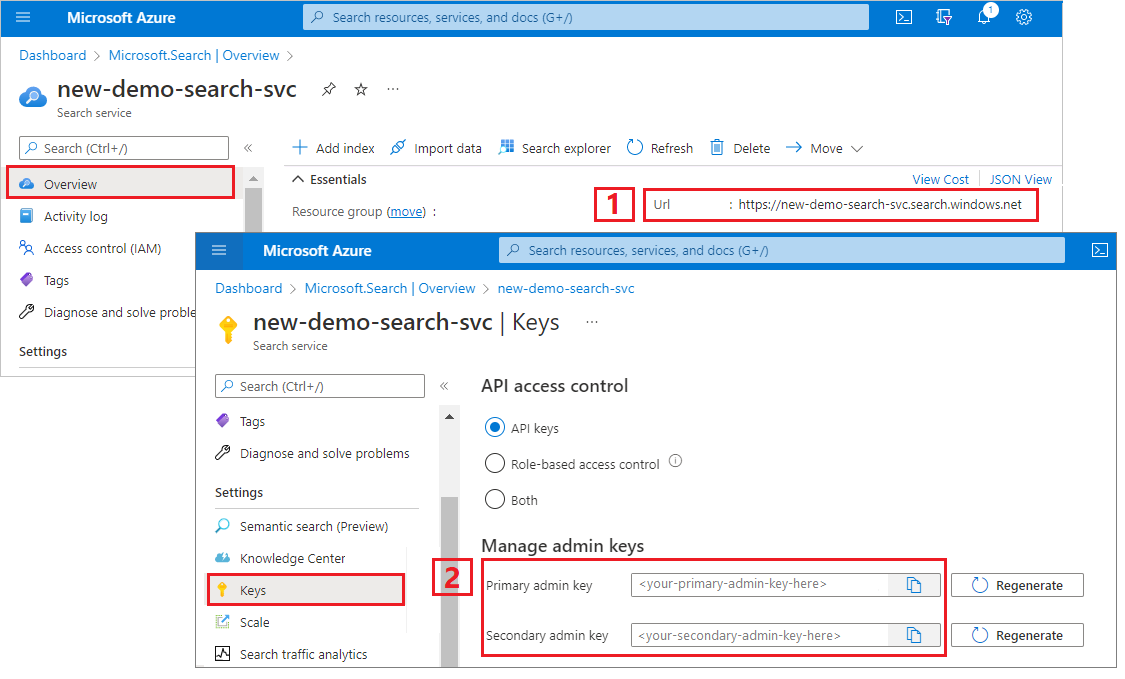
あなたのサービスに送信するすべての要求には、API キーが必要です。 有効なキーを使用すると、要求を送信するアプリケーションとそれを処理するサービスとの間に、要求ごとに信頼が確立されます。
環境を設定する
まず Visual Studio を開き、.NET Core 上で実行する新しいコンソール アプリ プロジェクトを作成します。
NuGet パッケージのインストール
Microsoft.Azure.Search パッケージは、NuGet パッケージとして配布されるいくつかのクライアント ライブラリで構成されています。
このプロジェクトでは、 Microsoft.Azure.Search NuGet パッケージのバージョン 10 と最新の Microsoft.Extensions.Configuration.Json NuGet パッケージを使用します。
[ツール]>[NuGet パッケージ マネージャー] で、 [ソリューションの NuGet パッケージの管理] を選択します。
参照をクリックしてください。
Microsoft.Azure.Searchを検索し、バージョン 10 を選択します。右側にある [ インストール ] をクリックして、プロジェクトとソリューションにアセンブリを追加します。
バージョン 2.2.0 以降を選択して、
Microsoft.Extensions.Configuration.Jsonに対して繰り返します。
Azure Cognitive Search サービス情報を追加する
ソリューション エクスプローラーで、プロジェクトを右クリックし、[ 追加>新しい項目... ] を選択します。
[新しい項目の追加] で、"JSON" を検索して、項目の種類の JSON 関連の一覧を返します。
[JSON ファイル] を選択し、ファイルに "appsettings.json" という名前を付け、[追加] をクリックします。
出力ディレクトリにファイルを追加します。 appsettings.json を右クリックし、[ プロパティ] を選択します。 [ 出力ディレクトリにコピー] で、[ 新しい場合はコピー] を選択します。
次の JSON を新しい JSON ファイルにコピーします。
{
  "SearchServiceName": "<YOUR-SEARCH-SERVICE-NAME>",
  "SearchServiceAdminApiKey": "<YOUR-ADMIN-API-KEY>",
  "SearchIndexName": "hotels-quickstart"
}
検索サービス名 (YOUR-SEARCH-SERVICE-NAME) と管理 API キー (YOUR-ADMIN-API-KEY) を有効な値に置き換えます。 サービス エンドポイントが
https://mydemo.search.windows.netされている場合、サービス名は "mydemo" になります。
プロジェクトにクラス ".Method" ファイルを追加してください。
この手順は、コンソールで意味のある出力を生成するために必要です。 結果をコンソール ウィンドウに出力する場合は、Hotel オブジェクトの個々のフィールドを文字列として返す必要があります。 この手順では、 ToString() を実装してこのタスクを実行します。これを行うには、必要なコードを 2 つの新しいファイルにコピーします。
プロジェクトに 2 つの空のクラス定義を追加します:Address.Methods.cs、Hotel.Methods.cs
Address.Methods.csで、既定の内容を次のコード (1 から 25 行目) で上書きします。
Hotel.Methods.csで、 1 から 68 行目をコピーします。
1 - インデックスの作成
ホテル インデックスは、単純フィールドと複合フィールドで構成されます。単純フィールドは "HotelName" または "Description" で、複合フィールドはサブフィールドを含むアドレス、または部屋のコレクションです。 インデックスに複合型が含まれている場合は、複合フィールド定義を個別のクラスに分離します。
プロジェクトに 2 つの空のクラス定義 (Address.cs、Hotel.cs) を追加します
Address.csで、既定の内容を次のコードで上書きします。
using System;
using Microsoft.Azure.Search;
using Microsoft.Azure.Search.Models;
using Newtonsoft.Json;

namespace AzureSearchQuickstart
{
    public partial class Address
    {
        [IsSearchable]
        public string StreetAddress { get; set; }

        [IsSearchable, IsFilterable, IsSortable, IsFacetable]
        public string City { get; set; }

        [IsSearchable, IsFilterable, IsSortable, IsFacetable]
        public string StateProvince { get; set; }

        [IsSearchable, IsFilterable, IsSortable, IsFacetable]
        public string PostalCode { get; set; }

        [IsSearchable, IsFilterable, IsSortable, IsFacetable]
        public string Country { get; set; }
    }
}
Hotel.csでは、クラスは、アドレス クラスへの参照を含むインデックスの全体的な構造を定義します。
namespace AzureSearchQuickstart
{
    using System;
    using Microsoft.Azure.Search;
    using Microsoft.Azure.Search.Models;
    using Newtonsoft.Json;

    public partial class Hotel
    {
        [System.ComponentModel.DataAnnotations.Key]
        [IsFilterable]
        public string HotelId { get; set; }

        [IsSearchable, IsSortable]
        public string HotelName { get; set; }

        [IsSearchable]
        [Analyzer(AnalyzerName.AsString.EnMicrosoft)]
        public string Description { get; set; }

        [IsSearchable]
        [Analyzer(AnalyzerName.AsString.FrLucene)]
        [JsonProperty("Description_fr")]
        public string DescriptionFr { get; set; }

        [IsSearchable, IsFilterable, IsSortable, IsFacetable]
        public string Category { get; set; }

        [IsSearchable, IsFilterable, IsFacetable]
        public string[] Tags { get; set; }

        [IsFilterable, IsSortable, IsFacetable]
        public bool? ParkingIncluded { get; set; }

        [IsFilterable, IsSortable, IsFacetable]
        public DateTimeOffset? LastRenovationDate { get; set; }

        [IsFilterable, IsSortable, IsFacetable]
        public double? Rating { get; set; }

        public Address Address { get; set; }
    }
}
フィールドの属性によって、アプリケーションでの使用方法が決まります。 たとえば、
IsSearchable属性は、フルテキスト検索に含める必要があるすべてのフィールドに割り当てる必要があります。注
.NET SDK では、フィールドは明示的に
IsSearchable、IsFilterable、IsSortable、およびIsFacetableとして属性付けする必要があります。 この動作は、データ型に基づいて属性を暗黙的に有効にする REST API とは対照的です (たとえば、単純な文字列フィールドは自動的に検索可能です)。string型のインデックス内の 1 つのフィールドは、各ドキュメントを一意に識別するキー フィールドである必要があります。 このスキーマでは、キーはHotelId。このインデックスでは、説明フィールドは、既定の標準 Lucene アナライザーをオーバーライドするときに指定された省略可能な
analyzerプロパティを使用します。description_frフィールドはフランス語のテキストを格納するため、フランス語の Lucene アナライザー (FrLucene) を使用しています。descriptionは、オプションの Microsoft 言語アナライザー (EnMicrosoft) を使用しています。Program.csで、アプリケーションの構成ファイル (appsettings.json) に格納されている値を使用して、サービスに接続する
SearchServiceClientクラスのインスタンスを作成します。SearchServiceClientにはIndexesプロパティがあり、Azure Cognitive Search インデックスの作成、一覧表示、更新、または削除に必要なすべてのメソッドを提供します。using System; using System.Linq; using System.Threading; using Microsoft.Azure.Search; using Microsoft.Azure.Search.Models; using Microsoft.Extensions.Configuration; namespace AzureSearchQuickstart { class Program { // Demonstrates index delete, create, load, and query // Commented-out code is uncommented in later steps static void Main(string[] args) { IConfigurationBuilder builder = new ConfigurationBuilder().AddJsonFile("appsettings.json"); IConfigurationRoot configuration = builder.Build(); SearchServiceClient serviceClient = CreateSearchServiceClient(configuration); string indexName = configuration["SearchIndexName"]; Console.WriteLine("{0}", "Deleting index...\n"); DeleteIndexIfExists(indexName, serviceClient); Console.WriteLine("{0}", "Creating index...\n"); CreateIndex(indexName, serviceClient); // Uncomment next 3 lines in "2 - Load documents" // ISearchIndexClient indexClient = serviceClient.Indexes.GetClient(indexName); // Console.WriteLine("{0}", "Uploading documents...\n"); // UploadDocuments(indexClient); // Uncomment next 2 lines in "3 - Search an index" // Console.WriteLine("{0}", "Searching index...\n"); // RunQueries(indexClient); Console.WriteLine("{0}", "Complete. Press any key to end application...\n"); Console.ReadKey(); } // Create the search service client private static SearchServiceClient CreateSearchServiceClient(IConfigurationRoot configuration) { string searchServiceName = configuration["SearchServiceName"]; string adminApiKey = configuration["SearchServiceAdminApiKey"]; SearchServiceClient serviceClient = new SearchServiceClient(searchServiceName, new SearchCredentials(adminApiKey)); return serviceClient; } // Delete an existing index to reuse its name private static void DeleteIndexIfExists(string indexName, SearchServiceClient serviceClient) { if (serviceClient.Indexes.Exists(indexName)) { serviceClient.Indexes.Delete(indexName); } } // Create an index whose fields correspond to the properties of the Hotel class. // The Address property of Hotel will be modeled as a complex field. // The properties of the Address class in turn correspond to sub-fields of the Address complex field. // The fields of the index are defined by calling the FieldBuilder.BuildForType() method. private static void CreateIndex(string indexName, SearchServiceClient serviceClient) { var definition = new Microsoft.Azure.Search.Models.Index() { Name = indexName, Fields = FieldBuilder.BuildForType<Hotel>() }; serviceClient.Indexes.Create(definition); } } }可能であれば、アプリケーションで
SearchServiceClientの単一インスタンスを共有して、開く接続が多くなりすぎないようにします。 クラス メソッドは、このような共有を有効にするためにスレッド セーフです。このクラスには、いくつかのコンストラクターがあります。 必要なものは、検索サービス名と
SearchCredentialsオブジェクトをパラメーターとして受け取ります。SearchCredentialsは API キーをラップします。インデックス定義では、
Fieldオブジェクトを作成する最も簡単な方法は、FieldBuilder.BuildForTypeメソッドを呼び出して、型パラメーターのモデル クラスを渡すことです。 モデル クラスには、インデックスのフィールドにマップされるプロパティがあります。 このマッピングを使用すると、検索インデックスからモデル クラスのインスタンスにドキュメントをバインドできます。注
モデル クラスを使用する予定がない場合でも、
Fieldオブジェクトを直接作成してインデックスを定義できます。 フィールドの名前を、データ型 (または文字列フィールドのアナライザー) と共にコンストラクターに指定できます。IsSearchable、IsFilterableといった他のプロパティを設定することもできます。F5 キーを押してアプリをビルドし、インデックスを作成します。
プロジェクトが正常にビルドされると、コンソール ウィンドウが開き、インデックスを削除して作成するためのステータス メッセージが画面に書き込まれます。
2 - ドキュメントを読み込む
Azure Cognitive Search では、ドキュメントはインデックス作成への入力とクエリからの出力の両方であるデータ構造です。 外部データ ソースから取得するドキュメント入力には、データベース内の行、Blob storage 内の BLOB、ディスク上の JSON ドキュメントがあります。 この例では、手短な方法として、4 つのホテルの JSON ドキュメントをコード自体に埋め込みます。
ドキュメントをアップロードするときは、 IndexBatch オブジェクトを使用する必要があります。
IndexBatchには、IndexAction オブジェクトのコレクションが含まれており、それぞれにドキュメントと、実行するアクション (アップロード、マージ、削除、mergeOrUpload) を Azure Cognitive Search に伝えるプロパティが含まれています。
Program.csで、ドキュメントとインデックスアクションの配列を作成し、配列を
IndexBatchに渡します。 以下のドキュメントは、ホテルと住所クラスで定義されているホテル クイック スタート インデックスに準拠しています。// Upload documents as a batch private static void UploadDocuments(ISearchIndexClient indexClient) { var actions = new IndexAction<Hotel>[] { IndexAction.Upload( new Hotel() { HotelId = "1", HotelName = "Secret Point Motel", Description = "The hotel is ideally located on the main commercial artery of the city in the heart of New York. A few minutes away is Time's Square and the historic centre of the city, as well as other places of interest that make New York one of America's most attractive and cosmopolitan cities.", DescriptionFr = "L'hôtel est idéalement situé sur la principale artère commerciale de la ville en plein cœur de New York. A quelques minutes se trouve la place du temps et le centre historique de la ville, ainsi que d'autres lieux d'intérêt qui font de New York l'une des villes les plus attractives et cosmopolites de l'Amérique.", Category = "Boutique", Tags = new[] { "pool", "air conditioning", "concierge" }, ParkingIncluded = false, LastRenovationDate = new DateTimeOffset(1970, 1, 18, 0, 0, 0, TimeSpan.Zero), Rating = 3.6, Address = new Address() { StreetAddress = "677 5th Ave", City = "New York", StateProvince = "NY", PostalCode = "10022", Country = "USA" } } ), IndexAction.Upload( new Hotel() { HotelId = "2", HotelName = "Twin Dome Motel", Description = "The hotel is situated in a nineteenth century plaza, which has been expanded and renovated to the highest architectural standards to create a modern, functional and first-class hotel in which art and unique historical elements coexist with the most modern comforts.", DescriptionFr = "L'hôtel est situé dans une place du XIXe siècle, qui a été agrandie et rénovée aux plus hautes normes architecturales pour créer un hôtel moderne, fonctionnel et de première classe dans lequel l'art et les éléments historiques uniques coexistent avec le confort le plus moderne.", Category = "Boutique", Tags = new[] { "pool", "free wifi", "concierge" }, ParkingIncluded = false, LastRenovationDate = new DateTimeOffset(1979, 2, 18, 0, 0, 0, TimeSpan.Zero), Rating = 3.60, Address = new Address() { StreetAddress = "140 University Town Center Dr", City = "Sarasota", StateProvince = "FL", PostalCode = "34243", Country = "USA" } } ), IndexAction.Upload( new Hotel() { HotelId = "3", HotelName = "Triple Landscape Hotel", Description = "The Hotel stands out for its gastronomic excellence under the management of William Dough, who advises on and oversees all of the Hotel’s restaurant services.", DescriptionFr = "L'hôtel est situé dans une place du XIXe siècle, qui a été agrandie et rénovée aux plus hautes normes architecturales pour créer un hôtel moderne, fonctionnel et de première classe dans lequel l'art et les éléments historiques uniques coexistent avec le confort le plus moderne.", Category = "Resort and Spa", Tags = new[] { "air conditioning", "bar", "continental breakfast" }, ParkingIncluded = true, LastRenovationDate = new DateTimeOffset(2015, 9, 20, 0, 0, 0, TimeSpan.Zero), Rating = 4.80, Address = new Address() { StreetAddress = "3393 Peachtree Rd", City = "Atlanta", StateProvince = "GA", PostalCode = "30326", Country = "USA" } } ), IndexAction.Upload( new Hotel() { HotelId = "4", HotelName = "Sublime Cliff Hotel", Description = "Sublime Cliff Hotel is located in the heart of the historic center of Sublime in an extremely vibrant and lively area within short walking distance to the sites and landmarks of the city and is surrounded by the extraordinary beauty of churches, buildings, shops and monuments. Sublime Cliff is part of a lovingly restored 1800 palace.", DescriptionFr = "Le sublime Cliff Hotel est situé au coeur du centre historique de sublime dans un quartier extrêmement animé et vivant, à courte distance de marche des sites et monuments de la ville et est entouré par l'extraordinaire beauté des églises, des bâtiments, des commerces et Monuments. Sublime Cliff fait partie d'un Palace 1800 restauré avec amour.", Category = "Boutique", Tags = new[] { "concierge", "view", "24-hour front desk service" }, ParkingIncluded = true, LastRenovationDate = new DateTimeOffset(1960, 2, 06, 0, 0, 0, TimeSpan.Zero), Rating = 4.6, Address = new Address() { StreetAddress = "7400 San Pedro Ave", City = "San Antonio", StateProvince = "TX", PostalCode = "78216", Country = "USA" } } ), }; var batch = IndexBatch.New(actions); try { indexClient.Documents.Index(batch); } catch (IndexBatchException e) { // When a service is under load, indexing might fail for some documents in the batch. // Depending on your application, you can compensate by delaying and retrying. // For this simple demo, we just log the failed document keys and continue. Console.WriteLine( "Failed to index some of the documents: {0}", String.Join(", ", e.IndexingResults.Where(r => !r.Succeeded).Select(r => r.Key))); } // Wait 2 seconds before starting queries Console.WriteLine("Waiting for indexing...\n"); Thread.Sleep(2000); }IndexBatchオブジェクトを初期化したら、SearchIndexClientオブジェクトのDocuments.Indexを呼び出して、インデックスに送信できます。Documentsは、インデックス内のドキュメントを追加、変更、削除、またはクエリするためのメソッドを提供するSearchIndexClientのプロパティです。Indexメソッドの呼び出しを囲むtry/catchは、インデックス作成の失敗をキャッチします。これは、サービスの負荷が高い場合に発生する可能性があります。 運用コードでは、失敗したドキュメントのインデックス作成を遅延してから再試行するか、サンプルと同様にログを記録して続行するか、アプリケーションのデータ整合性要件を満たす他の方法で処理することができます。2 秒の遅延により、非同期のインデックス作成を待ち、クエリの実行前にすべてのドキュメントのインデックスを作成できるようにしています。 通常、遅延のコーディングは、デモ、テスト、およびサンプル アプリケーションでのみ必要です。
Program.csの main で、"2 - ドキュメントの読み込み" の行のコメントを解除します。
// Uncomment next 3 lines in "2 - Load documents"
ISearchIndexClient indexClient = serviceClient.Indexes.GetClient(indexName);
Console.WriteLine("{0}", "Uploading documents...\n");
UploadDocuments(indexClient);
F5 キーを押してアプリをリビルドします。
プロジェクトが正常にビルドされると、コンソール ウィンドウが開き、ステータス メッセージが書き込まれます。今回は、ドキュメントのアップロードに関するメッセージが表示されます。 Azure portal の検索サービスの [概要 ] ページで、hotels-quickstart インデックスに 4 つのドキュメントが含まれるようになりました。
ドキュメント処理の詳細については、「 .NET SDK でドキュメントを処理する方法」を参照してください。
3 - インデックスを検索する
最初のドキュメントのインデックスが作成されるとすぐにクエリの結果を取得できますが、インデックスの実際のテストではすべてのドキュメントのインデックスが作成されるまで待つ必要があります。
このセクションでは、クエリ ロジックと結果の 2 つの機能を追加します。 クエリの場合は、 Search メソッドを使用します。 このメソッドは、検索テキストと他の パラメーターを受け取ります。
DocumentsSearchResult クラスは結果を表します。
Program.csで、検索結果をコンソールに出力する WriteDocuments メソッドを作成します。
private static void WriteDocuments(DocumentSearchResult<Hotel> searchResults)
{
    foreach (SearchResult<Hotel> result in searchResults.Results)
    {
        Console.WriteLine(result.Document);
    }

    Console.WriteLine();
}
クエリを実行して結果を返す RunQueries メソッドを作成します。 結果は、ホテルオブジェクトです。 select パラメーターを使用して、個々のフィールドを表示できます。 select パラメーターにフィールドが含まれていない場合、対応する Hotel プロパティは null になります。
private static void RunQueries(ISearchIndexClient indexClient) { SearchParameters parameters; DocumentSearchResult<Hotel> results; // Query 1 Console.WriteLine("Query 1: Search for term 'Atlanta' with no result trimming"); parameters = new SearchParameters(); results = indexClient.Documents.Search<Hotel>("Atlanta", parameters); WriteDocuments(results); // Query 2 Console.WriteLine("Query 2: Search on the term 'Atlanta', with trimming"); Console.WriteLine("Returning only these fields: HotelName, Tags, Address:\n"); parameters = new SearchParameters() { Select = new[] { "HotelName", "Tags", "Address" }, }; results = indexClient.Documents.Search<Hotel>("Atlanta", parameters); WriteDocuments(results); // Query 3 Console.WriteLine("Query 3: Search for the terms 'restaurant' and 'wifi'"); Console.WriteLine("Return only these fields: HotelName, Description, and Tags:\n"); parameters = new SearchParameters() { Select = new[] { "HotelName", "Description", "Tags" } }; results = indexClient.Documents.Search<Hotel>("restaurant, wifi", parameters); WriteDocuments(results); // Query 4 -filtered query Console.WriteLine("Query 4: Filter on ratings greater than 4"); Console.WriteLine("Returning only these fields: HotelName, Rating:\n"); parameters = new SearchParameters() { Filter = "Rating gt 4", Select = new[] { "HotelName", "Rating" } }; results = indexClient.Documents.Search<Hotel>("*", parameters); WriteDocuments(results); // Query 5 - top 2 results Console.WriteLine("Query 5: Search on term 'boutique'"); Console.WriteLine("Sort by rating in descending order, taking the top two results"); Console.WriteLine("Returning only these fields: HotelId, HotelName, Category, Rating:\n"); parameters = new SearchParameters() { OrderBy = new[] { "Rating desc" }, Select = new[] { "HotelId", "HotelName", "Category", "Rating" }, Top = 2 }; results = indexClient.Documents.Search<Hotel>("boutique", parameters); WriteDocuments(results); }クエリで用語を照合するには、フルテキスト検索とフィルターの 2 つの方法があります。 フルテキスト検索クエリでは、インデックス内の
IsSearchableフィールドで 1 つ以上の用語が検索されます。 フィルターは、インデックス内のIsFilterableフィールドに対して評価されるブール式です。 フルテキスト検索とフィルターを一緒に使用することも、個別に使用することもできます。検索とフィルターの両方が、
Documents.Searchメソッドを使用して実行されます。searchTextパラメーターには検索クエリを渡すことができますが、フィルター式はSearchParametersクラスのFilterプロパティで渡すことができます。 検索せずにフィルター処理するには、searchTextパラメーターの"*"を渡すだけです。 フィルター処理を行わずに検索するには、Filterプロパティを未設定のままにするか、SearchParametersインスタンスをまったく渡さないでください。Program.csの main で、"3 - Search" の行のコメントを解除します。
// Uncomment next 2 lines in "3 - Search an index"
Console.WriteLine("{0}", "Searching documents...\n");
RunQueries(indexClient);
これでソリューションが完了しました。 F5 キーを押して、アプリをリビルドし、プログラム全体を実行します。
出力には以前と同じメッセージが含まれており、クエリ情報と結果が追加されています。
リソースをクリーンアップする
独自のサブスクリプションで作業している場合は、プロジェクトの最後に、作成したリソースがまだ必要かどうかを特定することをお勧めします。 使われていないリソースが動作し続けると、費用がかかります。 リソースを個別に削除することも、リソース グループを削除してリソースのセット全体を削除することもできます。
ポータルでリソースを検索および管理するには、左側のナビゲーション ウィンドウの [すべてのリソース またはリソース グループ リンクを使用します。
無料のサービスを使用している場合は、3 つのインデックス、インデクサー、データ ソースに制限されていることに注意してください。 ポータルで個々のアイテムを削除して、制限を超えないようにすることができます。
次のステップ
この C# クイック スタートでは、インデックスの作成、ドキュメントの読み込み、クエリの実行を行う一連のタスクを実行しました。 さまざまな段階で、読みやすく、理解しやすいように、手短な方法として、コードを簡略化しました。 基本的な概念に慣れている場合は、次の記事で、知識を深める代替アプローチと概念の探索をお勧めします。
サンプル コードとインデックスは、このバージョンの拡張バージョンです。 次のサンプルでは、Rooms コレクションを追加し、さまざまなクラスとアクションを使用し、処理のしくみを詳しく見てみましょう。
クラウドの支出を最適化して節約しますか?