Microsoft 365 e Office | Excel | Per la casa | Windows
Una famiglia di software per fogli di calcolo Microsoft con strumenti per l'analisi, la creazione di grafici e la comunicazione dei dati.

Questo browser non è più supportato.
Esegui l'aggiornamento a Microsoft Edge per sfruttare i vantaggi di funzionalità più recenti, aggiornamenti della sicurezza e supporto tecnico.
' cx='32' cy='32' r='32' /%3E%3Ctext x='50%25' y='55%25' dominant-baseline='middle' text-anchor='middle' fill='%23FFF' %3EA%3C/text%3E%3C/svg%3E)
Salve,
vorrei sapere se potete aiutarmi.
Ho 3 fogli, e avrei la necessità di estrarre i dati univoci dalle colonne A dei tre fogli in "Foglio4" dalla cella A1.
Il codice che ho usato serve semplicemente per estrarre i valori univoci da un solo foglio.
Sub Extract_Unique()
Set Rng = Sheets("Foglio1").Range("A2:A5000")
Set destrng = Worksheets("Foglio4").Range("A1")
Rng.AdvancedFilter Action:=xlFilterCopy, CriteriaRange:=Rng, _
CopyToRange:=destrng, Unique:=True
End Sub
Vorrei sapere poi, se è possibile estrarre i valori univoci da un range, ad esempio da A2:D100.
Grazie a tutti
Una famiglia di software per fogli di calcolo Microsoft con strumenti per l'analisi, la creazione di grafici e la comunicazione dei dati.
Domanda bloccata. Questa domanda è stata eseguita dalla community del supporto tecnico Microsoft. È possibile votare se è utile, ma non è possibile aggiungere commenti o risposte o seguire la domanda.
Ciao Emiliano Li,
ti ringrazio molto per le tue risposte e avrei un'ultima domanda sul codice che mi hai fornito.
Prego!
È possibile estrarre i valori univoci senza riordinarli dal più piccolo al più grande?
Certo: ogni tuo desiderio è un ordine! :-)
Prova qualcosa del genere:
'=========>>
Option Explicit
'--------->>
Public Sub Tester()
Dim WB As Workbook
Dim SH As Worksheet, srcSH As Worksheet, destSH As Worksheet
Dim srcRng As Range, destRng As Range
Dim arrFogli As Variant
Dim arrDatiFoglio() As Variant, arrIn() As Variant
Dim arrOut() As Variant
Dim Res As Variant
Dim i As Long, LRow As Long
Dim UB As Long, UB2 As Long
Const sFoglioDestinazione As String = "Foglio4" '<<=== Modifica
Const sCellaDestinazione As String = "A1" '<<=== Modifica
Const sFogli As String = "1,2,3,4,5,6,7,8,9,10,11,12"
arrFogli = Split(sFogli, ",")
Set WB = ThisWorkbook
With WB
Set destSH = WB.Sheets(sFoglioDestinazione)
For Each SH In .Worksheets
With SH
Res = Application.Match(.Name, arrFogli, 0)
If Not IsError(Res) Then
With SH
LRow = LastRow(SH, .Columns("A:A"))
Set srcRng = .Range("A1:A" & LRow)
End With
arrDatiFoglio = srcRng.Value
If IsArrayAllocated(arrIn) Then
UB = UBound(arrIn)
End If
UB2 = UBound(arrDatiFoglio)
ReDim Preserve arrIn(1 To UB + UB2)
For i = 1 To UB2
arrIn(UB + i) = arrDatiFoglio(i, 1)
Next i
End If
End With
Next SH
End With
Set destRng = destSH.Range(sCellaDestinazione)
arrOut = myArrayList(arrIn)
With destRng.Resize(UBound(arrOut))
.NumberFormat = "@"
.Value = Application.Transpose(arrOut)
End With
End Sub
'--------->>
Public Function myArrayList(V As Variant)
Dim i As Long
Dim oArrayList As Object
Set oArrayList = CreateObject("System.Collections.ArrayList")
With oArrayList
For i = 1 To UBound(V)
.Add V(i) ', 1)
Next i
myArrayList = .ToArray
End With
End Function
'<<=========
===
Regards,
Norman
Buonasera Norman,
ti ringrazio molto per le tue risposte e avrei un'ultima domanda sul codice che mi hai fornito.
È possibile estrarre i valori univoci senza riordinarli dal più piccolo al più grande?
Grazie in anticipo!
Ciao Emiliano Li,
ti allego la lista con i valori:
https://1drv.ms/t/s!Ah9qYKDkqhKtgahOXfNgG0JiuCvEDw
Ho notato che il problema è probabilmente riconducibile al punto. Ho due valori ad esempio:
-"18000";
-"18000.".
La differenza è solo nel punto finale nel codice. Nella lista di soli valori univoci per alcuni valori perdo il punto.
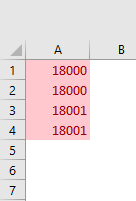
Infatti, il problema riscontrato da te è dovuto al modo in cui Excel interpreta i dati passata al foglio da VBA. Più precisamente, la mia procedura indentifica i valori 18000 e 18000. come due stringhe diverse e le passa a Excel; Excel poi converte la stringa 18000. nel valore numerico 18000, perdendo così ogni rappresentazione del punto.
Per superare questo problema non previsto da me, sostituisci l'istruzione
destRng.Resize(UBound(arrOut)).Value = Application.Transpose(arrOut)
con:
With destRng.Resize(UBound(arrOut))
.NumberFormat = "@"
.Value = Application.Transpose(arrOut)
End With
Per affrontare la questione della presenza dei dati di interesse su più fogli, vorrei sapere se quelli fogli sono denominati con i nomi dei mesi, i nomi abbreviati dei mesi, i numeri 1-12, oppure in qualche altro modo.
===
Regards,
Norman
Ciao Norman,
ti allego la lista con i valori:
https://1drv.ms/t/s!Ah9qYKDkqhKtgahOXfNgG0JiuCvEDw
Ho notato che il problema è probabilmente riconducibile al punto. Ho due valori ad esempio:
-"18000";
-"18000.".
La differenza è solo nel punto finale nel codice. Nella lista di soli valori univoci per alcuni valori perdo il punto.
Grazie
Ciao Emiliano Li ,
Ciao Norman, ti ho allegato il file con dei codici miei:
https://1drv.ms/x/s!Ah9qYKDkqhKtgahMwcSVHNJHK2BhHwPer i duplicati, sinceramente sembra strano anche a me. Sono dei codici prodotto.
Avendo dato un'occhiata al file che hai caricati, credo che sia corrotto! Mentre l'ultima riga popolata è la riga 2963, prova a selezionare la cella A1 e fai Ctrl+FRECCIA GIÙ e arriverai ala cella vuota A5000!!
Hai per caso un'altra copia degli stessi dati di quel foglio?
Per la seconda richiesta, sempre nel file, trovi tre fogli, 1, 2 e 3.
Ad esempio:
-nella colonna A del foglio 1 ho dei dati relativi a gennaio;
-nella colonna A del foglio 2 ho dei dati relativi a febbraio;
-nella colonna A del foglio 3 ho dei dati relativi a marzo e così via.
Quindi, vorrei estrarre i valori univoci dalle colonne A di più fogli.
Il passaggio che avevo fatto era in pratica di inserire i dati delle colonne A in un nuovo foglio in colonne adiacenti e utilizzare il codice che mi hai gentilmente fornito, volevo quindi sapere s
e potevo saltare questo passaggio. Ho provato con il multirange e union ma senza risultati.
OK. Bisognerebbe creare un array dei dati: non si può creare un range o un union di dati che si trovono su più di un foglio.
Comunque, prima di procedere, vorrei utilizzare una copia non corrotta dei tuoi dati!
===
Regards,
Norman