Hello there! I am Charity, I'm an Independent Advisor. I'm glad to help you today!
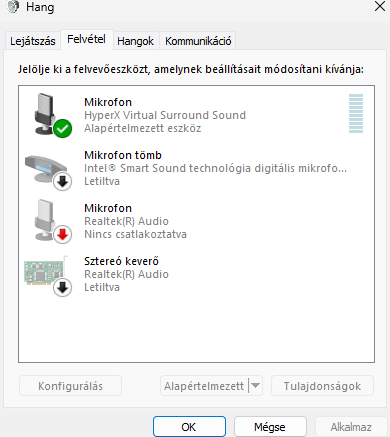
Thank you for the information. Sometimes, Windows might revert to using a different microphone or audio input device. After a restart or replugging, go back to the sound settings and ensure the HyperX Cloud 2 is selected as the default device under both the playback and recording tabs.
Please keep me know if this worked for you.
Kind Regards,
Charity
Thank you for your answer, i have this problem for weeks now so i tried most of the basic troubleshooting technics like this, above that every other michrophone device is disabled, only the headset in an usb is enabled and a speaker which is connected through jack. My biggest concern is that installing realtek audio driver solves the problem but after a computer restart its doing the same thing and after i redownload realtek it solves it again, like somehow a restart overwrite realtek...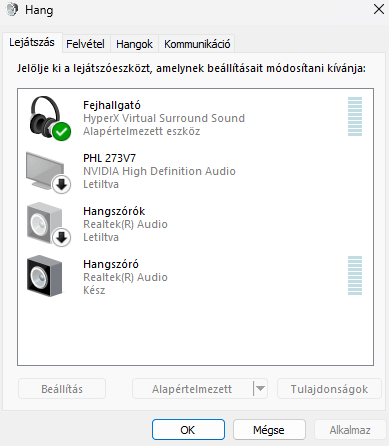
' cx='32' cy='32' r='32' /%3E%3Ctext x='50%25' y='55%25' dominant-baseline='middle' text-anchor='middle' fill='%23FFF' %3EA%3C/text%3E%3C/svg%3E)

' cx='32' cy='32' r='32' /%3E%3Ctext x='50%25' y='55%25' dominant-baseline='middle' text-anchor='middle' fill='%23FFF' %3ESC%3C/text%3E%3C/svg%3E)