I installed Windows 11 Home in 2022 on one of my computers, a Lenovo (Ideapad 310-15IKB – now 9 years old). The installation was challenging,🤔because the computer did not pass Microsoft's compatibility test = PC Health Check, because its processor, CPU = Intel Core i5 7200U is not compatible with Windows 11.
But … Microsoft itself has pointed out that Windows 11 can be installed on systems that do not meet all system requirements.
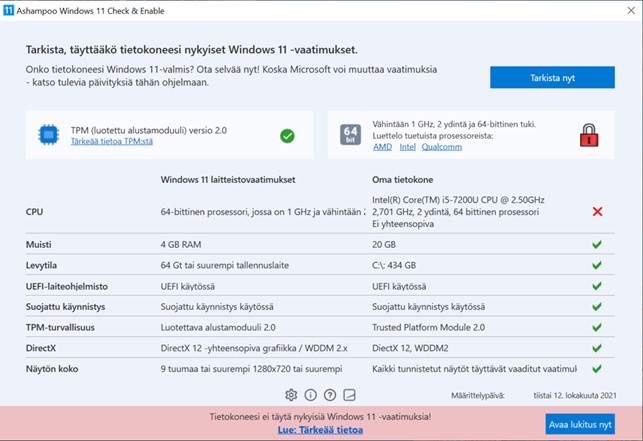
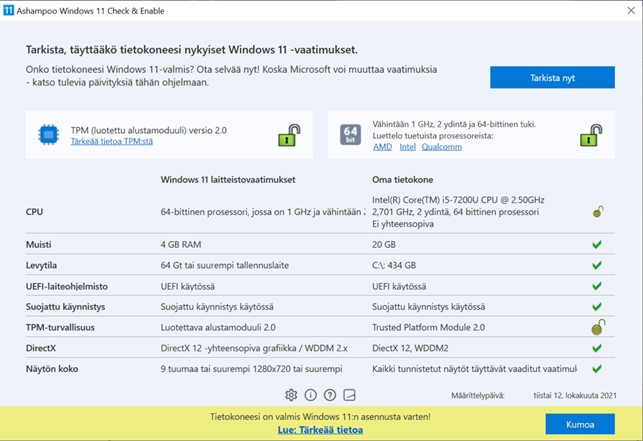
So I used the program Ashampoo® Windows 11 Check & Enable developed by a large German software company (the program removes the “lock” of an incompatible component in the test and allows Windows 11 to be installed on an incompatible computer) – see the pictures below.
According to Microsoft itself, the installation on several test computers went without a hitch.
Still, for liability reasons, Microsoft cites theoretical risks and the possibility that future updates may not be available. I downloaded the installation file (5.1 GB – v. 22H2) from the official Windows 11 download page:
https://www.microsoft.com/en-us/software-download/windows11 (3rd installation option)
So I downloaded the “virtual disk” or *.ISO file (right-click on the downloaded *.ISO file and select “open in application” --> select “Resource manager” --> click SETUP) and installed from there – the download took less than an hour and the installation took more than an hour, it went quite well.
**Updates started arriving immediately after the installation was complete!**👍So at least the fact that updates stopped arriving wasn’t true.
My computer has been working all these years WITHOUT PROBLEMS!
Compatibility test result first:
Compatibility test result after LOCK removal:
' cx='32' cy='32' r='32' /%3E%3Ctext x='50%25' y='55%25' dominant-baseline='middle' text-anchor='middle' fill='%23FFF' %3EJ%3C/text%3E%3C/svg%3E)

' cx='32' cy='32' r='32' /%3E%3Ctext x='50%25' y='55%25' dominant-baseline='middle' text-anchor='middle' fill='%23FFF' %3EA%3C/text%3E%3C/svg%3E)