Para aquellos que tengan MECM (SCCM), pueden resolverlo con una regla de cumplimiento (CI y CB).
Puesto que este cambio involucra valores binarios, se requiere el uso de scripts PowerShell para que funcione. Configúrenlos como scripts de detección y remediación y lo prueban:
#DiscoveryScript

$RegistryPath   = 'HKLM:\SOFTWARE\Microsoft\Windows NT\CurrentVersion\Time Zones\Pacific SA Standard Time\Dynamic DST'
$AttributeName  = "2019"
$binvalue = "f0,00,00,00,00,00,00,00,c4,ff,ff,ff,00,00,04,00,06,00,02,00,17,00,3b,00,3b,00,e7,03,00,00,09,00,06,00,02,00,17,00,3b,00,3b,00,e7,03"
$hexvalue = $binvalue.Split(',') | % { "0x$_"}

#Check_registry_value
$AttributeValue = @(Get-ItemProperty -Path $registrypath -Name $attributename).2019
if ((!$AttributeValue)) {
    return $false
}
if ($AttributeValue) {
    #convert_value_to_comparable_data
    [byte[]]$comparablevalue = $hexvalue
    #compare_object._if_null_then_values_match
    $compareresult = Compare-Object $AttributeValue $comparablevalue

    if ($compareresult -eq $null) {
        #values_match_then_return_true
        return $true
    }
    else {
    return $false
    }
}
Luego, ejecutan un script PowerShell de remediación que fuerce el valor correcto:
#RemediationScript

$RegistryPath   = 'HKLM:\SOFTWARE\Microsoft\Windows NT\CurrentVersion\Time Zones\Pacific SA Standard Time\Dynamic DST'
$AttributeName  = "2019"
$binvalue = "f0,00,00,00,00,00,00,00,c4,ff,ff,ff,00,00,04,00,06,00,02,00,17,00,3b,00,3b,00,e7,03,00,00,09,00,06,00,02,00,17,00,3b,00,3b,00,e7,03"
$hexvalue = $binvalue.Split(',') | % { "0x$_"}

Set-ItemProperty -Path $RegistryPath -Name $AttributeName -Value ([byte[]]$hexvalue) -Force
Finalmente, establecen una regla de cumplimiento para que el valor devuelto por el #DiscoveryScript sea igual a "True".
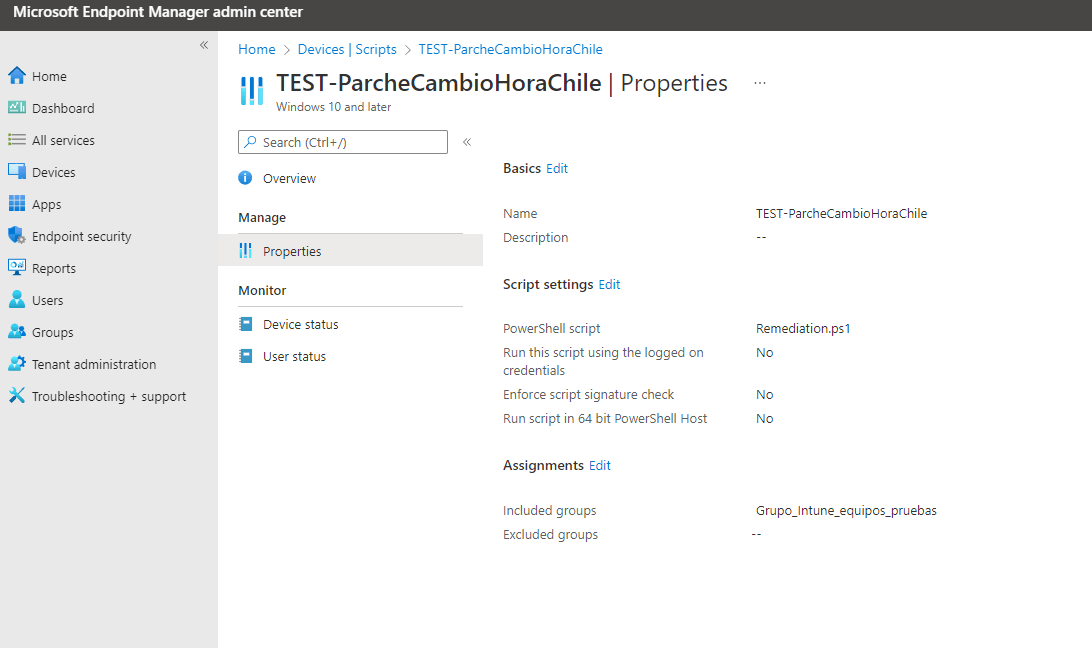
Desde MEM (Intune), simplemente cree un script desde el menú de dispositivos y use el #RemediationScript provisto para asignarlo a un grupo de pruebas. También debería funcionar bien.
Saludos,
Mariano
' cx='32' cy='32' r='32' /%3E%3Ctext x='50%25' y='55%25' dominant-baseline='middle' text-anchor='middle' fill='%23FFF' %3EA%3C/text%3E%3C/svg%3E)
