Azure Data Factory
An Azure service for ingesting, preparing, and transforming data at scale.
This browser is no longer supported.
Upgrade to Microsoft Edge to take advantage of the latest features, security updates, and technical support.
' cx='32' cy='32' r='32' /%3E%3Ctext x='50%25' y='55%25' dominant-baseline='middle' text-anchor='middle' fill='%23FFF' %3EPD%3C/text%3E%3C/svg%3E)
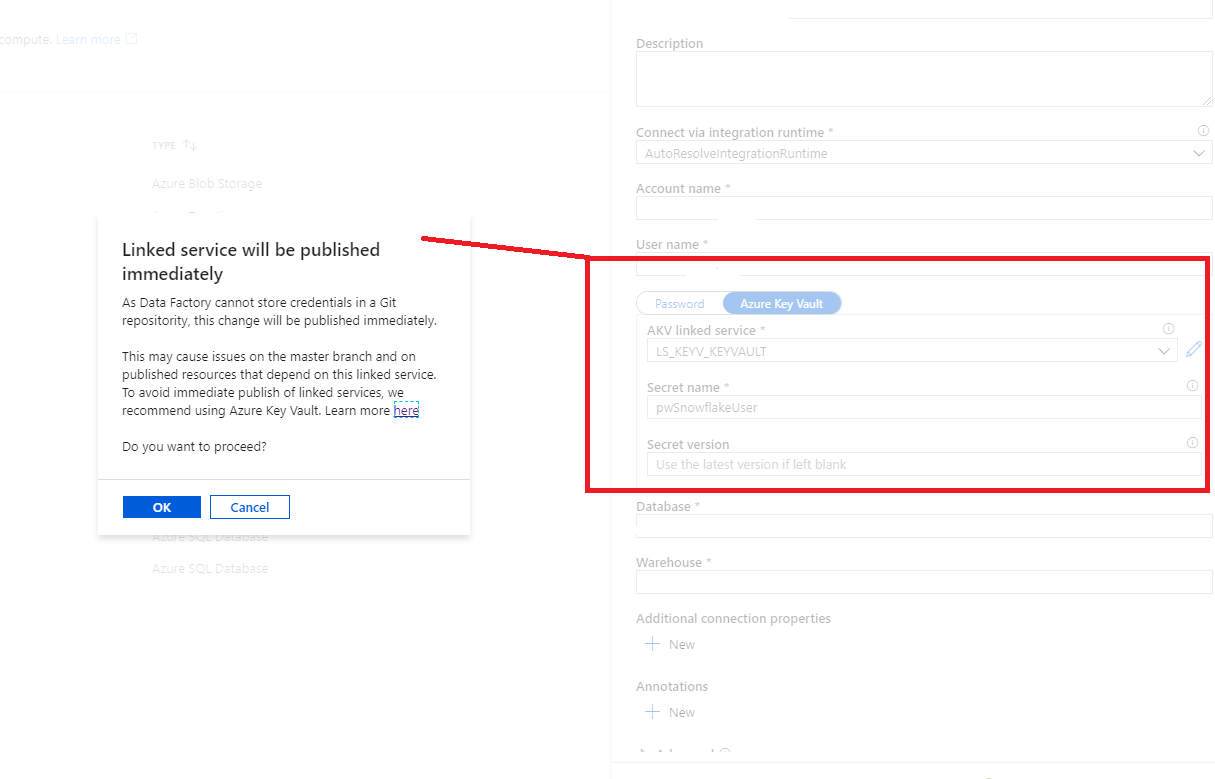
Currently the implementation of KeyVault inside the linked service template for Snowflake is not properly done.
An Azure service for ingesting, preparing, and transforming data at scale.
' cx='32' cy='32' r='32' /%3E%3Ctext x='50%25' y='55%25' dominant-baseline='middle' text-anchor='middle' fill='%23FFF' %3EKM%3C/text%3E%3C/svg%3E)
Hi @Patrick Doerig ,
Welcome to Microsoft Q&A platform and thanks for bringing this to our attention.
We have reached out to internal team regarding this issue and will keep you posted as soon as we have a response from the team.
----------
Thank you
Regarding having database and warehouse details in Azure Key Vault, could you please try saving the complete snowflake connection string (including accountname, username, password, database, warehouse details) in Azure Key Vault ?
Please let us know how it goes.
Thanks
Hi @Patrick Doerig ,
Just checking to see if you have got a chance to try adding the complete connection string (including Db and WH ) in AKV and using AKV in snowflake linked service?
Thanks for you feedback. Unfortunately the fields like db, wh, etc. are mandatory fields and can not be empty in the UI. Adding the jdbc connection string to keyvault did not work for me.
Any updates regarding the first issue with the warning?
Best regards
Patrick
Hi @Patrick Doerig ,
Thanks for your response. I have escalated this to internal sources to get more info about your query and awaiting a response from them. I'll keep you posted as soon as I hear back from them.
Thank you for your patience.
Hi @Patrick Doerig ,
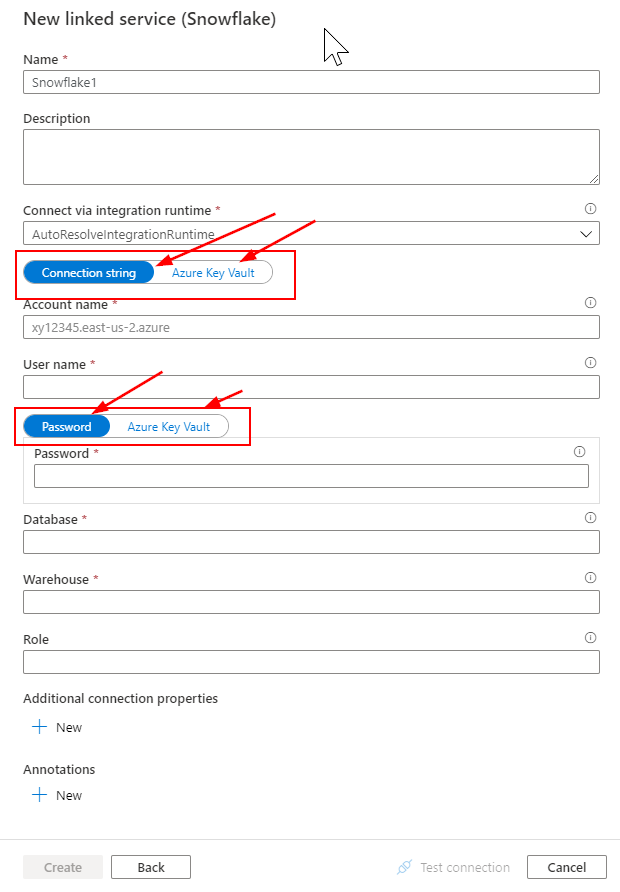
Just wanted to update you that ADF Product team has successfully implemented the feature request you have shared to support AKV for whole connection string in Snowflake Database. Please feel free to use it and let us know if you see any issues.
Thank you.
Sorry I was on vacation the last weeks.
Many thanks for the good news and the update provided, it works as intended.
Best regards
Patrick
This comment has been deleted due to a violation of our Code of Conduct. The comment was manually reported or identified through automated detection before action was taken. Please refer to our Code of Conduct for more information.
Thanks for the confirmation. When a pipeline is working by trigger, but not by debug, that suggests either: there is a difference between the published version and the version in the UI or there are parameters that depend upon the trigger. Have you created the Snowflake linked service first with hard coded values and then edited the JSON payload with connection string AKV? If that is the case, then, when the Snowflake linked service was created initially with hard coded values (no AKV) then the linked service is directly published to data factory service, and when you have edited the JSON payload of the linked service with AKV details, then the edited linked service is not immediately published to the data factory service, it has to be merged to master and then to be published from master to data factory service (nothing but adf_publish). This could be the case, where there is a mismatch between published version and local brach/UI version.
And since the linked service haven't been published yet, debug run would take all linked service resources payload fetched from UI, while trigger run would take all published resources in Azure. Debug run always takes the newest resources user edits on UI, after they publish resources, UI would keep consistency with published resource, everything should be fine.
Are you noticing the same error when you published the linked service and do a debug run? - Could you please confirm on this?
Thank you
Hi @Patrick Doerig ,
Just checking to see if you have got a chance to see my previous comment? In case if you have any further query, please do let us know.
Thank you.
This answer has been deleted due to a violation of our Code of Conduct. The answer was manually reported or identified through automated detection before action was taken. Please refer to our Code of Conduct for more information.
7 deleted commentsComments have been turned off. Learn more