Microsoft 365 and Office | SharePoint Server | Development
The process of building custom solutions for SharePoint Server.

This browser is no longer supported.
Upgrade to Microsoft Edge to take advantage of the latest features, security updates, and technical support.
' cx='32' cy='32' r='32' /%3E%3Ctext x='50%25' y='55%25' dominant-baseline='middle' text-anchor='middle' fill='%23FFF' %3ESV%3C/text%3E%3C/svg%3E)
I would need to Fetch sharepoint online list and update sharepoint list lookup columns ,multiline text column ,people column , override modified by column .Further copy items from one list to another with same list structure field column types.Appreciate kind help
The process of building custom solutions for SharePoint Server.
This answer has been deleted due to a violation of our Code of Conduct. The answer was manually reported or identified through automated detection before action was taken. Please refer to our Code of Conduct for more information.
Comments have been turned off. Learn more
Many Thanks for your help.
I tried as per your suggested link to copy the list items from source list to destination list and its working fine
I sincerely apologize for any issue in my understanding also I had some less skills in CSOM .
For updating list item fields (lookup/multiline text/person field and system Modified By field):
Please let me know above code of yours should be updated inside the Private static void CreateSPListItems function of the suggested reference link .Additionally I created the source list and destination list manually the fields structure manually.
Thanks in advance.

Hi @sweetu ve ,
The code sample for updating list item fields (lookup/multiline text/person field and system Modified By field), you can place in static void Main() method:
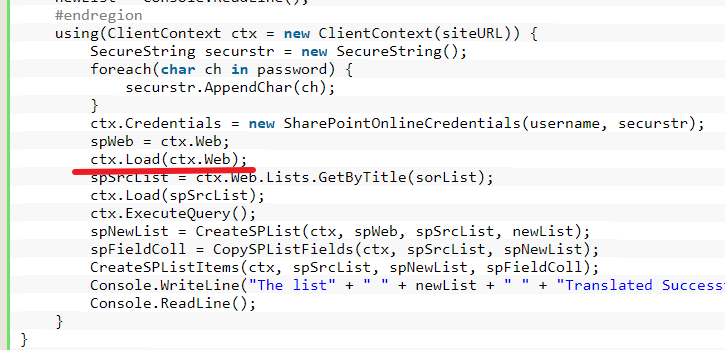
Firstly update the item field and then copy into another list.
Thanks
Best Regards
If the response is helpful, please click "Accept Answer" and upvote it.
Note: Please follow the steps in our documentation to enable e-mail notifications if you want to receive the related email notification for this thread.
Many thanks again. Thanks a lot for your quick help