

It seems unlinking OneDrive fixed the problem for me.
You know, OneDrive. The pre-installed trash that nobody asked for that aggressively tries to update your personal data for you.
This browser is no longer supported.
Upgrade to Microsoft Edge to take advantage of the latest features, security updates, and technical support.
' cx='32' cy='32' r='32' /%3E%3Ctext x='50%25' y='55%25' dominant-baseline='middle' text-anchor='middle' fill='%23FFF' %3ER%3C/text%3E%3C/svg%3E)
When I am scrolling through a long list of project files, if I don't pick a folder or keep scrolling, the display will jump back up to the top and I have to start all over again. This has apparently been a bug since Windows 10 because I see solutions suggested in a Google search. The solution suggested for the 10 system does not work for 11. The suggested solution for 10 is uncheck the "Automatically pick an accent color from my background option" check box under Choose your accent color which I assume is equivalent to choosing "Manual" in the "Auto/Man" selection of Accent Color in Windows 11.
Locked Question. You can vote on whether it's helpful, but you can't add comments or replies or follow the question.
' cx='32' cy='32' r='32' /%3E%3Ctext x='50%25' y='55%25' dominant-baseline='middle' text-anchor='middle' fill='%23FFF' %3EJR%3C/text%3E%3C/svg%3E)
' cx='32' cy='32' r='32' /%3E%3Ctext x='50%25' y='55%25' dominant-baseline='middle' text-anchor='middle' fill='%23FFF' %3ESM%3C/text%3E%3C/svg%3E)
Hay guys, this is not a mouse problem, it is a windows problem, it seems that the window is refreshing every 1 or 2 seconds so, as I scroll down the window scrolls to the top as it is redrawn. I have not seen this kind of problem since people tried to write programs with VB 3.
Really this is 3 steps backward in functionality; this interface is CRAP.
' cx='32' cy='32' r='32' /%3E%3Ctext x='50%25' y='55%25' dominant-baseline='middle' text-anchor='middle' fill='%23FFF' %3ED%3C/text%3E%3C/svg%3E)
' cx='32' cy='32' r='32' /%3E%3Ctext x='50%25' y='55%25' dominant-baseline='middle' text-anchor='middle' fill='%23FFF' %3EMB%3C/text%3E%3C/svg%3E)
None of the other comments helped. But I went into Explorer's setting a changed several settings that seemed to have been changed. Afterwards things were back to the way they were before and this problem disappeared. I'm not sure of which change fixed it, but I believe changing run in separate process was the one that fixed it. Please try and let us know if that helps.
' cx='32' cy='32' r='32' /%3E%3Ctext x='50%25' y='55%25' dominant-baseline='middle' text-anchor='middle' fill='%23FFF' %3EJC%3C/text%3E%3C/svg%3E)
None of these solutions work, nor have any other solutions I have found throughout my searches.
I am ready to buy a Mac at this point. I regularly search through hundreds of pictures and documents and it has gotten intolerable.
' cx='32' cy='32' r='32' /%3E%3Ctext x='50%25' y='55%25' dominant-baseline='middle' text-anchor='middle' fill='%23FFF' %3EA%3C/text%3E%3C/svg%3E)
I have the same issue with windows explorer in Windows 10. The menu on the left keeps jumping to a position without user input. It is a bit annoying....
' cx='32' cy='32' r='32' /%3E%3Ctext x='50%25' y='55%25' dominant-baseline='middle' text-anchor='middle' fill='%23FFF' %3ERP%3C/text%3E%3C/svg%3E)
' cx='32' cy='32' r='32' /%3E%3Ctext x='50%25' y='55%25' dominant-baseline='middle' text-anchor='middle' fill='%23FFF' %3ER%3C/text%3E%3C/svg%3E)
Same here. It is truly annoying. The calling window seems to grab focus back causing the child window to reset to the top (but not the selection, so that still stays highlighted down the list). Solutions don't work (but thank you), I think this started at about Windows 10 H2 and I've been expecting that someone will correct an obvious piece of poor programming followed by worse QA for the past two years but it seems to be getting worse. Unloaded logitech mouse and keyboard drivers and went back to wired ms mouse and a keyboard - no change. Perhaps we should ask ChatGPT because MS obviously don't have the brains to solve it?
' cx='32' cy='32' r='32' /%3E%3Ctext x='50%25' y='55%25' dominant-baseline='middle' text-anchor='middle' fill='%23FFF' %3EHL%3C/text%3E%3C/svg%3E)
Windows 11 Home. Up to date. Tried this. Sounded promising. But. No joy.
' cx='32' cy='32' r='32' /%3E%3Ctext x='50%25' y='55%25' dominant-baseline='middle' text-anchor='middle' fill='%23FFF' %3EOE%3C/text%3E%3C/svg%3E)
Same. finally, do you solve the problem?
' cx='32' cy='32' r='32' /%3E%3Ctext x='50%25' y='55%25' dominant-baseline='middle' text-anchor='middle' fill='%23FFF' %3EE%3C/text%3E%3C/svg%3E)
Anyone figure this out yet? Or is this a bug?
' cx='32' cy='32' r='32' /%3E%3Ctext x='50%25' y='55%25' dominant-baseline='middle' text-anchor='middle' fill='%23FFF' %3EA%3C/text%3E%3C/svg%3E)
' cx='32' cy='32' r='32' /%3E%3Ctext x='50%25' y='55%25' dominant-baseline='middle' text-anchor='middle' fill='%23FFF' %3EP%3C/text%3E%3C/svg%3E)
I have 3 Dell PC's on Win 10 and a Lenovo on Win 11 and all have this same problem. This only started maybe a year ago.
So my question to MS is WTF?? Why can't you fix this??
' cx='32' cy='32' r='32' /%3E%3Ctext x='50%25' y='55%25' dominant-baseline='middle' text-anchor='middle' fill='%23FFF' %3EBZ%3C/text%3E%3C/svg%3E)
I'm have the same issue on my work PC and my home PC. Both are Windows 11. It is the most frustrating thing about my day! Click a folder in Explorer and before you can access it Explorer's focus jumps to something else...usually outside the window boundary...ugh!! Does Microsoft not monitor these forums to correct issues? I also use a Mac at work and the file management IS FAR SUPERIOR...and I don't like Apple. Get it together Microsoft! Is there a way to stop the focus from jumping around in Windows File Explorer?
' cx='32' cy='32' r='32' /%3E%3Ctext x='50%25' y='55%25' dominant-baseline='middle' text-anchor='middle' fill='%23FFF' %3ERT%3C/text%3E%3C/svg%3E)
My desktop, still on Win7 doesn't have this issue. My laptop on Win11 doesn't have this issue. My wife's desktop on Win10 does have this issue VERY frustrating for her. I tried the proposed solutions about background colors and quick access on the wife's computer with no success. I checked what was set differently on my laptop that does not have the problem and her desktop. The difference is I use a set background picture. Her desktop was set to Slideshow and to change the picture every minute. I reset her computer to Picture instead of Slideshow and so far so good. Turn off Slideshow and see if that helps.
' cx='32' cy='32' r='32' /%3E%3Ctext x='50%25' y='55%25' dominant-baseline='middle' text-anchor='middle' fill='%23FFF' %3EL%3C/text%3E%3C/svg%3E)
I had this issue with win 11 just a few days ago - very annoying - I assumed it was my trackball mouse - so much believed this that I actually took it apart (partially) - guess what ? I only needed to reseat keyboard dongle and the problem went away - I’ve had keyboard for months so didn’t suspect it and no, scroll lock wasn’t switched on the keyboard.
' cx='32' cy='32' r='32' /%3E%3Ctext x='50%25' y='55%25' dominant-baseline='middle' text-anchor='middle' fill='%23FFF' %3EMC%3C/text%3E%3C/svg%3E)
from time to time I look up this issue and I still have on my Windows 10 laptop and now on my new Windows 11 laptop. Windows File Explorer still jumps to the top and is still annoying as it is still in Windows 10.
I do wish someone would resolve this issue please
' cx='32' cy='32' r='32' /%3E%3Ctext x='50%25' y='55%25' dominant-baseline='middle' text-anchor='middle' fill='%23FFF' %3EK%3C/text%3E%3C/svg%3E)
As someone stated above, this is not a Mouse problem: I get precisely the same behavior using the laptop's touchpad as I see when using a wireless mouse.
Also, it is not strictly a File Explorer problem: I see precisely the same behavior when attempting to scroll through any page and level in the Windows 11 Settings menus. I do not see it on any other installed program or app.
Curiously, my wife and I have two identical Dell Inspiron 16 7610 Laptops, running Windows 11 Home Ver 22H2, installed 11/03/2022, Build 22621.2283, last updated 09/13/2023. I have not experienced the issue on my device (knock on wood!), and I discovered today that my wife has been dealing with it for several months. Is there no way to escalate this to Microsoft??
' cx='32' cy='32' r='32' /%3E%3Ctext x='50%25' y='55%25' dominant-baseline='middle' text-anchor='middle' fill='%23FFF' %3EJJ%3C/text%3E%3C/svg%3E)
This is such an annoying problem with Windows 11 that I can't imagine why it ever became a bug. How have you not fixed this as a part of a regular update. It is enough to make me want to switch to a different OS. Completely unnecessary. Completely useless. Completely frustrating.
' cx='32' cy='32' r='32' /%3E%3Ctext x='50%25' y='55%25' dominant-baseline='middle' text-anchor='middle' fill='%23FFF' %3EDS%3C/text%3E%3C/svg%3E)
I have Windows 11, Home Edition and this has been a problem I have been coping with since I got my Razer laptop last year. Microsoft, please deal with this!!!
' cx='32' cy='32' r='32' /%3E%3Ctext x='50%25' y='55%25' dominant-baseline='middle' text-anchor='middle' fill='%23FFF' %3EF%3C/text%3E%3C/svg%3E)
Following seems to work for me:
That's it. Enjoy!
' cx='32' cy='32' r='32' /%3E%3Ctext x='50%25' y='55%25' dominant-baseline='middle' text-anchor='middle' fill='%23FFF' %3EDS%3C/text%3E%3C/svg%3E)
How has this not been fixed yet!? I will send you my computer so you can see that it isn't a mouse issue.
That said... How many people here are having this issue with a DELL computer? Mine is an XPS 15. I would be curious if this issue is a Dell driver/firmware issue.
' cx='32' cy='32' r='32' /%3E%3Ctext x='50%25' y='55%25' dominant-baseline='middle' text-anchor='middle' fill='%23FFF' %3EMW%3C/text%3E%3C/svg%3E)
It's not a hardware issue at all, but they want you to think its not a OS issue and getting anyone from Microsoft on the phone to get help takes an act of God! I tried opening folders in separate windows which sometimes works and I don't understand why, but usually it doesn't. I wish I never upgraded from Windows 10 to Windows 11, biggest case of buyers remorse I've ever had and the upgrade was free!
' cx='32' cy='32' r='32' /%3E%3Ctext x='50%25' y='55%25' dominant-baseline='middle' text-anchor='middle' fill='%23FFF' %3EA%3C/text%3E%3C/svg%3E)
Windows Explorer snaps back to the top of the list every time I open a file or copy/paste a file. Is it a "smart" feature no one asked for or a demostration of software programming incompetence? If I wanted to be at the top of the list I would scroll up all by my wittle self. [obscenities] If my folder has 336 files, it's a bunch of non-ergonomic additional mouse clicks and drags that I have to do each time to get back to the file I was looking at before "the snap". Is Microsoft's end goal to give all of their users carpal tunnel?
' cx='32' cy='32' r='32' /%3E%3Ctext x='50%25' y='55%25' dominant-baseline='middle' text-anchor='middle' fill='%23FFF' %3EWR%3C/text%3E%3C/svg%3E)
I have the same problem with Windows 11 and have tried everyone's suggestions to date without success. I think that it's time to switch to a different OS.
' cx='32' cy='32' r='32' /%3E%3Ctext x='50%25' y='55%25' dominant-baseline='middle' text-anchor='middle' fill='%23FFF' %3EKG%3C/text%3E%3C/svg%3E)
I have been seeing this frustrating issue in Windows dating back to Win95 both on pc's at work (enterprise type environment) and at home and in every iteration of Windows since. I have tried every suggestion I came across to resolve it to no avail.
I am convinced Microsoft does not care about the problem. Please fix it!
Ken G
Edmonton
' cx='32' cy='32' r='32' /%3E%3Ctext x='50%25' y='55%25' dominant-baseline='middle' text-anchor='middle' fill='%23FFF' %3EHI%3C/text%3E%3C/svg%3E)
This is a ridiculous situation. This bug (I assume its a bug since I cant fathom any programmer thinking it's a good idea to step on a user's explorer), is more than frustrating, it interferes with my productivity. Not only does it scroll back to the top on me as I'm delving deep into my directory structure, it rolls up as well after I minimize and come back later. And that Microsoft hasn't fixed this problem yet is in itself a scathing indication of how poorly some departments are run. The head of the programming team for explorer, and indeed to project manager, should be fired for gross incompetence. Get with it Microsoft, give a hoot about the customers who support your company by buying and using your product!
' cx='32' cy='32' r='32' /%3E%3Ctext x='50%25' y='55%25' dominant-baseline='middle' text-anchor='middle' fill='%23FFF' %3EDL%3C/text%3E%3C/svg%3E)
I've been searching for a solution for over 3 years. I have seen it on multiple computers.
This is why I am not moving onto Win 11. Same problem exists.
' cx='32' cy='32' r='32' /%3E%3Ctext x='50%25' y='55%25' dominant-baseline='middle' text-anchor='middle' fill='%23FFF' %3ER%3C/text%3E%3C/svg%3E)
None of those steps did resolve the issue. Windows is just pathetic.
' cx='32' cy='32' r='32' /%3E%3Ctext x='50%25' y='55%25' dominant-baseline='middle' text-anchor='middle' fill='%23FFF' %3EBS%3C/text%3E%3C/svg%3E)
Same problem. I scroll through hundreds of files at a time all day and Explorer constantly jumps to the top/beginning. I have been looking everywhere for a solution for many months. All I find is the same regurgitated suggestions that don't work.
' cx='32' cy='32' r='32' /%3E%3Ctext x='50%25' y='55%25' dominant-baseline='middle' text-anchor='middle' fill='%23FFF' %3EPM%3C/text%3E%3C/svg%3E)
' cx='32' cy='32' r='32' /%3E%3Ctext x='50%25' y='55%25' dominant-baseline='middle' text-anchor='middle' fill='%23FFF' %3ERV%3C/text%3E%3C/svg%3E)
Turn off slideshow background in personalise settings - it works! Thank you, forgotten tipster.
' cx='32' cy='32' r='32' /%3E%3Ctext x='50%25' y='55%25' dominant-baseline='middle' text-anchor='middle' fill='%23FFF' %3EGL%3C/text%3E%3C/svg%3E)
A way around this, its not a fix but if you press back (top left) it will go to the folder you were trying for. its what i do when trying save file or right clicking to open file in new window after the jump to home folder the back arrow will take you to the location you intended, most times.
Hope this helps till microsoft fixes
' cx='32' cy='32' r='32' /%3E%3Ctext x='50%25' y='55%25' dominant-baseline='middle' text-anchor='middle' fill='%23FFF' %3EKS%3C/text%3E%3C/svg%3E)
I agree. What does this have to do with my mouse. I use Logitech mouse and I am not going to switch mouse for a stupid microsoft issue.
Problem still exists. I am thinking about paying for Opus Directory just to solve this problem. Any recommendations on XPlorer2 vs Opus?
' cx='32' cy='32' r='32' /%3E%3Ctext x='50%25' y='55%25' dominant-baseline='middle' text-anchor='middle' fill='%23FFF' %3ERH%3C/text%3E%3C/svg%3E)
I modified the color settings from automatic to manual and adjusted the file explorer settings from "open in the same window" to "open in a new window." The change proved successful, resolving the persistent scrolling-up issue that had been plaguing me for some time. While I've come across comments from others declaring that nothing seems to work for them, I am pleased to report that this adjustment did indeed work for me. I wish you the best of luck in addressing your own concerns.
' cx='32' cy='32' r='32' /%3E%3Ctext x='50%25' y='55%25' dominant-baseline='middle' text-anchor='middle' fill='%23FFF' %3EH%3C/text%3E%3C/svg%3E)
Has this been solved? I upgraded to Win 11 pro and it worked fine until 2 weeks ago. Now everytime I'm scrolling through picture files the slide bars on the left panel with all the listings and the smaller white scroll tab to the right off the files or if opened all the pictures will flash a brighter white then jump back to the top. This is beyond annoying and frustrating. It just did it again while typing this. It occurs every minute.
' cx='32' cy='32' r='32' /%3E%3Ctext x='50%25' y='55%25' dominant-baseline='middle' text-anchor='middle' fill='%23FFF' %3EC%3C/text%3E%3C/svg%3E)
So it’s the background slideshow, every time the picture changes it will take you back to the top of the folder you’re in. :D don’t have a slideshow. I had mine set to change every minute so you can imagine how frustrating that got!!
' cx='32' cy='32' r='32' /%3E%3Ctext x='50%25' y='55%25' dominant-baseline='middle' text-anchor='middle' fill='%23FFF' %3EI%3C/text%3E%3C/svg%3E)
Same here. Since the latest update. When do we get paid for wasting our life and work time with this s%&@
' cx='32' cy='32' r='32' /%3E%3Ctext x='50%25' y='55%25' dominant-baseline='middle' text-anchor='middle' fill='%23FFF' %3ES%3C/text%3E%3C/svg%3E)
This is a problem accross the board.... explorer, outlook, calendar, word etc etc.... please fix it disabling one drive is not a solution when we use it for bussiness.... Win 11 24h2 PRO.
' cx='32' cy='32' r='32' /%3E%3Ctext x='50%25' y='55%25' dominant-baseline='middle' text-anchor='middle' fill='%23FFF' %3ERB%3C/text%3E%3C/svg%3E)
While working on image files, after opening one file I then highlight another file and the window will not scroll to the top after saving the file I am working on. Occassionally forget to highlight another file and it scrolls up on saving the edited file.
' cx='32' cy='32' r='32' /%3E%3Ctext x='50%25' y='55%25' dominant-baseline='middle' text-anchor='middle' fill='%23FFF' %3EBM%3C/text%3E%3C/svg%3E)
In Windows 11, go to Bluetooth & Devices > Mouse, go down to 'Scroll Inactive Windows When Hovering Over Them' and deselect. Come out of Settings. problem should now be fixed. :)
' cx='32' cy='32' r='32' /%3E%3Ctext x='50%25' y='55%25' dominant-baseline='middle' text-anchor='middle' fill='%23FFF' %3ECW%3C/text%3E%3C/svg%3E)
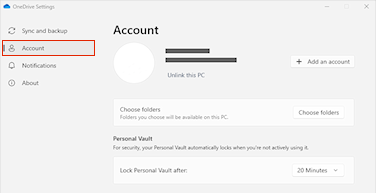
The issue is OneDrive because it's always refreshing to sync files/settings. I unlinked my PC from OneDrive and the issue has stopped. So simply unlink your PC from OneDrive should fix the issue. Here's how:
Windows 10/11
Select the OneDrive cloud in your notification area to show the OneDrive pop-up.
Select the OneDrive Help and Settings icon then select Settings.
Go to the Account tab.
Select Unlink this PC, and then select __Unlink account__.
' cx='32' cy='32' r='32' /%3E%3Ctext x='50%25' y='55%25' dominant-baseline='middle' text-anchor='middle' fill='%23FFF' %3EGN%3C/text%3E%3C/svg%3E)
I found that unchecking the "Automatically pick an accent color from my background option" worked for me with this issue.
' cx='32' cy='32' r='32' /%3E%3Ctext x='50%25' y='55%25' dominant-baseline='middle' text-anchor='middle' fill='%23FFF' %3EKT%3C/text%3E%3C/svg%3E)
"Clear file explorer history" in the file explorer options has worked for me on a few computers.
' cx='32' cy='32' r='32' /%3E%3Ctext x='50%25' y='55%25' dominant-baseline='middle' text-anchor='middle' fill='%23FFF' %3EPT%3C/text%3E%3C/svg%3E)
I figured this out. First go to settings and find display drivers. Mine was and intel IRIS xe. I switch to the generic windows graphics driver. Then went back in to the same place and asked it to update the driver. It reinstalled the intel IRIS xe. Now I don't get the snap back.
This answer has been deleted due to a violation of our Code of Conduct. The answer was manually reported or identified through automated detection before action was taken. Please refer to our Code of Conduct for more information.
Comments have been turned off. Learn more
' cx='32' cy='32' r='32' /%3E%3Ctext x='50%25' y='55%25' dominant-baseline='middle' text-anchor='middle' fill='%23FFF' %3EM%3C/text%3E%3C/svg%3E)
It seems unlinking OneDrive fixed the problem for me.
You know, OneDrive. The pre-installed trash that nobody asked for that aggressively tries to update your personal data for you.
The issue is OneDrive. I just unlinked my PC from OneDrive and have not had the issue occur again. Here's how to unlink your PC from OneDrive and resolve the issue:
Unlink OneDrive from your computer
You won't lose files or data by unlinking OneDrive from your computer. You can always access your files by signing in to OneDrive.com.
Windows 10/11
Select the OneDrive cloud in your notification area to show the OneDrive pop-up.
Select the OneDrive Help and Settings icon then select Settings.
Go to the Account tab.
Select Unlink this PC, and then select __Unlink account__.
' cx='32' cy='32' r='32' /%3E%3Ctext x='50%25' y='55%25' dominant-baseline='middle' text-anchor='middle' fill='%23FFF' %3EJ%3C/text%3E%3C/svg%3E)
I tried the solution mentioned in Richard Thomas' post above which is to go to Settings > Personalization > Background and switch Slideshow to Picture. I had noticed that when I had my background set to Slideshow, every time the background changed, the list of files showing in File Explorer would also jump back to the beginning. I know that this isn't the ideal solution as I like to have different backgrounds on my desktop, but it worked for me until MS can figure out a better fix for it.
It’s the wallpaper. If you have it set on slideshow it’ll refresh explorer with each slide change.
' cx='32' cy='32' r='32' /%3E%3Ctext x='50%25' y='55%25' dominant-baseline='middle' text-anchor='middle' fill='%23FFF' %3EGD%3C/text%3E%3C/svg%3E)
No I had no Wallpaper set, in the end I gave up with Win11 and went back to Win 10 Thank you for trying to help