Note
Access to this page requires authorization. You can try signing in or changing directories.
Access to this page requires authorization. You can try changing directories.
Note
Foundry IQ (Azure AI Search) provides direct indexing and query APIs alongside higher-level knowledge source and knowledge base APIs for managed retrieval. Use the Azure portal, REST APIs, or Azure SDKs to configure these capabilities, or connect agents to knowledge bases in the Microsoft Foundry portal.
Important
Features or capabilities marked (preview) in this article are in Public Preview and are subject to the Supplemental Terms of Use for Microsoft Azure Previews. For preview terms specific to Foundry IQ (Azure AI Search), see Preview functionality.
This article explains how to configure a shared private link for private, outbound connections from Foundry IQ (Azure AI Search) to an Azure resource running in a virtual network. With a shared private link, the Foundry IQ service connects to a virtual network IP address instead of a public endpoint.
A shared private link requires a destination that supports private endpoints and is listed under Supported resource types. Sources such as SharePoint Online aren't supported targets and continue to use public connectivity. This feature is separate from an inbound private endpoint for Search, which can coexist with public outbound connections. See Inbound and outbound network traffic.
Shared private link is a premium feature billed by usage. For details, see Azure Private Link pricing.
Note
If you're setting up a private indexer connection to a SQL Managed Instance, see Create a shared private link for SQL Managed Instance instead.
Prerequisites
A supported Azure resource configured to run in a virtual network.
A Foundry IQ service. Requirements vary by workload. For managed knowledge-source ingestion, also check Supported Search tiers and configurations; the generic indexer requirements don't establish knowledge-source eligibility.
S3 HD (
standard3withhostingMode: HighDensity) and Serverless don't support outbound Search shared private links to sources, skills, or models. "Basic and higher" and "S1 and higher" in the following table exclude S3 HD and Serverless. Ordinary S3 is distinct from S3 HD. This outbound restriction doesn't remove support for an inbound private endpoint to Search.Workload Tier requirements Region requirements Service creation requirements Indexers without skillsets Basic and higher None None Indexers with a skillset that includes an Azure OpenAI Embedding or Azure Vision multimodal embeddings skill (integrated vectorization) Basic and higher Basic and S1: High-capacity regions Basic and S1: After April 3, 2024 Indexers with a skillset that uses built-in or custom skills, but no Azure OpenAI Embedding or Azure Vision multimodal embeddings skill Standard 1 (S1) and higher S1: High-capacity regions S1: After April 3, 2024 Knowledge bases calling Azure OpenAI Basic and higher None None For both skillset rows, the region and creation-date requirements apply only to Basic and S1. S2, S3, L1, and L2 don't have these requirements. If a skillset includes an Azure OpenAI Embedding or Azure Vision multimodal embeddings skill along with other skills, use the first skillset row. Other ways of generating embeddings, such as a custom skill, fall under the second skillset row.
On Basic and S1, an indexer running in the private environment can have at most two Azure OpenAI Embedding and Azure Vision multimodal embeddings skills combined in its skillset. The other supported tiers don't have this two-skill limit.
Contributor or Owner role on both Foundry IQ and the target Azure resource, or the following specific permissions:
Resource Permissions Foundry IQ Microsoft.Search/searchServices/sharedPrivateLinkResources/write
Microsoft.Search/searchServices/sharedPrivateLinkResources/read
Microsoft.Search/searchServices/sharedPrivateLinkResources/operationStatuses/readOther Azure resource Permission to approve private endpoint connections. For example, on Azure Storage, you need Microsoft.Storage/storageAccounts/privateEndpointConnectionsApproval/action.
Supported Search tiers and configurations
Shared private links protect outbound connections to supported Azure resources. They don't replace authentication, identity permissions, or a private endpoint for inbound client access to Foundry IQ. For managed ingestion, check the knowledge-source configuration as well as each dependency.
Private ingestion for eligible indexed Azure Blob Storage, ADLS Gen2, Azure SQL, and OneLake knowledge sources is generally available with Search REST API 2026-10-01 on Dedicated services. Serverless doesn't support private execution or outbound Search shared private links; use NSP configuration for supported public-endpoint controls. This feature doesn't change the release status of other connectors, extraction features, or shared private link targets.
Tier requirements depend on who builds the indexer:
Managed knowledge sources: For indexed Azure Blob Storage, ADLS Gen2, Azure SQL, and OneLake knowledge sources with
networkAccessModeset toprivate, use S2, S3, L1, or L2. S2 is the minimum tier.Self-built indexers: Supported tiers depend on the indexer's configuration:
- No skillset: Basic and higher.
- Skillset with an Azure OpenAI Embedding or Azure Vision multimodal embeddings skill: Basic and higher, including S1.
- Skillset with only other skills (for example, OCR or custom skills): S1 and higher. Basic isn't supported.
On Basic and S1, a skillset also has region, service creation date, and skill requirements. See Prerequisites.
The self-built indexer requirements don't apply to managed knowledge-source ingestion private configuration parameters, even though a knowledge source generates its own indexer and skillset.
Shared private link support matrix
Use this matrix with the supported resource types, not as a replacement for their target and group ID requirements.
| Knowledge-source configuration | Private connectivity and scope |
|---|---|
| Azure Blob Storage | The generated indexer can reach the source through a shared private link. Add private connections for protected extraction, enrichment, model, or asset-storage dependencies only when your configuration uses them. See blob private-ingestion prerequisites. |
| ADLS Gen2 | The generated indexer requires both storage connections documented in the blob guide. Account for extraction, enrichment, model, and asset-storage dependencies separately. |
| Azure SQL Database without embeddings | Protect the SQL source connection. Without embeddingColumns, the generated pipeline doesn't create an embedding skillset or require an embedding-model connection. See Azure SQL prerequisites. |
| Azure SQL Database with embeddings | Protect the SQL source and each protected embedding-model endpoint. SQL ingestion doesn't require document extraction or image verbalization. |
| Azure SQL Managed Instance | Follow the separate SQL Managed Instance shared private link procedure (preview). That target remains in preview, independently of indexed SQL knowledge-source GA. Model dependencies apply only if embeddings are configured. |
| Indexed SharePoint | SharePoint Online uses public endpoints and isn't a shared private link target. The post-create override in this article doesn't apply. |
| Indexed OneLake | Private ingestion is generally available on eligible Dedicated services. Protect the Fabric workspace connection and each protected Azure dependency separately. OneLake permission preservation remains a separate preview capability. |
| File | Uses direct upload, not a generated indexer. Synchronous file operations are available in 2026-10-01; asynchronous ingestion requires 2026-11-01-preview. Follow the file knowledge-source prerequisites for private Foundry connections. Don't apply the indexer override or add networkAccessMode to this path. |
| Existing search index or push ingestion | A search index knowledge source wraps an existing index. Secure client uploads with inbound private endpoints; a shared private link isn't the upload path. If a separate indexer populates the index, apply that indexer's requirements. |
| Remote sources and web | These retrieve content at query time and don't use a generated ingestion indexer. This matrix doesn't establish private connectivity to remote platforms or Bing. |
For managed knowledge-source paths, use connector-specific tier guidance rather than inferring eligibility from the generic indexer prerequisites:
| Search tier or runtime | Managed knowledge-source private ingestion |
|---|---|
| S2, S3, L1, and L2 | Documented for eligible Blob, ADLS Gen2, SQL, and OneLake configurations. Apply the workload's region, service-creation, identity, and dependency requirements as well. |
| Basic and S1 | The generic indexer prerequisites above don't establish support for managed knowledge-source ingestion, including SQL without embeddings. Use the tiers documented in the connector guides; don't infer lower-tier support from the generated skillset. |
| Free | Shared private links aren't supported. The generic indexer prerequisites require Basic or higher. |
| S3 HD and Serverless | Private execution isn't supported. Their indexer execution model doesn't provide a private execution environment. Network security perimeter controls aren't a substitute for shared private link execution. |
For each applicable dependency, configure the correct resource target and group ID, retain the required identity and RBAC assignments, and satisfy its network and DNS requirements. Reuse an existing approved link for the same target and group ID where appropriate. Different targets or subresources require separate links. Verify approval and provisioning readiness before private indexer execution.
For an existing eligible Blob, ADLS Gen2, or SQL source, see Change networking after knowledge source creation for the interim indexer override.
Supported resource types
You can create a shared private link for the following resources.
| Resource type | Subresource (or Group ID) |
|---|---|
| Microsoft.Storage/storageAccounts 1 | blob, table, dfs, file |
| Microsoft.DocumentDB/databaseAccounts 2 | Sql |
| Microsoft.Sql/servers 3 | sqlServer |
| Microsoft.KeyVault/vaults | vault |
| Microsoft.DBforMySQL/servers (preview) | mysqlServer |
| Microsoft.Web/sites 4 | sites |
| Microsoft.Sql/managedInstances (preview) 5 | managedInstance |
| Microsoft.CognitiveServices/accounts 6 7 | openai_account |
| Microsoft.CognitiveServices/accounts 8 | cognitiveservices_account |
| Microsoft.CognitiveServices/accounts 9 | foundry_account |
| Microsoft.Fabric/privateLinkServicesForFabric 10 | workspace |
| Microsoft.ApiManagement/service 11 | Gateway |
1 If Azure Storage and Foundry IQ are in the same region, the connection to storage is made over the Microsoft backbone network, which means a shared private link is redundant for this configuration. However, if you already set up a private endpoint for Azure Storage, you should also set up a shared private link or the connection is refused on the storage side. Also, if you're using multiple storage formats for various scenarios in search, make sure to create a separate shared private link for each subresource.
2 The Microsoft.DocumentDB/databaseAccounts resource type is used for indexer connections to Azure Cosmos DB for NoSQL. The provider name and group ID are case-sensitive.
3 The Microsoft.Sql/servers resource type is used for connections to Azure SQL database. There's currently no support for a shared private link to Azure Synapse SQL.
4 The Microsoft.Web/sites resource type is used for App Service and Azure Functions. In the context of Foundry IQ, an Azure Function is the more likely scenario. An Azure Function is commonly used for hosting the logic of a custom skill. Azure Functions has Consumption, Premium, and Dedicated App Service hosting plans. The App Service Environment (ASE) and Azure Kubernetes Service (AKS) aren't supported at this time. For shared private link support to Azure API Management, use the Microsoft.ApiManagement/service resource type.
5 See Create a shared private link for a SQL Managed Instance for instructions.
6 The Microsoft.CognitiveServices/accounts resource type is used for vectorizer and indexer connections to Azure OpenAI embedding models when implementing integrated vectorization. There's support for shared private link to support the Azure Vision multimodal embeddings via Microsoft Foundry resources.
7 Shared private link for Azure OpenAI is only supported in public cloud and Microsoft Azure Government. Other cloud offerings don't have support for shared private links for openai_account Group ID.
8 Shared private links are supported for connections to Foundry resources. For Foundry resource skills used in AI enrichment, Foundry IQ connects to a Foundry resource for billing purposes. These connections can be private through a shared private link, which is only supported when configuring a managed identity (keyless configuration) in the skillset definition.
9 Shared private links are supported for connections to Foundry resources. For Azure-hosted model skills such as GenAI prompt skill, Azure OpenAI embedding skill, or Content Understanding skill, Foundry IQ connects to a Foundry resource to execute the underlying processing.
10 Shared private link is supported for connections to OneLake workspace. To create a privateLinkServicesForFabric resource specific to a workspace, register Microsoft.Fabric namespace to your subscription and refer to step 2 as documented in Create the private link service in Azure. Note that when using a shared private link, the OneLake data source configuration must be defined with a specific connection string as outlined in the OneLake indexer documentation.
11 The Microsoft.ApiManagement/service resource type targets the API Management Gateway runtime subresource for eligible indexer enrichments. Gateway isn't a tier and doesn't include management, portal, or developer-documentation endpoints. This target doesn't establish general support for arbitrary Microsoft.Network/privateLinkServices.
API Management topology and execution requirements
Azure API Management (APIM) Premium v2 is the only officially supported tier for this shared private link. Other tiers, classic tiers, and self-hosted or workspace gateways aren't supported.
The Gateway target applies to indexer-based workloads. Don't infer knowledge base retrieval or query-vectorizer private-route support from it. For eligible indexers, set parameters.configuration.executionEnvironment to "private" as described in Configure the indexer. Don't add this indexer property to knowledge base or query requests.
Use the configured gateway hostname, with a matching TLS certificate, rather than a private IP address in the model URI. Configure custom-domain DNS separately from the default privatelink.azure-api.net private DNS zone. See custom-domain DNS limitations.
Disable API Management public network access only after you configure the private endpoint and verify the private route. Secure API Management-to-backend connectivity separately.
For supported workloads and authentication, see Use API Management with Foundry IQ model calls. For platform restrictions, see API Management private endpoint limitations.
1 - Create a shared private link
Use the Azure portal, Management REST API, the Azure CLI, or Azure PowerShell to create a shared private link.
Here are a few tips:
- Give the private link a meaningful name. In the Azure PaaS resource, a shared private link appears alongside other private endpoints. A name like "shared-private-link-for-search" can remind you how it's used.
When you complete the steps in this section, you have a shared private link that's provisioned in a pending state. It takes several minutes to create the link. Once it's created, the resource owner must approve the request before it's operational.
Go to your Foundry IQ service in the Azure portal.
Under Settings on the left pane, select Networking.
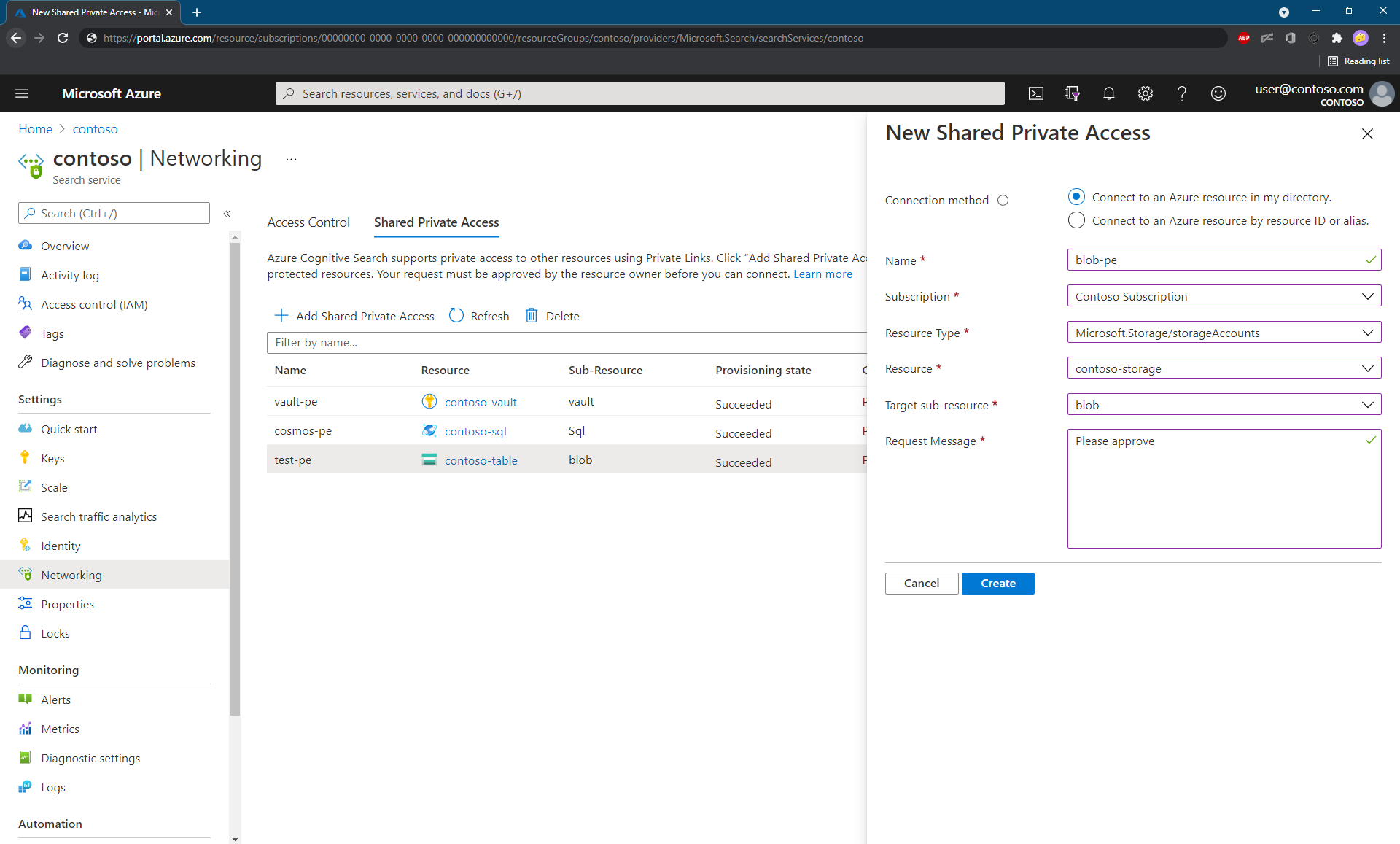
On the Shared Private Access page, select + Add Shared Private Access.
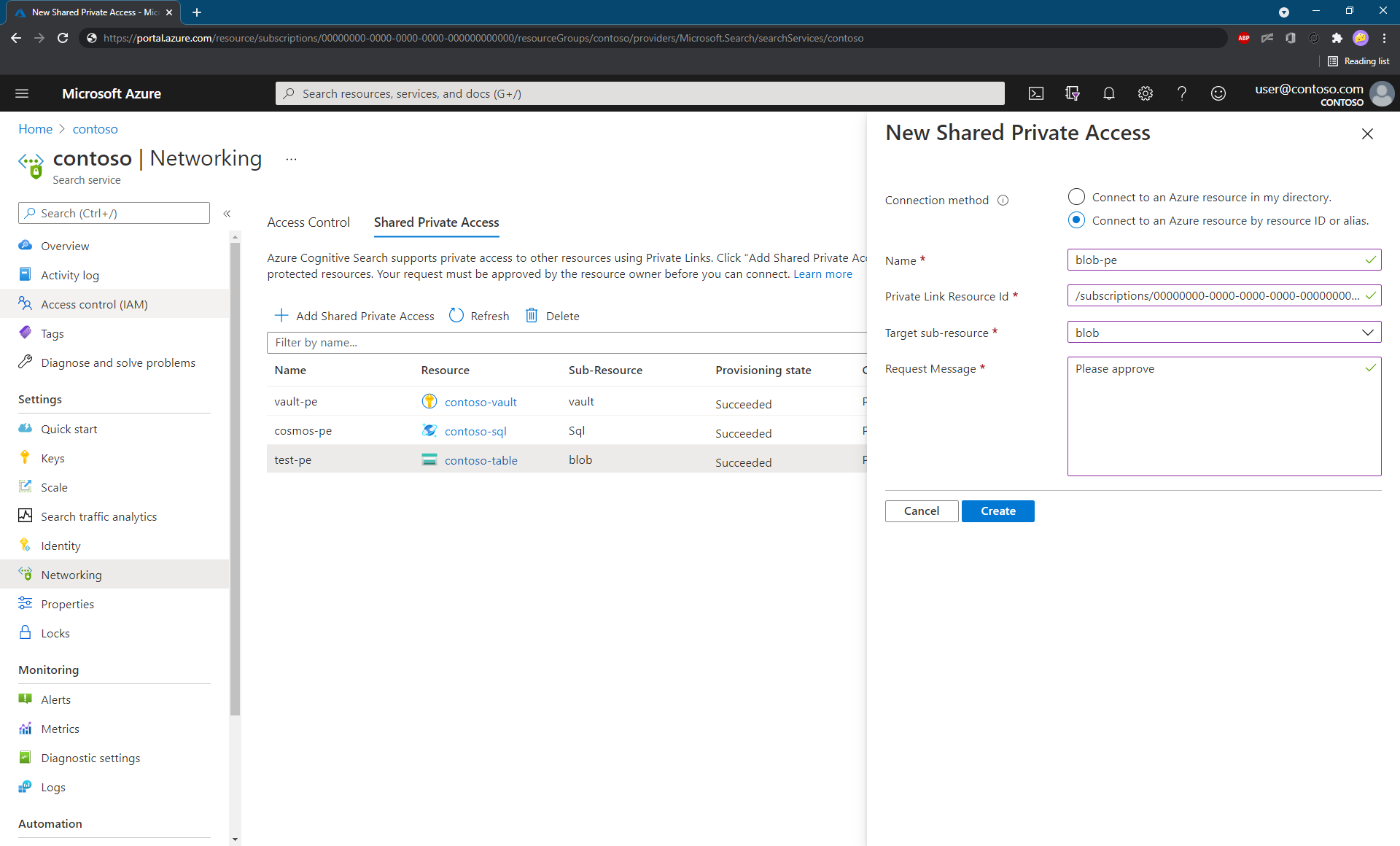
Select either Connect to an Azure resource in my directory or Connect to an Azure resource by resource ID.
If you select the first option (recommended), the Azure portal helps you pick the appropriate Azure resource and fills in other properties, such as the group ID of the resource and the resource type.
If you select the second option, enter the Azure resource ID manually and choose the appropriate group ID from the list at the beginning of this article.
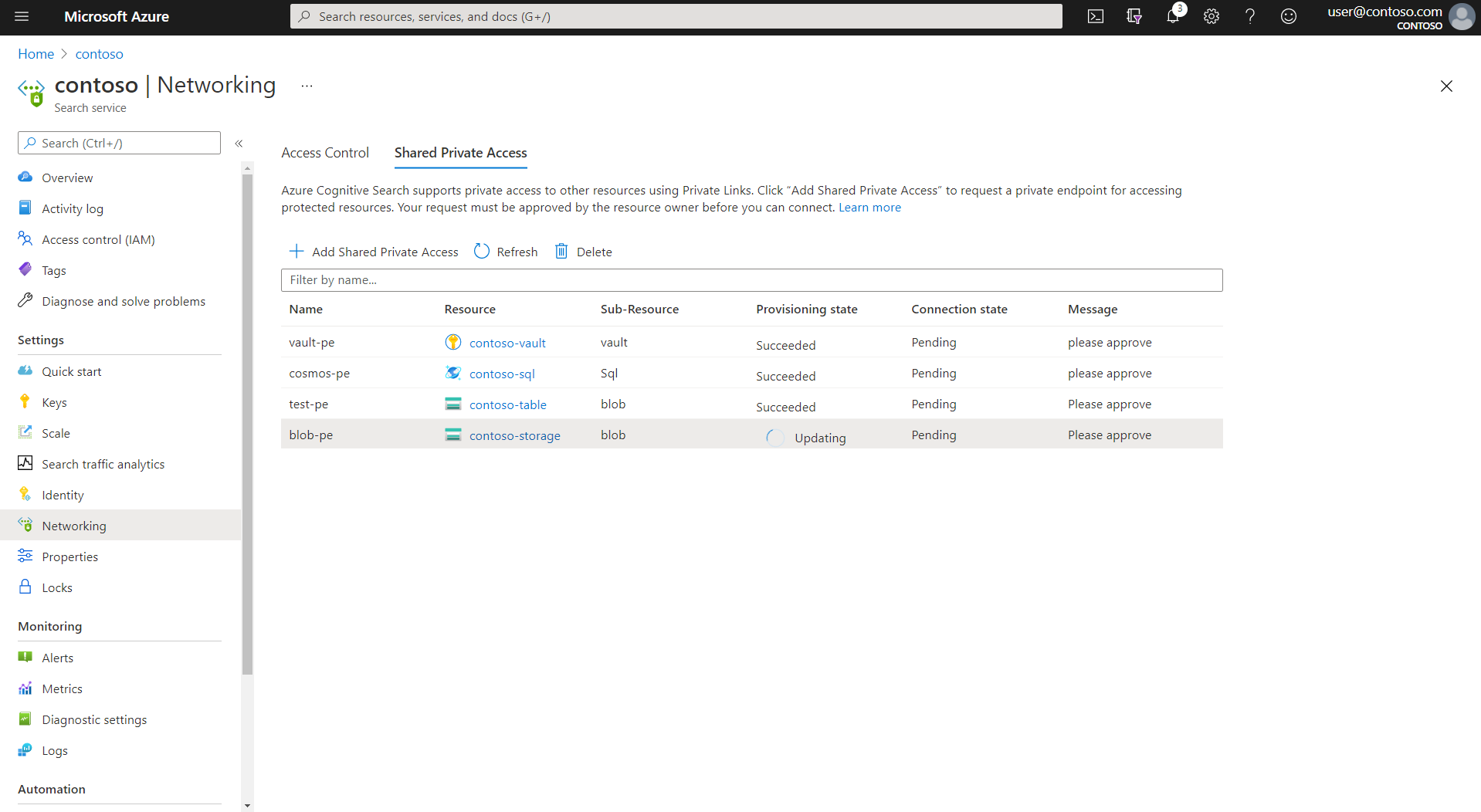
Confirm the provisioning status is "Updating".
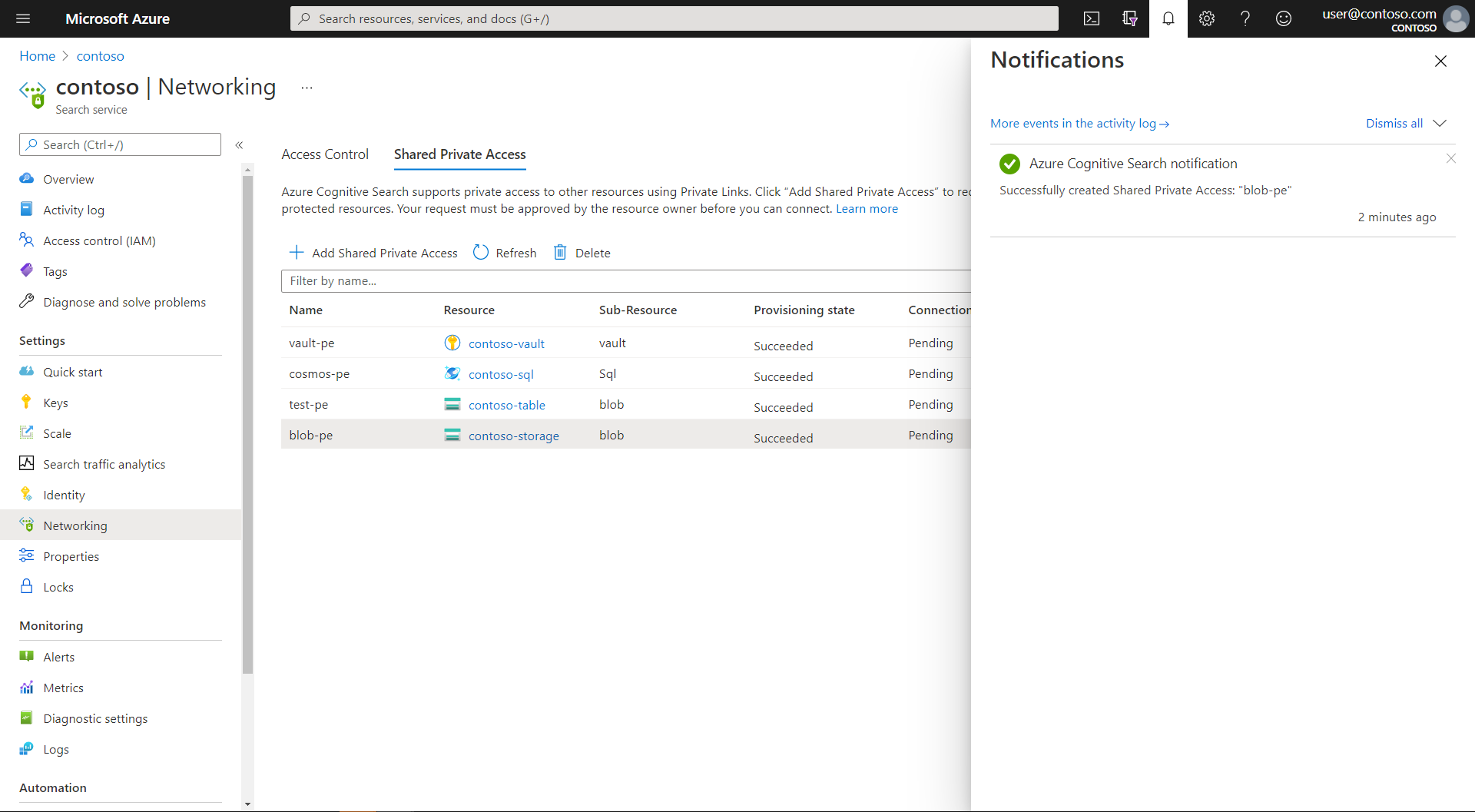
Once the resource is successfully created, the provisioning state of the resource changes to "Succeeded".
Shared private link creation workflow
A 202 Accepted response is returned on success. The process of creating an outbound private endpoint is a long-running (asynchronous) operation. It involves deploying the following resources:
A private endpoint, allocated with a private IP address in a
"Pending"state. The private IP address is obtained from the address space that's allocated to the virtual network of the execution environment for the Foundry IQ service-specific private indexer. Upon approval of the private endpoint, any communication from Foundry IQ to the Azure resource originates from the private IP address and a secure private link channel.A private DNS zone for the type of resource, based on the group ID. By deploying this resource, you ensure that any DNS lookup to the private resource utilizes the IP address that's associated with the private endpoint.
2 - Approve the private endpoint connection
Approval of the private endpoint connection is granted on the Azure PaaS side. Explicit approval by the resource owner is required. The following steps cover approval using the Azure portal, but here are some links to approve the connection programmatically from the Azure PaaS side:
- On Azure Storage, use Private Endpoint Connections - Put
- On Azure Cosmos DB, use Private Endpoint Connections - Create Or Update
- On Azure OpenAI, use Private Endpoint Connections - Create Or Update
- On Microsoft Onelake, use Private Endpoints - Approve via CLI or Private Endpoints - Approve via Portal
Using the Azure portal, perform the following steps:
Open the Networking page of the Azure PaaS resource.text
Find the section that lists the private endpoint connections. The following example is for a storage account.
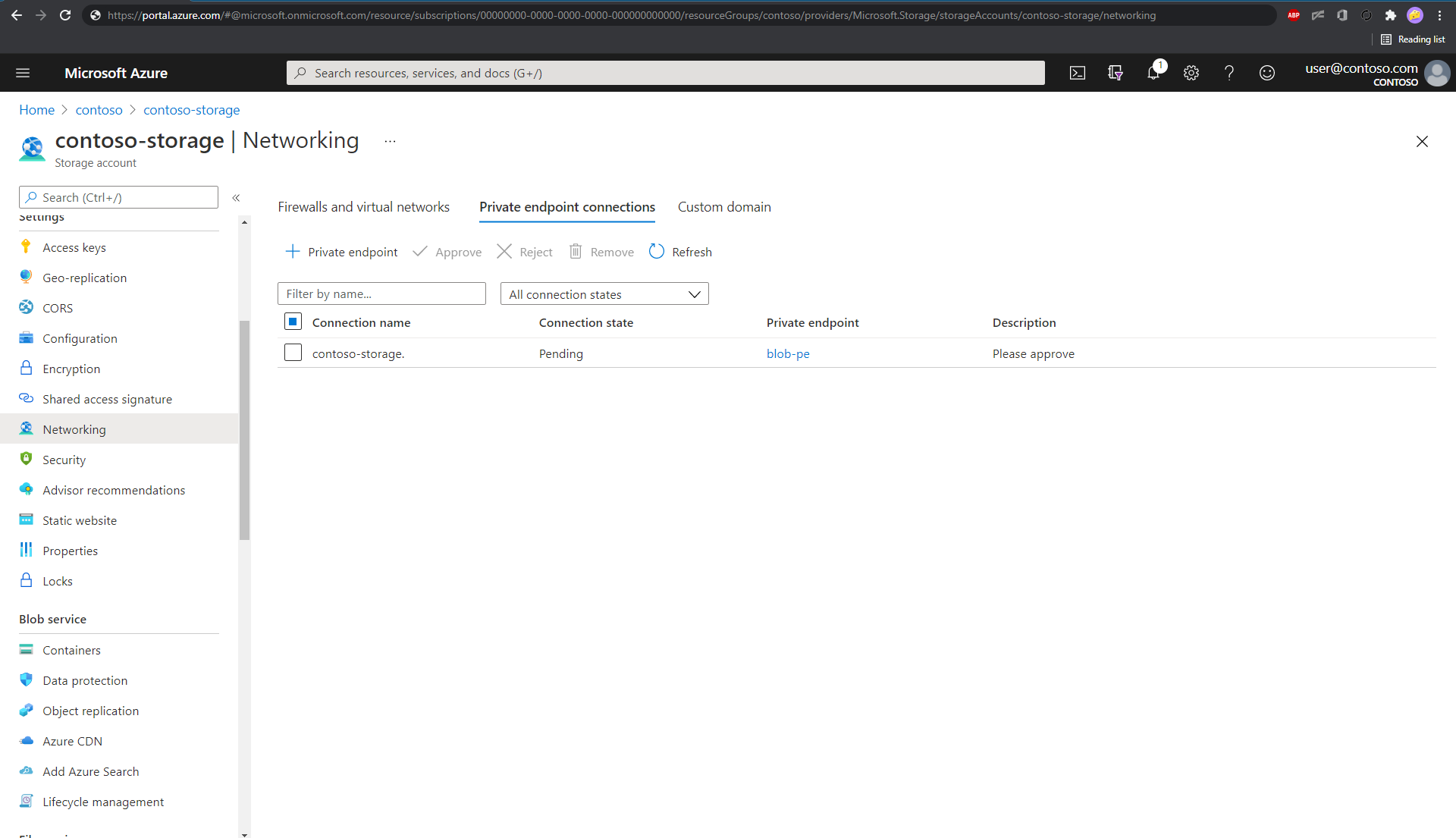
Select the connection, and then select Approve. It can take a few minutes for the status to be updated in the Azure portal.
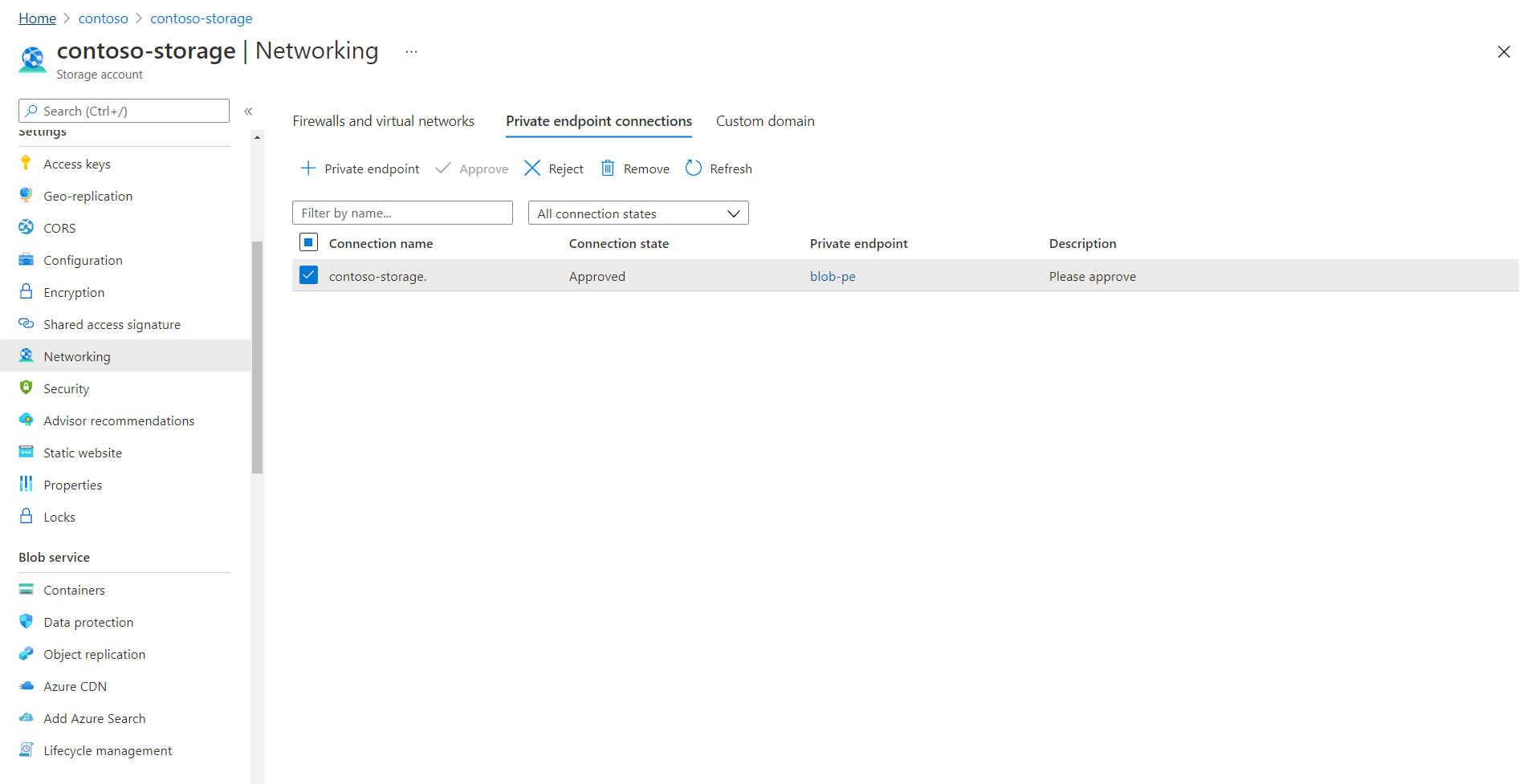
After the private endpoint is approved, Foundry IQ creates the necessary DNS zone mappings in the DNS zone that's created for it.
Although the private endpoint link on the Networking page is active, it won't resolve.

Selecting the link produces an error. A status message of "The access token is from the wrong issuer" and must match the tenant associated with this subscription appears because the backend private endpoint resource is provisioned by Microsoft in a Microsoft-managed tenant, while the linked resource (Foundry IQ) is in your tenant. It's by design you can't access the private endpoint resource by selecting the private endpoint connection link.
Follow the instructions in the next section to check the status of your shared private link.
3 - Check shared private link status
On the Foundry IQ side, you can confirm request approval by revisiting the Shared Private Access page of the Foundry IQ service Networking page. Connection state should be approved.
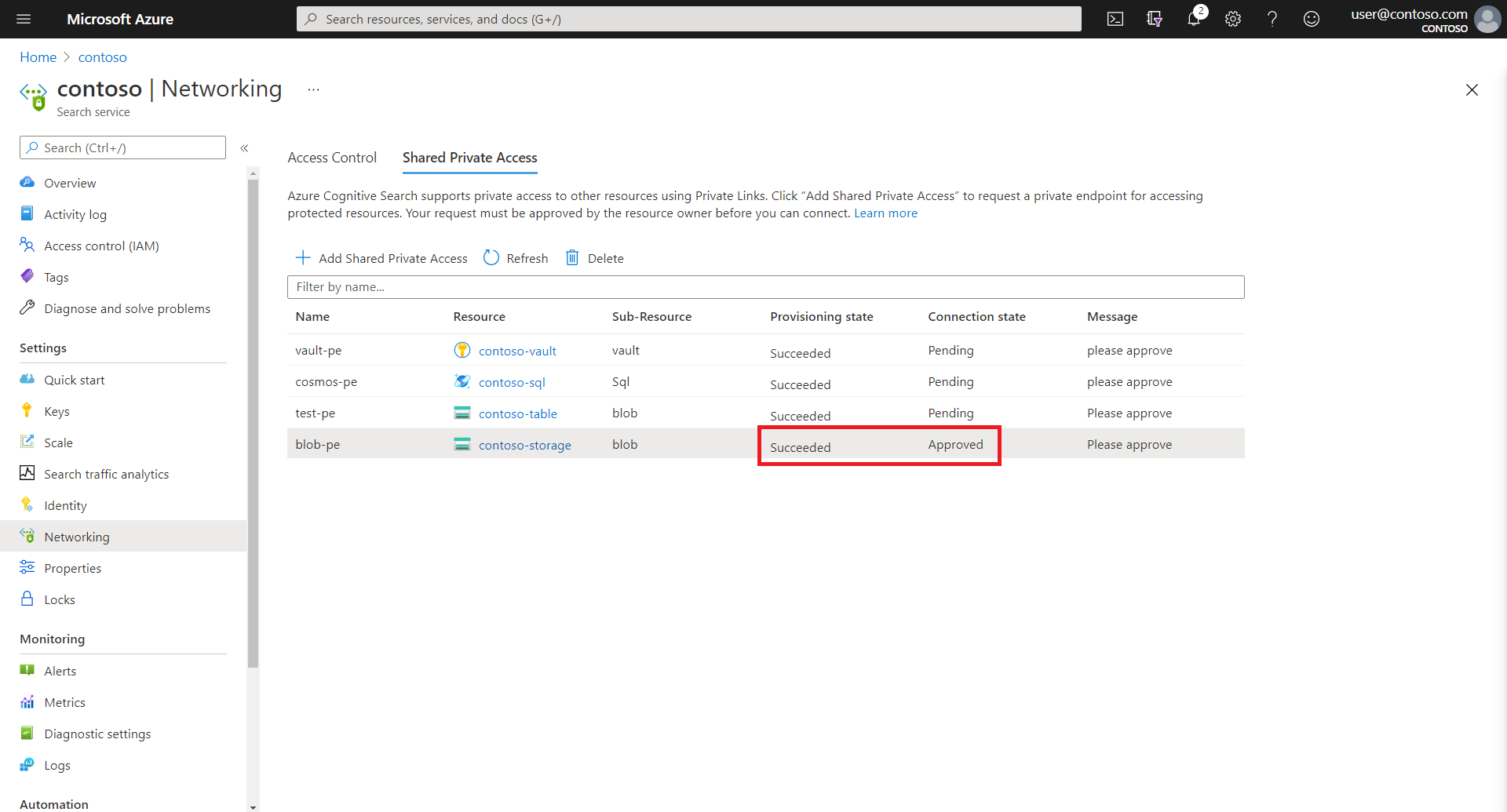
Alternatively, you can also obtain connection state by using the Shared Private Link Resources - Get.
az rest --method get --uri https://management.azure.com/subscriptions/aaaa0a0a-bb1b-cc2c-dd3d-eeeeee4e4e4e/resourceGroups/contoso/providers/Microsoft.Search/searchServices/contoso-search/sharedPrivateLinkResources/blob-pe?api-version=2025-05-01
This would return a JSON, where the connection state shows up as "status" under the "properties" section. Following is an example for a storage account.
{
      "name": "blob-pe",
      "properties": {
        "privateLinkResourceId": "/subscriptions/aaaa0a0a-bb1b-cc2c-dd3d-eeeeee4e4e4e/resourceGroups/contoso/providers/Microsoft.Storage/storageAccounts/contoso-storage",
        "groupId": "blob",
        "requestMessage": "please approve",
        "status": "Approved",
        "resourceRegion": null,
        "provisioningState": "Succeeded"
      }
}
If the provisioning state (properties.provisioningState) of the resource is "Succeeded" and connection state (properties.status) is "Approved", it means that the shared private link resource is functional and the indexer can be configured to communicate over the private endpoint.
4 - Configure the indexer to run in the private environment
Indexer execution occurs in either a private environment that's specific to the Foundry IQ service, or a multitenant environment that's used internally to offload expensive skillset processing for multiple customers.
The execution environment is transparent, but once you start building firewall rules or establishing private connections, you must take indexer execution into account. For a private connection, configure indexer execution to always run in the private environment.
This step shows you how to configure the indexer to run in the private environment using the REST API. You can also set the execution environment using the JSON editor in the Azure portal.
Note
You can perform this step before the private endpoint connection is approved. However, until the private endpoint connection shows as approved, any existing indexer that tries to communicate with a secure resource (such as the storage account) will end up in a transient failure state and new indexers will fail to be created.
Create the data source definition, index, and skillset (if you're using one) as you would normally. There are no properties in any of these definitions that vary when using a shared private endpoint.
Create an indexer that points to the data source, index, and skillset that you created in the preceding step. In addition, force the indexer to run in the private execution environment by setting the indexer
executionEnvironmentconfiguration property toprivate.{ "name": "indexer", "dataSourceName": "blob-datasource", "targetIndexName": "index", "parameters": { "configuration": { "executionEnvironment": "private" } }, "fieldMappings": [] }
After the indexer is created successfully, it should connect to the Azure resource over the private endpoint connection. You can monitor the status of the indexer by using the Indexer Status API.
Note
If you already have existing indexers, you can update them via the PUT API by setting the executionEnvironment to private or using the JSON editor in the Azure portal.
Change networking after knowledge source creation
The knowledge-source ingestionParameters.networkAccessMode property is create-time-only in REST API 2026-10-01 and 2026-11-01-preview. Changing its effective value through a knowledge-source update isn't supported. To change the stored mode, delete and recreate the knowledge source.
As an interim alternative, you can change only the generated indexer's parameters.configuration.executionEnvironment for eligible indexed Blob, ADLS Gen2, and Azure SQL knowledge sources. This change is a supported exception to the guidance against editing generated resources, not permission to change other generated settings. It doesn't apply to indexed SharePoint, OneLake, File, remote sources, S3 HD, or Serverless.
Prepare and update the generated indexer
Use the Search data-plane REST API 2026-10-01 for the following operations. Authenticate with a Microsoft Entra ID token. Assign Search Service Contributor to read, update, and run the indexer, and Search Index Data Reader to query the generated index for verification, or equivalent permissions. See Role-based access.
Shared private link creation and approval still use their separate management-plane APIs and versions described earlier in this article.
Check the configuration and tier matrix and your connector's prerequisites. Create or reuse every required link using the existing creation and approval procedures. Verify the target resource, group ID, approval, and provisioning readiness for each dependency.
If a portal check can't resolve a cross-subscription resource, manually verify approval on the target resource and readiness on the Foundry IQ service. An unavailable check isn't evidence of success. Don't disable public access before all private dependencies are approved and validated.
Get the knowledge source with
GET {search-endpoint}/knowledgesources('{knowledge-source-name}')?api-version=2026-10-01. ReadazureBlobParameters.createdResources.indexerorindexedSqlParameters.createdResources.indexerfrom the response. Use the returned name; don't derive it from a naming convention. If no indexer is returned, stop and check source creation and eligibility.Get the indexer with
GET {search-endpoint}/indexers('{indexer-name}')?api-version=2026-10-01. Retain its complete definition and ETag, and keep a secure copy for reversal. Coordinate with anyone updating the knowledge source or indexer.Build a complete update body from the current indexer's writable properties. Change only
parameters.configuration.executionEnvironmenttoprivate. Preserve all other supported properties, including the data source, target index, skillset, schedule, mappings, other configuration entries, and any encryption settings. Ifparametersorconfigurationis absent, add the missing object without replacing existing settings.Don't submit a partial definition or blindly send a GET response back as a PUT body. Exclude response-only metadata, and use the Indexers - Create or Update contract for writable fields. If any required secret is omitted or redacted, restore it securely from the original configuration before updating; never submit a redaction placeholder. If this API version can't represent existing settings, stop rather than drop them.
Update the existing indexer with
PUT {search-endpoint}/indexers('{indexer-name}')?api-version=2026-10-01,Content-Type: application/json,Prefer: return=representation, andIf-Match: <etag-from-get>. Send the complete body from the preceding step. Preserve the ETag exactly as returned. If the condition fails because another update changed the resource, get the latest definition and ETag, review the differences, and reapply only the networking change. Don't retry unconditionally.Get the indexer again and confirm that
parameters.configuration.executionEnvironmentisprivate. Run the indexer withPOST {search-endpoint}/indexers('{indexer-name}')/search.run?api-version=2026-10-01, then check its execution status. Check dependency connectivity and verify expected source content in the generated index.
A successful run alone doesn't prove that no public route was used. Validate the private connection and target network controls as described in Test the shared private link before relying on private isolation.
Reverse the override and maintain it
To reverse the override, repeat the complete-definition GET and conditional PUT procedure, changing only parameters.configuration.executionEnvironment to standard. Don't use public: that's a knowledge-source mode, not an indexer execution value. standard lets the service choose the execution environment; it doesn't force a public route. Confirm that the source and dependencies are reachable under the resulting configuration, and run and verify the indexer again.
The override doesn't change the knowledge source's stored networkAccessMode. A knowledge-source response or portal view can therefore show a mode that doesn't describe the generated indexer's current override. Check the indexer definition for its actual execution setting.
Later knowledge-source updates or regeneration can overwrite this generated-indexer setting. Recheck it after those operations and reapply the override only after reviewing the current definition, eligibility, and private-link readiness. Use this interim procedure until native post-create knowledge-source networking updates are explicitly supported; GA alone doesn't remove the create-time restriction.
5 - Test the shared private link
If you haven't done so already, verify that your Azure PaaS resource refuses connections from the public internet. If connections are accepted, review the DNS settings in the Networking page of your Azure PaaS resource.
Choose a tool that can invoke an outbound request scenario, such as an indexer connection to a private endpoint. An easy choice is using an import wizard, but you can also try a REST client and REST APIs for more precision. Assuming that your Foundry IQ service isn't also configured for a private connection, the REST client connection to search can be over the public internet.
Set the connection string to the private Azure PaaS resource. The format of the connection string doesn't change for shared private link. The Foundry IQ service invokes the shared private link internally.
For indexer workloads, the connection string is in the data source definition. An example of a data source might look like this:
 {
   "name": "my-blob-ds",
   "type": "azureblob",
   "subtype": null,
   "credentials": {
     "connectionString": "DefaultEndpointsProtocol=https;AccountName=<YOUR-STORAGE-ACCOUNT>;AccountKey=..."
   }
For indexer workloads, remember to set the execution environment in the indexer definition. An example of an indexer definition might look like this:
"name": "indexer",
"dataSourceName": "my-blob-ds",
"targetIndexName": "my-index",
"parameters": {
   "configuration": {
       "executionEnvironment": "private"
       }
   },
"fieldMappings": []
}
Run the indexer. If the indexer execution succeeds and the search index is populated, the shared private link is working.
When to use a shared private link
Foundry IQ makes outbound calls to other Azure resources in the following scenarios:
- Knowledge base connections to Azure OpenAI for agentic retrieval workflows
- Indexer or query connections to Azure OpenAI or Azure Vision in Foundry Tools for vectorization
- Indexer connections to supported data sources
- Indexer (skillset) connections to Azure Storage for caching enrichments or writing to a knowledge store
- Indexer (skillset) connections to Foundry Tools for billing purposes
- Encryption key requests to Azure Key Vault
- Custom skill requests to Azure Functions or similar resource
Shared private links only work for Azure-to-Azure connections. If you're connecting to OpenAI or another external model provider, the connection must be over the public internet.
Shared private links are for operations and data accessed through a private endpoint for Azure resources or clients that run in an Azure virtual network.
A shared private link is:
- Created using Foundry IQ tooling, APIs, or SDKs
- Approved by the Azure resource owner
- Used internally by Foundry IQ on a private connection to a specific Azure resource
Only your Foundry IQ service can use the private links that it creates, and there can be only one shared private link created on your service for each resource and subresource combination.
Once you set up the private link, it's used automatically whenever the Foundry IQ service connects to that resource. You don't need to modify the connection string or alter the client you're using to issue the requests, although the device used for the connection must connect using an authorized IP in the Azure resource's firewall.
There are two scenarios for using Azure Private Link and Foundry IQ together:
Scenario one: create a shared private link when an outbound (indexer or knowledge base) connection to Azure requires a private connection. This scenario is covered in this article.
Scenario two: configure search for a private inbound connection from clients that run in a virtual network.
While both scenarios have a dependency on Azure Private Link, they're independent. You can create a shared private link without configuring your Foundry IQ service for a private endpoint.
Limitations
When evaluating shared private links for your scenario, remember these constraints:
Several of the resource types used in a shared private link are in preview. If you're connecting to a preview resource (Azure Database for MySQL or Azure SQL Managed Instance), use a preview version of the Management REST API to create the shared private link. We recommend the latest preview API version.
Indexer execution must use the private execution environment that's specific to your Foundry IQ service. Private endpoint connections aren't supported from the multitenant content processing environment. The configuration setting for this requirement is covered in this article.
Shared private link resource limits vary by pricing tier.
Debug sessions don't support shared private links. If your Foundry IQ service uses private endpoint connectivity, you can't run debug sessions against it. For a workaround, see Debug sessions and private connectivity.
When you change your pricing tier, shared private link resources are evaluated against the target tier's limits. If your shared private link count exceeds the target tier's maximum, the tier change is blocked. If the tier change succeeds, existing shared private link resources aren't recreated and don't require reapproval. Private indexer connectivity continues to work after the Foundry IQ service returns to a "Succeeded" provisioning state and "Running" status, provided the shared private link provisioning state remains "Succeeded" and the connection status remains "Approved."
Remediate legacy S3 HD shared private links
Some S3 HD services can have legacy shared private link resources even though the configuration isn't supported. Historical acceptance of the resource or a successful indexer run doesn't establish supported private routing.
A full-service update can validate this legacy state and fail during an otherwise unrelated change, such as scaling, identity, tags, or an ARM or Terraform update. Confirm that the failure concerns unsupported shared private links before using this procedure:
- Confirm that the service SKU is
standard3and itshostingModeisHighDensity. Don't apply this remediation to ordinary S3 solely because its SKU name is similar. - Inventory the Search-side shared private link resources. Record targets, group IDs, provisioning states, target approval states, and workloads that depend on each connection.
- Identify a supported connectivity alternative and assess workload impact before deleting anything. Plan a maintenance window and pause affected workloads where appropriate. Don't assume a public endpoint is an acceptable alternative.
- Delete the unsupported Search-side shared private link resources through the Shared Private Link Resources management API. Deleting only the target-side private endpoint connection doesn't remove the invalid Search-side state.
- Verify that deletion completes and the Search-side resource list reflects the intended state. Then retry the original service update.
- Validate each affected workload over its supported connectivity path. Request success alone doesn't prove private routing.
- If deletion fails, resources are orphaned, or validation errors persist, contact Azure support with sanitized resource IDs, timestamps, provisioning and approval states, and the dependency inventory.
Don't delete links without a workload plan or try to resolve this state by changing hostingMode in place. This procedure addresses unsupported legacy shared private links, not every service-update failure.
For the distinction between inbound endpoints, outbound links, identity, and perimeter access rules, see Network security for agentic retrieval.
Troubleshooting
If your indexer creation fails with "Data source credentials are invalid," check the approval status of the shared private link before debugging the connection. If the status is
Approved, check theproperties.provisioningStateproperty. If it'sIncomplete, there might be a problem with underlying dependencies. In this case, reissue thePUTrequest to re-create the shared private link. You might also need to repeat the approval step.If indexers fail consistently or intermittently, check the
executionEnvironmentproperty on the indexer. The value should be set toprivate. If you didn't set this property, and indexer runs succeeded in the past, it's because the Foundry IQ service used a private environment of its own accord. A Foundry IQ service moves processing out of the multitenant environment if the system is under load.If you get an error when creating a shared private link, check service limits to verify that you're under the quota for your tier.
Next steps
Learn more about private endpoints and other secure connection methods: