Microsoft Edge | Microsoft Edge development
Developing and testing features or extensions for Microsoft Edge

This browser is no longer supported.
Upgrade to Microsoft Edge to take advantage of the latest features, security updates, and technical support.
' cx='32' cy='32' r='32' /%3E%3Ctext x='50%25' y='55%25' dominant-baseline='middle' text-anchor='middle' fill='%23FFF' %3EPS%3C/text%3E%3C/svg%3E)
Hi all, I can see from some previous tickets that I think other people have had the same issue, though can't seem to find an actual fix for the problem.
I have recently gone through the process of setting up a large amount of browser profiles (logging in to each and importing a bookmark profile). I have removed the profiles, however edge seems to retain some of the information.
If I now go to create a new profile and go to the 'Sign in to sync data' option, I have a list of every user that I previously created a profile for, some 100 users or so. I can't for the life of me find out where this data is held and how to get rid of it. I have removed all but my own account from the windows interface (access work & school) which had a couple of extra accounts there. And tried removing my own profile from edge, along with scrolling through every option menu I can locate, but nothing seems to have made a difference.
Surely there must be a way to fix this, that doesn't involve creating an entirely new local profile?
Developing and testing features or extensions for Microsoft Edge
' cx='32' cy='32' r='32' /%3E%3Ctext x='50%25' y='55%25' dominant-baseline='middle' text-anchor='middle' fill='%23FFF' %3ESM%3C/text%3E%3C/svg%3E)
I don't get an option to remove, only manage. Like Kevin, I also want to remove the option to choose to sign back into the account.
' cx='32' cy='32' r='32' /%3E%3Ctext x='50%25' y='55%25' dominant-baseline='middle' text-anchor='middle' fill='%23FFF' %3EDJ%3C/text%3E%3C/svg%3E)
I don't get an option to remove, only manage. Like Kevin, I also want to remove the option to choose to sign back into the account.
' cx='32' cy='32' r='32' /%3E%3Ctext x='50%25' y='55%25' dominant-baseline='middle' text-anchor='middle' fill='%23FFF' %3EA%3C/text%3E%3C/svg%3E)
Hi PeterSowersby-3494,
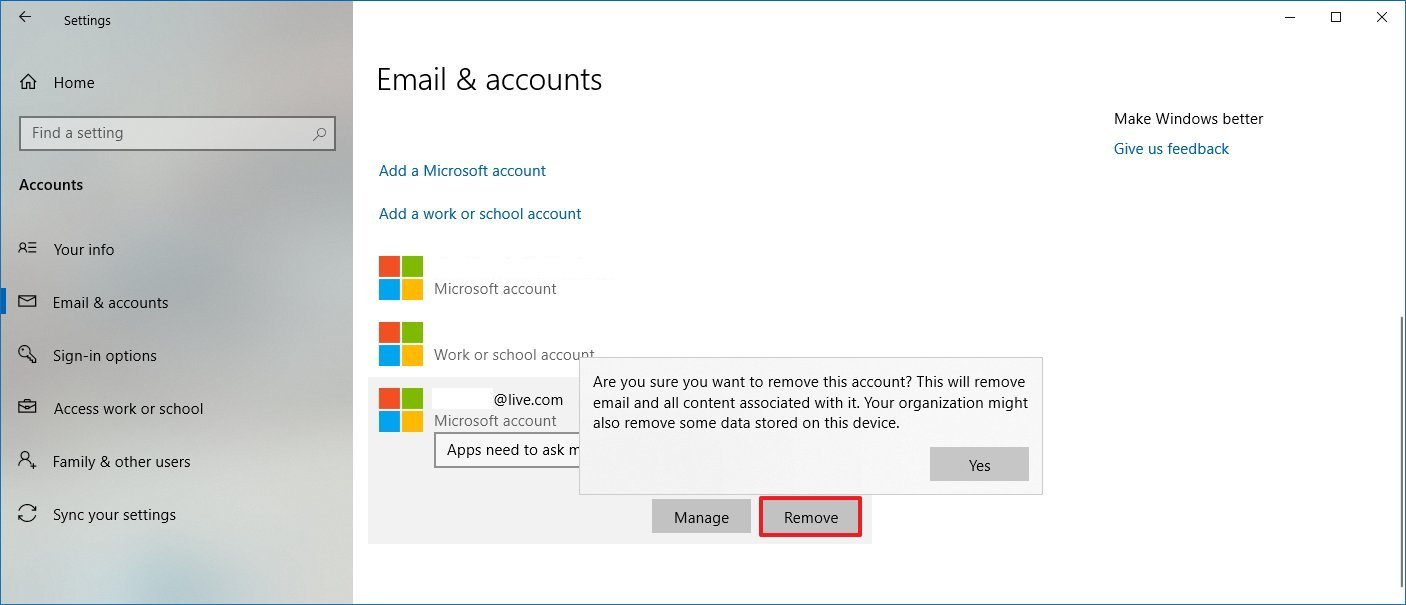
Your accounts are retained at Email & accounts. You can remove those obsolete accounts which you don't need to show up when you sign in to sync data.
To find this setting, please go to Windows Settings --> Accounts --> Email & accounts --> Remove
If it does not work for you, please let me know.
If the answer is helpful, please click "Accept Answer" and upvote it.
Note: Please follow the steps in our documentation to enable e-mail notifications if you want to receive the related email notification for this thread.
Best Regards,
Shijie Li

I don't get these emails in the "Emails & accounts" but I still see them on the edge profile, which is annoying, since I can't access these emails anymore because they are linked with old orgs which I used to work for
' cx='32' cy='32' r='32' /%3E%3Ctext x='50%25' y='55%25' dominant-baseline='middle' text-anchor='middle' fill='%23FFF' %3EKH%3C/text%3E%3C/svg%3E)
I did as you said and went to settings accounts. the only account there is the one im using. But when I log out of Edge or Bing, my old account from long ago with a not so nice name appears. I need that removed from options for signing in before someone sees it. I have long since deleted the account and have no access to it. When I did try to sign in to attemt to delete it in case it wasnt it told me account is no longer exists but the option to sign into it still exists.
' cx='32' cy='32' r='32' /%3E%3Ctext x='50%25' y='55%25' dominant-baseline='middle' text-anchor='middle' fill='%23FFF' %3EC%3C/text%3E%3C/svg%3E)
This issue still continues in 2026. I have removed all accounts from Windows Settings --> Accounts --> Email & accounts except for one. Yet my previous accounts still show up in the list in Edge Settings > Profiles. You can only see these accounts after signing out from Edge, and returning to Profile tab and boom.... there's a list of all previously synced emails under "Sync this account".
And yes, I did select an email from this list and hit "Delete (trash can icon)", confirming "Remove Profile". Guess what, a brand new windows opens as if everything is cleared only to get back to Profile tab only to feel disappointed at Microslop's tactics.