Hello All,
Does anybody see the local computer in the list of computers in Explorer's "Network" view?
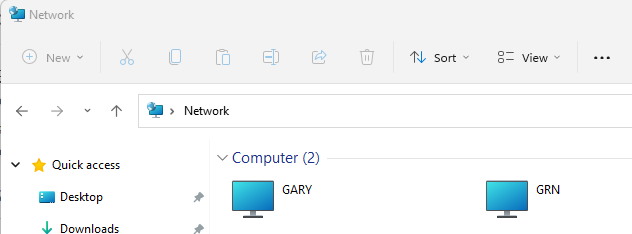
The reason that I am asking is that I think that I have discovered why it does not appear in my list and, if the idea is correct, I would not expect any Windows 11 system to show the local computer.
I think that there has been a long-term problem/bug in evaluating Windows Filtering Platform (WFP) filters for loopback traffic that had been disguised by default settings in Windows 10. A default has changed in Windows 11 and this has allowed the problem to become more visible.
The "missing" local computer is just an easily verifiable manifestation of the problem and not a big problem itself, but I think that some other problems that I have seen in forums might have the same root cause.
Update: I have written about the suspected problem and its causes in more detail at: https://gary-nebbett.blogspot.com/2022/04/windows-filtering-platform-loopback.html
Gary


' cx='32' cy='32' r='32' /%3E%3Ctext x='50%25' y='55%25' dominant-baseline='middle' text-anchor='middle' fill='%23FFF' %3EDE%3C/text%3E%3C/svg%3E)
' cx='32' cy='32' r='32' /%3E%3Ctext x='50%25' y='55%25' dominant-baseline='middle' text-anchor='middle' fill='%23FFF' %3EA%3C/text%3E%3C/svg%3E)

' cx='32' cy='32' r='32' /%3E%3Ctext x='50%25' y='55%25' dominant-baseline='middle' text-anchor='middle' fill='%23FFF' %3EFG%3C/text%3E%3C/svg%3E)