Microsoft Teams | Microsoft Teams for business | Other
Additional features, settings, or issues not covered by specific Microsoft Teams categories

This browser is no longer supported.
Upgrade to Microsoft Edge to take advantage of the latest features, security updates, and technical support.
' cx='32' cy='32' r='32' /%3E%3Ctext x='50%25' y='55%25' dominant-baseline='middle' text-anchor='middle' fill='%23FFF' %3EI%3C/text%3E%3C/svg%3E)
Hello Teams Community,
Please i need your help on this.
I notice that Teams calendar is missing on the account.
Please how do i resolve this issue?
Additional features, settings, or issues not covered by specific Microsoft Teams categories
' cx='32' cy='32' r='32' /%3E%3Ctext x='50%25' y='55%25' dominant-baseline='middle' text-anchor='middle' fill='%23FFF' %3EJM%3C/text%3E%3C/svg%3E)
Hi @IBN
Do you have the same problem in Teams web client?
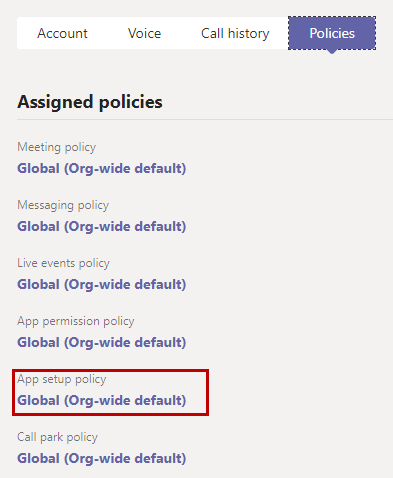
Someone from your organization might have changed the settings and accidentally removed the calendar app for your team.To fix the issue, you need to have an admin access for your team. Follow this guide to turn on the MS Teams calendar again.
It has been a while, how is everything going?
If you have any update about this issue, please feel free to post back.
' cx='32' cy='32' r='32' /%3E%3Ctext x='50%25' y='55%25' dominant-baseline='middle' text-anchor='middle' fill='%23FFF' %3ERC%3C/text%3E%3C/svg%3E)
I have the same issue. The calendar is missing from both online and desktop version. And when I am trying to log in online 365 is saying my account doesn't exist.
' cx='32' cy='32' r='32' /%3E%3Ctext x='50%25' y='55%25' dominant-baseline='middle' text-anchor='middle' fill='%23FFF' %3ESR%3C/text%3E%3C/svg%3E)
I'm having the same issue and no policy tab showing up?
' cx='32' cy='32' r='32' /%3E%3Ctext x='50%25' y='55%25' dominant-baseline='middle' text-anchor='middle' fill='%23FFF' %3EGI%3C/text%3E%3C/svg%3E)
Has anyone found a solution? The above steps didn't help me
' cx='32' cy='32' r='32' /%3E%3Ctext x='50%25' y='55%25' dominant-baseline='middle' text-anchor='middle' fill='%23FFF' %3EMW%3C/text%3E%3C/svg%3E)
Unfortunately, this solution does not work.
In the admin center, everything is correct. Also the calendar. But it does not appear when Teams is restarted.
Other sites show another option via Powershell with the command: Get-CASMailbox "Identity Name" | fl ews*, but that results in a 'not recognized' error message.
We as a small company with two people own this Teams Enterprise account. Unfortunately, we don't have a civil engineer in computer science and apparently you need that to get Teams running ;-)
' cx='32' cy='32' r='32' /%3E%3Ctext x='50%25' y='55%25' dominant-baseline='middle' text-anchor='middle' fill='%23FFF' %3ECB%3C/text%3E%3C/svg%3E)
I always forget how Bill Gates fixes his car. Restarting fixed it! Go figure.
Unfortunately the tabs you are saying that exists, do not exist when I follow the steps. I am the admin and calendar is missing from my desktop application only. And there is no "policy" tab in my account.
Calendar doesn't show up in the add apps.
' cx='32' cy='32' r='32' /%3E%3Ctext x='50%25' y='55%25' dominant-baseline='middle' text-anchor='middle' fill='%23FFF' %3ESK%3C/text%3E%3C/svg%3E)
Same for me. No Calendar on left side (or elsewhere) Just want to use Teams Essentials and apparently this calendar is helpful to Join meetings. Spending far too much time to join a simple video call. No need for Exchange, extra apps and certainly not having 3 mail accounts or so to find my way in Teams or Support. Oh, I am in IT for 30 years...I've seen a fair share of Interfaces but Teams beats all records (on the downside :)
' cx='32' cy='32' r='32' /%3E%3Ctext x='50%25' y='55%25' dominant-baseline='middle' text-anchor='middle' fill='%23FFF' %3EJ%3C/text%3E%3C/svg%3E)
' cx='32' cy='32' r='32' /%3E%3Ctext x='50%25' y='55%25' dominant-baseline='middle' text-anchor='middle' fill='%23FFF' %3EST%3C/text%3E%3C/svg%3E)